
Short-Drama Storyboard Workbench: Turn Novels into Episodes
Five screenshot-verified steps to adapting a novel into a multi-episode short drama in DeepSeek Harness — episode dialogue, professional storyboards, and packaged Midjourney and video-model prompts.
Last updated: 2026-09-16
Short drama is one of the few formats where one person really can run an entire production crew — if the writing pipeline keeps up. The bottleneck is rarely ideas; it is splitting a story into bingeable episodes, writing punchy dialogue with a twist in every episode, and translating each shot into prompts an image or video model can actually execute.
This walkthrough follows a real screencast (credited below) of the Oh Story workbench plugin for DeepSeek Harness, in its short-drama mode. Three slash commands — /short-drama, /short-drama-write, /short-drama-storyboard — take you from raw novel to an acceptance report plus structured exports that hand off cleanly to AI animation and video production. The novel-mode half of the same video is covered in our novel-writing guide.
Adapt a novel into a short drama in five steps
- 1
Switch to the short-drama tab and run /short-drama
The workbench opens in novel mode; switching the tab to the short-drama workbench turns the same layout into a screenwriter's desk. Type /short-drama and the plugin pulls the novel apart into numbered episodes: in the demo the episodes tree grows EP001 through EP008 in one pass, each carrying 15 tracked nodes plus its own assets folder.
$/short-drama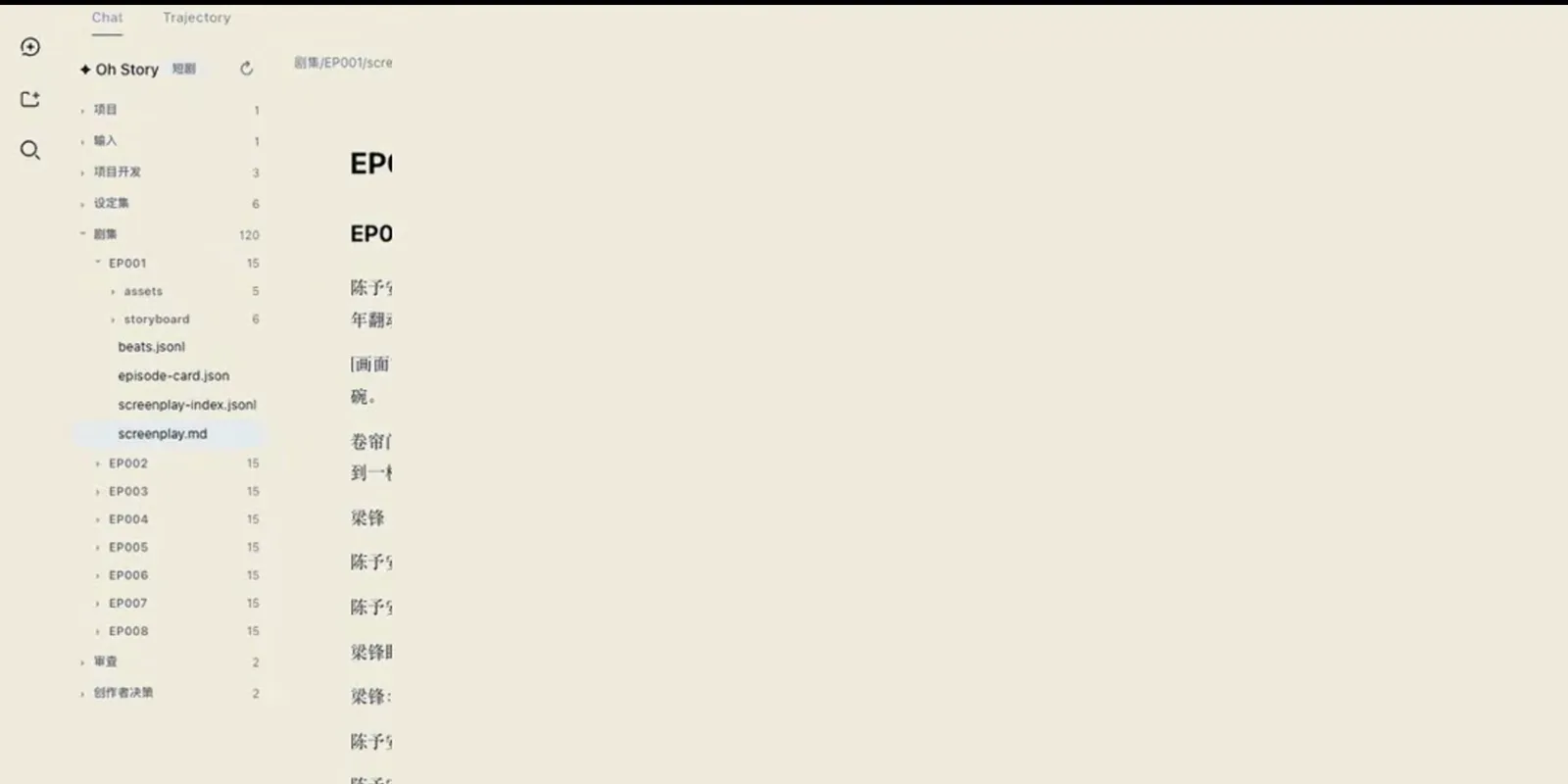
One command later: eight numbered episodes, each with its own assets, sitting in the tree.Watch at 2:07 - 2
Open an episode screenplay and study its scene grammar
Each episode is a folder, and EP001/screenplay.md opens in the editor with a Preview/Source toggle. The scene slug EP001-SC001 names the place and time — a noodle shop at dusk in light rain — followed by scene action, [on-screen text] tags for titles baked into the frame, and dialogue with acting directions in parentheses. Beside it, beats.jsonl, episode-card.json and screenplay-index.jsonl make the same episode machine-readable.
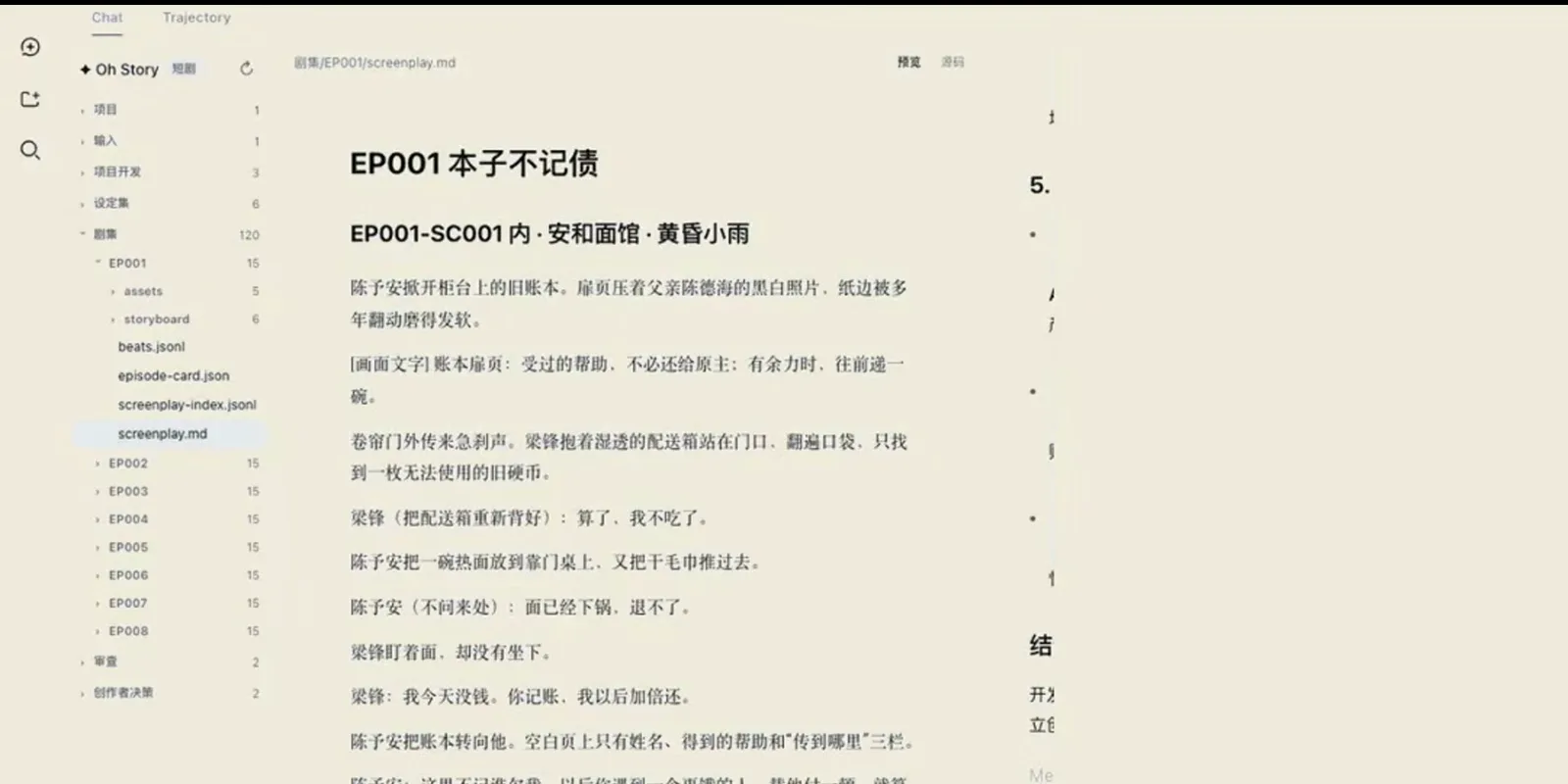
An episode is a folder: screenplay plus machine-readable beats, cards and an index.Watch at 2:24 - 3
Write dialogue and a twist into every episode
Type /short-drama-write and each episode fills in scene by scene: short, playable lines and a high-energy reversal per episode. In the demo scene a delivery rider cannot pay for his bowl, the owner answers "it's already in the pot, no refunds" — and "put it on my tab, I'll pay back double" lands the debt-ledger hook the whole series hangs on.
$/short-drama-write![EP001-SC001 scene in the DeepSeek Harness short-drama editor showing scene action, an [on-screen text] tag and the noodle-shop dialogue written by /short-drama-write.](/images/guides/short-drama/short-drama-episode-dialogue-write.webp "EP001-SC001 scene in the DeepSeek Harness short-drama editor showing scene action, an [on-screen text] tag and the noodle-shop dialogue written by /short-drama-write.")
Dialogue stays short and playable; the ledger line lands as the episode hook.Watch at 2:16 - 4
Generate the storyboard and prompt package
/short-drama-storyboard turns the screenplay into an audiovisual storyboard — shot composition, camera movement, shot size and on-screen action for every shot — and ships prompts with it: image-prompt-specs.jsonl plus image-prompts.md covering the character/location/prop trio, and dedicated prompts for video-generation models. Paste them straight into Midjourney or your video tool of choice.
$/short-drama-storyboard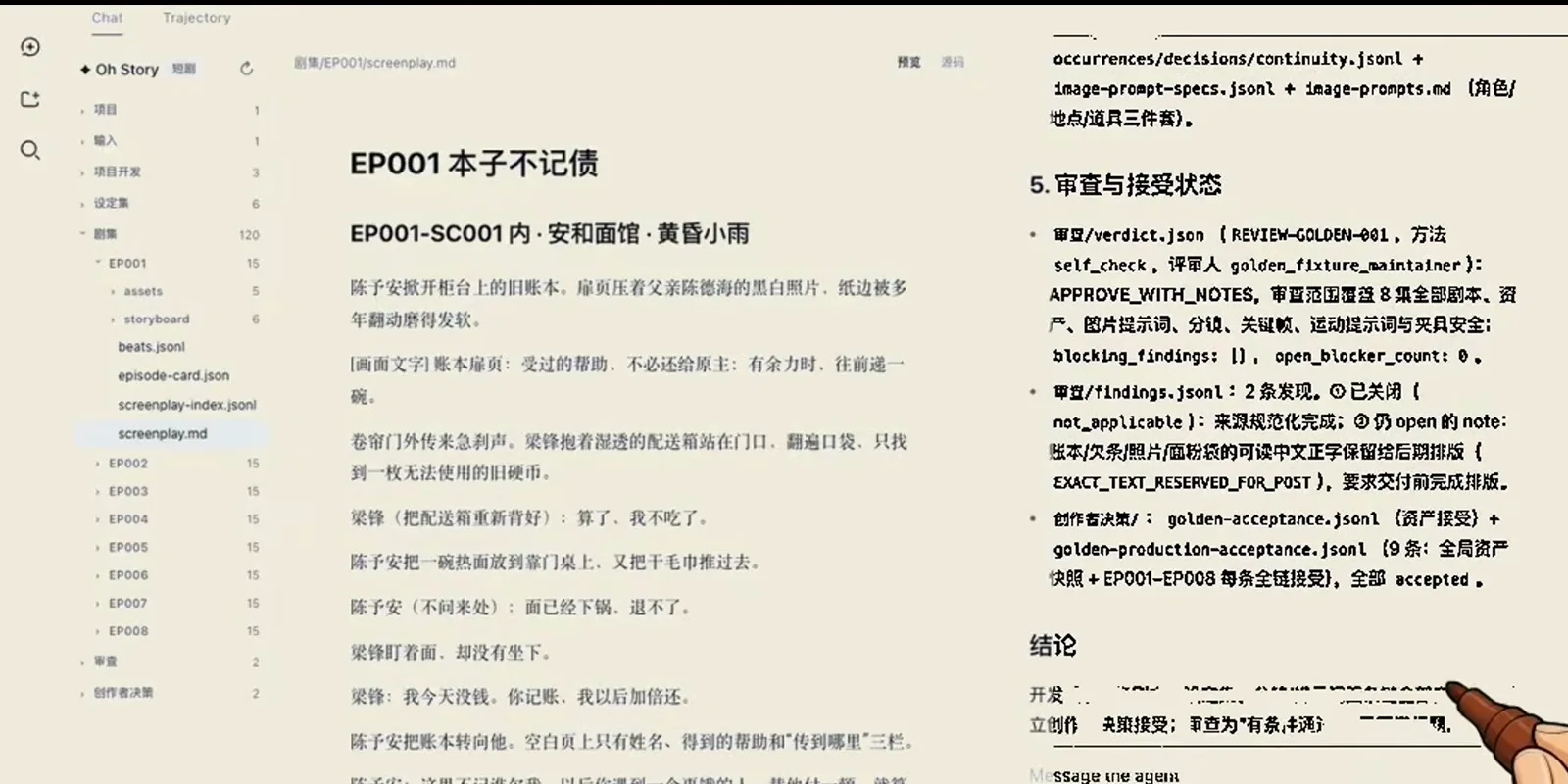
Prompts ship with the storyboard: one file per discipline, ready to paste.Watch at 2:35 - 5
Read the acceptance report and hand off downstream
The run ends in a review-and-acceptance panel: verdict.json returns APPROVE_WITH_NOTES from a self-check reviewer, blocking_findings sits at zero, and the golden-acceptance records mark every chain EP001-EP008 accepted. Continuity ledgers and prompt lists all carry line numbers and status, so the package drops straight into AI animation and video production — one person running the whole crew.
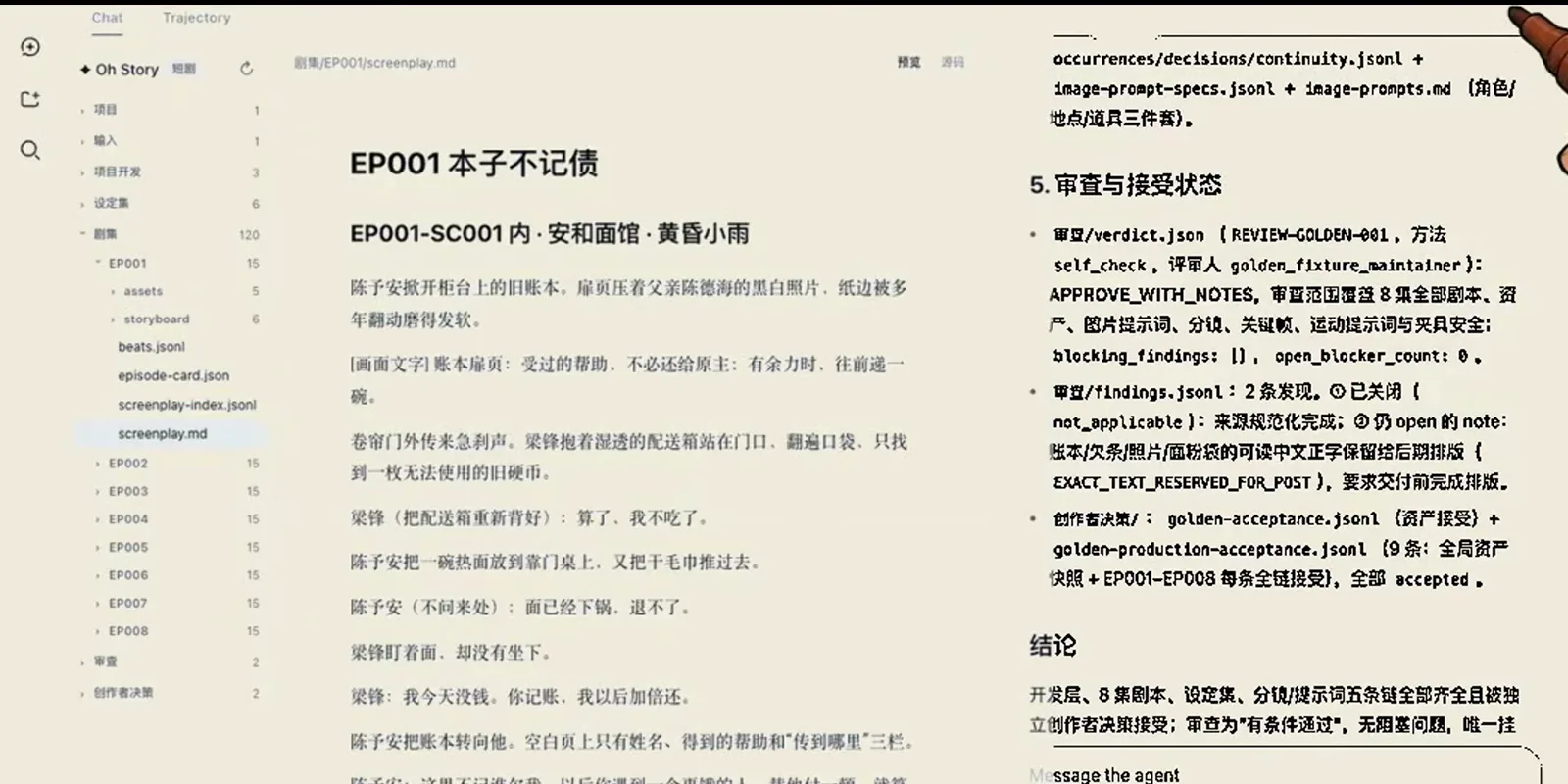
The sign-off card a producer reads: what passed, what's open, what ships next.Watch at 2:37
Short-drama workbench FAQ
Quick answers about adaptations, storyboards, prompts and hand-off in DSH.
Can I paste the generated prompts straight into Midjourney or a video model?
Yes. /short-drama-storyboard packages ready-to-use prompts: image-prompt-specs.jsonl and image-prompts.md cover every recurring character, location and prop, and each shot also carries prompts tuned for video-generation models. Copy, paste, generate — no prompt rewriting needed.
I don't have a novel yet — can I still use the short-drama mode?
The adaptation command expects a manuscript, but the same workbench ships a novel mode for exactly that: the /story wizard builds topic, world, characters and an opening outline, and story-long-write keeps chapters coming when you stall. Draft there first, then switch to the short-drama tab and adapt your own draft.
How many episodes does one adaptation produce?
It follows your source material — the count is not hard-coded. The demo split one novel into eight numbered episodes (EP001-EP008), each holding 15 tracked nodes, and the acceptance report tracked every episode end to end. Longer manuscripts split into more episodes; the tree keeps them in order.
Which AI models does the workbench support?
You bring your own model keys, and switching between models is seamless — the demo session runs on a DeepSeek-V4-Flash High profile picked from the model selector. The whole pipeline is designed to run on an ordinary home computer.
How does short-drama mode differ from the novel-writing mode?
Same workbench, two tabs. Novel mode (/story, story-long-write, story-review) takes you from idea to finished chapters; short-drama mode takes a finished manuscript and turns it into episodes, dialogue, storyboards and prompts. Draft in one, adapt in the other — our novel-writing guide covers the first half.
What exactly do I hand to downstream video production?
Structured exports with line numbers and status: per-episode screenplays, a continuity ledger, the image-prompt trio, and an acceptance trail — verdict.json with the reviewer method and APPROVE_WITH_NOTES, findings.jsonl with open items, golden-acceptance records per episode. In the demo every chain EP001-EP008 was accepted with zero blocking findings.
Related DeepSeek Harness guides
Keep going: the novel half of this workbench, plugins and models, one guide at a time.
The novel-writing workbench
The other half of the same video: outline deduction, three-column writing and AI proofreading for long-form novels.
Read the guideInstall DSH plugins the right way
Profiles and one-command installs — how to mount the workbench plugin this guide is built on.
Read the guideSwitch AI models in DSH
Point the workbench at DeepSeek, Qwen or any OpenAI-compatible key — the same selector shown in step five.
Read the guideRun DSH on local models
Keep drafts and generation fully offline by pointing the workbench at a local model.
Read the guideWhat are DSH plugins?
The mental model: what a plugin adds to DeepSeek Harness and how it differs from skills.
Read the guideSources & credits
Frames in this guide are captured from the screencast below and remain the property of its creator — each image links back to the exact moment it was taken. Commands and panel names follow the on-screen UI; the plugin repository is linked for reference.