
Build an AI Novel Writing Workbench in DeepSeek Harness
Seven screenshot-verified steps to turning DSH into a novel workbench — one command to install oh-story-dsh, outline deduction when you stall, story-review proofreading that strips the AI tone, and drafts that never leave your machine.
Last updated: 2026-09-16
Web-novel writers know two kinds of pain: stalling mid-volume, and AI prose that reads like plastic. Drafting in a plain chat window makes both worse — your settings scatter across messages and the manuscript never becomes a file. The oh-story-dsh plugin takes a different route: it mounts a dedicated novel workbench inside DeepSeek Harness, where the manuscript, the outline and the agent's review sit side by side, and a hundred chapters still look like one tidy project.
Every screenshot below comes from a real screen recording. You will install the plugin with one command, connect a model key, let the story wizard scan trending topics, build the world, draft character sheets and deduce your opening chapters, then write in the three-pane workbench; story-long-write carries you past stalls and story-review strips the AI tone. Each image links back to the exact second of the source video.
Set up the AI novel writing workbench in seven steps
- 1
Install the workbench plugin with one command
The whole workbench is a single DSH plugin: oh-story-dsh. Run the add command against your web profile, then start the DSH Web UI — the terminal prints the local address where the workbench lives. The only prerequisite is Node.js 24 or newer, and because the plugin runs as a native DSH extension there is nothing else to configure before first launch.
$npx -y @deepseek-ai/dsh@0.1.1-rc.1 plugin --profile web add @oh-story/dsh@0.1.2$npx -y @deepseek-ai/dsh@0.1.1-rc.1 web - 2
Open the workbench and connect a model key
Open the printed address and the workbench comes up on your own machine at 127.0.0.1:3080. In DSH Settings → Models, add a provider and paste your API key — a DeepSeek key works out of the box — or set DEEPSEEK_API_KEY before launching. The composer at the bottom of the chat panel carries a model picker, so you can switch models per message. Setup takes about five minutes, and the plugin never touches your private keys.
- 3
Run story to brief the creation wizard
In novel mode, typing story wakes the full-process creation wizard. It scans trending topics, builds a complete world view, drafts character sheets and deduces the outline of your opening chapters with a built-in professional agent. The two frames below are its artifacts: a character sheet recording identity, core traits and unlocked abilities, and the chapter-one outline with its structure formula, stage position and core events.
$story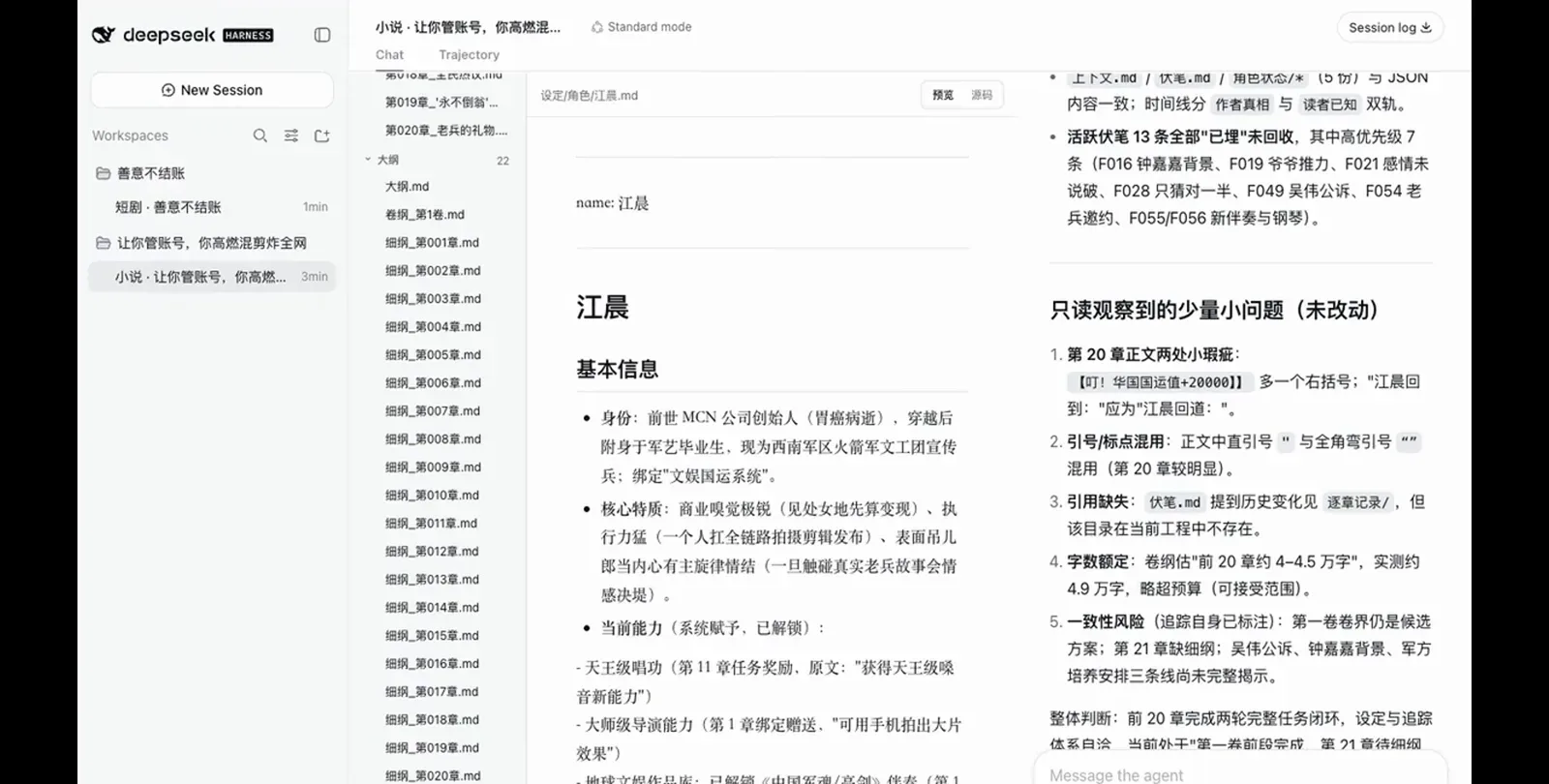
Every character is a real file: identity, traits, even the abilities the plot unlocked along the way.Watch at 0:32 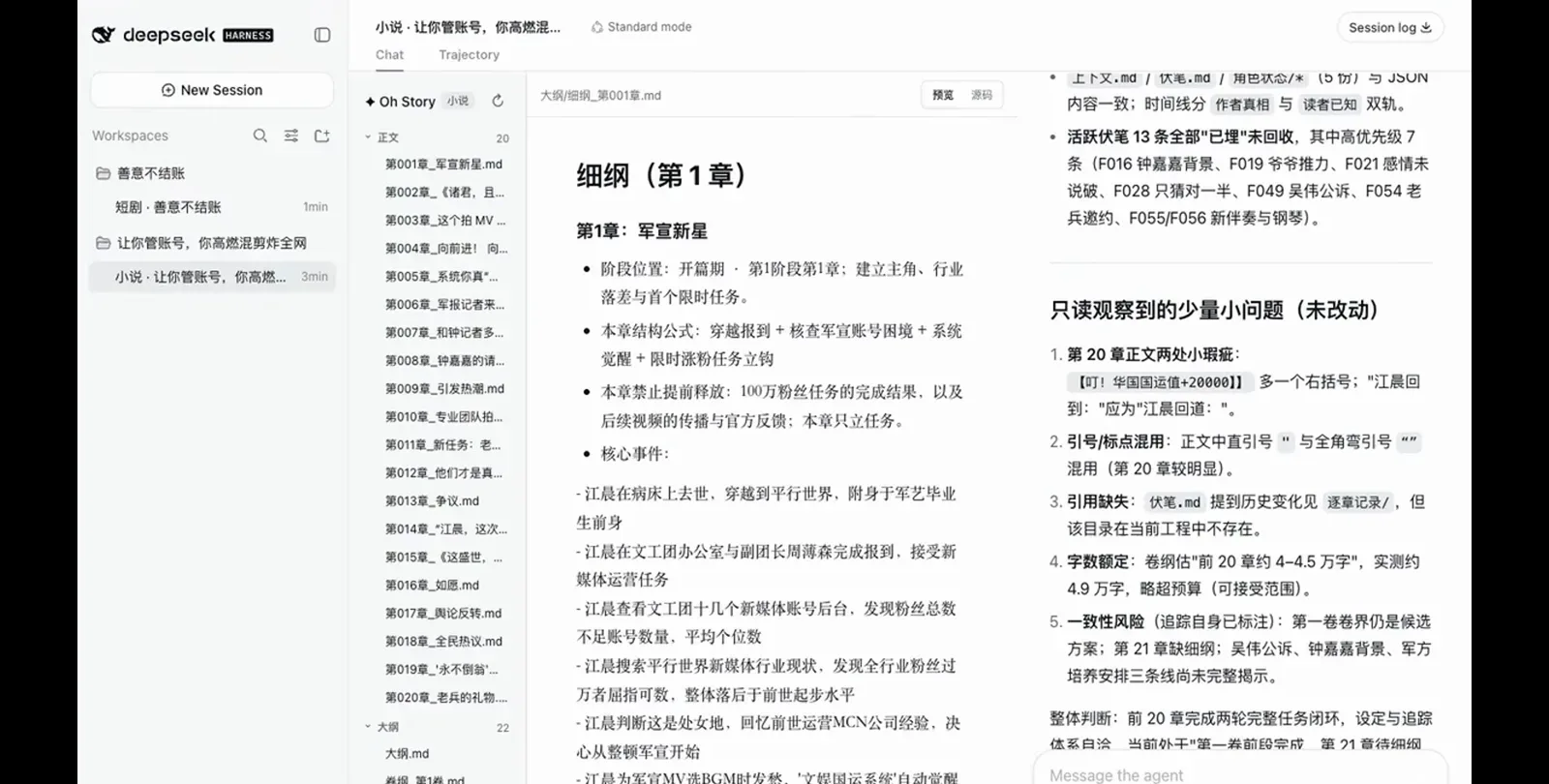
Outline deduction lands as per-chapter files: structure formula first, then the beat list.Watch at 0:30 - 4
Write in the three-pane workbench
This is the view you will live in: the project file tree on the left — 20 manuscript chapters, outlines, settings, tracking — the chapter text streaming into the center editor as the agent writes, and the agent panel on the right. When the agent edits files the editor follows in real time, so the copy-paste loop between a chat window and your drafts simply disappears.
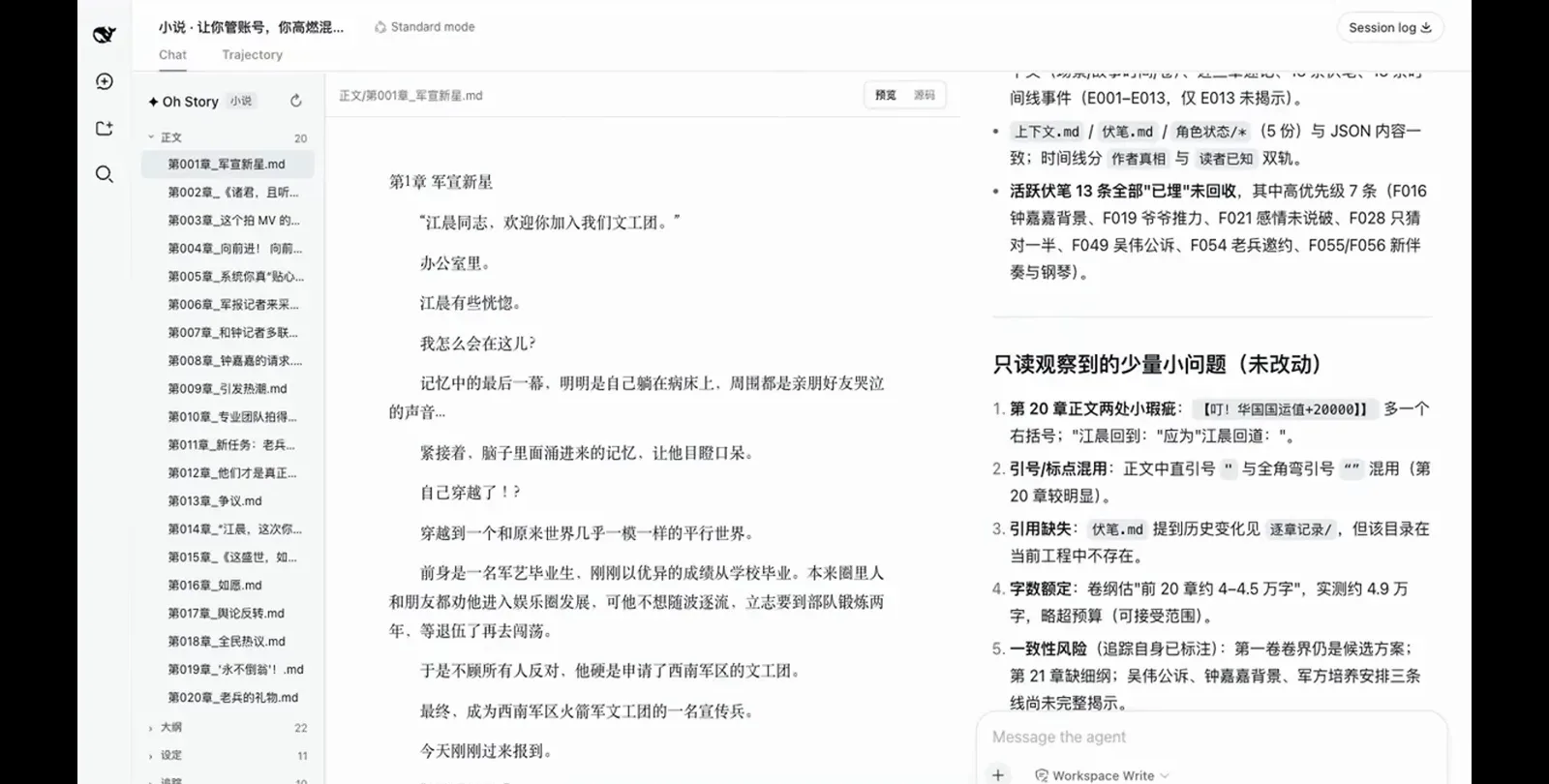
Tree, manuscript and agent on one screen — the editor follows while the agent writes.Watch at 0:28 - 5
Stalled? Let story-long-write deduct the next chapters
When you hit a wall mid-volume, story-long-write starts long-form chapter deduction: the agent works out where the next chapters should go instead of you staring at a blank editor. Long plots stay coherent because the workbench maintains machine-readable tracking files — a tracking-state JSON holding each character's goal, knowledge and relationships, plus a foreshadowing list and per-chapter records the agent has to stay consistent with.
$story-long-write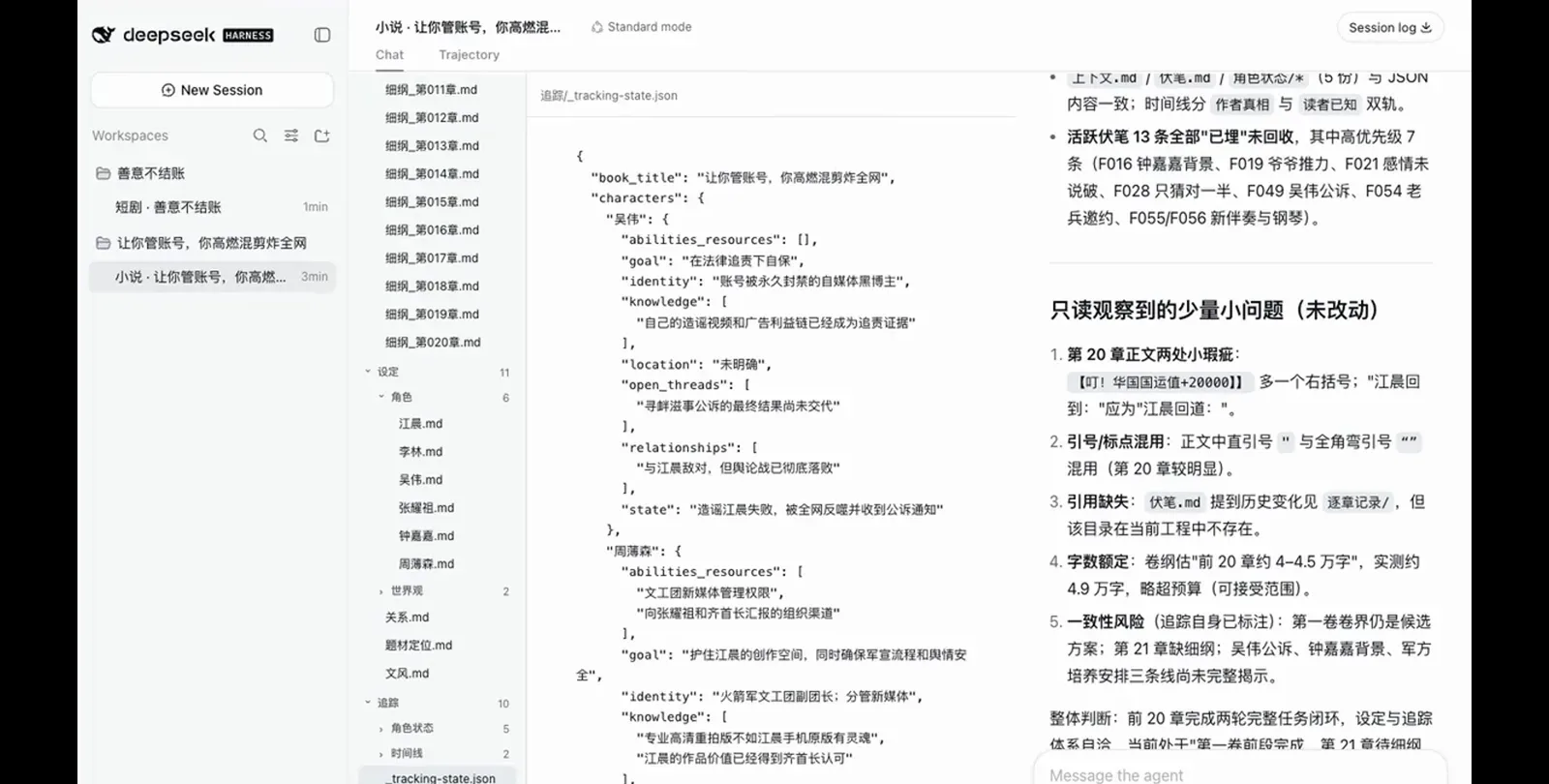
Long novels stop drifting: every named character gets a machine-readable state file.Watch at 0:34 - 6
Proofread with story-review to strip the AI tone
After a writing sprint, story-review runs the built-in proofreading module that pulverizes empty clichés and mechanical parallelism — the two tells of AI prose. The report lands in the agent panel: quote and punctuation slips, a missing reference, word-count drift against the volume plan, consistency risks — each finding marked fixed or left unchanged, and edits go through the normal DSH approval flow before anything is written.
$story-review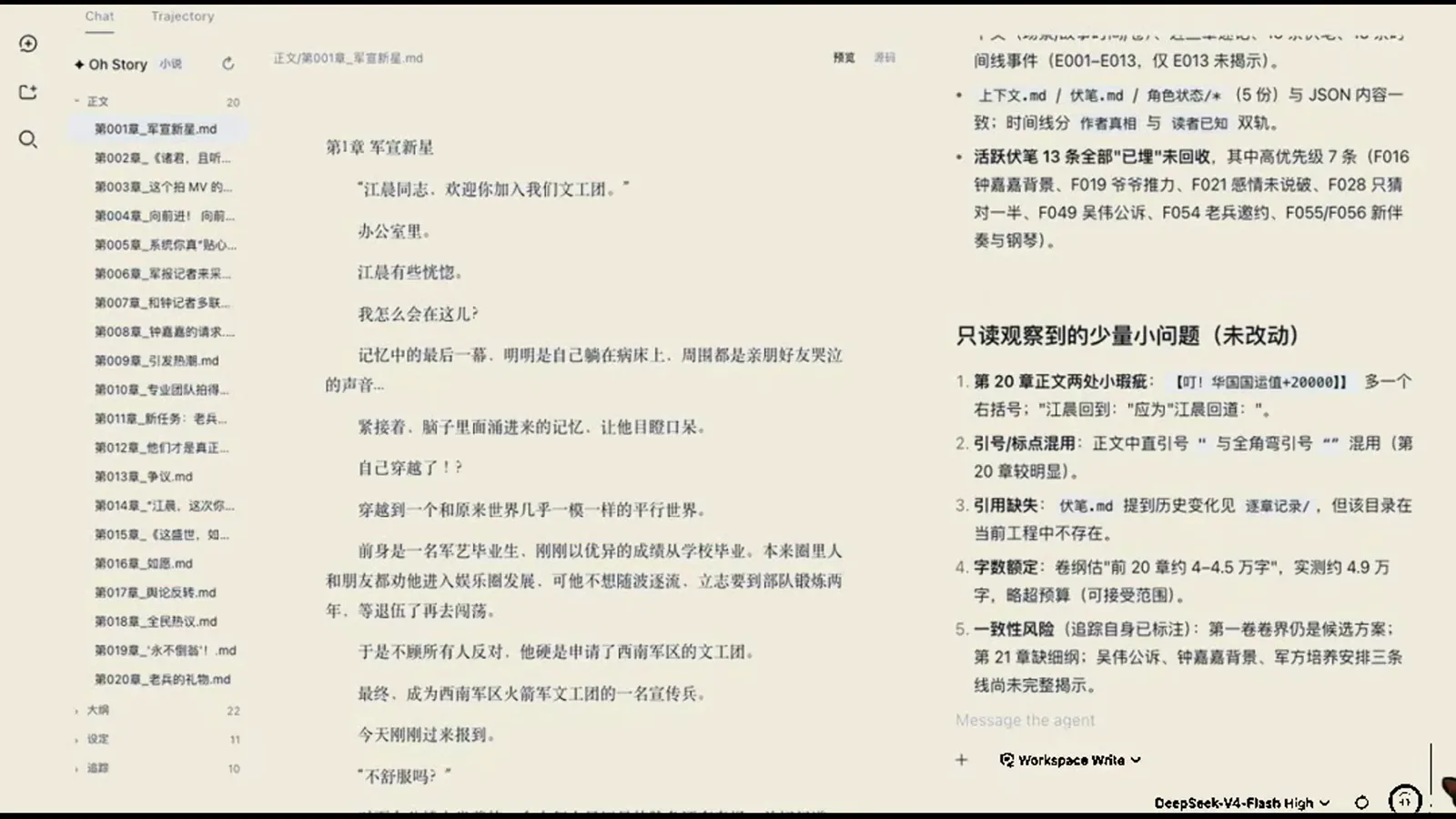
The review panel reads like an editor's memo: five findings, each marked fixed or left unchanged.Watch at 1:41 - 7
Keep every draft local
The workbench is a local app: the editor, the file tree and every draft live in the workspace on your own disk, reached through 127.0.0.1. Chapters accumulate in the manuscript folder as plain project files, so daily updates of ten thousand words are just — more files. No cloud locker, no sync step, and an unpublished outline never leaves the machine.
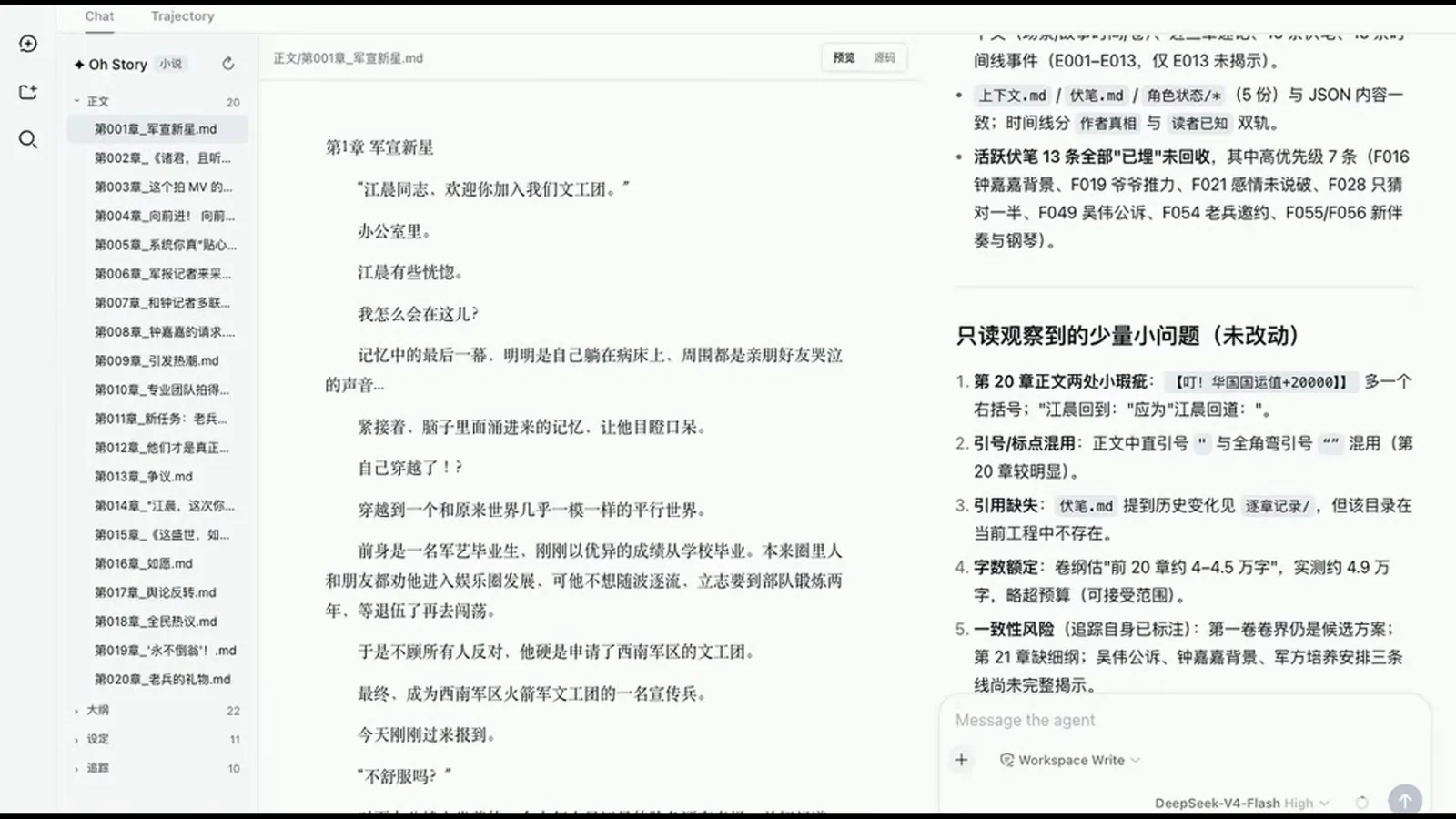
Drafts live in your workspace, not a cloud editor — cut the network and the novel is still there.Watch at 1:47
FAQ
Quick answers about models, privacy and how the novel workbench actually works.
Which models can the novel workbench use?
Anything DSH can connect to. A DeepSeek API key works out of the box, and the recording shows the composer's model picker switching models on the fly — the demo runs on DeepSeek-V4-Flash. Custom providers can be added through DSH Settings → Models or the plugin's openai_compatible.json, so local and third-party models work too.
Do my drafts ever leave my machine?
No. The workbench runs on your computer at 127.0.0.1:3080, and all manuscripts, outlines, settings and tracking files are saved locally in the project workspace. The only network traffic is the calls you make to your own model provider; the plugin itself is a native DSH extension and does not touch your private keys.
What kind of computer do I need? Is setup hard?
A regular home computer — Node.js 24+ is the only hard requirement. The plugin runs offline as a native DSH extension, and the recording drives a full 20-chapter novel on an ordinary desktop. Long-form deduction spends your model provider's compute, not your CPU. Installation is one command; after wiring the key you can start writing within five minutes.
How is this different from asking a chatbot to write my novel?
In a chat window the novel lives inside the conversation; here it lives as project files — a chapter tree, outline documents, character sheets and tracking state that the agent reads and updates. That is why story-review can check chapter 20 against the volume plan, and why a library of 13 novel skills and 7 professional roles has something real to work on instead of one context-blind prompt.
Can it draft several chapters in one go?
Yes — that is what story-long-write is for: it deduces the coming chapters automatically whenever you stall. In the recording, the volume plan budgets the first 20 chapters at roughly 40,000–45,000 Chinese characters, and the review pass flags actual drift (about 49,000). Daily updates of ten thousand words are the workbench's intended rhythm.
What is the short-drama mode shown in the video?
The same plugin also ships Drama Skills, a short-drama pipeline that adapts a novel into multi-episode scripts, writes per-episode dialogue and twists, and produces professional storyboards plus image and video prompts. It is a separate workbench mode with its own commands — that half is covered in our short-drama guide.
Related guides
More DeepSeek Harness walkthroughs that pair well with the novel workbench.
Turn a novel into a short drama
The sibling half of this plugin: adapt a novel into multi-episode scripts with per-episode twists, professional storyboards, and image/video prompts.
Read the guideInstall DSH plugins the right way
Profiles, version pinning and the dsh plugin --profile web add syntax this guide relies on.
Read the guideSwitch models in DeepSeek Harness
Wire up different providers and pick per-message models — the same picker the workbench composer uses.
Read the guideRun local models with DSH
Pair the novel workbench with local weights so both inference and drafts stay on your machine.
Read the guideWhat are DSH plugins?
The mental model: what a plugin adds to DeepSeek Harness, and how oh-story-dsh loads a novel method library into it.
Read the guideSources & credits
Frames in this guide are captured from the screencast below and remain the property of its creator — each image links back to the exact moment in the source video. Command names and UI labels follow what the recording shows; plugin facts were cross-checked against the official oh-story-dsh repository.