
The Four DeepSeek Harness Modes, Explained
Standard, PTC, Minimal and Creator — what each agent preset really changes, with screenshots from two real setups.
Last updated: 2026-09-11
Everything in DeepSeek Harness is a plugin — including the agent's own behavior. Instead of one fixed coding assistant, the harness ships four built-in agent presets ("modes"), each assembling a different set of tools and system prompt around your model.
This guide walks through all four with real screenshots: where to switch them, what each one includes, and how to roll a preset of your own in Creator mode. Frames come from two public walkthroughs, credited at the foot of the page.
The four modes, one guide
- 1
Where the modes live
Open Settings → Agent presets and you'll find all four cards — Standard, PTC, Minimal and Creator. The mode you pick applies to sessions you start from then on; running sessions keep the preset they began with. Inside a session, the composer's command menu is where per-session controls live: /plan for plan mode, permission for the sandbox tier, model for the brain.
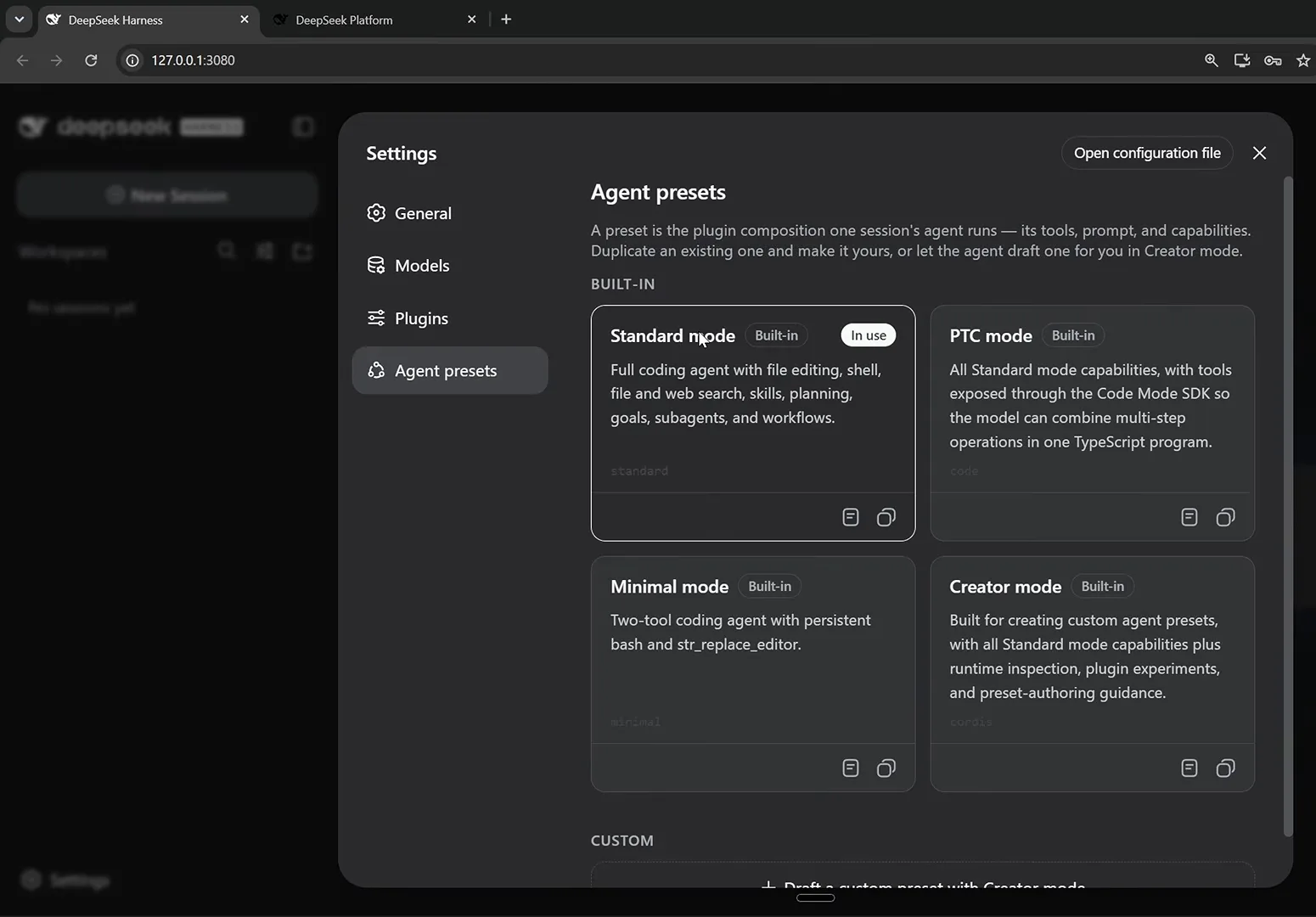
All four built-in presets on one screen — each card is a different bundle of tools and system prompt.Watch at 3:40 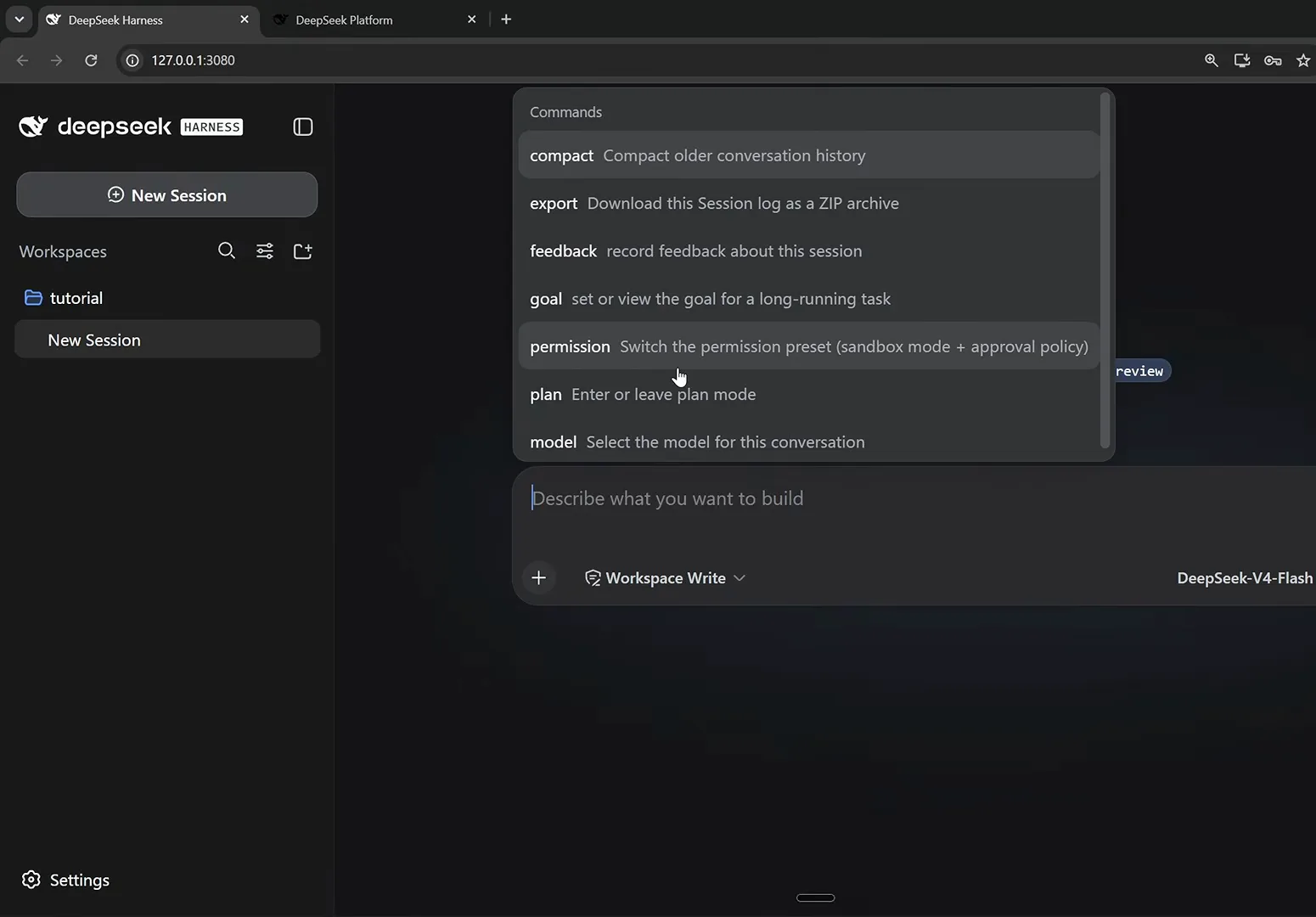
Not every "mode" is a preset: plan mode, permissions and the model are switched per session from this menu.Watch at 6:00 - 2
Standard mode: the full coding agent
Standard is the default and the mode you'll use for most coding work. It assembles the whole toolbox — file editing, shell, file and web search, skills, planning, goals, subagents and workflows — and the trajectory view shows just how long the tool list is. Start here; leave when you have a reason to.
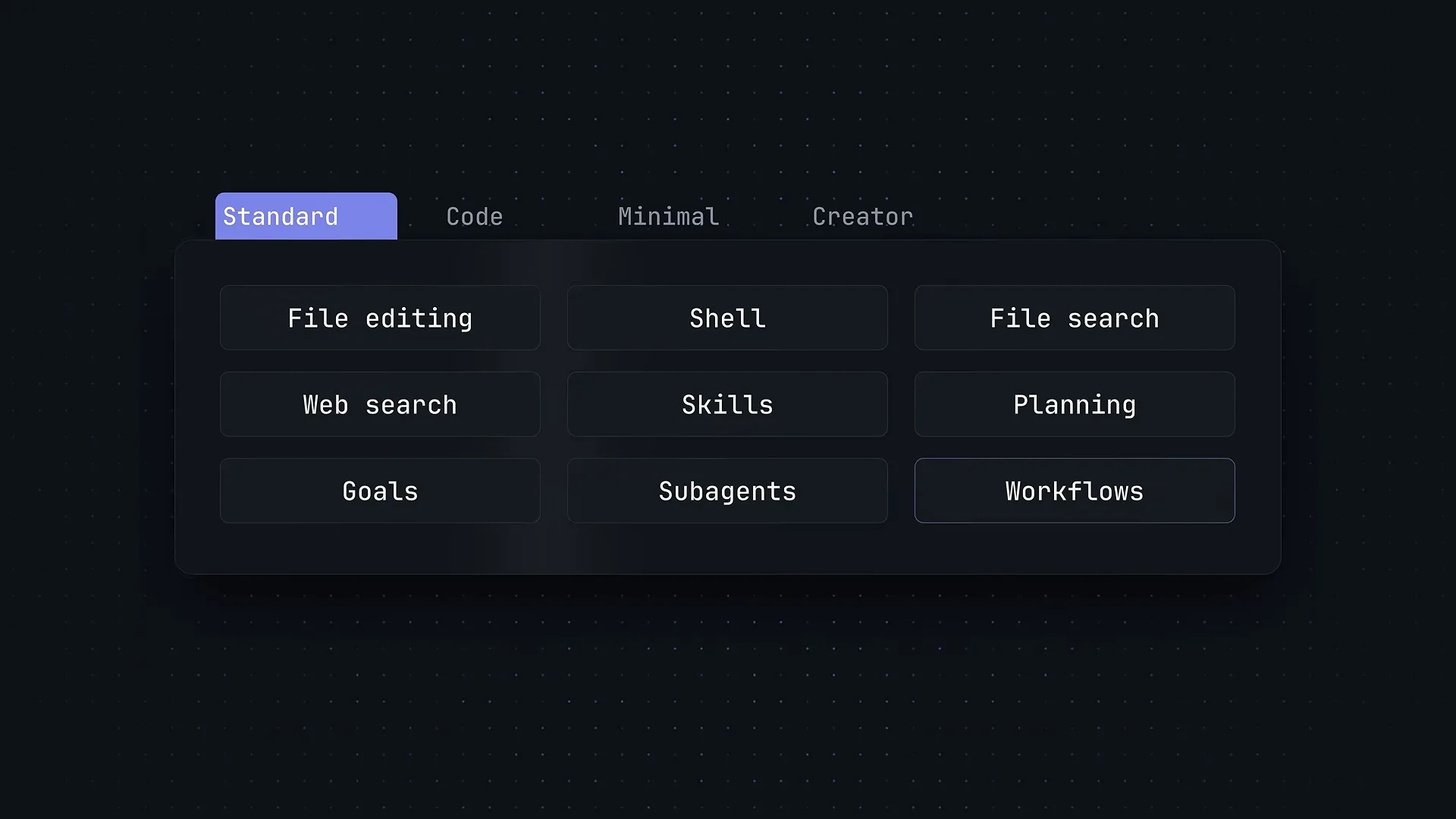
Standard mode is the whole toolbox — nine capability groups lit up at once.Watch at 3:15 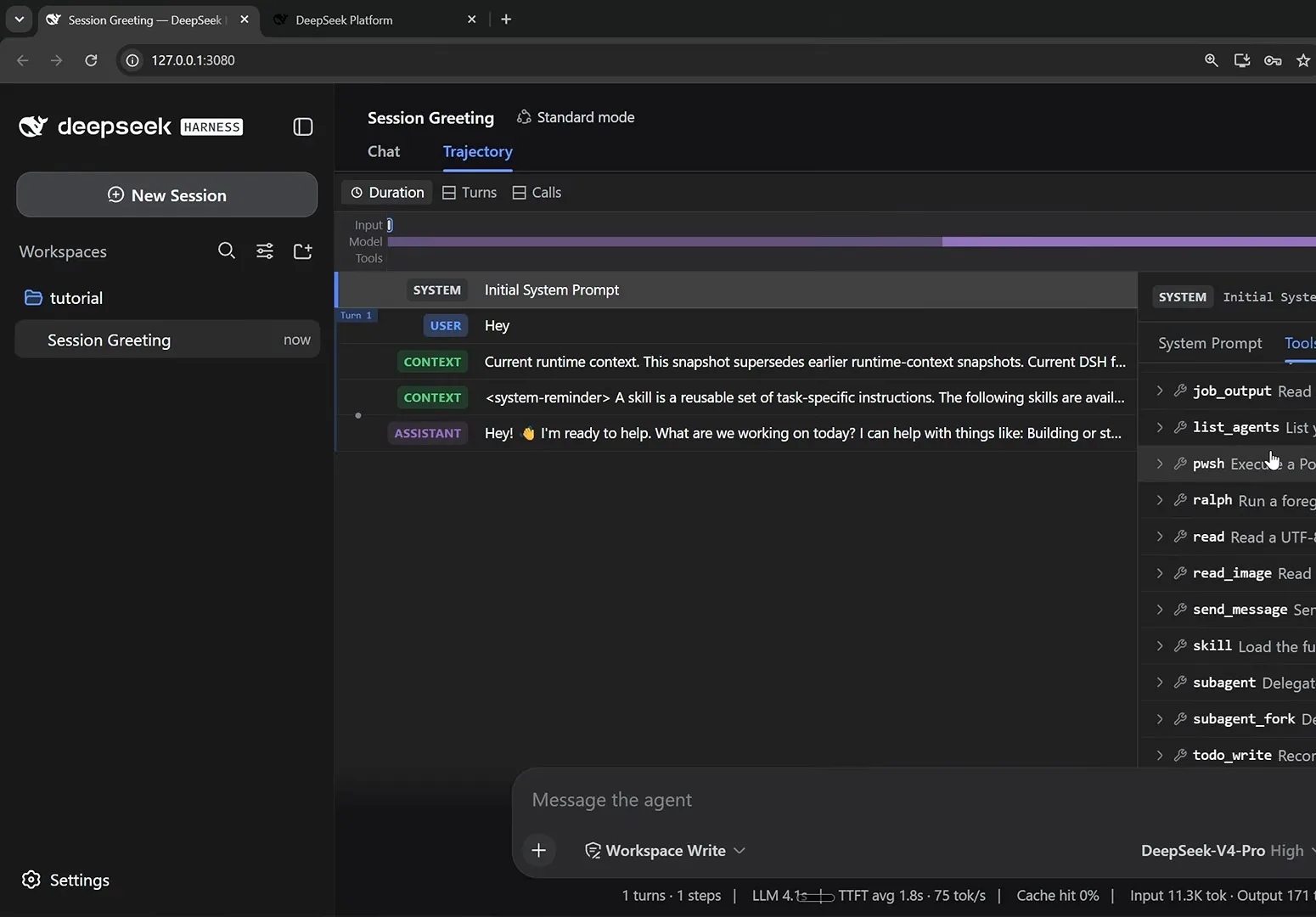
The same story from a real session: Standard mode's tool registry runs the full height of the panel.Watch at 7:45 - 3
PTC mode: many tool calls, one program
PTC (programmatic tool calling) keeps every Standard capability but exposes the tools through the Code Mode MCP, so the model can combine multi-step operations into a single TypeScript program instead of round-tripping each one. The walkthroughs point to data-heavy jobs and complex workflows as its home turf.
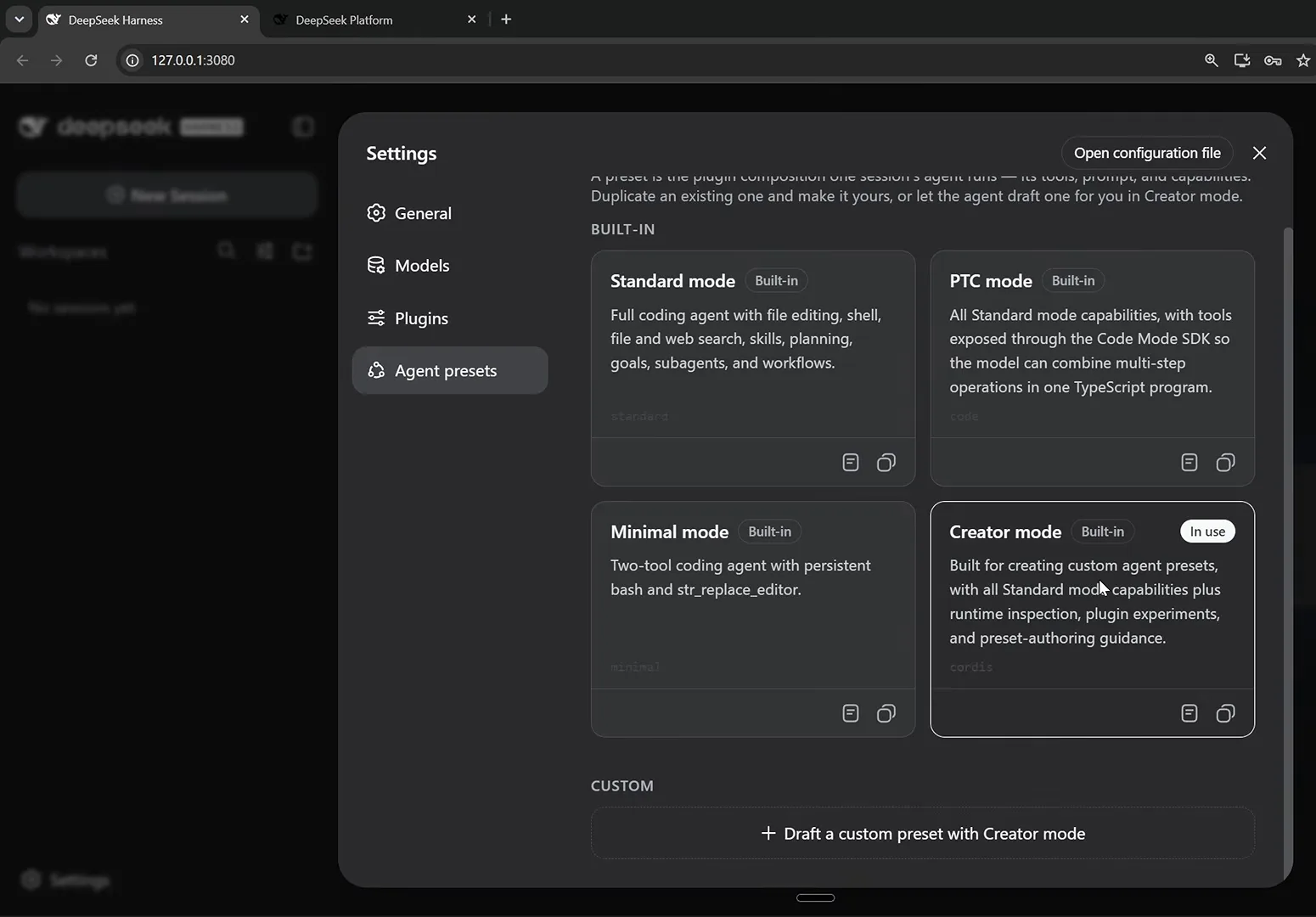
PTC keeps Standard's toolbox but hands the tools to the Code Mode MCP — and the panel hints you can author your own variant.Watch at 4:00 - 4
Minimal mode: two tools and a one-line prompt
Minimal strips the agent down to a persistent shell and a str_replace file editor, and swaps the long system prompt for a single line. Less context spent on tool definitions means more room for your actual task — and a faster, cheaper loop.
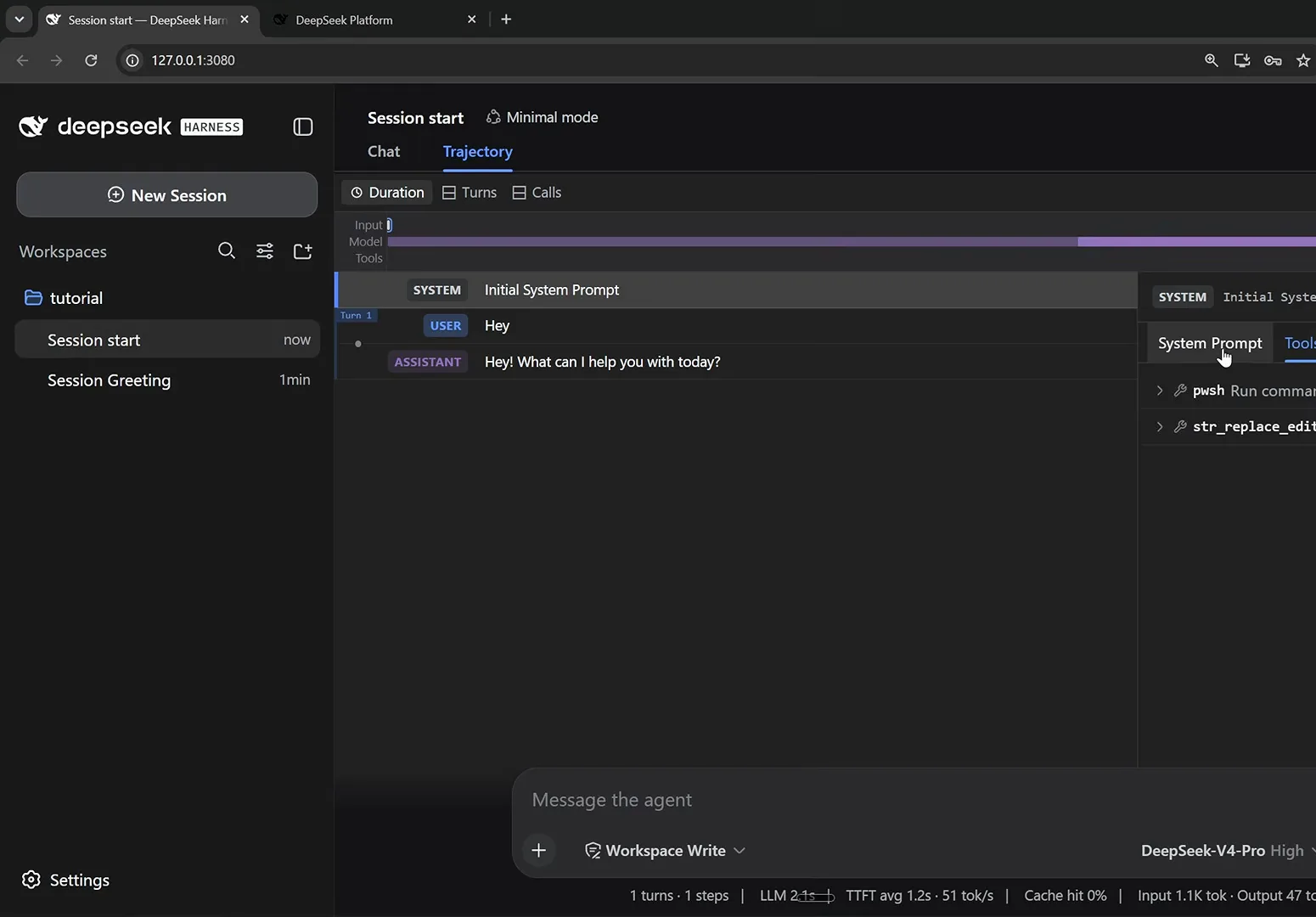
Minimal mode in one screenshot: two tools, one-line prompt, nothing else eating the context window.Watch at 8:15 - 5
Creator mode: unlock the runtime itself
Creator adds three powers on top of the full Standard set: runtime inspection, plugin experiments and preset authoring. This is the mode for changing the harness rather than just using it — the settings panel even labels it beta.
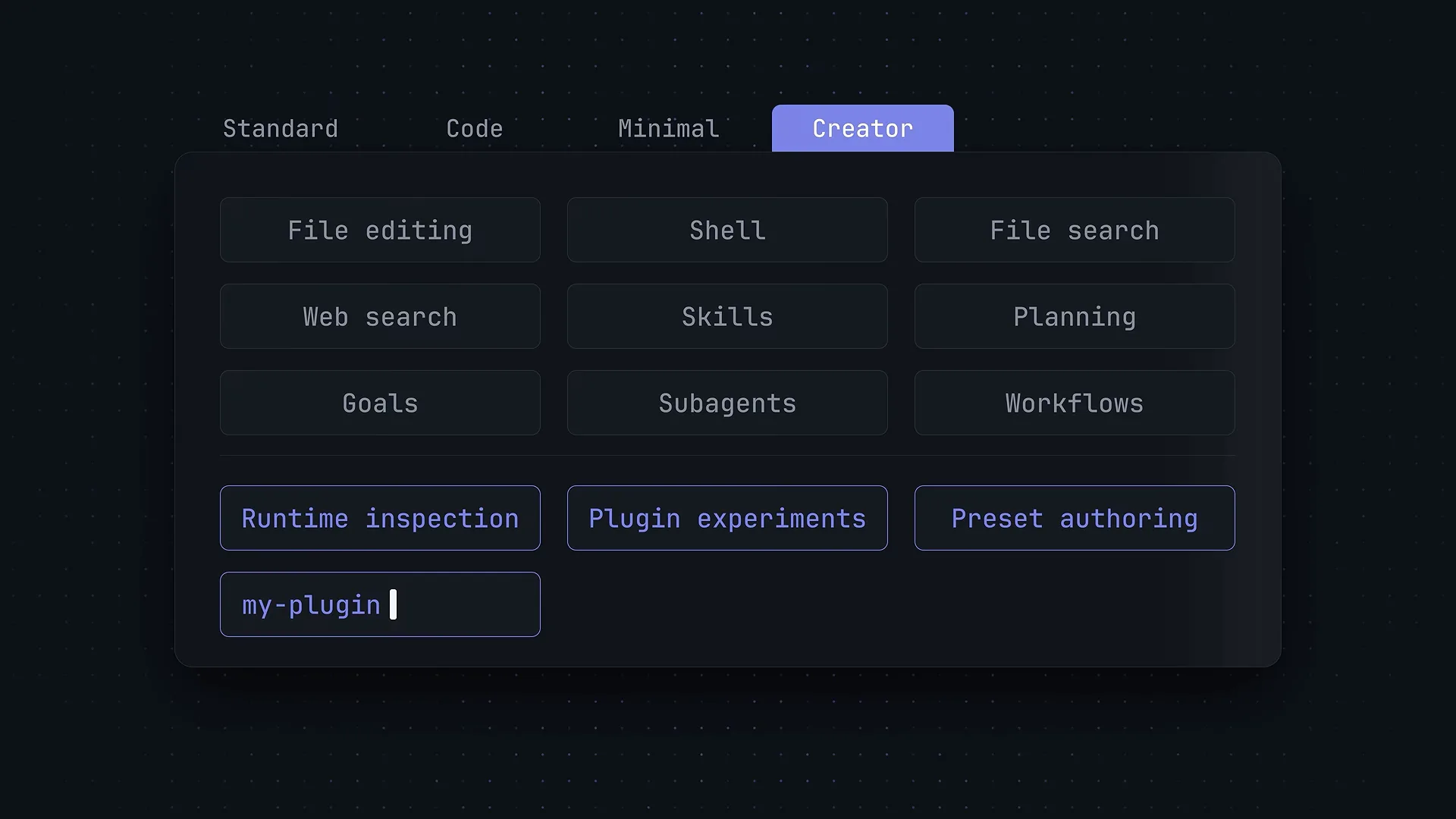
Creator mode = Standard's nine groups plus three runtime-level powers.Watch at 3:20 - 6
Watch Creator mode build a plugin
In the walkthrough, one prompt — "add a new plugin with a dinosaur jumping game floating in the bottom right" — has the agent injecting context, inspecting the Cordis runtime, and listing a running Cordis Plugin in the sidebar. That's the point of Creator mode: the harness can extend itself while it runs.
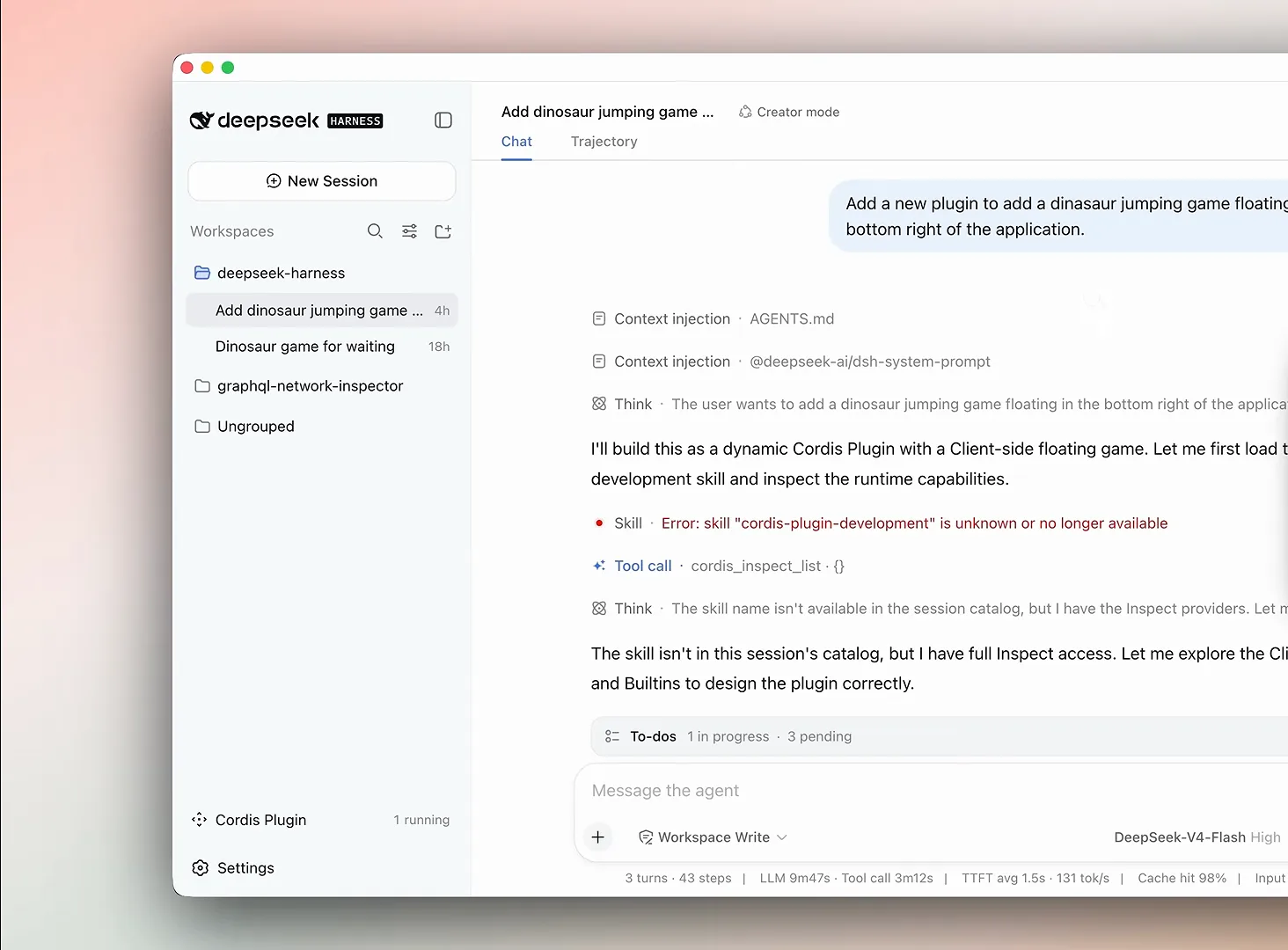
A real Creator session: one prompt in, and the agent is inspecting the runtime and shipping a live plugin.Watch at 3:40 - 7
Build your own preset — then pick wisely
You're not limited to four. In Creator mode, one prompt — "create a new agent preset called Local Models; disable the Ralph plugin and the sub agents plugins" — produced a working preset that appeared in the session dropdown immediately, with a shorter tool list to match. Rule of thumb: Standard by default, PTC for batchy data work, Minimal (or a custom preset) for small local models, Creator when you're building.
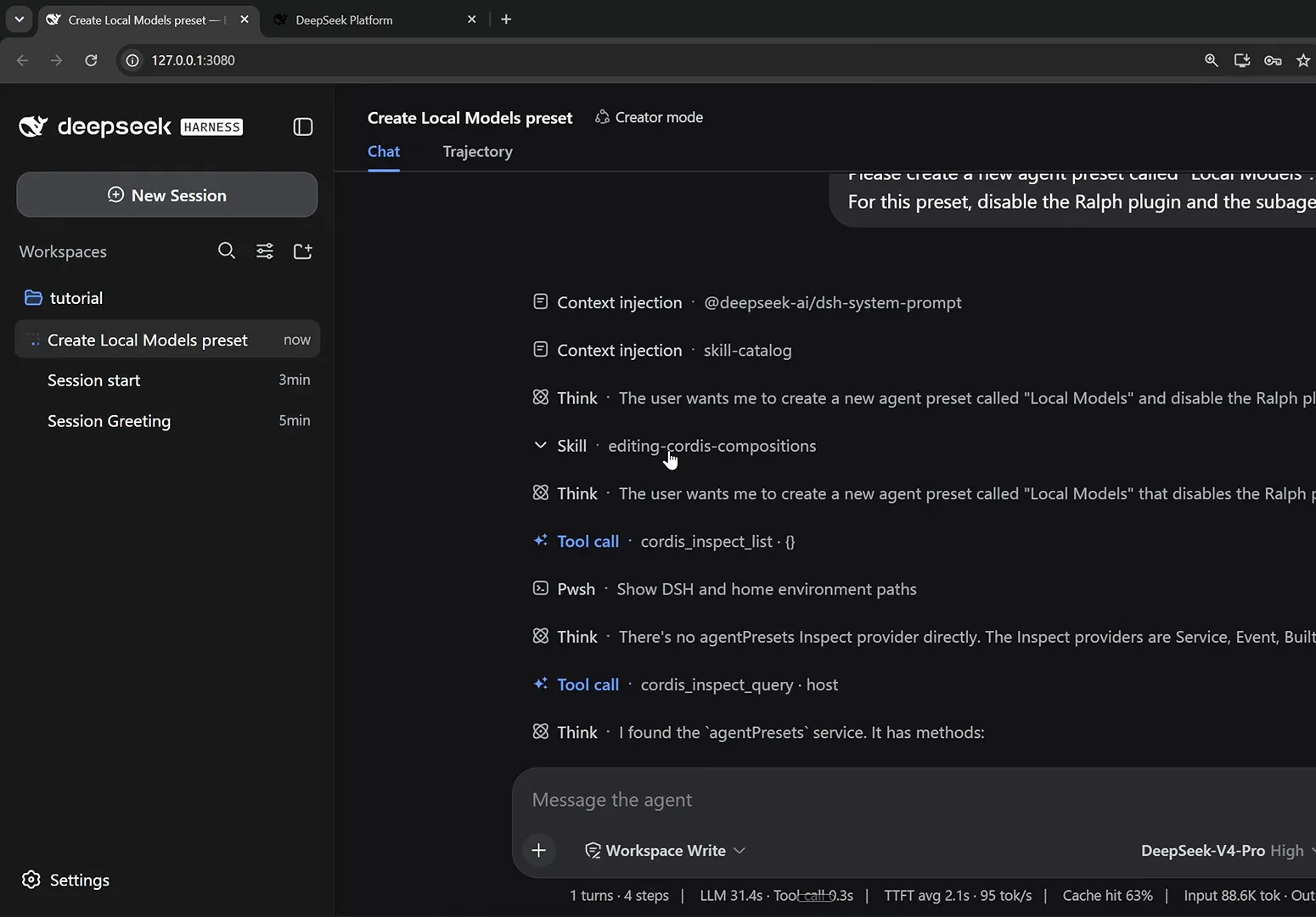
Custom presets are one prompt away: ask in Creator mode, and the agent authors the preset for you.Watch at 9:05 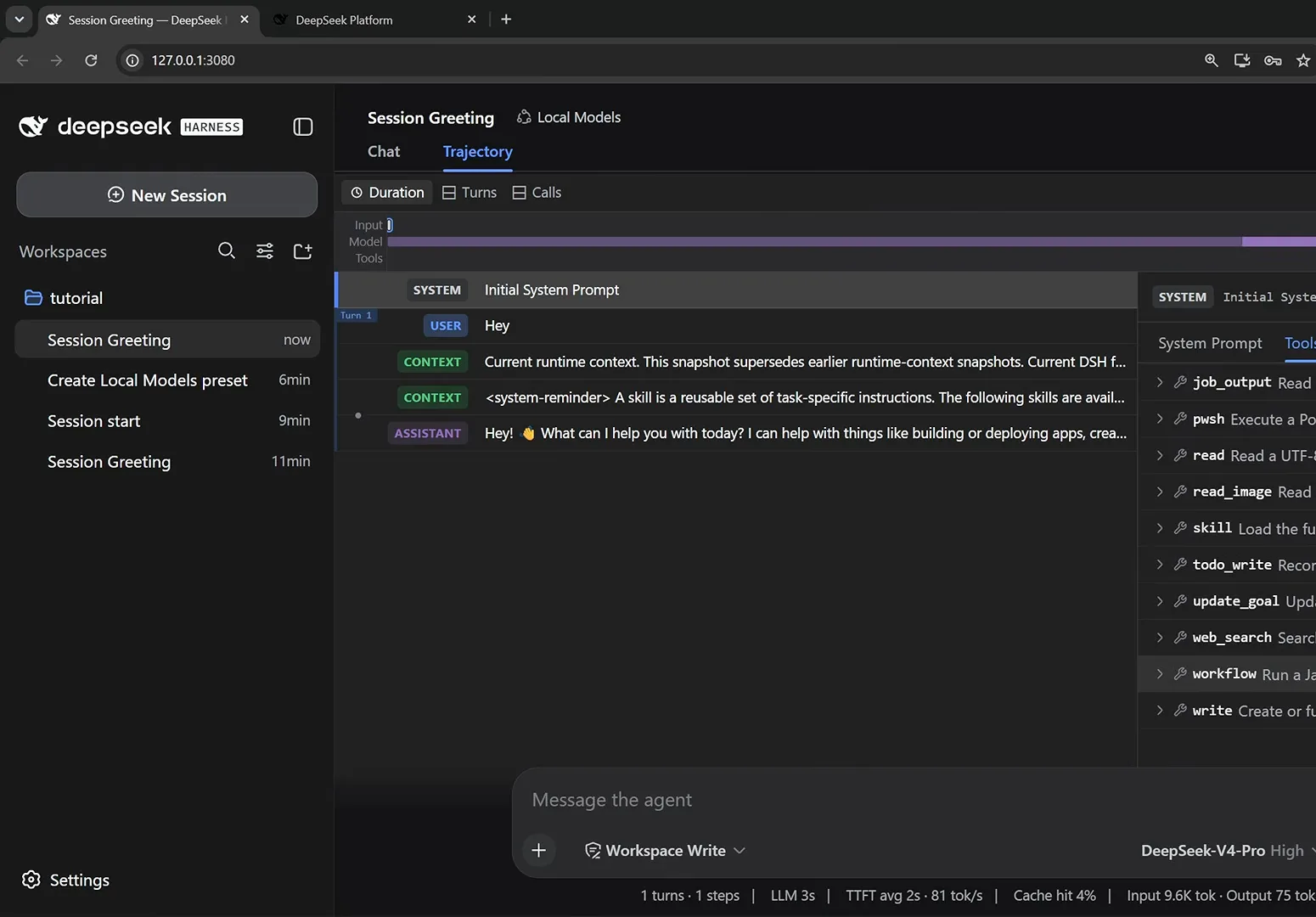
The payoff: sessions started with the new preset carry a shorter tool list — exactly what small local models need.Watch at 9:40
DeepSeek Harness modes: FAQ
Short answers to the questions every new user asks about agent presets.
What is the difference between Standard and PTC mode?
Standard is the everyday coding preset — full file editing, shell, search, skills, planning, goals, subagents and workflows. PTC mode keeps all of that but exposes the tools through the Code Mode MCP, so the model can combine multi-step operations into a single TypeScript program — handy for data-heavy jobs and complex workflows.
Is Minimal mode faster or cheaper?
It can be. Minimal mode cuts the tool registry down to a persistent shell and a str_replace editor and replaces the long system prompt with a single line, so far less of the context window is spent on tool definitions before your task even starts.
Can I switch modes in the middle of a session?
No — the agent preset is fixed when the session starts, and running sessions keep the preset they began with. Start a new session to change mode. The composer's /plan command is the in-session exception: it toggles plan mode without restarting anything.
How do I create a custom mode?
Open a session in Creator mode and ask for it. In the walkthrough, one prompt — "create a new agent preset called Local Models; disable the Ralph plugin and the sub agents plugins" — produced a working preset that appeared in the session dropdown immediately.
Which mode should I use with local models?
Minimal, or a custom preset derived from it. Local models have smaller context windows, and Standard's long tool list eats tokens before the first task begins — the walkthrough's Local Models preset disables the Ralph loop and sub-agents for exactly this reason.
Are mode, permission and model the same selector?
No — the composer exposes three separate controls: the agent preset (which tools and prompt the agent gets), the permission preset (read-only, workspace write or full access), and the model (which LLM runs the session). Changing one never changes the others.
Related guides
Where to take each mode next.
Switch models & custom providers
Change models mid-session, add NVIDIA NIM or Ollama as a custom provider, and verify what you're really talking to.
Read the guideOllama & free models
Point DeepSeek Harness at OpenRouter free models or a local Ollama server and run sessions without a paid API key.
Read the guidePlugins vs Skills: the Difference
One swaps harness capabilities, the other teaches the agent. Side-by-side comparison with real screenshots and two worked examples.
Read the guideInstalling plugins you can trust
How plugin installation actually works in dsh, plus a checklist for vetting third-party code.
Read the guidedsh vs Claude Code
An honest side-by-side: openness, pricing, model freedom, and extensibility.
Read the guideSources & credits
All screenshots come from these two public walkthroughs. Every image deep-links back to the exact moment in its source video.