
DSH Launcher & Integration Packs: Melody Launcher Walkthrough
The third-party Windows launcher for DeepSeek Harness, walked frame by frame: readiness cards, pack config, cross-pack session migration, the built-in plugin market — plus the .dspack route.
Last updated: 2026-10-09
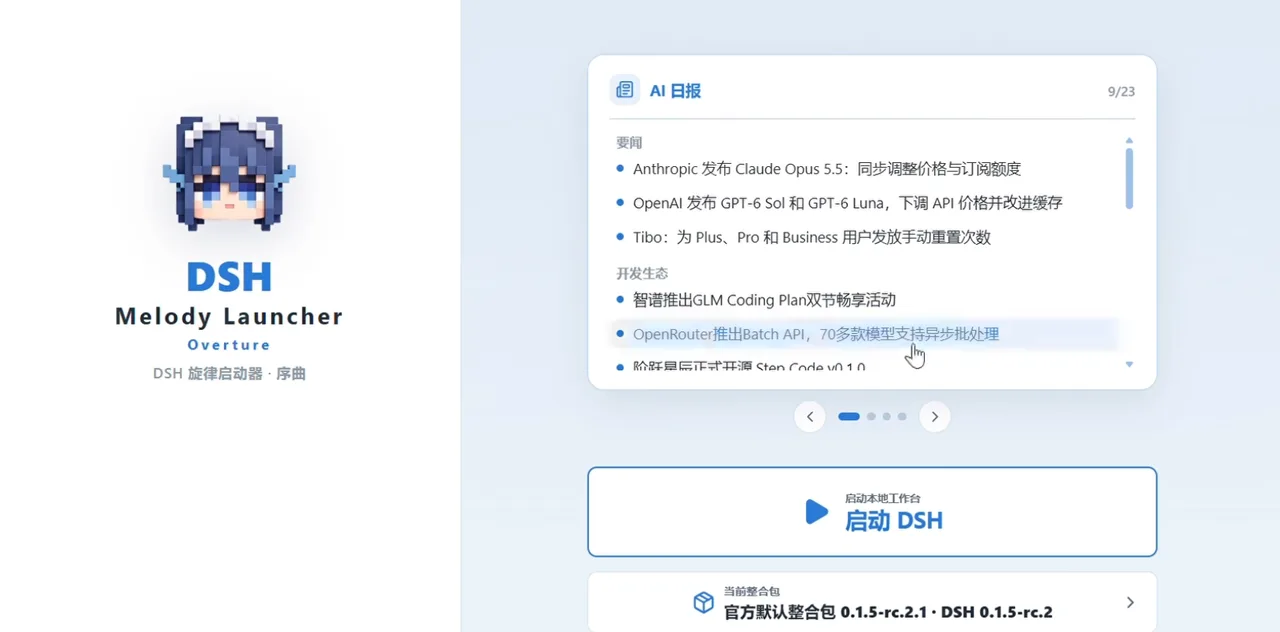
DeepSeek Harness usually starts in a terminal or a browser tab — DSH Melody Launcher: Overture wraps it in a Windows desktop launcher built around integration packs. This guide walks the author's own release walkthrough frame by frame: the home card carousel, pack configuration, drag-in import with a receipt dialog, cross-pack session migration, the version switch, the built-in plugin market and the agent-preset manager. Every screenshot below links to the exact second of the recording it came from.
If you only need dsh itself, the official installer is the shorter road — Install DeepSeek Harness on Windows
TL;DR
- ▸DSH Melody Launcher Overture is a third-party Windows launcher for DeepSeek Harness — ★77 on GitHub and a C-end fork of rirko/dsh-melody-launcher.
- ▸Its unit is the integration pack: one pinned dsh build plus a plugin/skill/preset set, importable and exportable, with cross-pack session migration.
- ▸The launcher reads readiness for you: a version card, an environment card, a built-in plugin market and an agent-preset manager — no terminal.
- ▸A second pack route exists: yukitakasama's .dspack (better-deepseek-harness-codex, ★13, v2.3.0, 21 plugins, 21/21 dependency checks) — different author, different product.
The walkthrough: 8 frame-verified steps
Meet the launcher
- 1
Read the version card first
The home carousel opens on a version card: the recording shows dsh 0.1.7-rc.1 with a one-click update button while the launcher itself is marked already up to date. Version awareness is built into the first screen — you never open a terminal to learn where you stand.
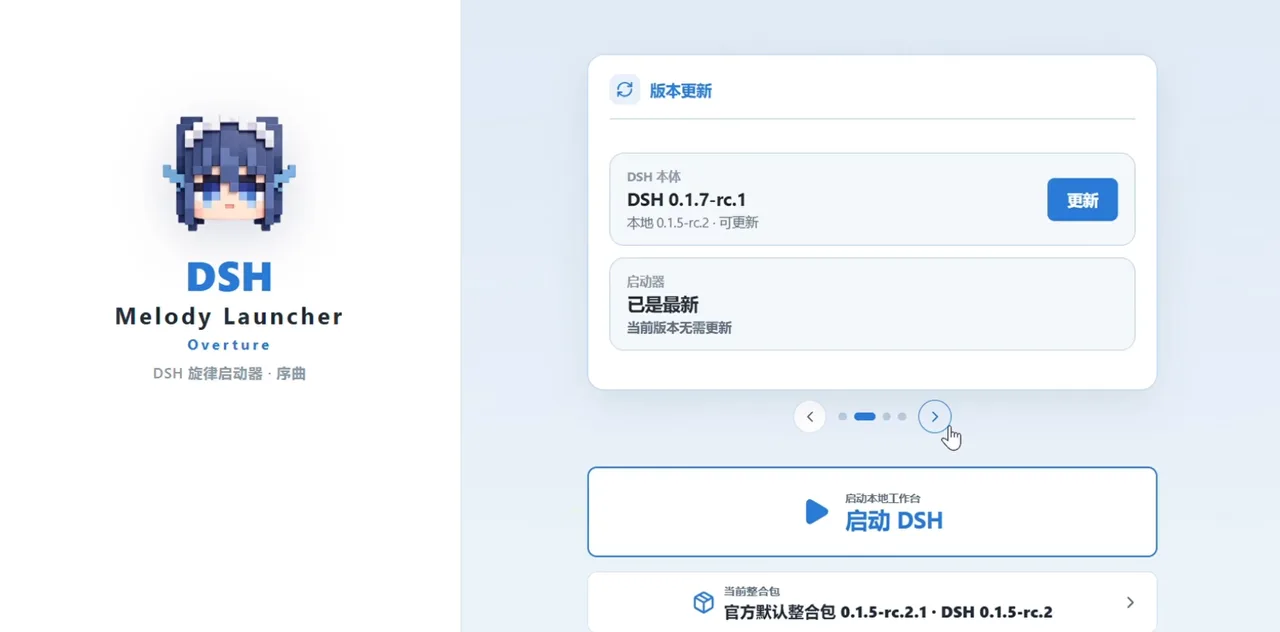
dsh and launcher updates checked from the same card, no terminal.Watch at 0:20 - 2
Check the pack environment card
The next card is the environment view: an active dsh 0.1.5-rc.2 runtime plus counters for installed plugins, skills and agent presets. An integration pack is a launch unit — it pins one dsh build and its own extension set, and this card proves the pairing before you start anything.
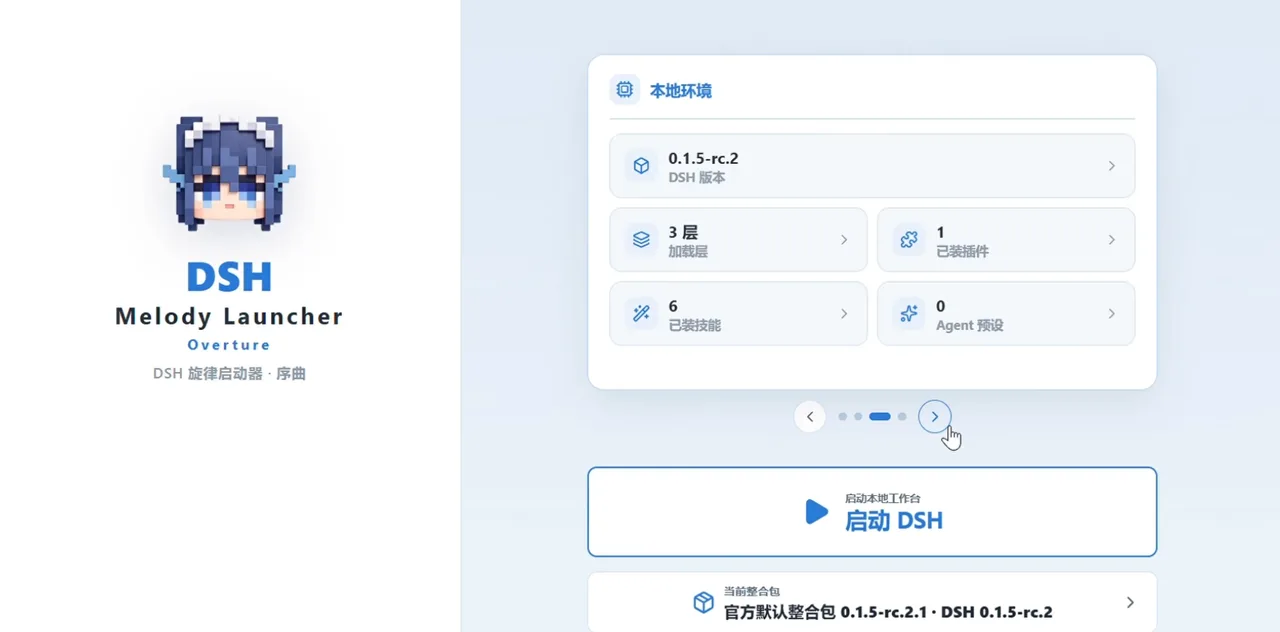
Readiness at a glance: version, plugins, skills, presets.Watch at 0:21
Pack config & session migration
- 3
Tune what the pack enables
Packs decide their own plugins and skills. The recorded pack carries UI-optimization plugins and an Office suite: find-skills, humanizer-zh, offici-docx, offici-pptx and offici-xlsx, each with its own toggle — so you can slim the pack before first launch instead of uninstalling afterwards.
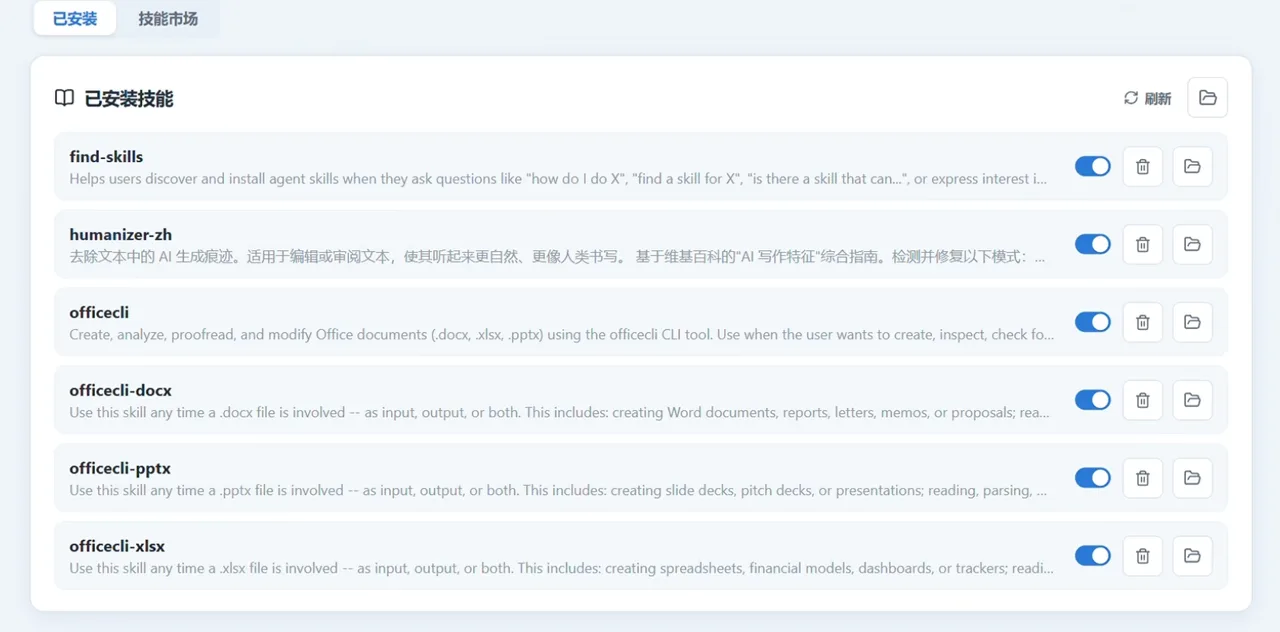
A pack ships its own plugin and skill set — tune it before launch.Watch at 0:42 - 4
Import a pack by drag-and-drop
Sharing goes through exported pack files: drag one in and the launcher unpacks it for you. The processing dialog is the receipt — archive progress, the plugins it installed (the recording installs github/dsh-web-all) and an apply-pack button that promotes the import to your active launch unit.
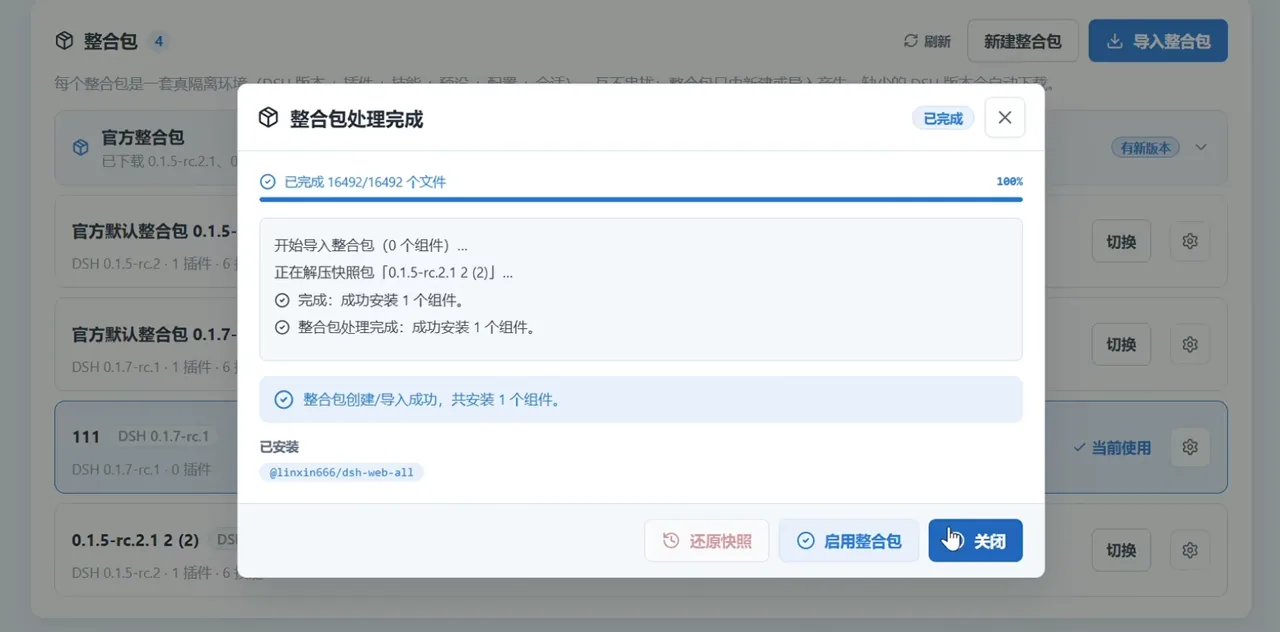
Imports end with a receipt, not a shrug.Watch at 1:00 - 5
Migrate sessions across packs
Switching packs normally strands your chats. Melody Launcher ships cross-pack session migration: the import-session dialog picks a target pack — pack 111 on dsh 0.1.7-rc.1 in the recording — and moves conversations over without re-running any setup. The narration is explicit that this is a launcher feature, not a dsh one.
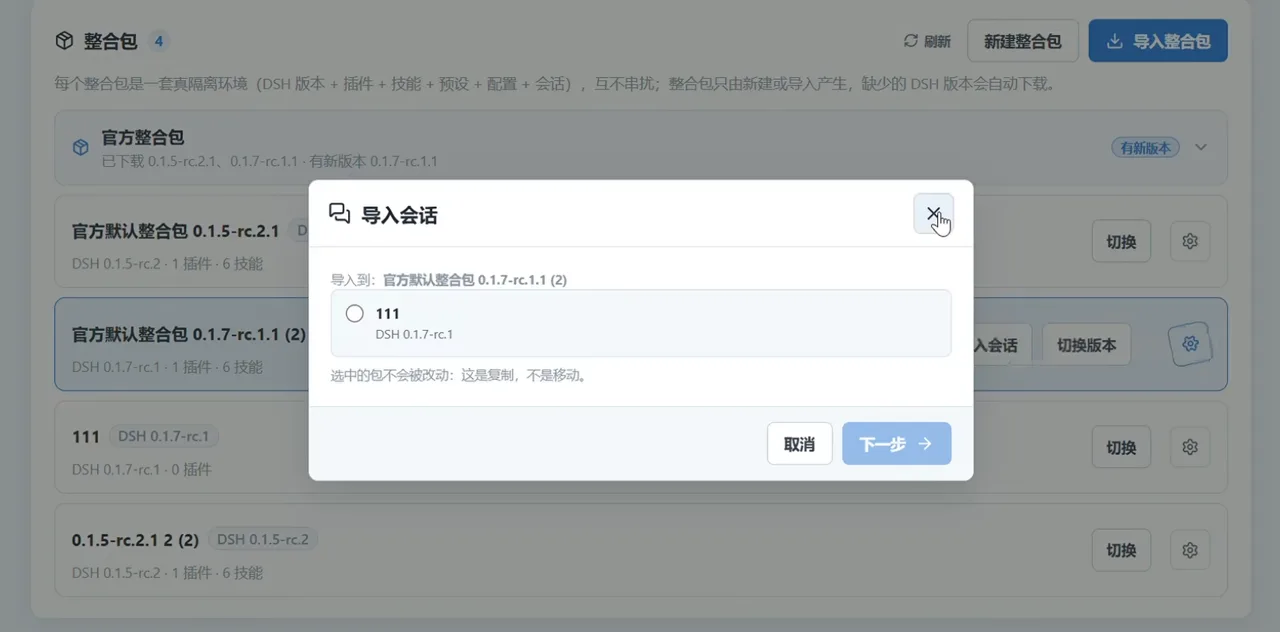
Chats follow the pack, not the machine.Watch at 1:04 - 6
Switch the pack's dsh version
A switch-version confirmation moves the pack to a different dsh build; once configured, the pack returns to the launch page ready to start. Version bumps stay a one-dialog affair inside the launcher, and the pack row keeps the previous builds listed for fallback.
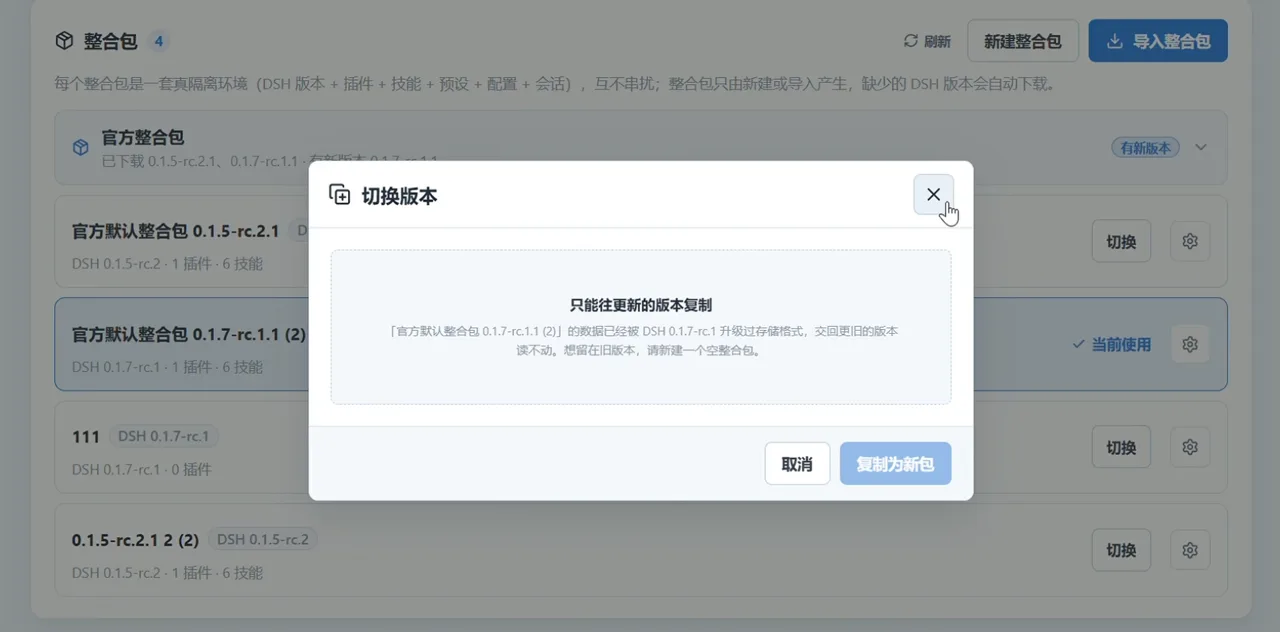
Version bumps are one confirmation away.Watch at 1:09
Market & presets
- 7
Install from the built-in market
The plugin page manages the active pack's plugins and embeds a market: highlight-coding-agents, dsh-git-graph, dsh-plugin-manager, dsh-ssh, dsh-task-board and more, in a star-rated grid that installs straight into the pack — no CLI, no manual restart.
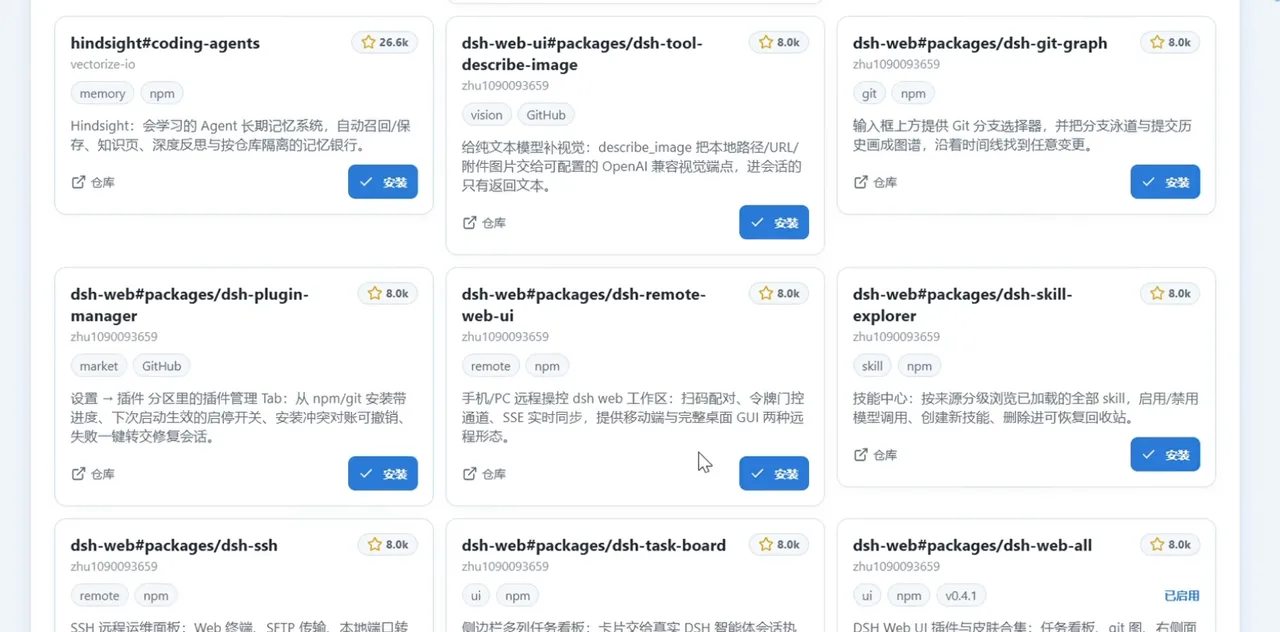
The market installs straight into the active pack.Watch at 1:24 - 8
Manage agent presets
The presets page is where dsh agent modes live: built-in and installed sections, both empty on a fresh install. As packs and plugins land, this page becomes the switchboard for how the agent behaves — the launcher's last stop before the Launch DSH button.
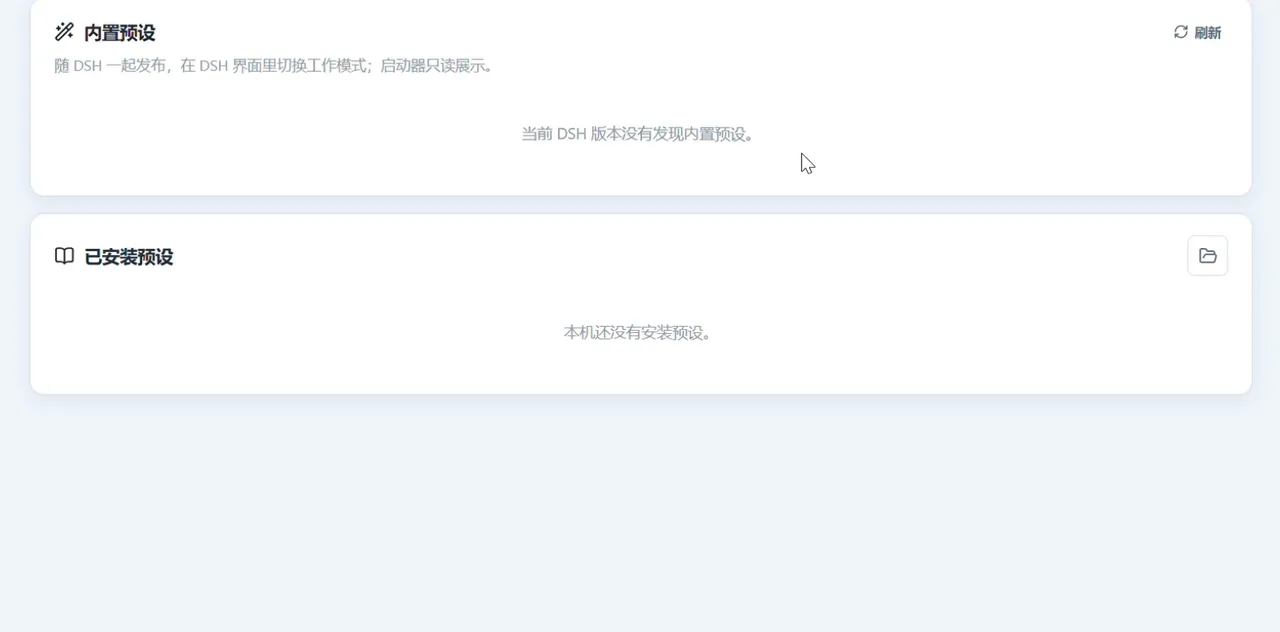
Agent presets live here — and start empty.Watch at 1:30
Two integration-pack routes (and they are unrelated)
Route one is the launcher's own: Melody Launcher Overture ships official default packs that pin dsh releases, and the same author's DSH-PackFabric (★1) documents the philosophy — stability first, a full dsh configuration carrying a version-matched dsh body, hook-linked, with mirror downloads for slow networks. Miyazawai/DSH-PackFabric
Route two is independent: yukitakasama's better-deepseek-harness-codex (★13) distributes .dspack files — a Codex-style interface with code review, a thinking-intensity slider, cost metering and a desktop pet, on base DSH 0.2.0-rc.2. Its update video records pack versions v1.1.0 to v2.3.0, the plugin count growing from 11 to 21, and 21/21 real-machine dependency checks passed. yukitakasama/better-deepseek-harness-codex
Same word, different authors: Miyazawai's launcher packs and yukitakasama's .dspack are unrelated products — pick one lane, don't mix their files. The version facts in this section come from the .dspack update video by 四月Aph (3,027 plays, API value); it is a full-slide design video, so it contributed facts only — zero frames.
Frequently asked questions
Straight answers about the launcher, the packs, and where the official routes live.
Is Melody Launcher an official DeepSeek Harness product?
No. It is a third-party, open-source Windows launcher: Miyazawai/DSH-Melody-Launcher-Overture (★77, checked 2026-10-09), a C-end fork of upstream rirko/dsh-melody-launcher. The official routes live on other pages — the Windows installer (/learn/install-windows), the desktop-client overview (/learn/desktop-apps) and the official update channel (/learn/update-plugins).
Does it run on macOS or Linux?
The repo targets Windows and the recorded walkthrough is a Windows desktop session, start to finish. macOS and Linux users should stay on the official installs (/learn/install-mac, /learn/install-linux) — nothing on this page applies to those platforms directly.
What exactly is an integration pack?
A bundle that pins one dsh version together with a plugin, skill and preset set, launched as a single unit. The launcher ships official default packs that track dsh releases (the recording shows 0.1.5-rc.2.1 and 0.1.7-rc.1.1 rows), exports a pack as a shareable file, and imports one by drag-and-drop.
Melody Launcher packs vs .dspack — same thing?
No, and this page keeps them apart. The launcher packs come from Miyazawai (DSH-Melody-Launcher-Overture plus DSH-PackFabric). The .dspack route is yukitakasama's better-deepseek-harness-codex (★13), a Codex-style integration pack pinned to base DSH 0.2.0-rc.2. Two different authors, two different products that both use the word pack.
Where should I download it, and is it safe?
Treat it as any third-party channel: the canonical source is the GitHub repo and its releases (★77, pushed 2026-10-05). The author also shares cloud-drive mirrors in the video's comment section — convenient, but not an official channel. Verify what you download, never hand a shared pack file your API keys, and prefer the official installer if you don't need pack features.
Which dsh versions do the packs track?
In the recording, the official default packs sit on dsh 0.1.5-rc.2 / 0.1.7-rc.1, a custom pack (111) runs 0.1.7-rc.1, and the version card checks updates for you. The independent .dspack route pins base DSH 0.2.0-rc.2 and moved from v1.1.0 to v2.3.0 while growing from 11 to 21 plugins with 21/21 real-machine dependency checks — per its own update video, credited in sources.
Related guides
The official routes this page is distinguished from, plus the plugin baseline.
Install DeepSeek Harness on Windows
A 10-step, screenshot-by-screenshot Windows walkthrough: Node.js, npm install, the Web UI on port 3080, your API key.
Read the guideDeepSeek Harness desktop app: official vs community
The official Web UI, community clients like DSHDesktop, and a safe-download checklist.
Read the guideUpdate DSH & plugins
Verified update commands: check your version, upgrade the dsh CLI, refresh plugins from the terminal or the Web UI market, and roll back safely.
Read the guideEssential dsh plugins, hands-on
The must-install walkthrough: put a searchable market inside the manage panel, vet with stars and a script audit, then run vision, sidebar and background-task plugins — every step a verified video still.
Read the guideSource credits
All nine frames come from the launcher author's own release walkthrough (星冉Miyazawa, BV1kXaw64Eih), cropped to remove the uploader watermark, the burned-in subtitles and the desktop pillarbox; the anime end card (t<15) and the low-resolution dark GitHub segment (t≥102) were never framed. The uploader = GitHub Miyazawai identity rests on the repo link self-reported in the video description. The .dspack version facts are credited to 四月Aph's update video (BV1XVHt6XEKv) — no frames were taken from it. View counts are yt-dlp API values (Bilibili search pages inflate them ~10x), and repository facts were re-checked against the GitHub API on 2026-10-09.