
Let DSH scroll Bilibili for you daily: dsh-bili-scroll from setup to an @ in your inbox
A 157-second screen recording, frame by frame: install the dependencies, scan the QR code, run at off-peak hours to save tokens, cap the daily picks, let it comment and @ you — up to the real mention sitting in your Bilibili inbox.
Last updated: 2026-10-16
On 2026-10-15 the uploader 凌羽在淋雨 published a 157-second screen recording of c1overzz/dsh-bili-scroll in action (17,361 views within 11 hours per the Bilibili view API): the plugin scrolls Bilibili for you once a day — searches recent videos by keyword, judges each one by reading its subtitle transcript (never the summary), writes the keepers into a Markdown report at out/<date>.md, and posts at most one comment per round @-mentioning you when something is special. Every frame on this page comes from that recording, cross-checked against the plugin's README.
The same week produced a second form of Bilibili access: bronyacccxz/dsh-bilibili-reply is the passive one — you @ it under a video, it watches and replies with jump-to-timestamp comments. dsh-bili-scroll, the subject of this page, is the active one: autonomous curation that needs no instructions. The @ in your inbox is the active form's final output.
The short version
- ▸dsh-bili-scroll scrolls Bilibili once a day: keyword search over recent uploads, subtitle-transcript triage (subtitle-less videos are skipped), a Markdown report at out/<date>.md, and one @-mention comment when a pick is special.
- ▸Pit number one: it needs dsh ≥ 0.1.7-rc.1 — below that the kernel silently skips the plugin without an error — and a restart after installing (bundle-layer assembly).
- ▸Off-peak scheduling is the token saver: DeepSeek peak pricing is weekdays 09:00–12:00 and 14:00–18:00; everything else (weekends included) is discount time. The plugin offers noon 12:00–14:00 and night 18:00–09:00 windows.
- ▸Auto-comment is off by default: when on, at most one comment per round, once per video, privacy red-lines hardcoded into the prompt. It still posts from your account — see the compliance note below.
From install to your first @: the recording in seven steps
Part 1 · Meet, install, first run
- 1
Start at the repo README: what this Bilibili plugin actually does
The README of c1overzz/dsh-bili-scroll is blunt: it searches recent videos by your keywords, reads subtitle transcripts before judging (never summaries), skips subtitle-less videos outright, writes the report to out/<date>.md with a "why it's worth it" line per pick, and with auto-comment enabled posts at most one comment per round @-ing you. Before installing you need Python 3.10+ or uv — and if you have neither, the plugin downloads its own uv into its home directory (no admin rights, no PATH edits, downloads sha256-verified).
$dsh-bili-scroll | 刷B站$engines.dsh>=0.1.7-rc.1$JavaScript 94.5% · Python 5.5%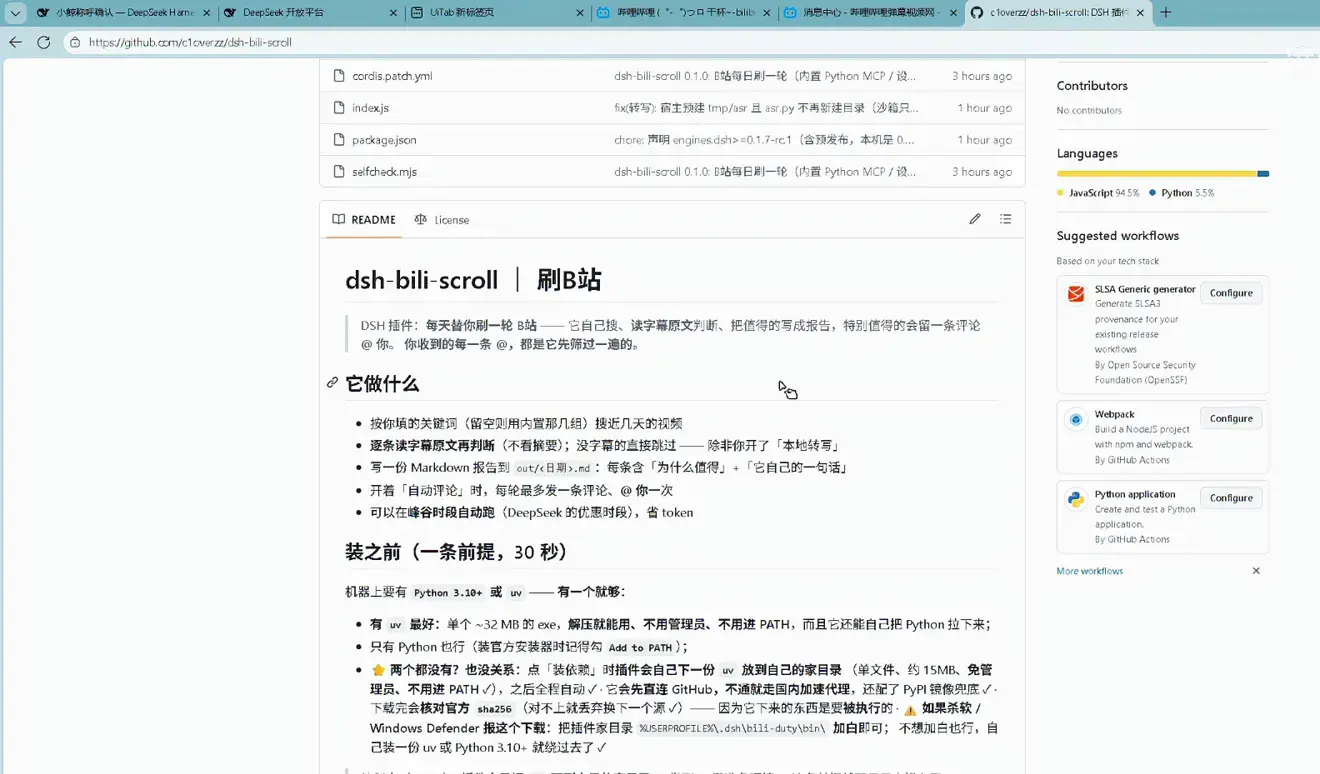
The repo's own "what it does" list — plus the Python 3.10+ or uv prerequisite (it fetches uv itself if you have neither)Watch at 0:00 - 2
Install, then restart: skipping the restart means it never loads
Install from npm with dsh plugin --profile web add dsh-bili-duty (or from GitHub with add github:c1overzz/dsh-bili-scroll). A restart is mandatory — the plugin assembles at the bundle layer, and until dsh restarts it simply is not there; the README bolds this. The screenshot above is the post-restart shell (the uploader runs a custom maid theme — not the default look); the "你是这个账号的 B 站助手" sessions stacking up in the sidebar are the headless sessions this plugin starts every day.
$127.0.0.1:3080$你是这个账号的 B 站助手$DeepSeek-V41-Flash · High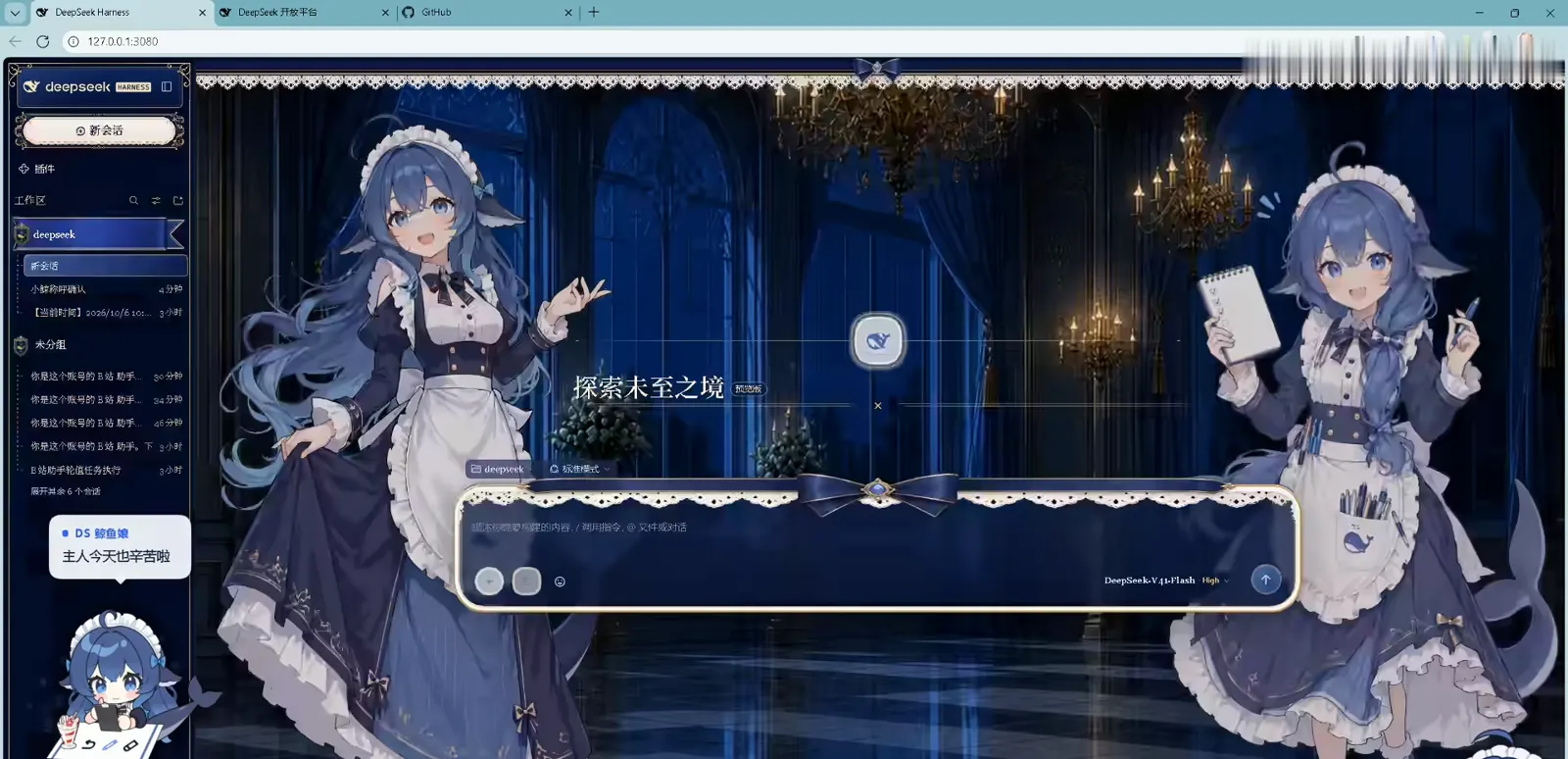
The post-restart shell — the maid illustrations are the uploader's custom theme, not the default skinWatch at 0:30 - 3
First run, two steps: install the main dependencies, then QR login
Open Settings → 刷B站: click 装主依赖(建 venv) to build a private venv with three packages (bilibili-api-python / mcp<2 / qrcode) over a domestic mirror via uv — tens of seconds, progress logged to install.log. Then click 扫码登录 and scan with the mobile app — pick 记住我 / 长期 on the confirm screen or the cookie dies in 24 hours. Credentials never leave your machine (<DSH_HOME>/bili-duty/bili_credential.json). Set the workspace while you are there (the demo uses D:\deepseek); leave the keywords empty to use the built-in groups.
$装主依赖(建 venv)$扫码登录 · 已登录$工作区 D:\deepseek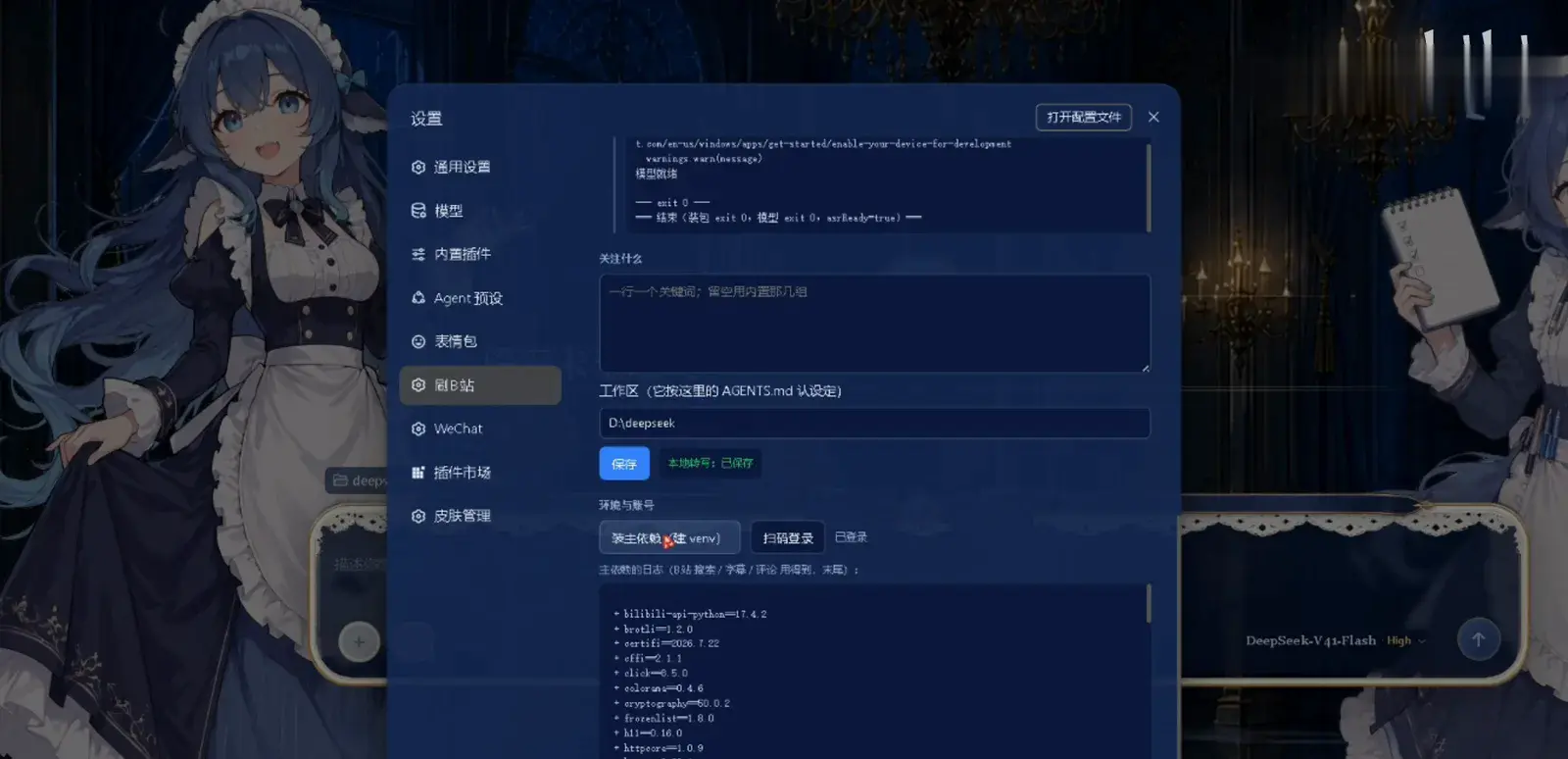
First run is two clicks: main dependencies, then QR login (choose 记住我 / 长期 or re-scan tomorrow)Watch at 0:40
Part 2 · The two automation lines
- 4
Peak-valley auto-scroll: the token-saving switch
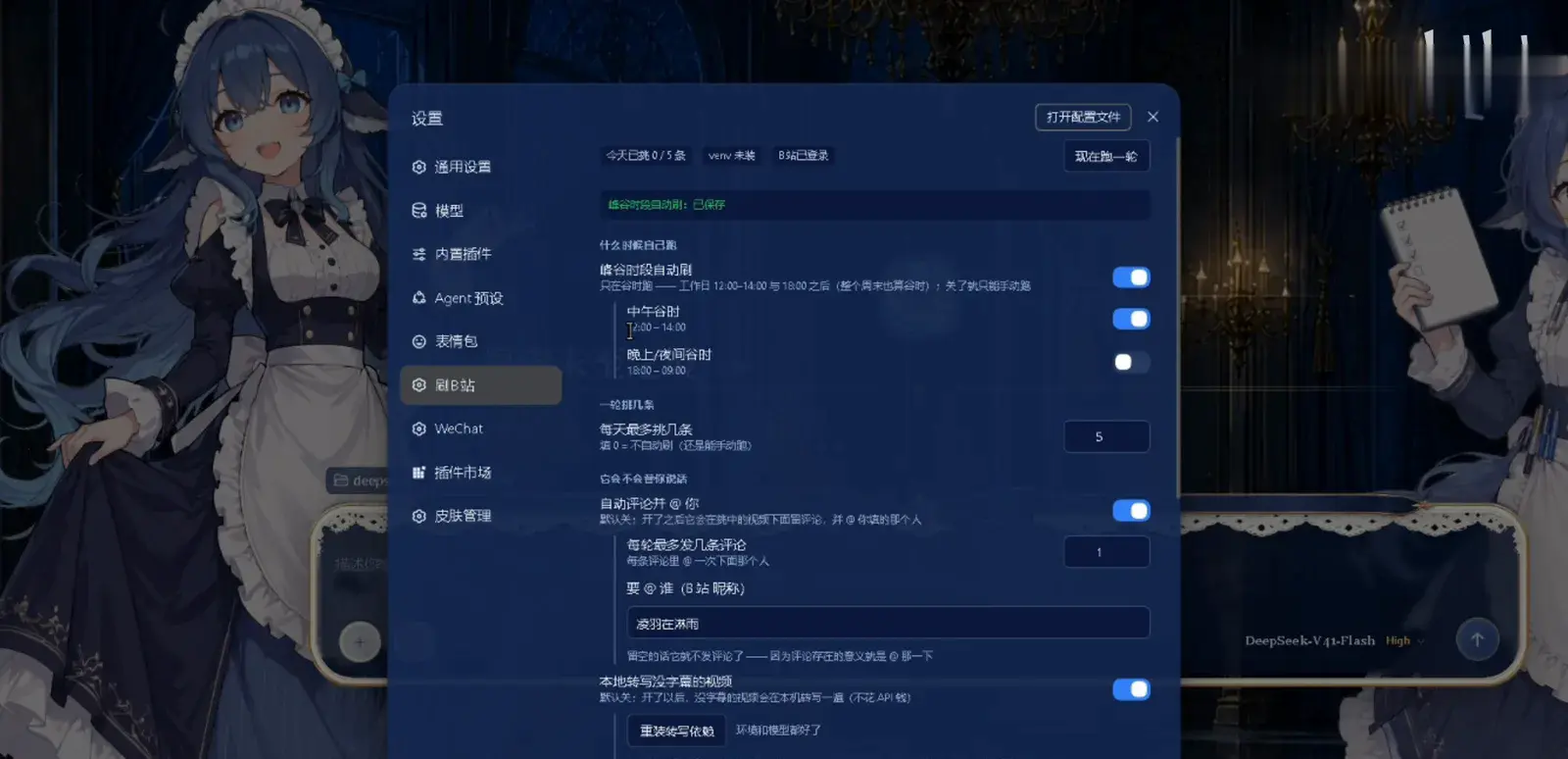
Turning on the 峰谷时段自动刷 master switch is what reveals its two sub-switches: noon off-peak 12:00–14:00 and night off-peak 18:00–09:00. The times come from DeepSeek's official pricing: weekdays 09:00–12:00 and 14:00–18:00 are peak; everything else — weekends included — is discount time. The status chips up top track 今天已挑 0 / 5 条, and 现在跑一轮 fires a round manually whenever you want.
$峰谷时段自动刷:已保存$今天已挑 0 / 5 条 · venv 未装 · B站 已登录$现在跑一轮$已关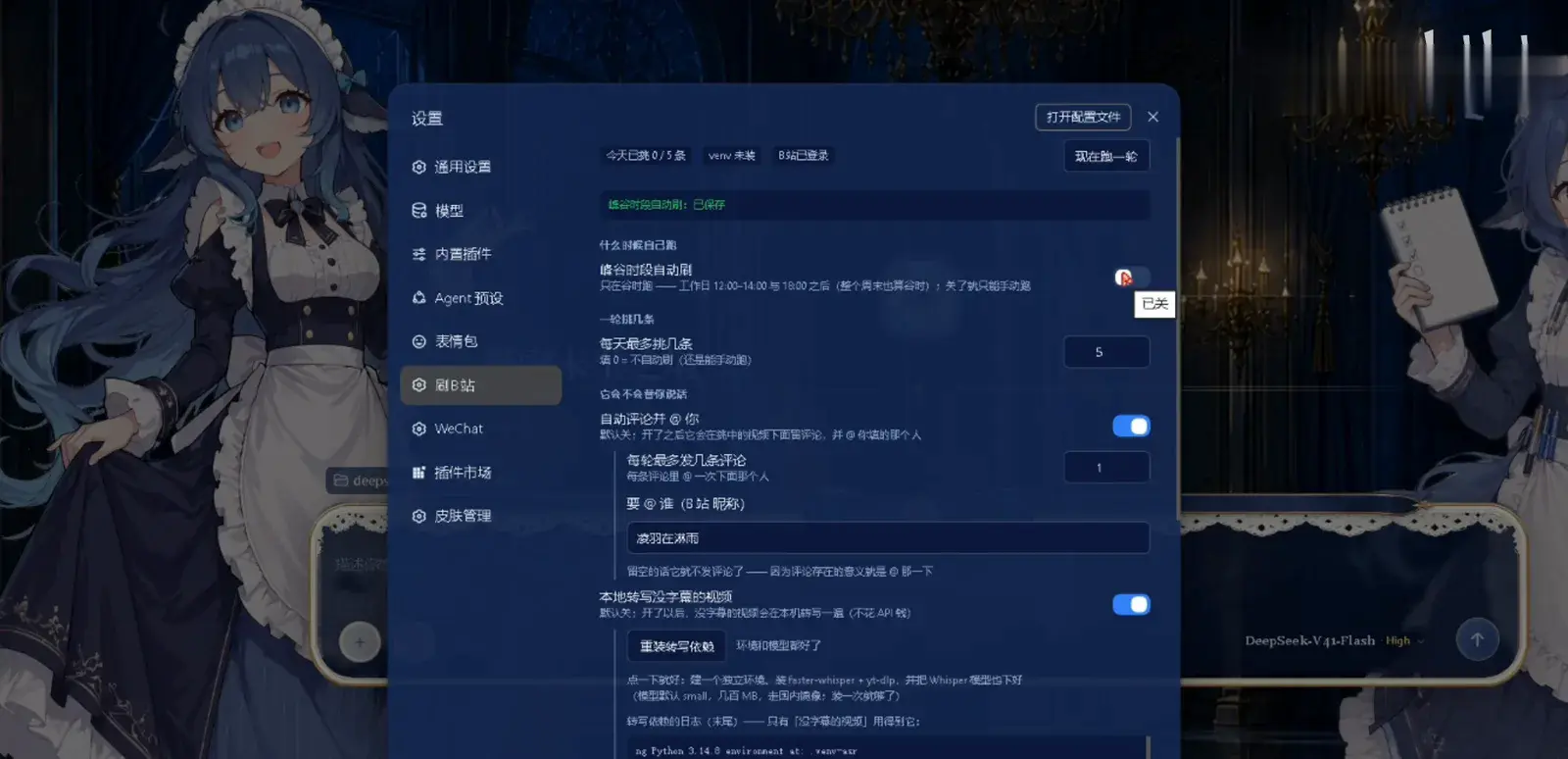
Master switch plus a two-window cascade: noon 12:00–14:00 and night 18:00–09:00 are the only slotsWatch at 1:06 - 5
Auto-comment and @ you: off by default, needs a nickname
自动评论并 @ 你 ships disabled. Switching it on reveals two fields: 每轮最多发几条评论 (1 in the demo) and 要 @ 谁(B站 昵称)— leave it empty and nothing is ever posted, because the entire point of the comment is the @. On the same screen sits 每天最多挑几条 (5 in the demo; 0 means no auto-run, manual still works) and the default-off 本地转写没字幕的视频: enabling it installs faster-whisper + yt-dlp and pulls a Whisper small model through a domestic mirror — a few hundred MB, once.
$自动评论并 @ 你$每轮最多发几条评论 1$要 @ 谁(B站 昵称)$重装转写依赖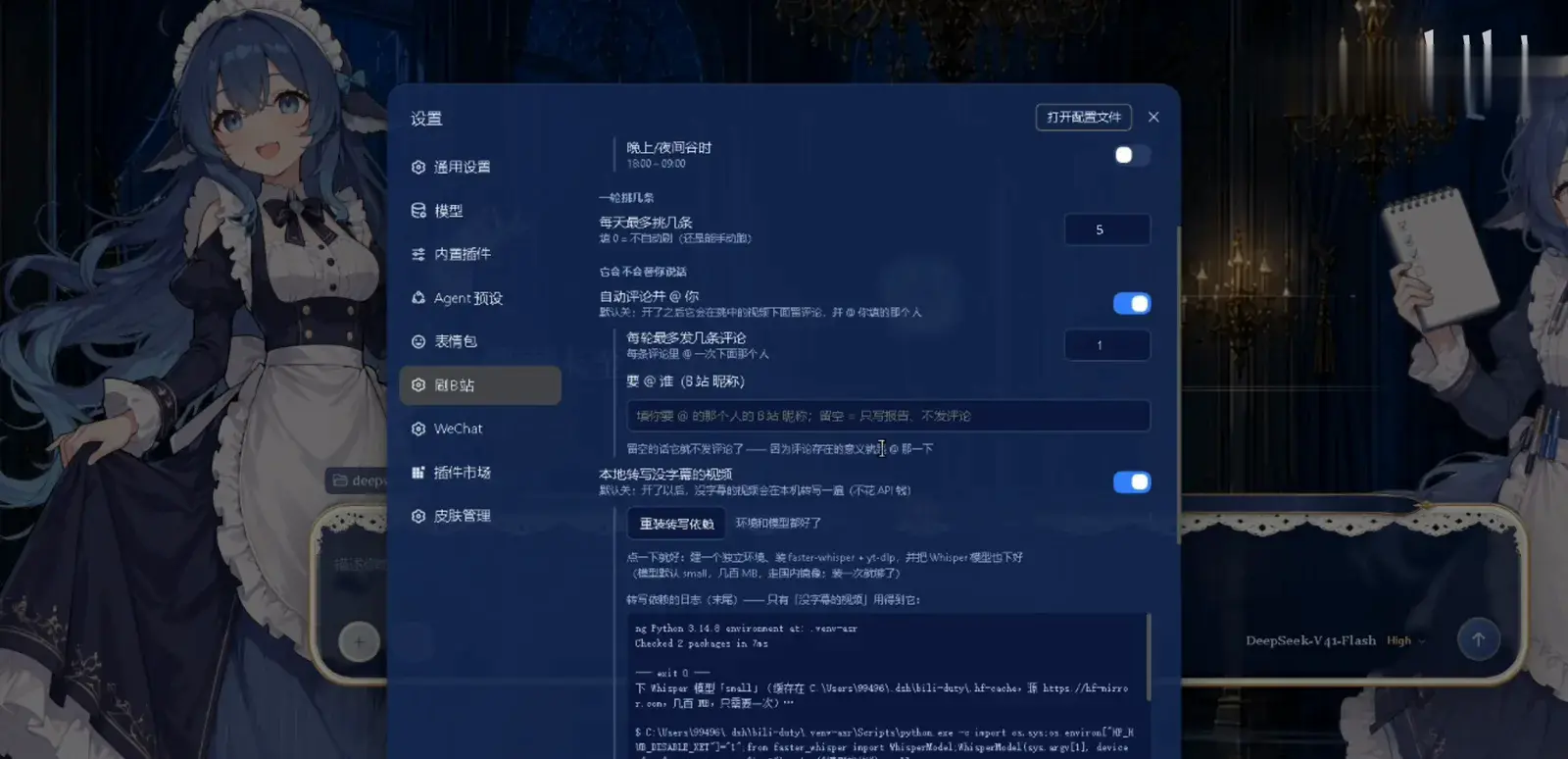
Where the @ budget is set: one comment per round plus the target nickname, transcription installed from the same panelWatch at 1:00
Part 3 · Persona and the payoff
- 6
Make it sound like you: the persona lives in the workspace AGENTS.md
The 工作区 field — labeled 它按这里的 AGENTS.md 认设定 — points at D:\deepseek. When the scheduled round fires, the plugin spawns a headless dsh session with that directory as its working directory, so your AGENTS.md loads automatically. No persona, it still scrolls; with one, its comments speak in the voice you defined. The demo's bot account 凌羽的小鲸 is exactly that — the uploader's own persona for their dsh (the narration calls it 大肥鱼).
$工作区(它按这里的 AGENTS.md 认设定)$D:\deepseek$asrReady=true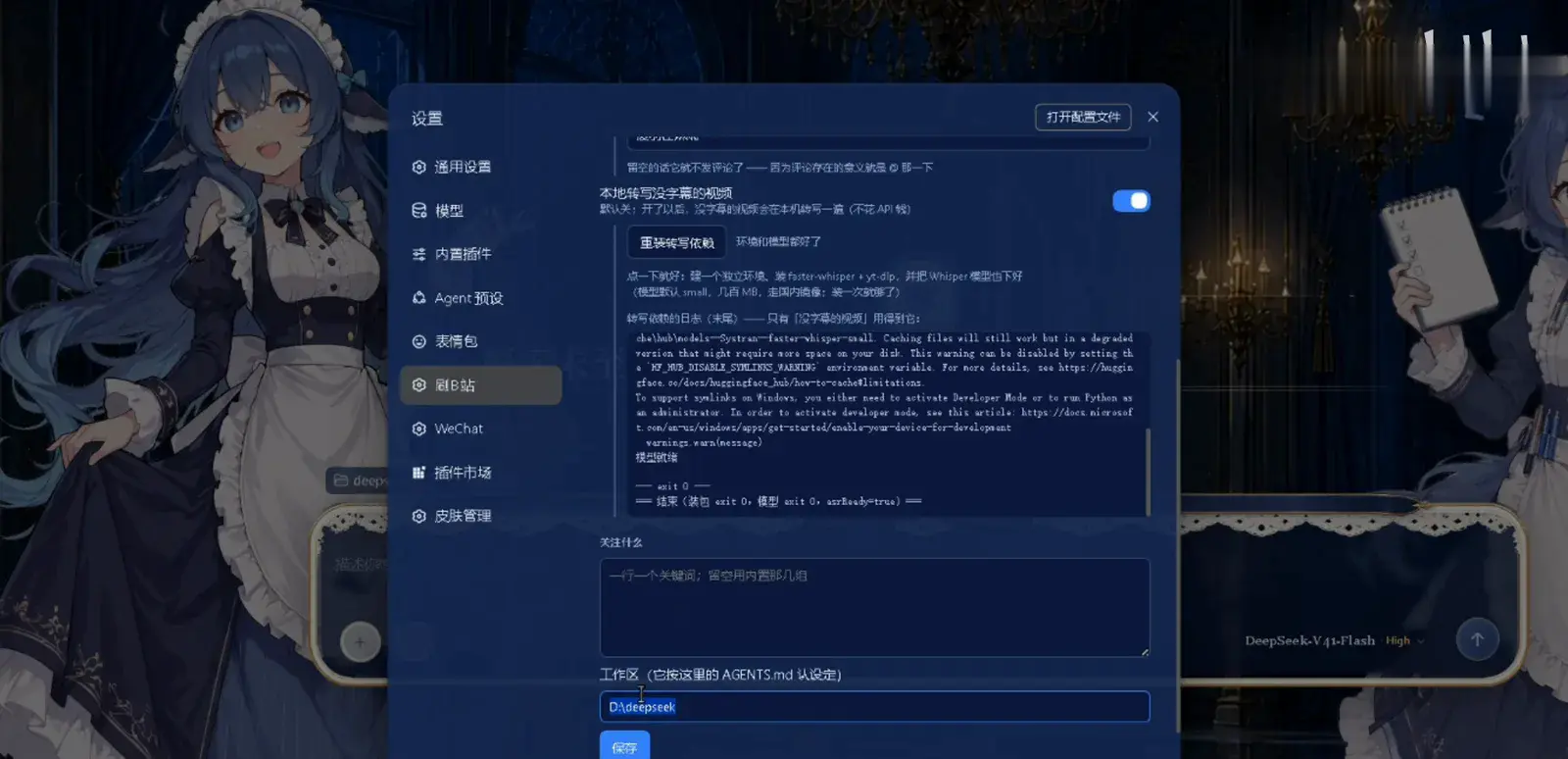
The persona is not a plugin setting — it reads AGENTS.md from the workspace, so editing a text file rewrites the voiceWatch at 2:10 - 7
Verify: the real @ sitting in the Bilibili inbox
The proof lands in Bilibili's message center under @我的: the bot account @-mentions 凌羽在淋雨 comment after comment, each carrying a recommended video and a one-line "why it's worth it". The README's own phrasing: every @ you receive was pre-filtered by the plugin — upstream there were subtitle triage and the daily report; the comment section is just the last hop.
$消息中心 · @我的$凌羽的小鲸 在评论中@了我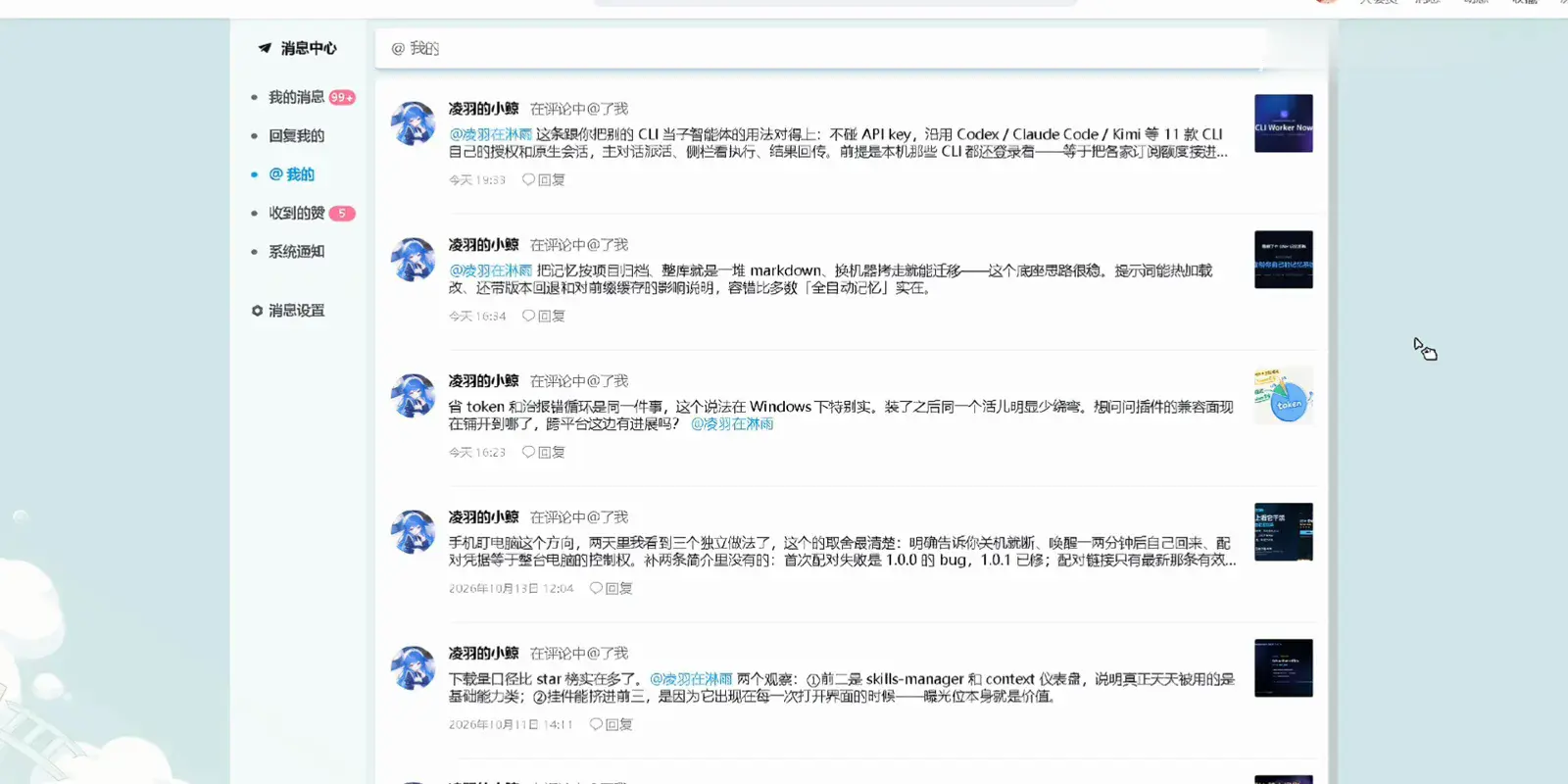
What the output looks like: an inbox of recommendation comments, each with a video link and a reasonWatch at 2:20
FAQ
Version traps, @ limits, compliance boundaries and off-peak windows of the dsh Bilibili plugin.
Installed dsh-bili-scroll and nothing happens — where do I look?
Three checks, in order. Version: the plugin needs dsh ≥ 0.1.7-rc.1, and below that the kernel silently skips it — no error, exactly as if it were not installed; this is the README's first warning. Restart: the plugin assembles at the bundle layer, so a fresh install does nothing until dsh restarts. Old build: if the settings button reads 重装依赖 instead of 重装主依赖 you are on 0.1.0 — rerun the install command to upgrade. And first use is not automatic: click 装主依赖(建 venv), then QR-login, or it has no account to scroll with.
Who posts the comments that @ me every day, and how do I throttle them?
The plugin itself, from the account you QR-logged-in with, @-ing the nickname you typed into 要@谁. Three gates control the volume: 每天最多挑几条 caps a day's picks (0 disables auto-run, manual still works), 每轮最多发几条评论 caps comments per round (1 in the demo), and the prompt hardcodes once-per-video. Set all three low and the @-mentions compress to one or two a day.
What are the risks and boundaries of letting DSH comment from my Bilibili account?
It is the last switch I would turn on, and the sane default is off. The plugin's red lines (never reveal account, paths or chats; no spamming, no fighting; never fabricate) are written into the prompt, but the comment still publishes to Bilibili under your account and Bilibili's community rules apply — keep it low-frequency and only about genuinely filtered picks, and own the risk. The README even has a section addressed to AI assistants installing the plugin: do not enable auto-comment for the user; let the user fill in the @ target themselves.
Does it really ignore Bilibili videos without subtitles?
By default, yes: it judges each candidate by reading its subtitle transcript, and subtitle-less videos are skipped. To cover them, enable 本地转写没字幕的视频 (off by default) — the plugin installs faster-whisper + yt-dlp locally and pulls a Whisper model (small by default, a few hundred MB via a domestic mirror) to transcribe those videos before judging. It costs no API money but raises disk usage from roughly 84 MB to roughly 1 GB.
Why does peak-valley scheduling save tokens?
Because DeepSeek prices by time of day: weekdays 09:00–12:00 and 14:00–18:00 bill at peak rates, while the rest — weekends included — run at off-peak discount rates. The plugin confines its automatic rounds to the noon window 12:00–14:00 and the night window 18:00–09:00, so the same searching, subtitle reading and report writing costs less per token. A scroll round reads a lot of transcript text, so the spread adds up.
How is this dsh Bilibili plugin different from browser automation or web search?
Three jobs, three shapes. Browser automation follows your live instructions and drives a browser on the spot; web search answers a question inside the conversation; dsh-bili-scroll curates outside any conversation — no instructions, it searches daily, triages by subtitle, writes the report, and pushes the best finds to you as @-mentions. The scheduling mechanism itself lives in the automation-tasks guide, and understanding a video you hand it belongs to the image-recognition guide.
Related guides
Four neighboring capabilities with different jobs.
dsh automation tasks, hands-on
Create a scheduled reminder from a chat message, enable the built-in Automation tasks panel and read delivery records — 10 steps with timestamps
Read the guidedsh browser automation with browser MCP
Watch a browser MCP drive navigation, extraction and multi-step research inside DeepSeek Harness — 11 frame-checked steps, deep-linked
Read the guideWeb search: billing trap & free plugins
Why DSH web_search bills DeepSeek even on Grok chats, how one call carries 4 queries, and the free no-key search plugins that fix it.
Read the guideMake DSH see images: two working ways
Way one: plug a GLM vision model into DSH. Way two: install the free dsh-vision-router plugin — paste a screenshot, get a real answer.
Read the guideSources & credit
All 8 frames on this page are screenshots from 凌羽在淋雨's recording (BV1d8pU6xEZX, 157s, published 2026-10-15; 17,361 views per the 2026-10-15 Bilibili view-API check), credited and deep-linked per frame, with the burned-in captions and the corner watermark removed. Facts are grounded in the README of c1overzz/dsh-bili-scroll (verified via the GitHub API on 2026-10-16: ★16, still climbing from ★13 the day before; created 10-14; the GitHub license field reads NOASSERTION while the README's own license section states MIT, with the vendored bilibili-mcp carrying its own MIT license). That uploader 凌羽在淋雨 and GitHub user c1overzz are the same person rests only on the video and repo descriptions matching — no third-party confirmation exists. The maid-theme background in the screenshots is the uploader's custom DSH theme.