
DeepSeek Harness Web Search: Enable It, Dodge the Billing Trap
Two real screen recordings, frame by frame: why native web_search bills your DeepSeek account even when you chat through Grok or Gemini, how one call can carry four billed queries, and how to switch to free no-key search plugins.
Last updated: 2026-10-11
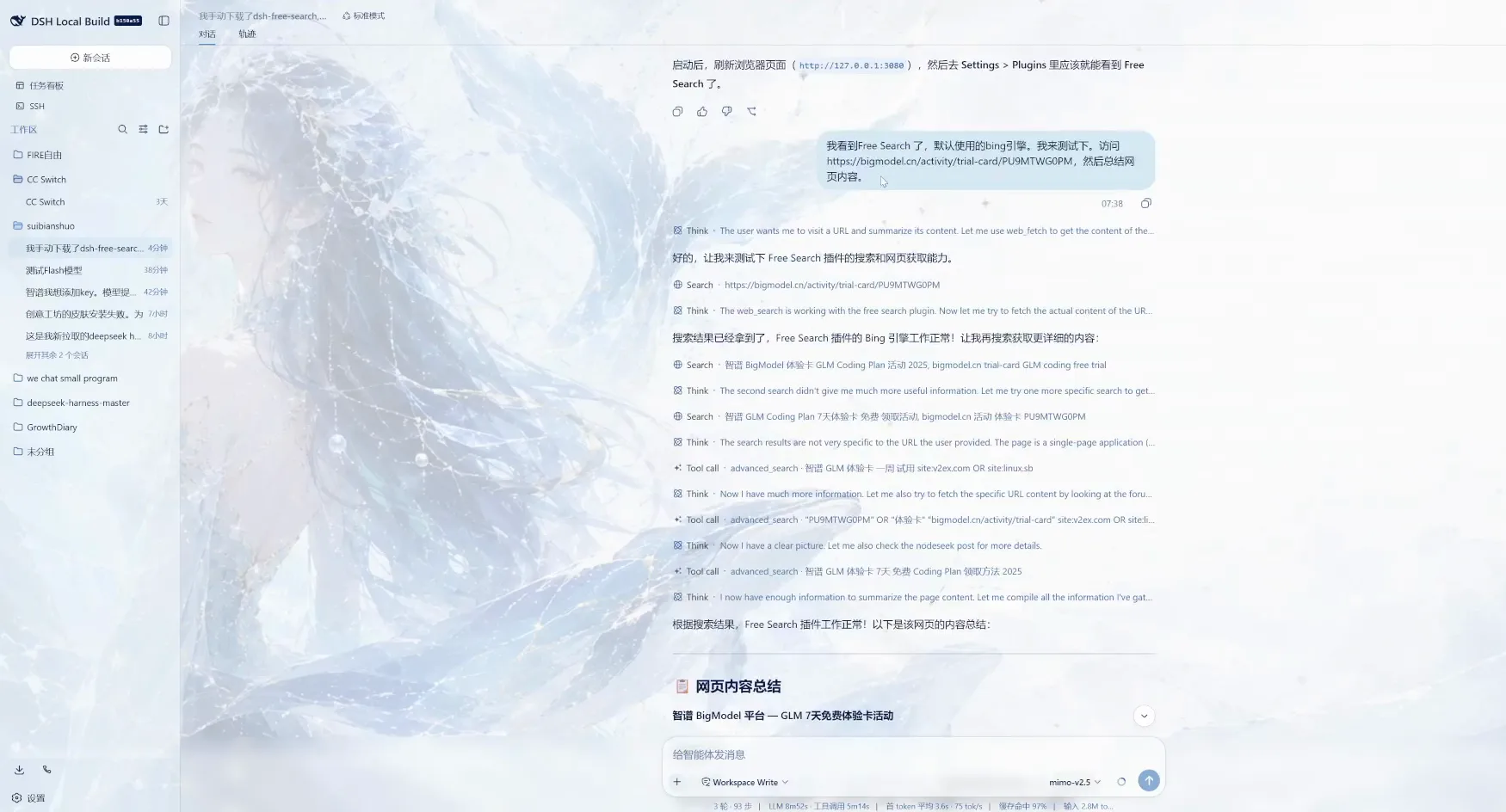
Two screen recordings anchor this guide. In the first, a DeepSeek Harness user chats entirely through Grok and Gemini models yet watches his DeepSeek balance drain; he pulls the official source code and points at the search provider hardcoded behind web_search. In the second, the free dsh-free-search plugin is installed and real Search tool calls run inside a local session.
Since the 0.2.0 candidate release, DeepSeek Harness can also search the web with no API key configured at all — that change sits on the version-update axis, so this page stays on the search itself: the billing mechanics, the free plugins, and the settings panel that switches engines. The full version tour lives in Update DSH & plugins
TL;DR
- ▸The built-in web_search ships with its own provider: the official base config pins it to deepseek-official, so bills land on DeepSeek even when the chat model is Grok or Gemini (verified against cordis.patch.yml from line 238 by the uploader — a third-party source reading, not official docs).
- ▸One web_search call can carry up to 4 queries, each billed as its own request. One uploader measured 351 searches in a day, 93% fired by sub-agents, and a 17-sub-session swarm burned 326 searches in 18 minutes (all uploader-measured figures).
- ▸Since the 0.2.0 candidate release you can search the web with no API key configured; or install dsh-free-search (★366, MIT) and run on the free default Bing engine out of the box.
- ▸The engine table: bing is the free default (zh-CN optimized); ddg, ddg-lite, anysearch, searxng, exa, tavily and keenable are free too — keyless tiers with optional keys for higher limits; perplexity and deepseek-official are the paid rows. Engines switch in one place: Settings → Plugins → Web Search.
The walkthrough
Part 1 · The billing dark pit, on screen
- 1
The symptom: chatting on Grok, billed on DeepSeek
The recording opens in a DeepSeek Harness session (the local web UI at localhost:3080, session titled 调查Grok使用时Deepseek余…). The question is blunt: why does the DeepSeek balance keep dropping when every conversation runs on a Grok model? The header line — 51 tool calls · 7 messages — hints where to look: something in the tool pipeline is calling DeepSeek behind the scenes.
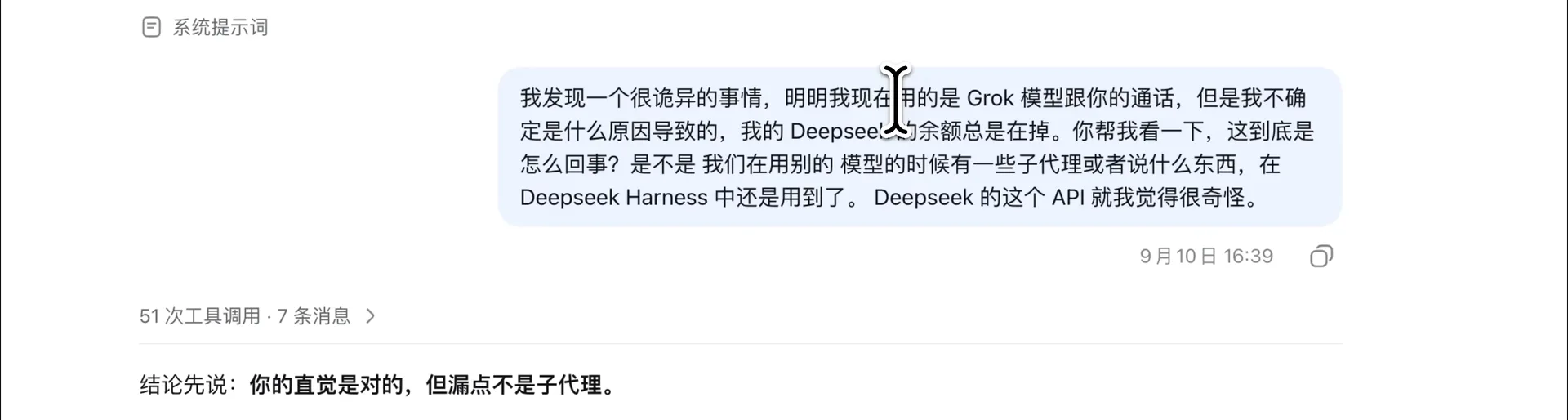
51 tool calls · 7 messages — the session that started the investigationWatch at 0:00 - 2
Source evidence: the provider is hardcoded
The agent pulls the official base config @deepseek-ai/dsh-base/cordis.patch.yml and quotes it verbatim: from line 238 on, the web entry pins searchProvider: deepseek-official, and the bundled provider reads DEEPSEEK_API_KEY. The annotation in the frame says it plainly — the official build hardcodes the provider. One default search implementation ships; Grok and Gemini are simply not in the route.
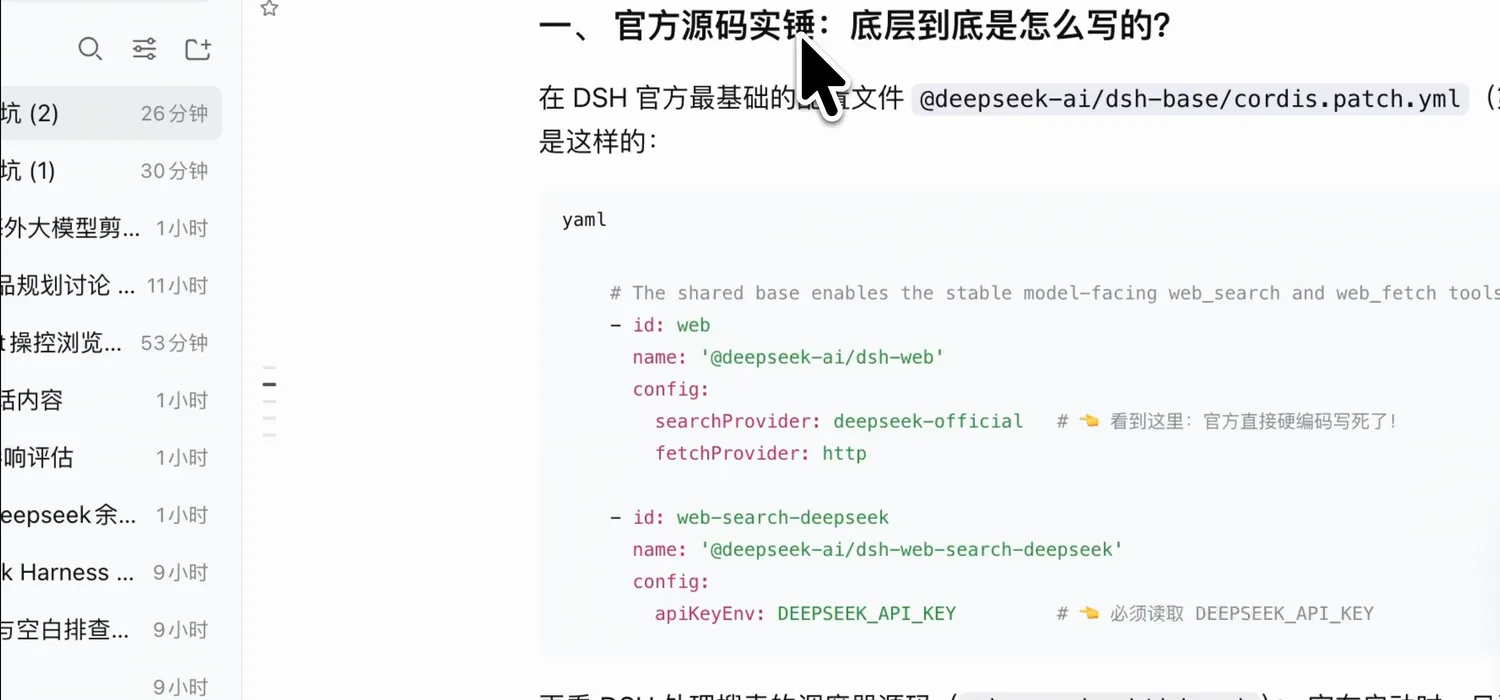
cordis.patch.yml from line 238 — the smoking gun in the official base configWatch at 0:25 - 3
The verdict, highlighted
The session's conclusion, selected in blue: your instinct is right, but the leak is not sub-agents. When the main session runs Grok, sub-agents, titles and compaction all follow Grok; what actually hits the DeepSeek bill is web_search — hardcoded to the official DeepSeek API, indifferent to the chat model. This is the uploader's source reading, not an official document — treat it as a well-argued field report.
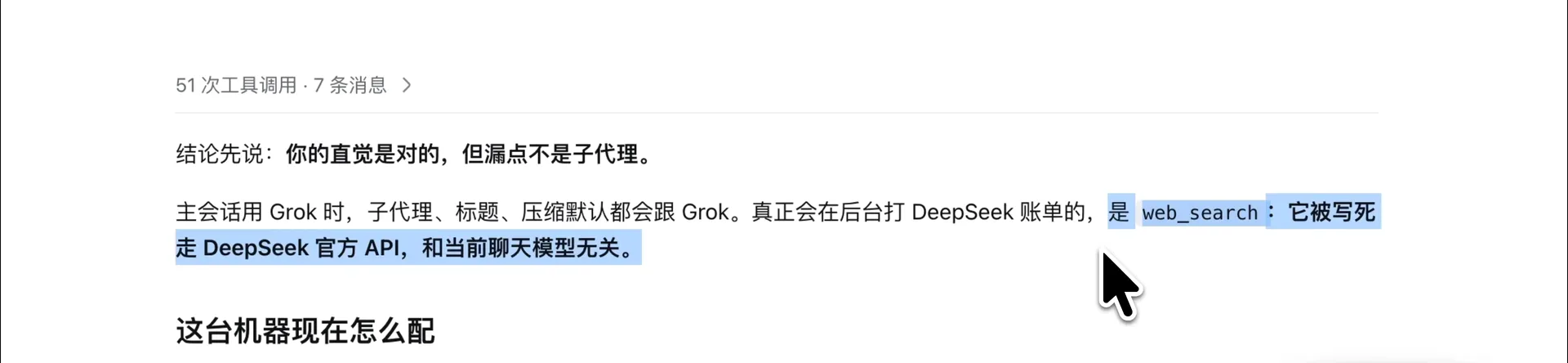
Selected in blue: web_search is hardcoded to the official DeepSeek APIWatch at 0:12 - 4
The fix: let the agent design a search plugin
Instead of patching the core, he aligns with the agent on the plugin's shape: an independent search backend plugin, not another entry stuffed into dsh-grok-oauth. The reply plans it the community way — the model still calls web_search, presets stay untouched, the host searchProvider id is swapped for their own, and the plugin registers via ctx.web.registerSearchProvider.
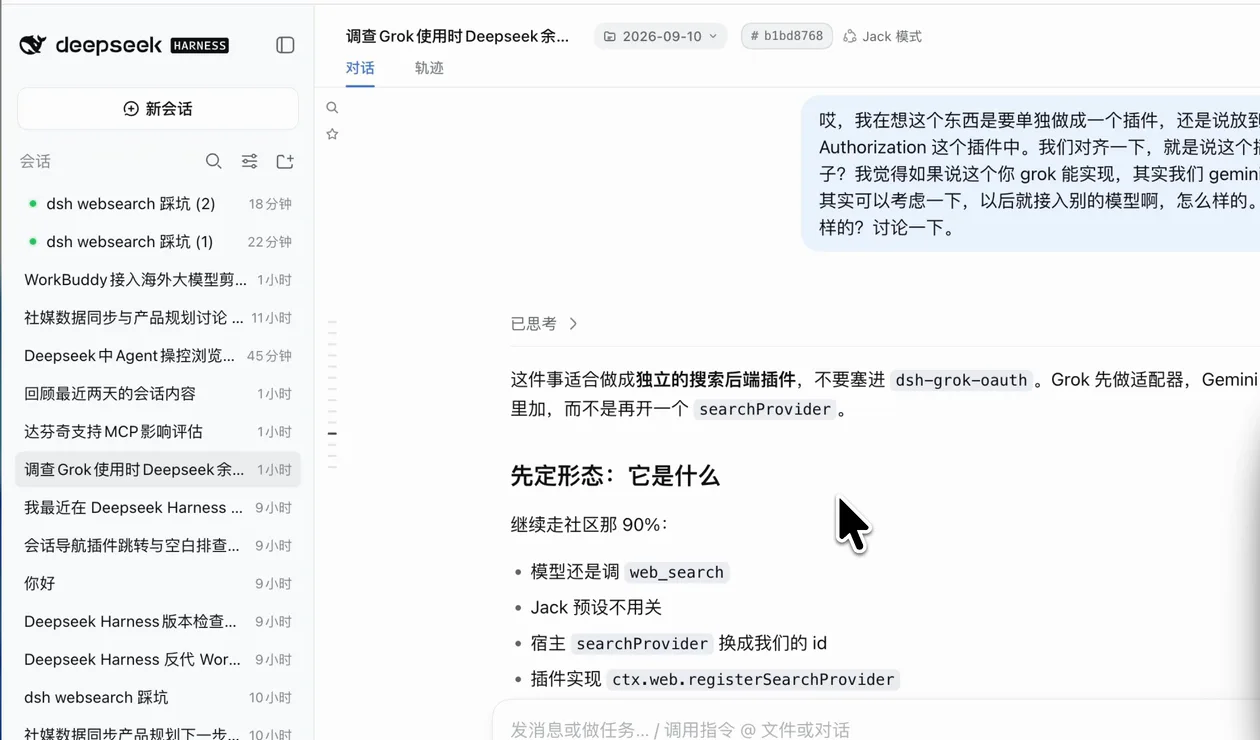
Planning the shape: keep calling web_search, swap the host searchProvider idWatch at 0:45 - 5
Shipped: dsh-web-search-follow
Two agent-workdays later the repo exists: JackAIStudio/dsh-web-search-follow (MIT), delivered in a single commit — a search plugin that follows the session model, supporting Grok, Gemini and DeepSeek native search with smooth fallback on empty results (+803 lines). A search backend that follows the session instead of a hardcoded provider.
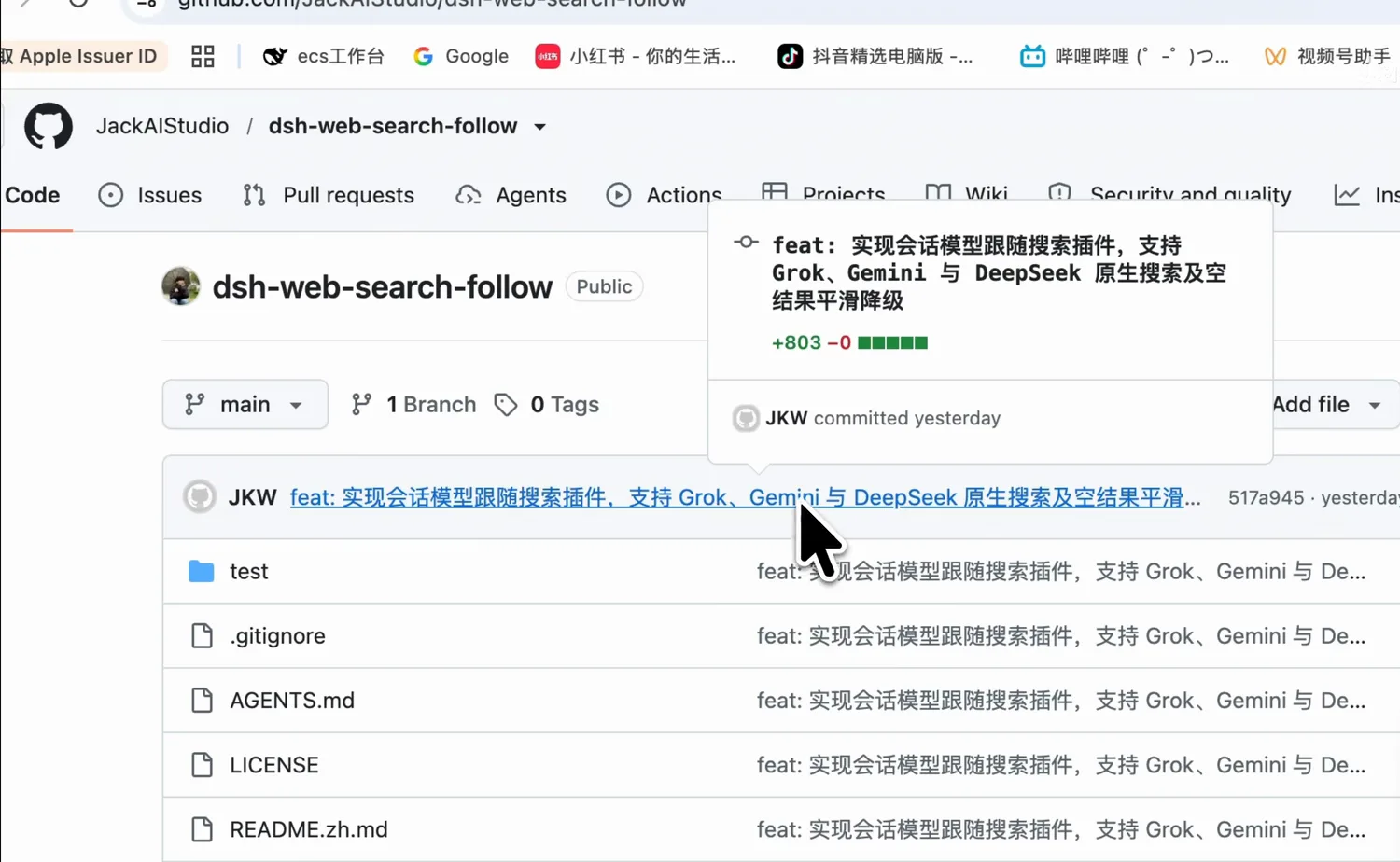
One commit, +803 lines: a search backend that follows the session modelWatch at 1:05
Part 2 · Free no-key search with dsh-free-search
- 6
The free route: install dsh-free-search
The second recording takes the community shortcut. DDDMUC/dsh-free-search (MIT, ★366 as of the 2026-10-11 check) is a free search provider — no API key needed. The agent walks the install in a local session: clone, mount with dsh plugin, restart, and Free Search appears under Settings > Plugins. The README's one-line pitch: multi-engine search for DeepSeek Harness, at zero cost.
$git clone https://github.com/DDDMUC/dsh-free-search.git$dsh plugin --profile web add /path/to/dsh-free-search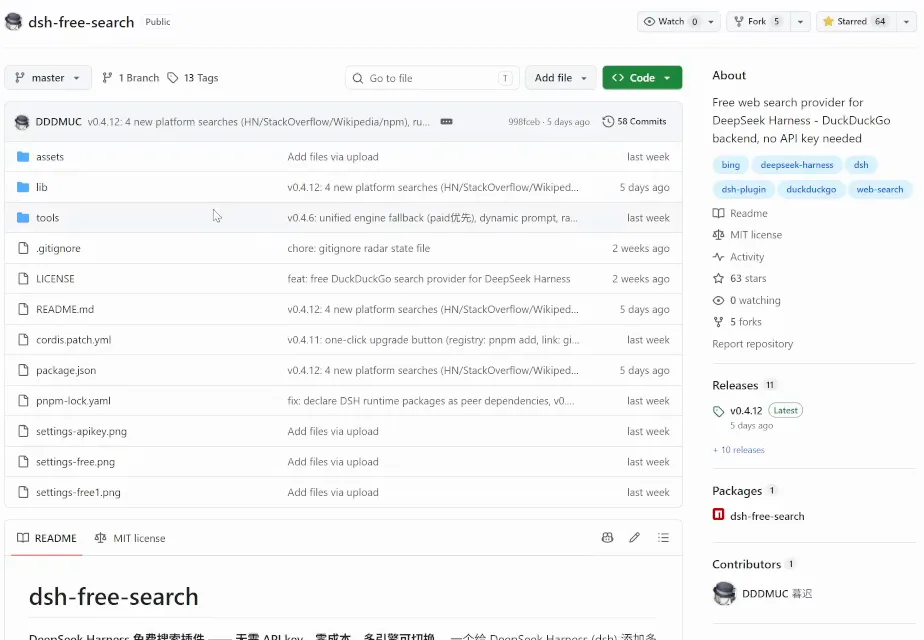
dsh-free-search on GitHub — 63 stars on recording day, 366 by the 2026-10-11 checkWatch at 0:30 - 7
Pick an engine: the free-vs-paid table
The README's engine table answers "which engine" in one screen: bing is the default — free, most stable, zh-CN optimized; ddg and ddg-lite are free with light rate limits; anysearch, searxng, exa, tavily and keenable all work keyless (a key raises limits); perplexity and deepseek-official are the only paid rows. A refused engine falls back automatically, no manual rescue needed.
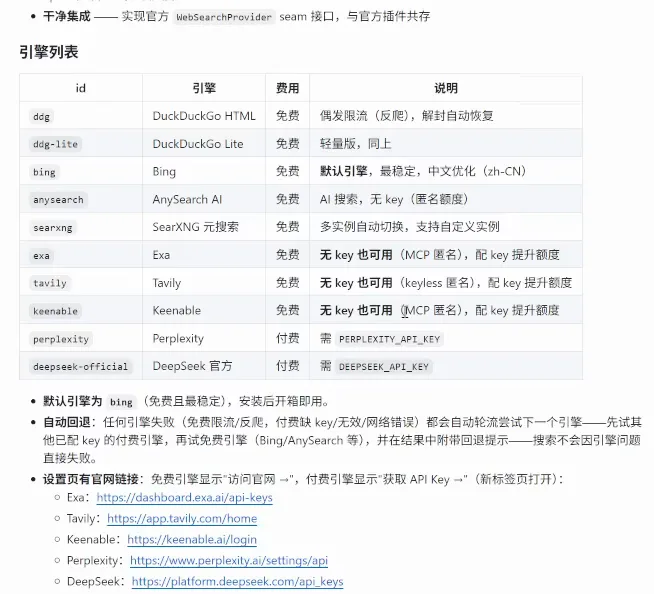
Bing is the free default; only the last two rows need paid keysWatch at 2:10 - 8
Flip the switch: Settings → Plugins → Web Search
After install, the switch lives in the DSH settings dialog: the Web Search entry gains a Free Search card with a FREE badge — engine set to Bing (FREE), optional key fields for Exa/Tavily/Keenable/Perplexity/DeepSeek, platform direct-search toggles (GitHub, V2EX, Bilibili, Reddit, Hacker News, Stack Overflow, Wikipedia, npm), a 5-minute result cache, and Check update / Test engine / Save buttons. That is the whole configuration surface.
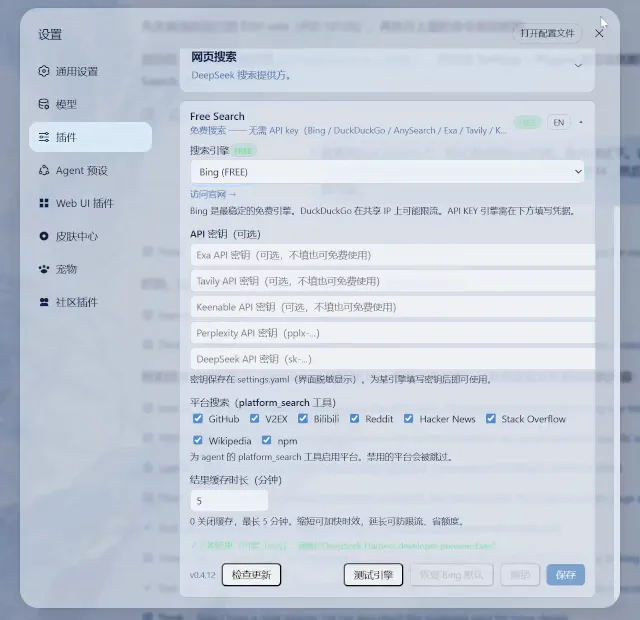
The Free Search card in Settings → Plugins → Web Search: engine, keys, platforms, cacheWatch at 3:10
FAQ
The questions this page's search intent actually asks.
How do I enable web search in DeepSeek Harness?
Two routes. Official: since the 0.2.0 candidate release, web search works with no API key configured — the capability ships with the base install, and the provider shows up under Settings → Plugins → Web Search. Plugin route: install dsh-free-search, open Settings → Plugins → Web Search, pick a free engine such as Bing (FREE), test and save. Steps 6-8 above show the plugin route end to end.
Why does one search burn so many tokens and billed calls?
Because one search call is not one request. Per one uploader's own measurements (field data, not official numbers): native web_search can carry up to 4 queries in a single call, and each query is billed as its own request — bookkeeping by call count understates usage by 3-4x. Sub-agents amplify it: 93% of one day's 351 searches came from sub-agents, and a swarm run of 17 sub-sessions burned 326 searches in 18 minutes. The usage-tracking guide covers where these numbers surface.
Can DeepSeek Harness search the web without any API key?
Yes, both routes. Official: since the 0.2.0 first candidate release (rc.1), web search works without a configured key — the release notes list it, matching the 0.2.0 review video credited below. Plugin: dsh-free-search works keyless out of the box — bing is the default engine, and ddg, anysearch, searxng, exa, tavily and keenable all offer anonymous tiers; configure a key only for higher limits.
Which free web search plugins exist for DSH?
The two shown on this page: dsh-free-search (DDDMUC, MIT, ★366) — multi-engine, free by default, engines switchable in the settings page; and dsh-web-search-follow (JackAIStudio, MIT) — a backend that follows the current session model (Grok, Gemini or DeepSeek native), so searches stop landing on the DeepSeek bill. Community plugins come and go; check the plugin market in your build for the current roster.
How do I stop sub-agents from burning my search quota?
Measure first: one uploader's measurement attributed 93% of a day's 351 searches to sub-agents. Then constrain: keep swarm runs small, don't let every sub-session search independently, and prefer web_fetch on known URLs when the page is known (fetching a specified page is not billed as a search). The session log's tool-call count is your ledger — the first recording's header literally shows "51 tool calls · 7 messages", which is exactly where such counts surface.
Why am I billed on DeepSeek when I chat with Grok or Gemini?
Because the chat model and the search provider are different wires. The first recording's source reading shows the official base config pinning searchProvider to deepseek-official — the web_search tool bills DeepSeek regardless of the session's chat model, and valid Grok/Gemini keys don't change that. The 0.2.0 keyless search and the follow-model plugin above both rewire that provider; until then, Settings → Plugins → Web Search tells you who is actually serving your searches.
Related guides
Adjacent axes, deliberately kept out of this page.
dsh browser automation with browser MCP
Watch a browser MCP drive navigation, extraction and multi-step research inside DeepSeek Harness — 11 frame-checked steps, deep-linked
Read the guideDSH Common Errors and Hands-On Fixes
Match your symptom — install failure, plugin-caused startup crash, or a broken update — against real screenshots and commands cross-checked with official discussions.
Read the guideTrack dsh token usage & costs
Read the per-request receipt, spot context hogs in Trajectory, then cut costs with model tiers and usage plugins.
Read the guideSet up MCP servers in DeepSeek Harness
Wire an MCP server into dsh: the Claude Code / Codex field mapping, the registered-server cards, the mcpServers block you paste, and a real dsh session calling the Amap Maps MCP.
Read the guideUpdate DSH & plugins
Verified update commands: check your version, upgrade the dsh CLI, refresh plugins from the terminal or the Web UI market, and roll back safely.
Read the guideSources & credits
Frames come from two Bilibili screen recordings; every image deep-links to its own timestamp. Two more videos informed the facts without supplying frames: one is a motion-graphics billing measurement (numbers quoted as the uploader's own), the other a 0.2.0 version tour whose free-key search fact matches the official release notes. Uploader-to-GitHub identities are self-reported, not independently verified. View counts are Bilibili view-API values from the 2026-10-10 check.