
DSH architecture diagram: let the agent draw a verifiable system map
A Mermaid block gives you a picture. The archify skill gives you a typed specification, a self-contained interactive HTML diagram and a validation receipt — and its repository documents a community DeepSeek Harness bundle. Footage from one real one-sentence generation run.
Last updated: 2026-09-27
A Mermaid block is still the fastest way to get a diagram inside a chat reply, but it stops at a picture. This page is about the next step: an agent that reads your repository or your description, writes a typed specification, renders a self-contained interactive HTML diagram, and refuses to hand it over until the artifact passes its own checks. The skill behind it is archify (tt-a1i/archify — 72,468 stars when we checked on 2026-09-27), and its repository ships a documented DeepSeek Harness integration.
One caveat before the screenshots: this footage contains no DeepSeek Harness interface. It shows the creator's GitHub pages, the archify project site and a generic agent IDE session, so treat it as a record of the skill's output and workflow rather than a dsh walkthrough. Every command and number below was re-checked against github.com/tt-a1i/archify, its integrations/deepseek-harness README and the npm registry on 2026-09-27. The GitHub page in the recording reads 'Starred 19.1k' because it was captured earlier in the project's run.
The short version
- ▸archify is an agent skill, not a dsh built-in. Install it for any agent with npx skills add tt-a1i/archify -g, or add the community DSH bundle with dsh plugin --profile web add @tt-a1i/archify-dsh@0.1.0.
- ▸No repository is required to start: one sentence is enough. For a source-backed map, ask the agent to analyze the repo and return 8–12 core components, one primary path, external dependencies and trust boundaries.
- ▸The deliverable is two files — a typed architecture specification and one self-contained interactive HTML diagram that needs no installation to open, forward or export.
- ▸Delivery is gated by a receipt: 9/9 showcase checks, 0 errors, 0 warnings, visual_review passed, four desktop widths with no overflow, plus specification and artifact hashes.
From install to receipt, step by step
Before you install: what this thing actually is
- 1
Read the repository before you install anything
Open github.com/tt-a1i/archify and look at the tree: 179 commits, 25 branches, folders such as .impeccable, benchmarks/ordinary-model-floor and experiments — and the part that matters here, integrations/deepseek-harness, whose latest commit reads 'ci(dsh): install acceptance runtime with pnpm'. The About line calls the project an agent skill for verifiable architecture, workflow, sequence, data-flow and lifecycle diagrams rendered as self-contained HTML, and the topic list includes deepseek-harness, dsh-plugin and mermaid-alternative.
npx skills add tt-a1i/archify -g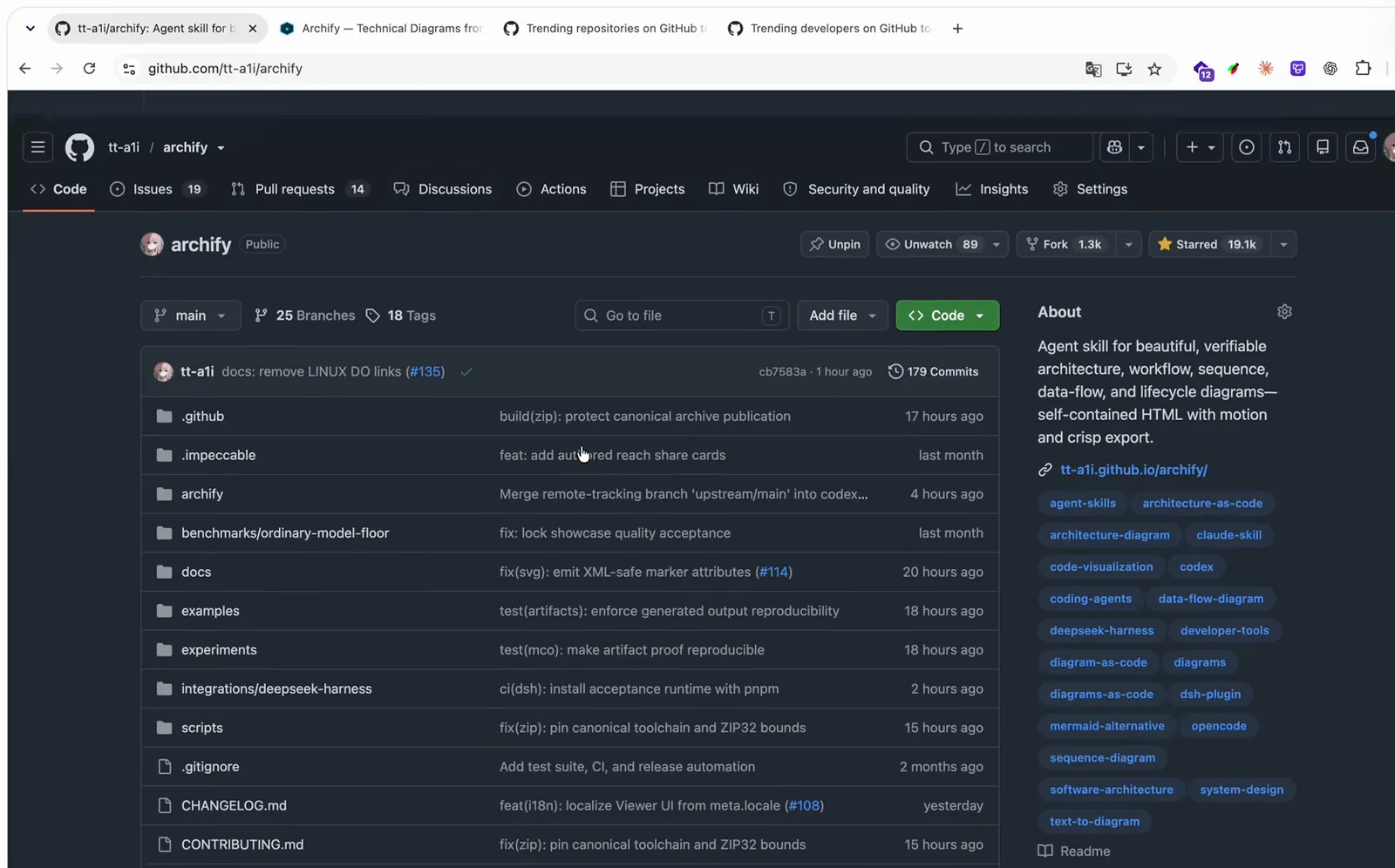
Check the tree first: the dsh adapter lives inside the repository, not in the skill core.Watch at 2:40 - 2
Install the skill, then decide whether you want the DSH bundle
The generic install works with Cursor, Claude Code, Codex CLI and OpenCode. The repository also documents a community DSH opt-in published as @tt-a1i/archify-dsh@0.1.0: a Skill-only bundle that declares experimental compatibility with developer-preview @deepseek-ai/dsh@0.1.0-rc.6 on Node ^22.19.0 or >=24.0.0, bundles Archify Skill 2.14.0, and states in its own README that it is not an official DeepSeek product and does not imply DeepSeek endorsement. Do not try dsh plugin add tt-a1i/archify — the repository root has no DSH bundle metadata (issue #341). A separate third-party port, GongYuanCaiJi/dsh-archify, also exists; it was created in August 2026 and describes itself as ported from tt-a1i/archify.
dsh plugin --profile web add @tt-a1i/archify-dsh@0.1.0Use the archify skill to map this repository's runtime architecture.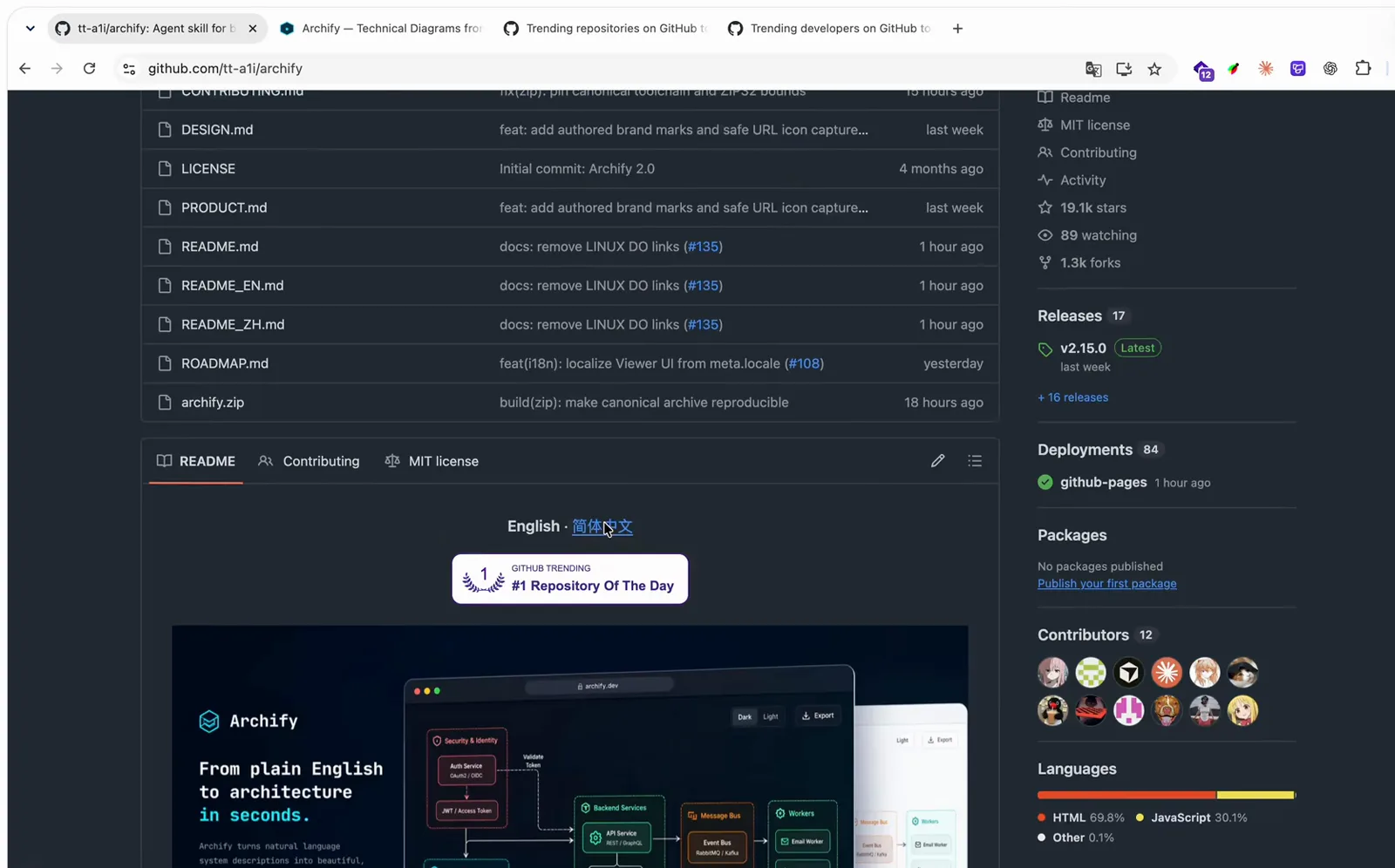
The README and the releases page are where the install commands and their limits are written down.Watch at 2:30
What it promises to hand back
- 3
Check the output format on the project site first
The site's headline is 'From plain English to architecture you can trust', and the LIVE PROOF panel plays a real generated artifact rather than a mockup, with three live specimens you can load: S-01 Agent Tool Call, S-02 Production Deployment and S-03 Cache Miss. The counter row underneath is the part worth remembering: 5 diagram types, 4 visual presets, 2 coordinated themes, 4× native export scale — and 0 dependencies, which is exactly why the HTML stays portable.
05 DIAGRAM TYPES · 04 VISUAL PRESETS · 02 COORDINATED THEMES4× NATIVE EXPORT SCALE · 00 DEPENDENCIES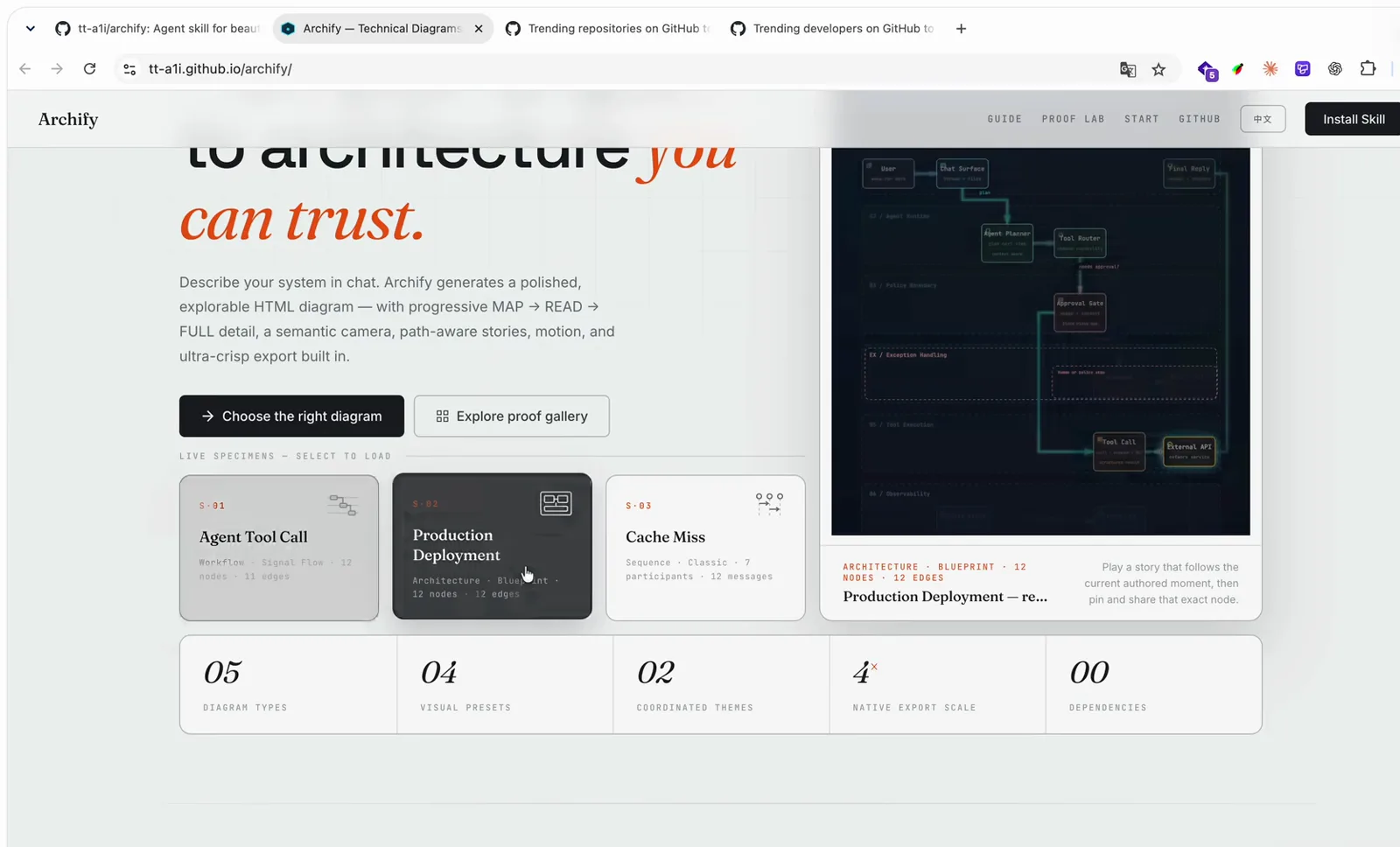
LIVE PROOF plays an actual generated artifact, and the counter row ends at 00 dependencies.Watch at 0:48 - 4
Pick the diagram type before you write the prompt
The gallery lists five visual languages — Architecture, Workflow, Sequence, Data Flow, Lifecycle — and the checked-in Proof Lab holds 11 scenarios together with their JSON sources, named views and validation receipts. The Architecture example on screen is a web request path: CloudFront to Load Balancer to API Server to PostgreSQL, with S3, SQS and a worker alongside, plus a legend counting 2 databases, 3 cloud resources, 1 security group, 1 message bus and 1 external system. The repository is explicit that automatic Mermaid parsing is out of scope, so name the type in your prompt instead of hoping it imports a .mmd file.
Architecture · Workflow · Sequence · Data Flow · LifecycleT-01 Architecture · T-03 Sequence · T-04 Data Flow · T-05 Lifecycle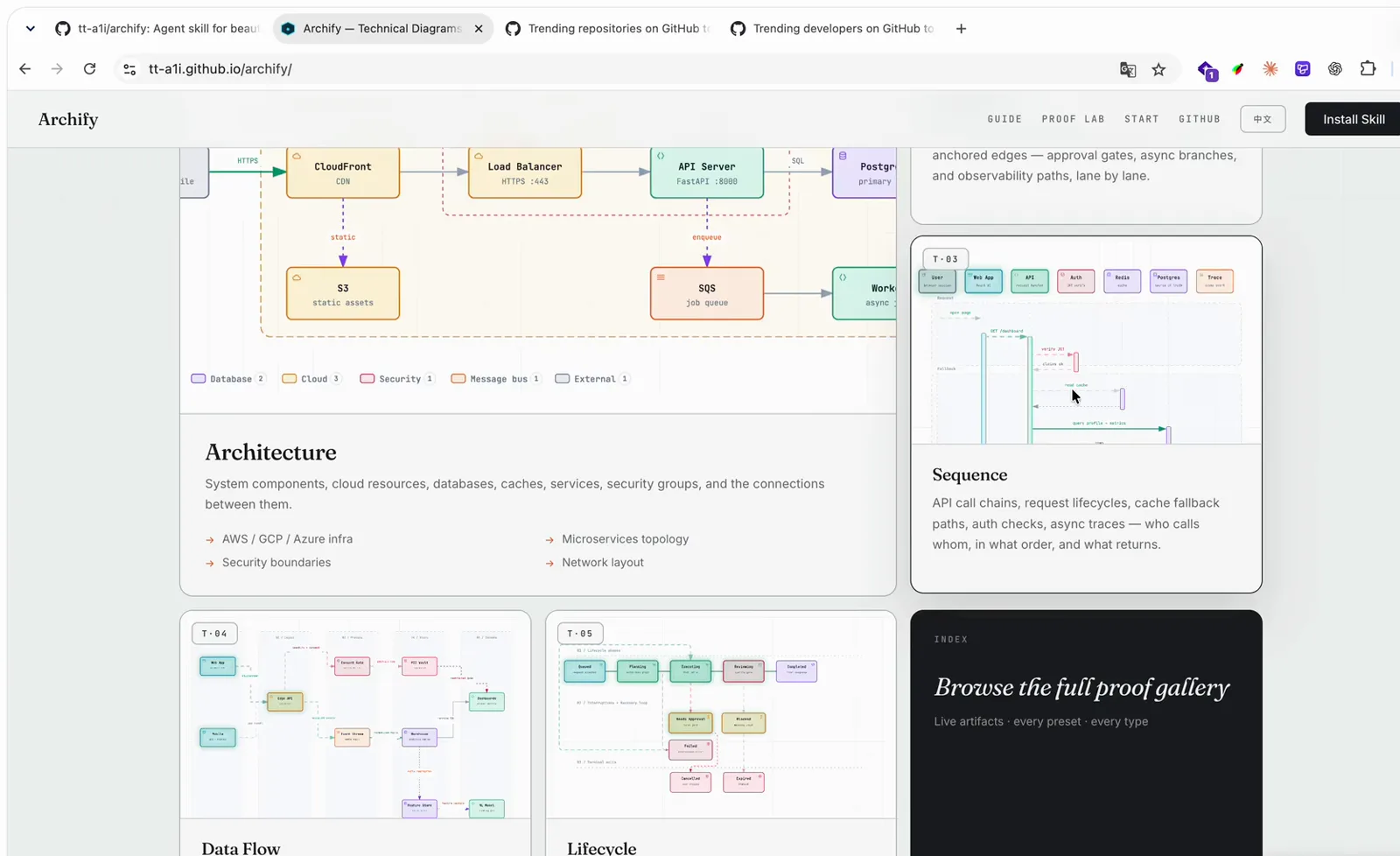
Architecture with its type legend, plus Sequence, Data Flow and Lifecycle cards in the same gallery.Watch at 0:55
One real run, and the receipt that came with it
- 5
Ask in one sentence, then read the validation receipt
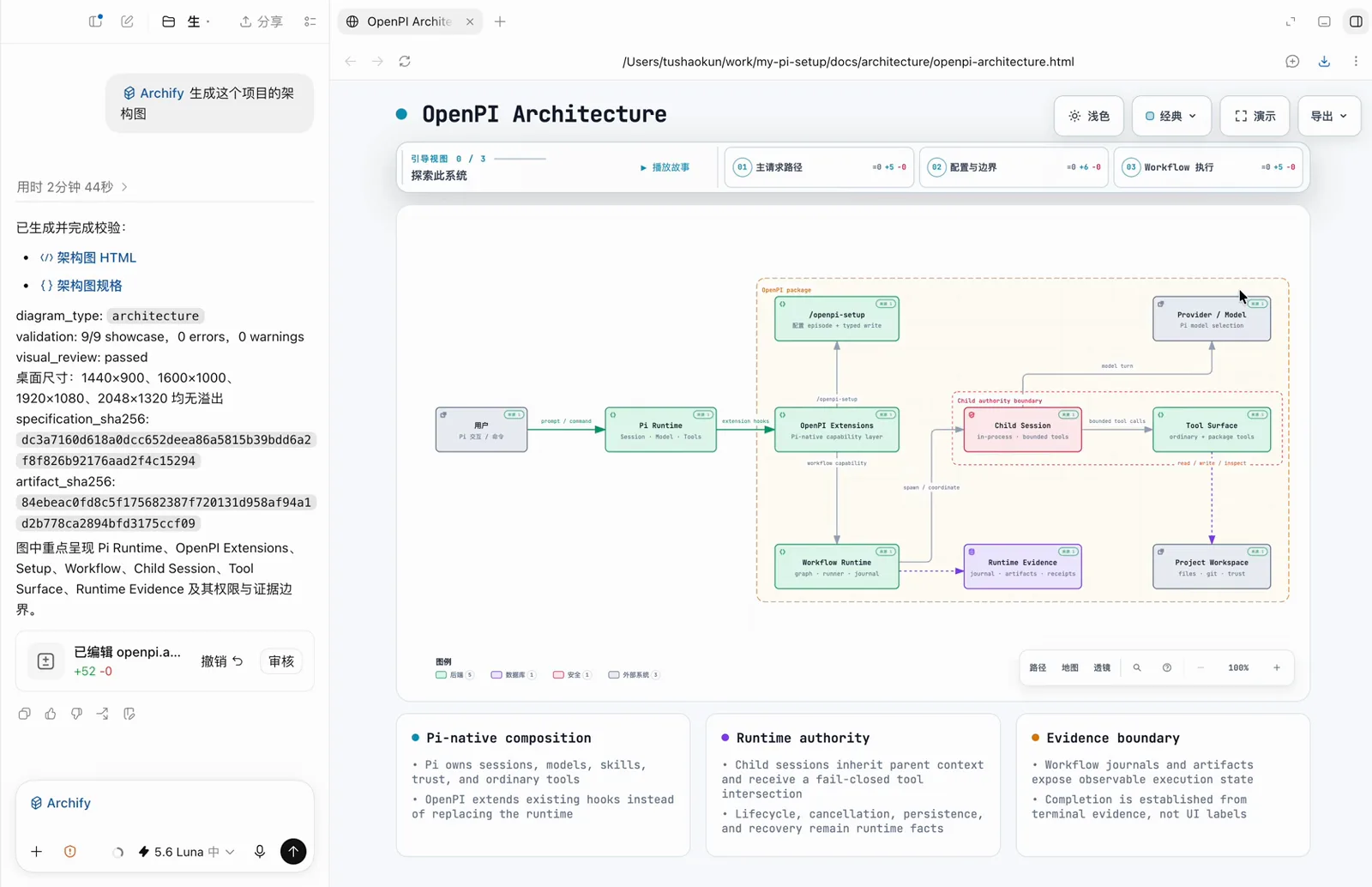
The whole prompt in the recorded session was 'Archify 生成这个项目的架构图'. It finished in 2 minutes 44 seconds and returned two artifacts — the diagram HTML and the diagram specification — with the checks that had to pass listed above them: diagram_type: architecture, validation: 9/9 showcase, 0 errors, 0 warnings, visual_review: passed, and no overflow at 1440×900, 1600×1000, 1920×1080 or 2048×1320. The session also prints specification_sha256 and artifact_sha256, and the diff counter shows the specification edited at +52 lines, 0 removed.
diagram_type: architecturevalidation: 9/9 showcase, 0 errors, 0 warningsvisual_review: passed桌面尺寸: 1440×900 · 1600×1000 · 1920×1080 · 2048×1320 均无溢出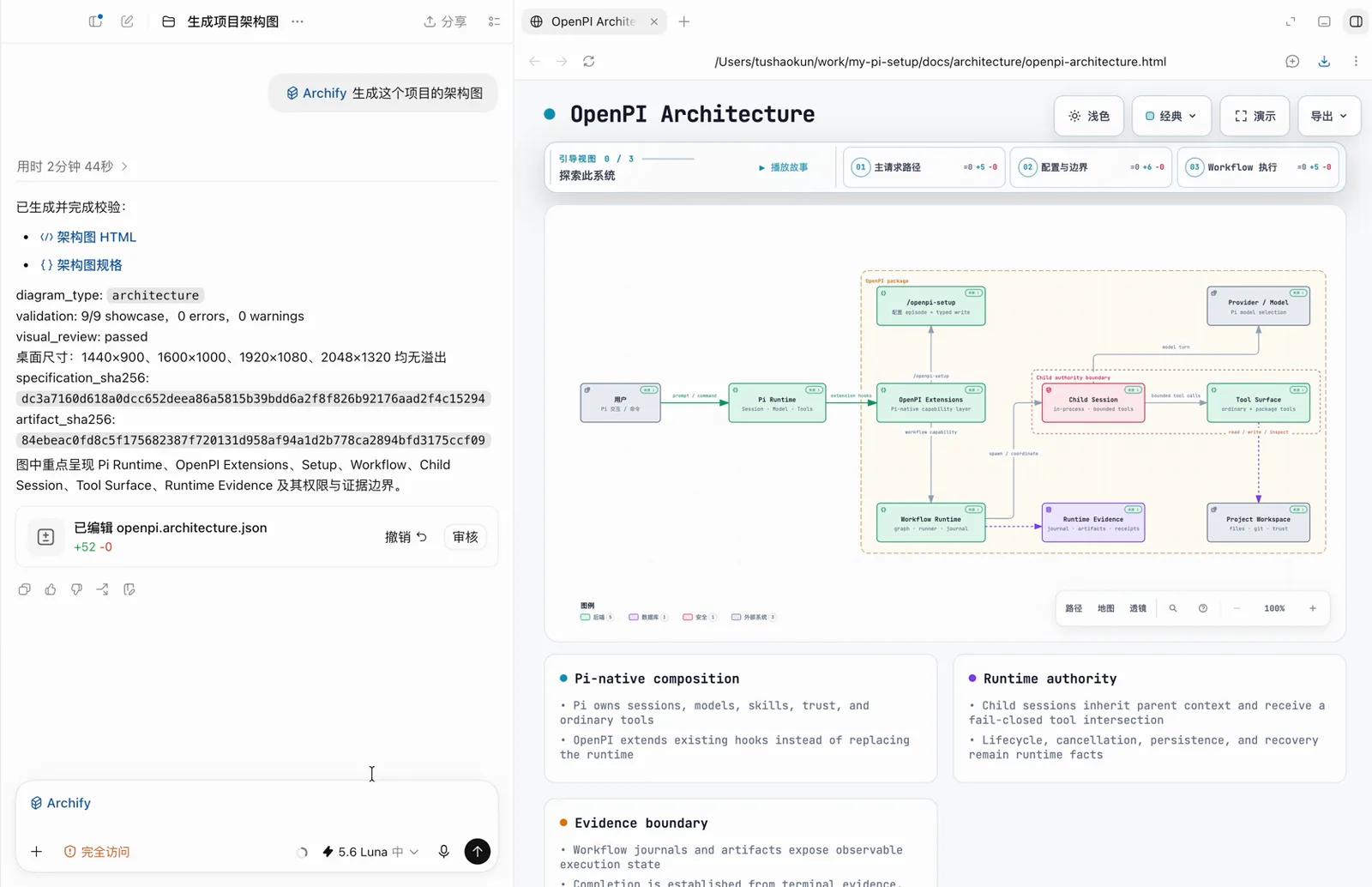
Two minutes forty-four seconds, one sentence, and a receipt you can read line by line.Watch at 1:24 - 6
Walk the guided chapters to see what the diagram claims
The generated HTML ships with authored guided chapters. Chapter 3 of 3, WorkFlow 执行, walks five stops in order — Workflow Runtime, Child Session, Tool Surface, Runtime Evidence, Project Workspace — at 145% zoom, and every node carries its own micro-facts: in-process · bounded tools · fail-closed for Child Session, ordinary · package tools for Tool Surface, graph · runner · journal for Workflow Runtime, journal · artifacts · receipts for Runtime Evidence. A static render cannot give you this layer, and the in-page legend counts 5 backend nodes, 1 database, 1 security boundary and 1 external system.
引导视图 3 / 3 · WorkFlow 执行01 Workflow Runtime → 02 Child Session → 03 Tool Surface → 04 Runtime Evidence → 05 Project Workspace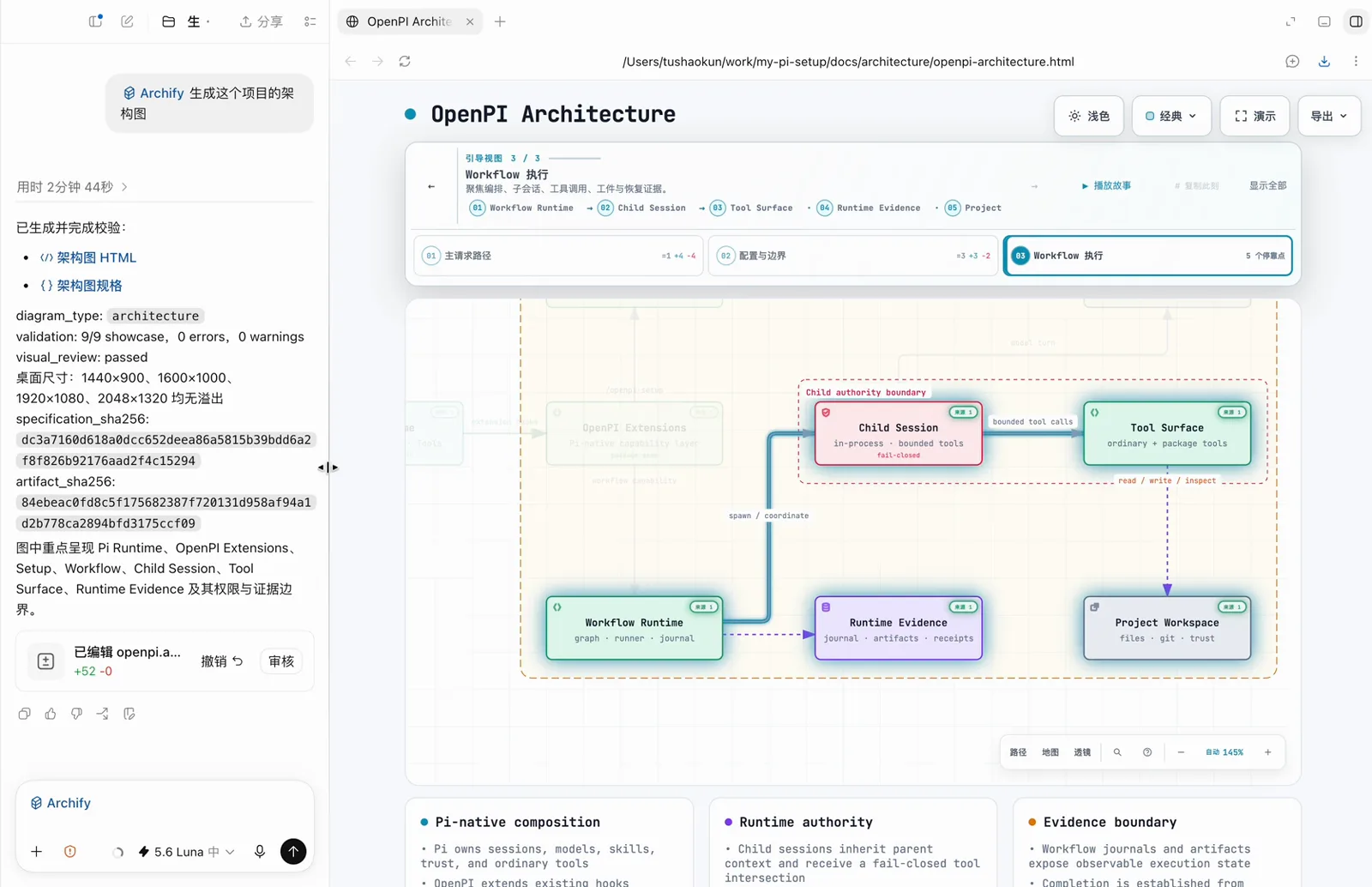
Guided chapters turn the diagram into a walkthrough, and each node keeps its own micro-facts.Watch at 2:06 - 7
Keep the artifact in the workspace and ask for its paths
The three cards closing the artifact — Pi-native composition, Runtime authority, Evidence boundary — are the diagram stating where authority stops and where evidence begins: Pi owns sessions, models, skills, trust and ordinary tools; a child session inherits context and receives a fail-closed tool intersection; completion is established from terminal evidence, not from UI labels. Inside dsh, remember the bundle's documented limitation: files created by shell commands do not appear in the Web Produced Files strip, so finish the request by asking the agent to return the exact workspace paths of the specification JSON and the HTML artifact.
After delivery, return the exact workspace paths of the specification JSON and the HTML artifact.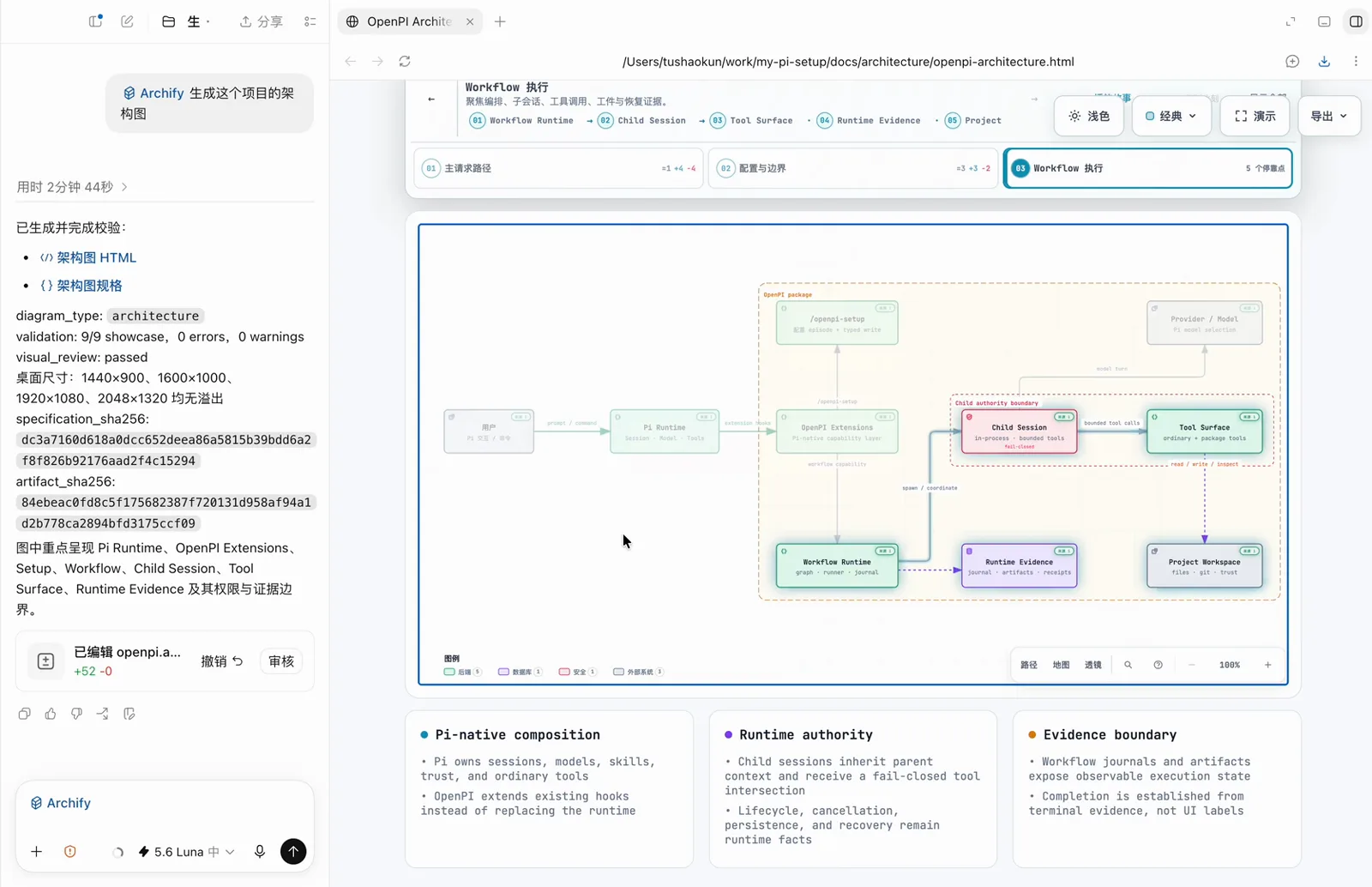
The artifact states its own limits: what the runtime owns, and what counts as evidence.Watch at 2:13
Mermaid first, archify when the diagram has to survive review
The two are not rivals, and the archify repository is unusually blunt about the boundary.
- ▸Mermaid renders inline and costs one code block — ideal for a sketch you will throw away or a sequence you only need to read once.
- ▸Mermaid output is a render. You cannot click a node, follow a named path, open a source pointer or hand someone a receipt that says the artifact is reproducible.
- ▸archify says it outright: 'Archify is not a general-purpose drawing editor or a Mermaid theme', and automatic Mermaid parsing is listed among the things intentionally outside its scope.
- ▸What it adds instead is a delivery contract — typed JSON IR, atomic validation over schema, layout, HTML/SVG, route and label-to-route clearance, and a machine-readable repair receipt when a check fails.
- ▸A workable split: Mermaid for the diagram inside the conversation, archify for the diagram that has to survive a design review, an incident postmortem or an onboarding doc.
Frequently asked questions
The questions this footage actually raises — answered with what the repository and the npm registry say.
Is there an official DeepSeek Harness architecture-diagram plugin?
No. The DSH path is a community opt-in published as @tt-a1i/archify-dsh@0.1.0; its README states that it is not an official DeepSeek product and does not imply DeepSeek endorsement, and it targets developer-preview @deepseek-ai/dsh@0.1.0-rc.6 while bundling Archify Skill 2.14.0. A separate third-party port, GongYuanCaiJi/dsh-archify, appeared in August 2026 and describes itself as ported from tt-a1i/archify. Both are adapters around the same skill.
Does the video show DeepSeek Harness running archify?
No. The recording shows GitHub repository pages, the archify project site and a split-screen agent IDE session; the dsh web interface never appears. It is evidence of the skill's output and of the creator's workflow, not of a dsh session. Every command on this page comes from the repository README or the npm registry, both checked on 2026-09-27.
Can it turn my existing Mermaid diagram into an interactive artifact?
Not automatically. The repository lists automatic Mermaid parsing among the capabilities intentionally outside its scope, so there is no .mmd import path. You can still describe the same system in words and let the agent build a typed specification from that.
What does 'validation: 9/9 showcase, 0 errors, 0 warnings' actually prove?
It proves the artifact matches its own authored specification and passed the bundled schema, layout, render, route and label-to-route clearance checks at four desktop widths — that is why the file is reproducible and safe to forward. It does not prove the architecture is correct: the diagram describes what you or your sources said, and the repository notes that these artifacts never inspect live infrastructure.
Related guides
Where to go after your first verified diagram.
Best DSH skills to install first
The shortlist that pairs with archify: what each skill actually delivers, and which ones agents reach for by default.
Read the guideRaw HTML rendering in the DSH chat
How rendered HTML cards behave inside a dsh conversation — the inline layer these generated artifacts sit next to.
Read the guideCoding workbench collection
The plugins and skills that turn a session into a working development environment.
Read the guideCreate your own DSH plugin
Package a workflow like this one as an installable plugin instead of a prompt you retype every week.
Read the guideSkill authoring guide
Write the SKILL.md that makes an agent repeat this workflow without you explaining it again.
Read the guideSource and credits
Footage: one Bilibili video, credited below with per-frame deep links. Every command and number on this page was verified on 2026-09-27 against github.com/tt-a1i/archify, its integrations/deepseek-harness README and the npm registry; the GitHub page inside the recording shows 19.1k stars because it was captured earlier in the project's run. New to skills as a format? See the skill authoring guide