
README
dsh-client-ui-cpa-quota




English | 中文
A DSH (DeepSeek Harness) Web UI plugin that shows CLIProxyAPI quota right where you look: a native-styled ring beside the model picker, and a CPA-management-style settings card listing every account's quota windows in one place.
- Zero dependencies, plain JavaScript, no build step.
- Instances are discovered automatically from your DSH provider
baseURLs — no model lists, no config file required. - Everything runs browser-side; your management keys never leave this browser's
localStorage.
Screenshots
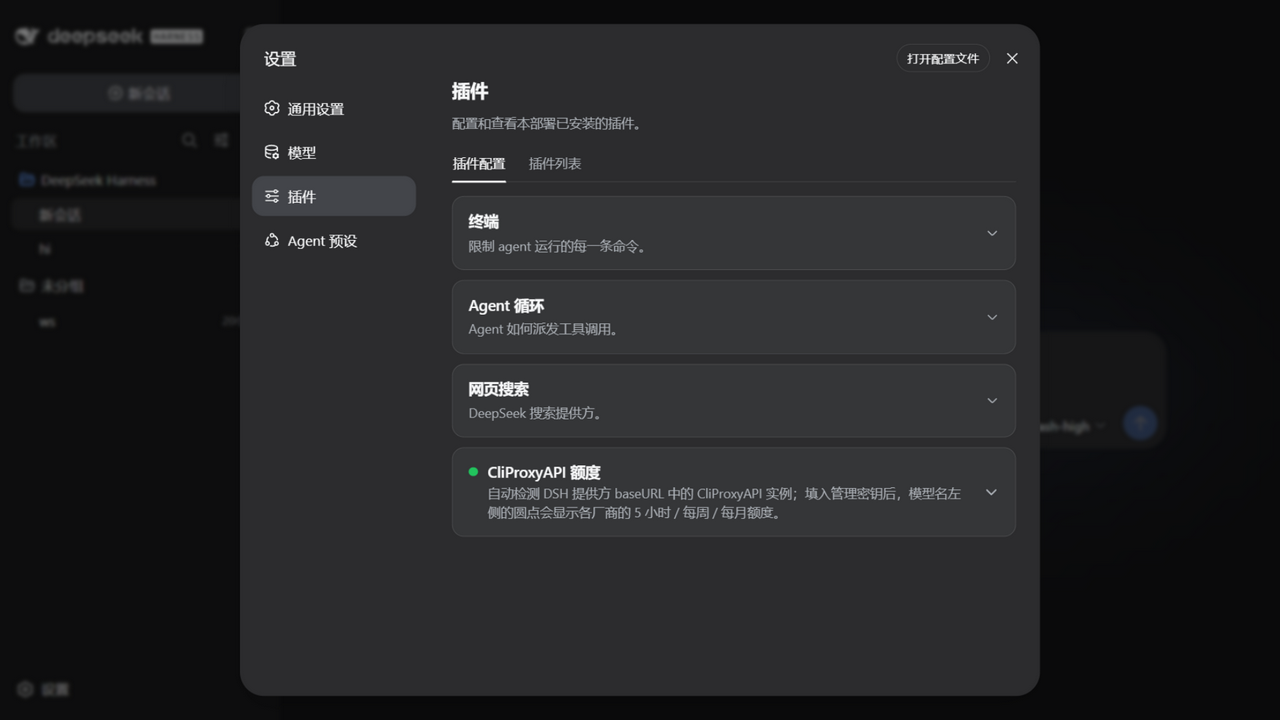
Collapsed card
The settings card stays collapsed like the built-in ones — plain title/description, expand for the details.
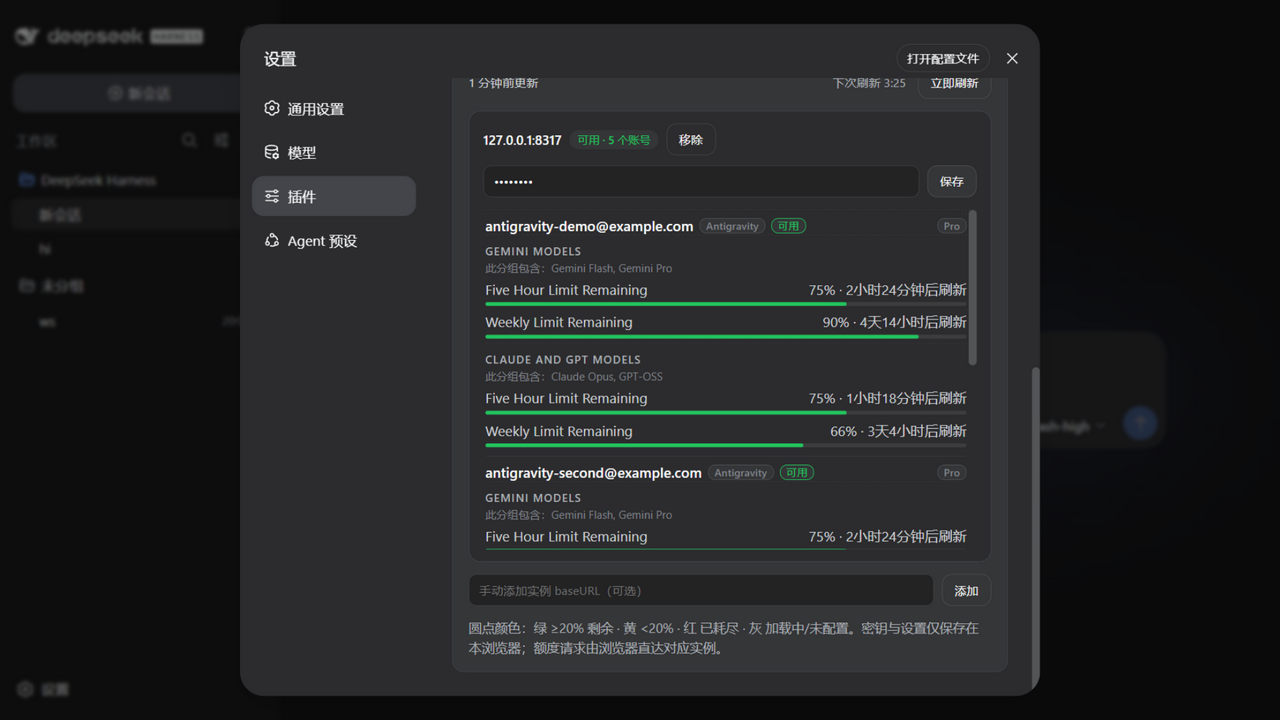
All accounts, CPA-management style
Expand it and every account of every instance is listed with its subscription plan, provider badge, and all quota windows (5-hour / weekly / monthly) — not filtered by the current model. (Demo data from tests/mock-cpa.mjs.)
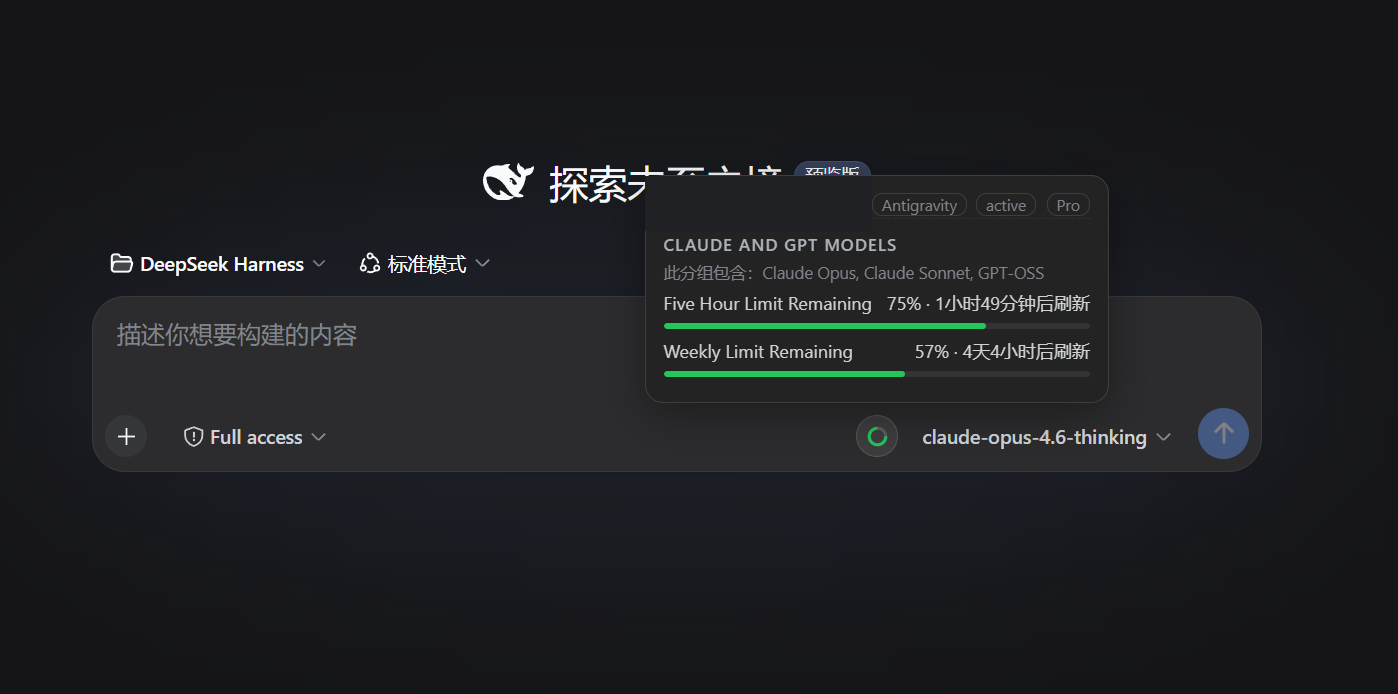
Ring beside the model picker
Hover the ring next to the selected model for matching accounts, providers, plans, windows, and reset times.
Features
- Reads models and
baseURLvalues from DSH providers automatically; no model list to maintain. - Fingerprints each
baseURLas CLIProxyAPI and never leaves an empty ring on ordinary OpenAI-compatible endpoints. - Supports multiple CLIProxyAPI instances and accounts, filtering the hover tooltip to the selected model while the settings panel always shows everything.
- Orders windows as
5-hour → weekly → monthly → daily; the ring uses the first available window in that order. - Queries Codex, Claude, Antigravity, Gemini CLI, Kimi, and xAI/Grok through their upstream quota APIs; other CPA providers still expose account status and recent activity.
- In-use account detection: CPA's per-request usage queue feeds a local 7-day ledger, so the tooltip shows the accounts that actually served the selected model within the current refresh cycle (sorted by last use, with an "in use" badge and request/token totals) and collapses the rest under "Other accounts". The in-use window follows the card's refresh interval.
- Account probes run through a bounded pool with a per-request timeout — one hung upstream can never stall the refresh cycle.
- Keeps the last successful snapshot across transient refresh failures and reuses rings across DSH screen remounts.
- Colors: green ≥20% remaining, amber <20%, red exhausted/error, gray loading or missing a management key.
Requirements
- DSH Web profile on the current plugin contract (validated against
dsh0.1.1-rc.2, 0.1.2-rc.1, 0.1.5-rc.2, 0.1.6-alpha.1, 0.2.0-rc.2, 0.2.1-alpha.2 and 0.2.1-rc.1 — 0.1.5+ needs plugin ≥ 0.8.5 for the model button's markup, 0.2.x needs ≥ 0.9.0 for the rebuilt plugins settings slot); the plugin registers in the Web UI. - The official Desktop app runs the same web stack from its reserved
desktopprofile — install the plugin through the app's own plugin manager (the CLI rejectsdsh plugin --profile desktopby design). - A reachable CLIProxyAPI instance with its management API enabled.
- Models must be routed through a DSH provider whose
baseURLpoints at the corresponding CPA instance. - A management key for each CPA instance. Keys entered in the settings card stay in the current browser's
localStorage; YAML-managed keys remain in the YAML file.
Quick install
The plugin declares a dsh.bundle manifest and is published to npm, so one command installs and activates it — no config editing, no git, no build:
dsh plugin --profile web add dsh-client-ui-cpa-quota
Prefer the installer? It also handles networks where GitHub is flaky, falls back to copying when pnpm is unavailable, and migrates older installs:
Windows PowerShell
$p=Join-Path $env:TEMP 'dsh-cpa-install.ps1'; Invoke-WebRequest -UseBasicParsing -Uri 'https://raw.githubusercontent.com/wkscc310/dsh-client-ui-cpa-quota/main/install.ps1' -OutFile $p; powershell -NoProfile -ExecutionPolicy Bypass -File $p
macOS / Linux
curl -fsSL https://raw.githubusercontent.com/wkscc310/dsh-client-ui-cpa-quota/main/install.sh -o /tmp/dsh-cpa-install.sh && sh /tmp/dsh-cpa-install.sh
Restart the DSH Web host, then open:
Settings → Plugins → CliProxyAPI Quota
Expand the card, paste the management key for each instance, and reopen the model picker.
After updates, just run the same
dsh plugin add(or the installer) again and restart the host.
Manual install
macOS / Linux
git clone https://github.com/wkscc310/dsh-client-ui-cpa-quota.git "$HOME/.dsh/plugins/dsh-client-ui-cpa-quota"
dsh plugin --profile web add "$HOME/.dsh/plugins/dsh-client-ui-cpa-quota"
Windows PowerShell
更多「用量与计费」插件
dsh-cost-meter
作者 han-1413141
DeepSeek Harness 会话与当日 API 费用、预算与官方余额统计插件:历史看板、峰谷计价与官方价格一键同步。
dsh-usage-stats
作者 ychris12138
为 DeepSeek Harness Web GUI 提供提供方余额、订阅额度与 Token 用量分析。
dsh-plugin-langfuse
作者 linyp
Langfuse 可观测性插件:以 OpenTelemetry 追踪树导出会话至 Langfuse OTLP 端点
dsh-token-usage
作者 laoyuehanni
贴近 DSH 原生设计风格的 token 用量统计插件:实时记录每次请求的用量与费用,在 Web UI 中提供趋势图表、按模型定价明细和供应商配额显示。