
README
dsh-im-hub



A multi-platform IM gateway plugin for DeepSeek Harness (dsh): connect your dsh agent to Feishu (Lark), WeCom (WeChat Work), and Telegram, and chat with it from the messaging apps you already use.
One agent per chat. Multi-turn context. Whitelist access control. Idle reaping. No public endpoint required (Feishu long connection / Telegram long polling; WeCom uses an HTTP callback).
Highlights
- Feishu (Lark) — official WebSocket long connection (
/callback/ws/endpoint+ protobuf frames, client-driven ping keepalive, 3s event ACK, message-id dedup), or webhook mode. No public URL needed for the default mode. The same adapter also serves the international Lark edition (open.larksuite.com) viaadapters.lark. - WeCom (WeChat Work) — app message callback with full
WXBizMsgCryptAES-256-CBC decryption and SHA1 signature verification, plus active replies via the messaging API. - Telegram — Bot API long polling (
getUpdates), automatic message splitting at the 4096-char limit. - Mock adapter — stdin + local HTTP endpoint for testing without any real platform credentials.
- Per-chat agent sessions: conversation context is retained, each chat is serialized (no interleaved turns), and idle agents are disposed after a configurable timeout.
- Whitelist enforcement (
allowedUserIds) on every adapter; empty means everyone — set it in production. - Slack-style commands:
/help,/reset,/status,/model.
Install
# From npm (recommended):
dsh plugin --profile im add dsh-im-hub

# From a Git repo or a local checkout (development):
dsh plugin --profile im add link:D:/projects/dsh-im-hub
This creates a headless profile im whose bundles are @deepseek-ai/dsh-base + dsh-im-hub. Boot it with:
dsh --profile im
Configure
Option A — Web GUI settings card (v0.2.0+)
When the plugin runs inside the Web GUI (dsh web profile), a visual
configuration card appears at Settings → Plugins → Configurable plugins →
IM Gateway (dsh-im-hub). It edits the same configuration live — no
cordis.patch.yml hand-editing, no restart needed (the bridge hot-reloads on
save). Credential fields are stored server-side and shown as write-only
"configured / not set" badges.
Guided configuration
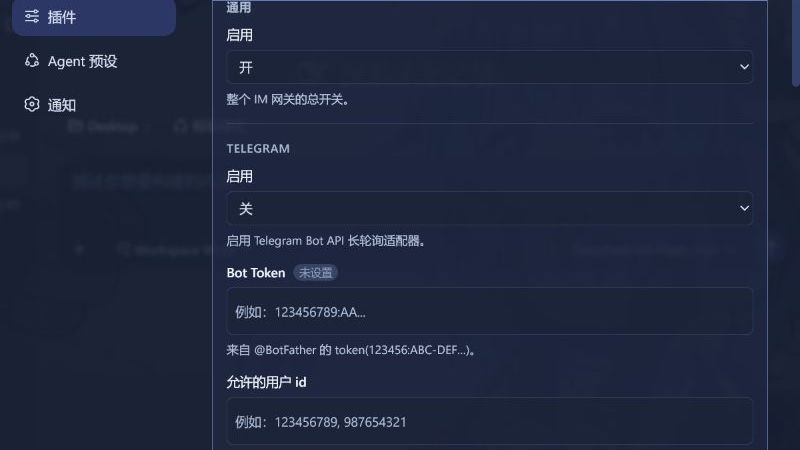
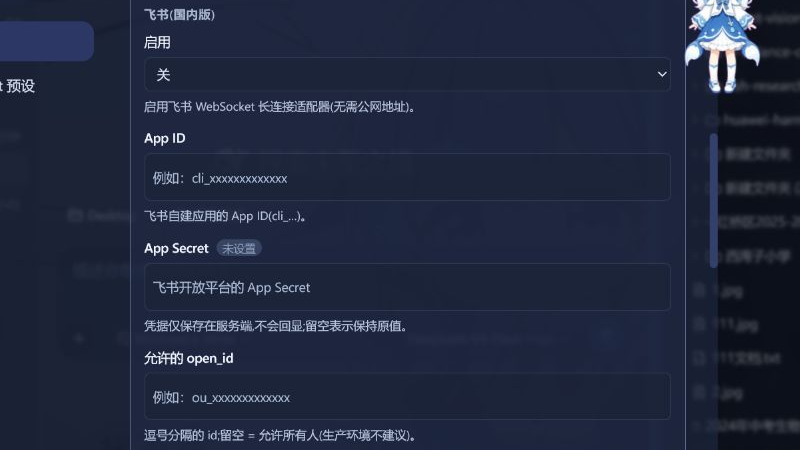
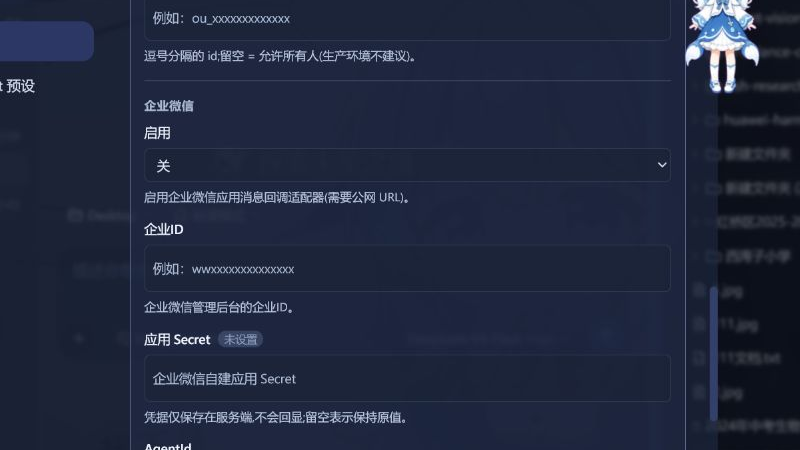
Every control states its purpose and every empty input includes a safe example. Credential values remain write-only: the screenshots below use placeholders, not real tokens or secrets.
Telegram: Bot Token and access whitelist
Feishu: App ID, App Secret, and Open ID whitelist
WeCom: enterprise ID, application credentials, and callback Token
Option B — YAML (cordis.patch.yml)
The plugin row is disabled by default. Enable it from the profile's own cordis.patch.yml ($DSH_HOME/profiles/im/cordis.patch.yml):
- id: dsh-im-hub
  disabled: false
  config:
    adapters:
      telegram:
        enabled: true
        token: '123456:ABC-DEF...'
        allowedUserIds: [123456789]        # numeric Telegram user ids; empty = everyone
Full configuration reference:
| Key | Default | Description |
|---|---|---|
adapters.telegram.enabled |
false |
Enable the Telegram Bot API adapter (long polling). |
adapters.telegram.token |
'' |
Bot token from @BotFather. |
adapters.telegram.allowedUserIds |
[] |
Numeric user ids allowed to talk to the bot. |
adapters.telegram.timeoutSeconds |
50 |
getUpdates long-poll timeout. |
adapters.telegram.pollIntervalMs |
500 |
Gap after a poll timeout/error. |
adapters.feishu.enabled |
false |
Enable the Feishu adapter. |
adapters.feishu.appId / appSecret |
'' |
Feishu/Lark custom app credentials. |
adapters.feishu.mode |
'websocket' |
websocket (official long connection, no public URL) or webhook. |
adapters.feishu.webhookPath |
'/feishu' |
HTTP path for webhook mode. |
adapters.feishu.verificationToken |
'' |
Webhook event verification token. |
adapters.feishu.allowedUserIds |
[] |
Open ids allowed to talk to the bot. |
adapters.lark.enabled |
false |
Enable the international Lark adapter (same open platform as Feishu, open.larksuite.com). |
adapters.lark.appId / appSecret |
'' |
Lark custom app credentials. |
adapters.lark.mode |
'websocket' |
websocket (official long connection, no public URL) or webhook. |
adapters.lark.webhookPath |
'/lark' |
HTTP path for webhook mode. |
adapters.lark.verificationToken |
'' |
Webhook event verification token. |
adapters.lark.allowedUserIds |
[] |
Open ids allowed to talk to the bot. |
adapters.wecom.enabled |
false |
Enable the WeCom app-message callback adapter. |
adapters.wecom.corpId / corpSecret / agentId |
'' |
WeCom app credentials. |
adapters.wecom.token / encodingAesKey |
'' |
Callback Token / EncodingAESKey from the WeCom admin console. |
adapters.wecom.path |
'/wecom' |
HTTP callback path. |
adapters.wecom.allowedUserIds |
[] |
User ids allowed to talk to the bot. |
adapters.mock.enabled |
false |
Test-only adapter (stdin + local HTTP). |
adapters.mock.port |
0 |
Fixed HTTP port for the mock endpoint (0 = ephemeral). |
agent.cwd |
'' |
Working directory for agent sessions (defaults to dsh's cwd). |
agent.provider / agent.model |
'' |
Override the model selection; empty = deployment default. |
agent.maxMessageLength |
4000 |
Max chars per outbound IM message (longer replies split). |
agent.idleTimeoutMs |
1800000 |
Idle time before a chat's agent is disposed (0 = never). |
agent.instructionPrefix |
'' |
Prefix prepended to every user message. |
http.host / http.port |
0.0.0.0 / 8080 |
Bind address for webhook-mode HTTP servers (feishu webhook / wecom callback). |
Feishu / Lark prerequisites
- Create a custom app in the Feishu Open Platform (or the Lark Open Platform for the international edition), enable the
im.message.receive_v1event subscription, and grant the message permissions (im:message:send_as_bot,im:message:p2p_msg,im:message:group_msg/group_at_msg). - Long-connection mode is available to self-built (enterprise) apps. In the admin console choose Event subscription → 使用长连接接收事件 (long connection) or configure the webhook URL for webhook mode.
WeCom prerequisites
- In the WeCom admin console create an app, configure 接收消息服务器 (callback server) with the URL
https://your-public-host/wecom, a random Token and a 43-char EncodingAESKey, and copy them into the config. - The callback server needs a public HTTPS URL (or a tunnel) — WeCom does not offer a long-connection mode.
Commands
| Command | Effect |
|---|---|
/help |
Show command help. |
/reset |
Clear this chat's conversation context (fresh agent). |
/status |
Show active chats / agents / adapters. |
/model |
Show the current model selection. |
How it works
IM platform ──(adapter)──► Bridge ──► ctx.agents.create({ sessionId })
   ▲                          │                │
   └──── reply text ◄─────────┴── session/event listener ◄── agent turn
- Each
platform:chatIdmaps to one agent session (like@deepseek-ai/dsh-headless, but kept alive per chat). - Inbound IM messages enter the session with
source.kind = 'plugin'/form = 'relay'(community norm), and outbound text is read back fromsession/event(assistant/message, aggregated per turn, then chunked tomaxMessageLength). - Turns per chat are serialized through a busy-promise chain; a message queue prevents interleaving.
- Idle agents are disposed after
agent.idleTimeoutMsand re-created on the next message.
Security notes
- Force a whitelist. Set
allowedUserIdson every enabled adapter before exposing the bot publicly. An empty list means anyone can drive your agent — which can execute tools on the host. - IM messages are injected into the agent session as plugin-originated user messages; they do not bypass the deployment's own approval/guardrail policy — treat them like any other user input.
- Platform secrets (
token,appSecret,encodingAesKey) live in the profile'scordis.patch.yml; keep that file private.
Development
node --test test/                          # unit tests (protobuf frame codec)
dsh plugin --profile im add link:D:/projects/dsh-im-hub   # install from checkout
dsh --profile im --patch test/disable-skin.overlay.yml         # boot with mock adapter
# POST a message: curl -X POST http://127.0.0.1:9099/mock -H 'content-type: application/json' -d '{"text":"hi","chatId":"test"}'
Tip: if the dsh-skin manager (
$DSH_HOME/cordis.patch.yml) inserted a UI-skin row that your headless profile cannot resolve, disable it via a--patchoverlay (seetest/disable-skin.overlay.yml) — the home layer outranks the profile layer, so an overlay is the reliable place to turn it off.
License
MIT
更多「集成与分享」插件
dsh-notification
作者 omdsh-dev
DeepSeek Harness 桌面通知插件,任务完成时提醒,可按结果与关键词规则控制。
dsh-open-in-vscode
作者 omdsh-dev
从 DSH Web 界面直接以 VS Code 打开工作区目录。
dsh-lark-bot
作者 plutokeating
DeepSeek Harness (dsh) 接入飞书/Lark bot,扫码即用:流式卡片、项目工作区、并行任务、多角色 Agent、跨会话通知、对话内模型/密钥管理与安全网守护(dsh 崩溃后飞书仍可自救)。A scan-to-connect bridge bot connecting DeepSeek Harness (dsh) into Feishu/Lark: streaming cards, workspaces, parallel tasks, multi-role agents, cross-session notify, in-chat model/key management, and a safety-net guardian.
dsh-session-notification
作者 dingyi222666
提供会话完成等四种状态的通知响应,支持浏览器提示和提示词