
README

CloudBase AI Toolkit
AI writes the code. CloudBase runs the backend.
The CloudBase integration layer for AI coding tools: Plugin installs the stack, Skills steer how code is written, MCP operates databases, functions, storage, and deploys from chat.
English · 简体中文 · Docs · Changelog · Issues



Recent updates
v2.28.x (2026-08)
- Env:
queryEnvadds metrics (DescribeCurveData) and resource-usage query - Cloud Run:
getProcessLog, traffic/deploy-record query, image-deploynext_step,initEnvVPC/tcbr fixes, and hide small-tenant create API - Registry:
@cloudbase/cloudbase-mcppublished to the Official MCP Registry - Skills / ops: ops-inspector v3 alarm playbooks; skill-inject metadata persistence and React fullstack routing
v2.27.x (2026-08)
- Tools:
downloadRemoteFileremoved (high error rate) — download remote assets with shellcurl/Invoke-WebRequestinstead (#908, #909) - Cloud Run:
manageCloudRununifies tcbr init-check + deploy and drops legacy tcb cloudrun APIs; app deployment skipstarget/.nextto avoid oversized zips - Skills: mini program SEO / search-optimization guidance merged into
miniprogram-development(#906) - Gateway / hosting: route-level enable support with disabled access URL detection; hosting skips deploy notifications when
accessUrlis empty - Docs: simplified quick start with externalized images (#905),
--cloudbase-api-keyCLI login, and CodeBuddy plugin marketplace install guide
Releases · Star · Watch → Releases
What it is
AI IDEs (Cursor, Claude Code, Codex, CodeBuddy, and others) are strong at generating code. What usually blocks you is the backend: schemas, permissions, functions, storage, environments, and release.
CloudBase is Tencent Cloud’s AI-native all-in-one backend (database, storage, auth, cloud functions, Cloud Run, and more). This repo is the Toolkit that connects that backend to AI tools:
| Piece | Role |
|---|---|
| Plugin | Installs MCP Server, Agent Skills, and Hooks together—less per-IDE wiring |
| Agent Skills | Scenario skills (Web / Mini Program / database / auth / functions, etc.) toward workable CloudBase practice |
| MCP | Login, query and change data, manage functions and hosting, read logs—from the conversation |
This repository ships the npm package @cloudbase/cloudbase-mcp, Skills, and AI plugins.
You still need your own CloudBase environment, and you should confirm sensitive actions the AI proposes. The Toolkit provides capability and path—not judgment.
Related repositories
Publishing and sync repos live under TencentCloudBase. Directly related to this Toolkit:
| Repository | Contents | Typical entry |
|---|---|---|
| CloudBase-AI-Toolkit (this repo) | MCP Server source; marketplace source for Claude Code / Codex | npx @cloudbase/cloudbase-mcp@latest |
| cloudbase-plugin | Open Plugin Spec publish repo (CI-synced): MCP + Skills + Hooks | npx plugins add TencentCloudBase/cloudbase-plugin · CNB fallback: npx plugins add https://cnb.cool/tencent/cloud/cloudbase/cloudbase-plugin.git |
| cloudbase-sites-plugin | Sites plugin: Vite Web create & deploy | npx plugins add TencentCloudBase/cloudbase-sites-plugin · CNB: https://cnb.cool/tencent/cloud/cloudbase/cloudbase-sites-plugin.git |
| cloudbase-skills | Agent Skills collection | npx skills add TencentCloudBase/cloudbase-skills · CNB: https://cnb.cool/tencent/cloud/cloudbase/cloudbase-skills.git |
| skills | Per-skill install catalog (also on skills.sh) | npx skills add tencentcloudbase/skills --skill <name> |
| awesome-cloudbase-examples | CloudBase examples and case studies | Browse / clone examples |
| OpenVibeCoding | Vibecoding template on CloudBase | Use as a project starter |
Prefer Plugin for the full stack; Skills alone when you only need knowledge constraints. For marketplace IDEs use this repo—do not also run npx plugins add on the same tool.
Quick start
Fastest way to get started
Copy this AI prompt into your AI IDE. The agent reads skill.md and completes the setup:
Set up CloudBase for me:
1. Open https://docs.cloudbase.net/skill.md and complete the setup following its instructions.
2. Tell me when you're done, and suggest the most relevant next step.
Pick one default path for your tool (Plugin / CLI / MCP)
| Your tool | Suggested path |
|---|---|
| Claude Code / Codex (native marketplace) | Add this repo as marketplace, then install the cloudbase plugin (plugin docs) |
| Open Plugin Spec tools | npx plugins add TencentCloudBase/cloudbase-plugin |
| Prefer one CLI for many tools | CloudBase AI CLI: npm i -g @cloudbase/cli && tcb ai |
| CodeBuddy / WorkBuddy / ZCode (built-in) | Use the IDE’s built-in CloudBase plugin or connector; for CodeBuddy you can also install via plugin marketplace |
| Other MCP-capable IDEs | MCP config only (below) |
Plugin
npx plugins add TencentCloudBase/cloudbase-plugin
Details and IDE differences: AI plugin docs.
MCP only
{
  "mcpServers": {
    "cloudbase": {
      "command": "npx",
      "args": ["@cloudbase/cloudbase-mcp@latest"]
    }
  }
}
Hosted HTTP, self-hosted Cloud Mode, and plugin scoping: Install & connect.
First prompts
Login to CloudBase
Use CloudBase Skills to build a todo app with login, database and permissions, then deploy
Skills shape structure and practice; MCP handles environment and resources. You should be able to verify data and APIs in your own environment—not only get local source files.
Supported AI IDEs
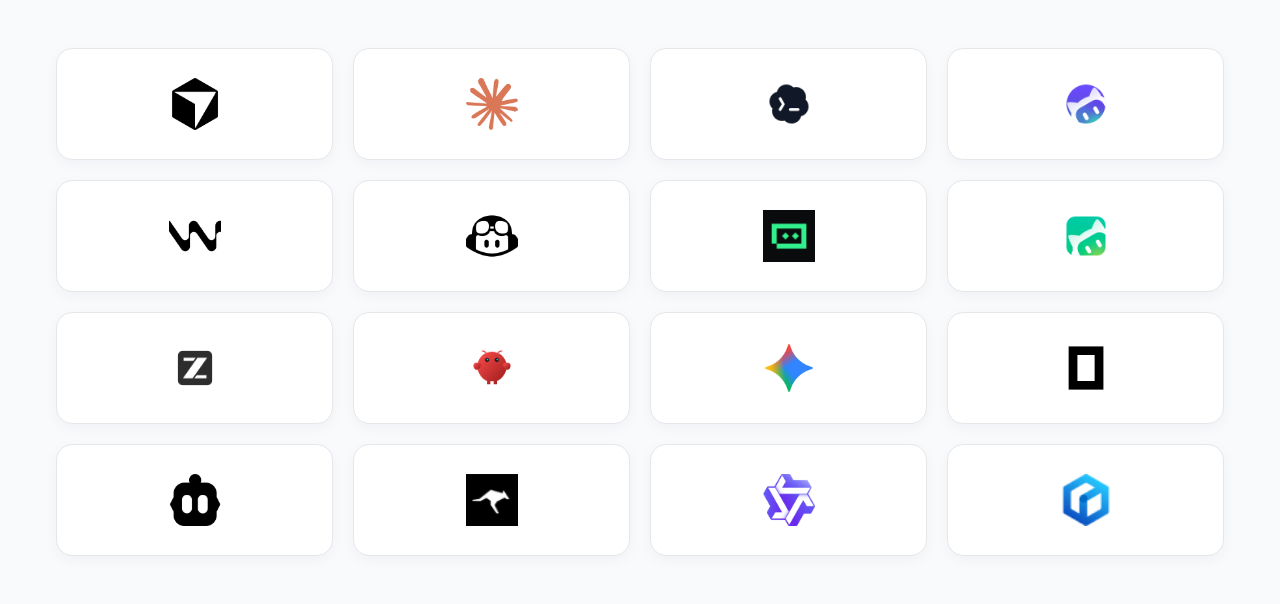
| Tool | Platform | Guide |
|---|---|---|
| CloudBase AI CLI | CLI | Guide |
| OpenClaw | CLI | Guide |
| WorkBuddy | Standalone IDE | Guide |
| ZCode | Standalone IDE (≥ 3.4.1 built-in) | Guide |
| Codex App | App | Guide |
| Cursor | Standalone IDE | Guide |
| WindSurf | IDE / plugins | Guide |
| CodeBuddy | Standalone IDE (built-in) | Guide |
| CLINE | VS Code plugin | Guide |
| GitHub Copilot | VS Code plugin | Guide |
| Trae | Standalone IDE | Guide |
| Tongyi Lingma | IDE / plugins | Guide |
| RooCode | VS Code plugin | Guide |
| Baidu Comate | Plugins | Guide |
| Augment Code | Plugins | Guide |
| Claude Code | CLI | Guide |
| Gemini CLI | CLI | Guide |
| Codex CLI | CLI | Guide |
| OpenCode | CLI | Guide |
| Qwen Code | CLI | Guide |
Full setup: IDE guides.
Capabilities
After setup, the AI can do typical backend work in your environment (confirm critical steps):
- Database: PostgreSQL and document DB, data models, CRUD, permissions and security rules
- Compute: author, deploy, invoke, and debug cloud functions / Cloud Run
- Auth & storage: login methods, object storage, permission linkage with data
- Release & ops: static hosting / Mini Program publish; inspect logs and redeploy
Fits Web, WeChat Mini Programs, and backend services. Platform overview: CloudBase docs.
Evaluation
Under controlled conditions, the same Todo application brief and frontend scaffold were used to compare two backend paths: a traditional cloud VM (self-managed runtime, process, and network exposure) and CloudBase (managed database, anonymous auth, and related backend services). An AI agent performed end-to-end development and verification. Given the model and task setup, the CloudBase path was more favorable in completion latency, token usage, and tool-call count. These outcomes are conditioned on the model, agent framework, and task definition, and should not be generalized beyond that scope.
Methods, data, and limits: Same-task evaluation: cloud VM vs CloudBase
Install & connect
Prerequisites
- Node.js v18.15.0+
- A CloudBase environment
- An AI tool that supports Plugin / Skills / MCP
Setup options
- Plugin (when the tool supports it)
npx plugins add TencentCloudBase/cloudbase-plugin - CloudBase AI CLI
npm i -g @cloudbase/cli && tcb ai - Manual MCP (write the IDE config file)
Cursor (.cursor/mcp.json)
{
  "mcpServers": {
    "cloudbase": {
      "command": "npx",
      "args": ["@cloudbase/cloudbase-mcp@latest"]
    }
  }
}
WindSurf (.windsurf/settings.json)
{
  "mcpServers": {
    "cloudbase": {
      "command": "npx",
      "args": ["@cloudbase/cloudbase-mcp@latest"]
    }
  }
}
CodeBuddy
CloudBase is built in (MCP / Skills); manual config is usually unnecessary.
You can also install via the plugin marketplace: see the CodeBuddy setup guide.
Others: IDE setup guide.
MCP connection modes
Local (default): npx on your machine—full features, including local filesystem upload/templates.
Hosted: IDE connects over HTTP to Tencent Cloud MCP; no local Node. Some local-file features are unavailable.
{
  "mcpServers": {
    "cloudbase": {
      "type": "http",
      "url": "https://tcb-api.cloud.tencent.com/mcp/v1?env_id=<env_id>",
      "headers": {
        "X-TencentCloud-SecretId": "<Tencent Cloud Secret ID>",
        "X-TencentCloud-SecretKey": "<Tencent Cloud Secret Key>"
      }
    }
  }
}
Hosted URLs can use site (domestic / intl) to pick the login site (e.g. domestic-site Singapore needs site=domestic), plus enable_plugins / disable_plugins to trim tools. Canonical names live in mcp/src/server.ts.
Self-hosted Cloud Mode: set CLOUDBASE_MCP_CLOUD_MODE=true (or MCP_CLOUD_MODE=true) so local file and process tools are disabled for remote callers.
| Scenario | Suggestion |
|---|---|
| Personal | Local npx |
| Team / zero ops | Hosted HTTP |
| Self-hosted MCP | Cloud Mode required |
Example
Online Gomoku: describe the need; get Web + cloud database / realtime and deploy.
Demo: Gomoku · More: tutorials
Docs
FAQ
How is this different from Vercel / Netlify?
Those focus on shipping frontends or containers. CloudBase provides backend building blocks (database, auth, functions). The Toolkit lets AI tools use them in chat. Deploy is only part of the path.
Can I use this without a GUI IDE?
Yes. Any tool that can configure an MCP Server or install the matching Plugin / Skills works—including Claude Code, Gemini CLI, OpenCode. Support list
Where does my code go?
Deploy targets your own CloudBase environment. In local mode MCP runs on your machine; code need not leave until you deploy. Cloud traffic uses HTTPS.
Is self-hosting the MCP server safe?
Local npx is equivalent to running tools yourself. For remote hosts, set CLOUDBASE_MCP_CLOUD_MODE=true to disable local file/process tools. Tencent Cloud hosted HTTP includes this protection.
Cost?
The Toolkit (including MCP) is open source under MIT. CloudBase has free quotas; usage beyond that is billed—see billing.
Login says environment does not exist?
Confirm an environment exists and is healthy in the console, then login again and pick the right one.
Domestic site env at `ap-singapore` is treated as international?
Both the domestic site (cloud.tencent.com) and the international site (tencentcloud.com) offer the ap-singapore region, so region alone is ambiguous. Without an explicit site, MCP defaults to intl for ap-singapore (backward compatible). Domestic-site Singapore users must set TCB_SITE=domestic (together with TCB_REGION=ap-singapore) in the MCP env, or add a .cloudbase/project.json at the project root:
{ "site": "domestic", "region": "ap-singapore", "envId": "your-env-id" }
Credentials are stored per site (credential.domestic / credential.intl) so domestic and international logins can coexist; legacy single-slot auth.json is read as domestic and migrated on first write.
Hosted mode: add site=domestic to the hosted URL (https://tcb-api.cloud.tencent.com/mcp/v1?env_id=<env_id>&site=domestic), since the URL is the only place hosted mode can carry the site (there is no MCP env block for HTTP servers).
Community
| Docs | docs.cloudbase.net |
| Issues | GitHub Issues |
| Releases | Changelog |
Activity
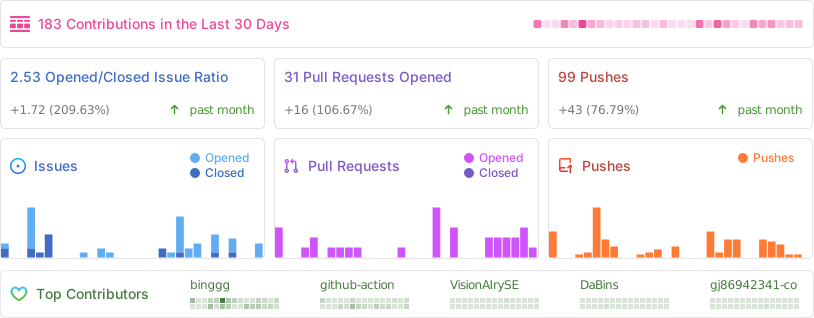
Contributors
更多「MCP 与协议」插件
reactive-resume
作者 amruthpillai
注重隐私的开源简历生成器,安全、可定制、可移植,永久免费,支持自托管。
everos
作者 evermind-ai
为所有 AI 智能体提供的便携统一记忆层,本地优先、Markdown 原生、数据归用户所有,跨应用与工作流自进化。
yao
作者 yaoapp
在桌面、移动端、浏览器或 API 上统一管理你的智能体与工作区,看板式任务追踪,支持自托管。
openpencil
作者 zseven-w
全球首个开源 AI 原生矢量设计工具,支持并发智能体团队,可在画布上直接通过提示词生成 UI。