
deepseek-harness-cli
维护状态: 活跃soolaugust/deepseek-harness-cli
交互式终端智能体:Claude Code 风格 REPL,全屏 UI、Markdown 渲染、会话统计与自定义 OpenAI 兼容 Provider。
$ dsh plugin add deepseek-harness-cli4
星标
0
Fork
TypeScript
语言
MIT
许可证
2026-08-14
创建于
2026-08-17
最近推送
README
dsh cli — interactive terminal agent
English | 中文
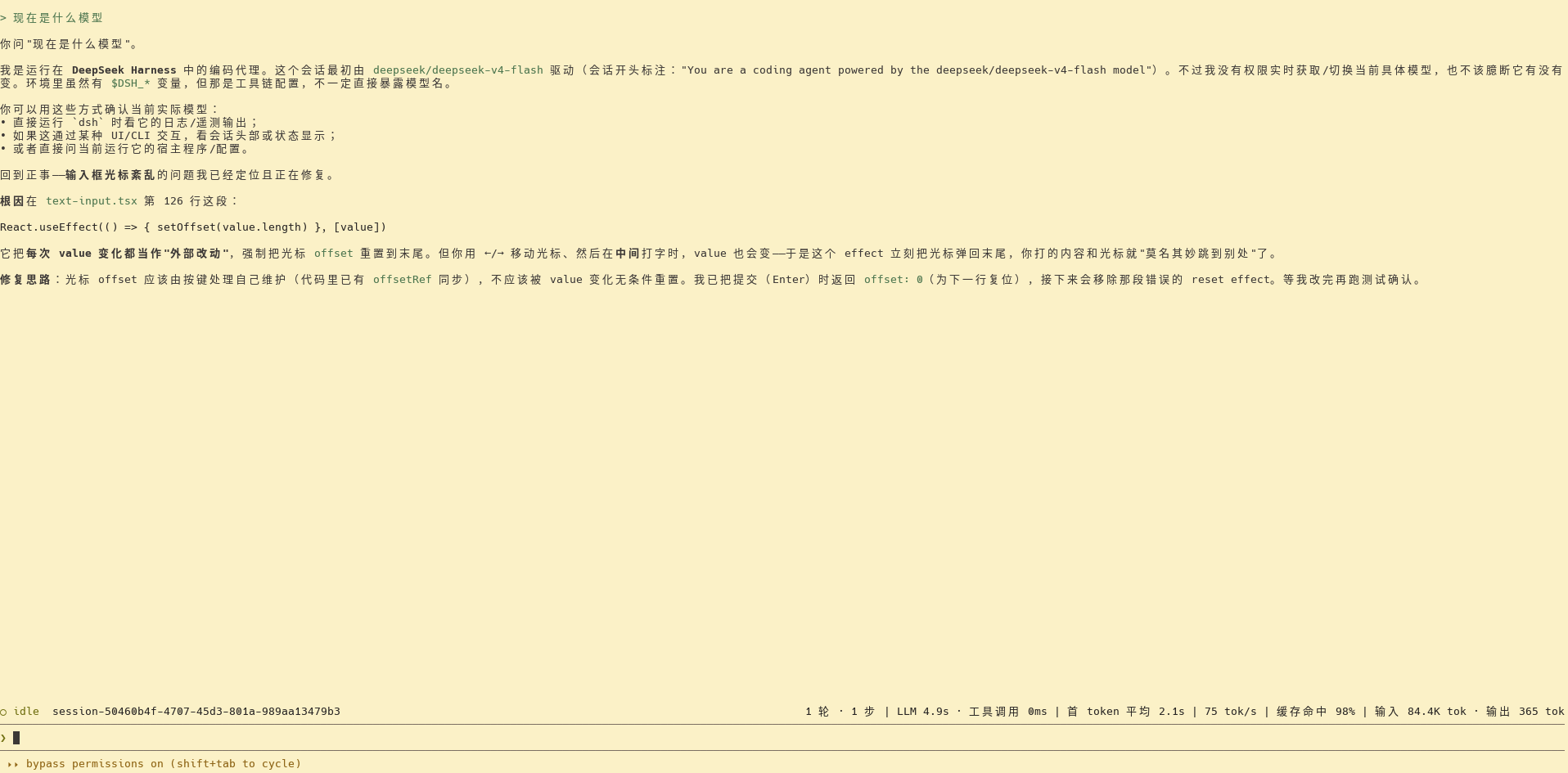
dsh cli is an interactive terminal agent, forked from DeepSeek Harness with a CLI focus: a Claude Code-style coding experience in your terminal — full-screen UI, streaming output, tool cards, session history, and permission controls, with no browser needed.
Under the hood it is DeepSeek Harness's plugin architecture (everything is a plugin), but this repository only cares about and polishes the single dsh cli interaction path.
Features
- Claude Code-style interaction: full-screen alternate screen, input bar pinned to the bottom, up/down arrow history navigation (including cross-session persistent history)
- Markdown terminal rendering: bold, italic, code, lists, and headings rendered with terminal styles
- Tool card folding: adjacent tool calls merge into one line, expand with
Ctrl+O - Session stats bar: turns/steps, LLM time, first-token latency, throughput, cache hit rate, input/output tokens
- Permission badge:
Shift+Tabcyclesread-only → workspace-write → danger-full-access, withdanger-full-accessshown as "bypass permissions" - Custom provider: point to any OpenAI-compatible endpoint (e.g. mify), with both model routing and
web_searchconfigurable - Session resume: reopening
dsh clicontinues the last session, switch with/session - Hot-reload development:
pnpm dsh:dev(node --watch) auto-restarts on source changes
Demo
Quick start
Requires Node.js ≥ 22.
# from source
git clone https://github.com/soolaugust/deepseek-harness-cli.git
cd deepseek-harness-cli
pnpm install
pnpm run build
pnpm dsh cli
From npm:
npx @deepseek-ai/dsh cli
The first launch creates/resumes a session; type text and press Enter to send, and model output renders streaming above the input bar.
Usage
| Action | Effect |
|---|---|
Type text + Enter |
Send to the agent |
↑ / ↓ |
History navigation (cross-session persistent) |
Shift+Tab |
Cycle permission preset |
Ctrl+O |
Expand/collapse tool group |
Ctrl+C |
Cancel current turn while running; quit at the prompt |
/exit /help /clear /session /model /permission |
Slash commands |
Full instructions in the CLI guide.
Configuring a custom provider
Point ~/.dsh/settings.yaml at any OpenAI-compatible endpoint (e.g. mify, OpenRouter); both model routing and web_search are configurable. See CLI guide · Using a custom model provider.
Development
pnpm dsh:dev          # auto-restart on source changes (hot-reload development)
pnpm run test         # unit tests
pnpm run typecheck    # type checks
Inherited from DeepSeek Harness
This repository is a fork of DeepSeek Harness focused on its dsh cli interactive terminal capability. The full multi-profile architecture, Web UI, SDK, and more remain in the upstream repository.
License
更多「命令行与终端」插件
deepseek-reasonix
作者 esengine
专为 DeepSeek 打造的终端 AI 编程智能体,围绕前缀缓存稳定性设计,可常驻运行。
mnemon
作者 mnemon-dev
LLM 监督的持久记忆系统,基于图结构召回、跨会话知识共享,单个二进制文件,兼容 DeepSeek Harness 等运行时。
phi
作者 pulseaiclub
来自 pi 的编码智能体,支持无限提供方、子智能体、行内编辑与权限门控。
sivtr
作者 ariestar
A unified agent memory workspace for human and agent | 一个统一的agent记忆工作空间