
README
DeepSeek Harness for VS Code
English | 简体中文
A native VS Code coding-agent extension powered by DeepSeek Harness. Install the platform-specific VSIX and start working—there is no upstream repository to clone, no Node/npm setup, and no local Harness deployment to manage.
This is a community-maintained
0.4.8release. DeepSeek Harness is currently a Developer Preview, and this extension pins the official@deepseek-ai/dsh@0.1.0-rc.7package.
Features
- Native VS Code workbench — all interaction happens in the sidebar; the local Harness Gateway exposes only the loopback API transport, while the official WebUI is neither served nor embedded.
- Detachable workbench — open the same synchronized conversation UI in an editor-area panel and move it to another VS Code window when more space is needed.
- Complete session workflow — persistent history, create, switch, rename, fork, and resume sessions.
- Streaming Markdown — headings, lists, tables, code blocks, copy controls, safe external links, and clickable workspace file references.
- Stable incremental rendering — streamed updates preserve disclosure state and the reader's scroll position.
- Claude-style live reasoning — reasoning opens automatically while deltas stream, follows the newest text, and collapses when its block completes.
- Editor context — selected code appears as a removable context card; type
@to fuzzy-search and attach workspace files without leaving the composer. - Slash commands — use official Harness commands plus
/model,/reasoning, and/presetextension commands. - Harness-native capabilities — reasoning, tool calls, approvals, structured questions, Todos, Skills, Goals, Plan mode, and background jobs.
- Model and agent controls — DeepSeek V4 Flash / Pro,
off/low/high/maxreasoning effort, and four official Agent Presets. - Token usage — see current input and output token counts in the composer.
- Native DSH plugin center — search a curated catalog, filter by category, inspect installed plugins, or install an npm/GitHub/local/tarball package.
- Automatic localization — follows the VS Code display language with English and Simplified Chinese support.
- Zero-deployment runtime — official
dsh, pnpm, and standalone Node 22.22.3 are bundled in each platform VSIX and managed by the extension.
Open the workbench with Ctrl+Alt+H on Windows/Linux or Cmd+Alt+H on macOS.
Interface preview
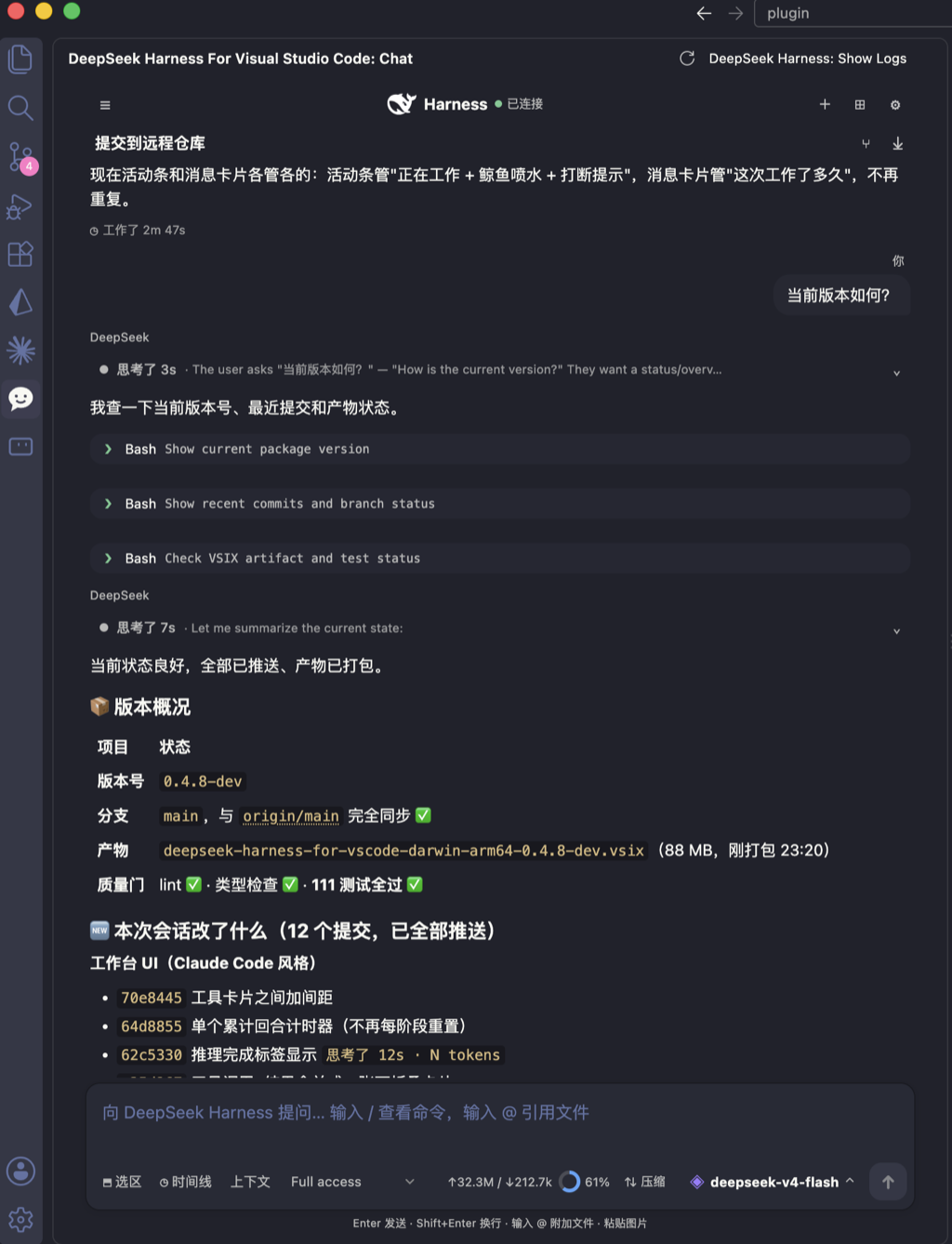
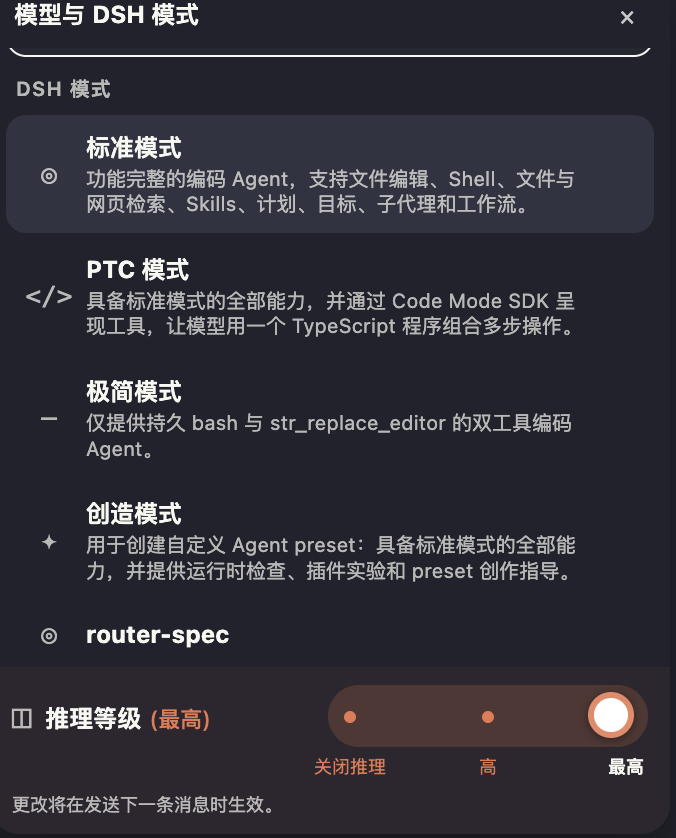
The workbench follows the VS Code display language. The screenshots below use Simplified Chinese; select either image to view it at full resolution.
|
|
| Native conversation workbench — streaming replies, tool calls, composer pinned to the bottom | Model, DSH mode, and reasoning effort |
Installation
- Download the VSIX matching your platform from Releases.
- Open the VS Code Extensions view (
Cmd/Ctrl+Shift+X). - Select
...→ Install from VSIX... and choose the downloaded file. - Reload the VS Code window when prompted.
For example, an Apple Silicon Mac requires the darwin-arm64 package.
Quick start
- Open the project you want to work on.
- Select the DeepSeek Harness icon in the Activity Bar.
- Open Connection settings and configure DeepSeek Official or add a relay source. You can also run
DeepSeek Harness: Set API Keyfor the official source. - Describe your task in the composer and send it.
No Harness install or start command is required.
DSH plugins
Open the ⊞ Plugins button in the workbench header to browse repositories read directly from the dsh-plugin GitHub topic. Results are merged with Awesome DSH Plugin metadata for curated categories, localized descriptions, and npm install specs. The Installed tab also accepts one package spec directly, including an npm package, github:owner/repository, a local path without shell metacharacters, or a tarball URL.
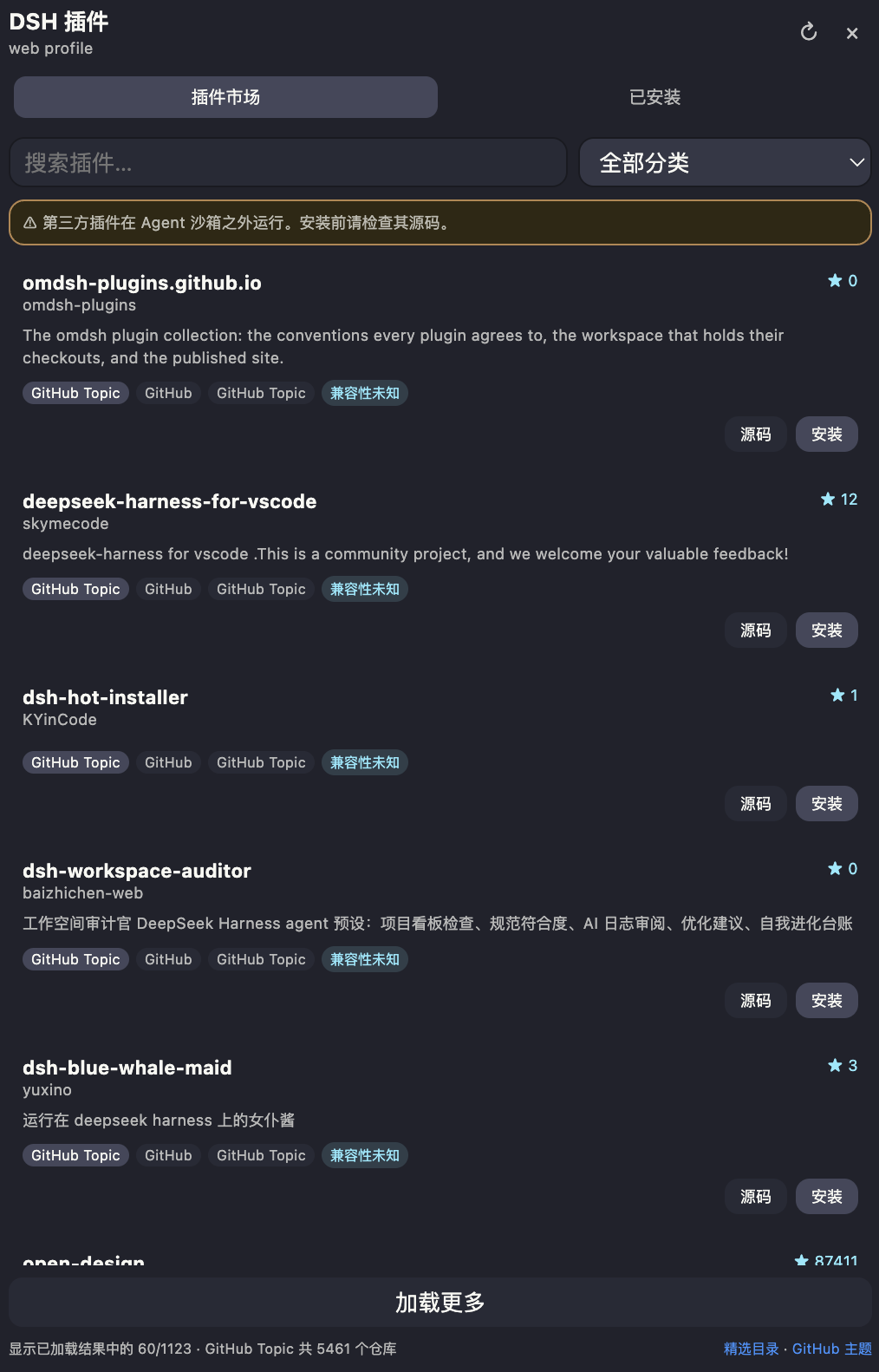
Native plugin discovery, compatibility labels, and managed installation
The extension uses the official dsh plugin --profile web add/remove workflow. Plugin profile files live under the extension's globalStorageUri/harness-home/profiles/web; Harness is stopped while pnpm changes that profile and is then restarted automatically. The bundled pnpm means no system package manager is required.
Host tools, policies, and runtime services contributed by a plugin work in this extension. A plugin may also contain client UI designed specifically for the upstream DSH browser application; those UI contributions cannot be rendered generically by this native VS Code workbench and are marked Official Web UI.
Marketplace cards classify known entries as Agent compatible, Agent works · Web UI unavailable, or Official Web UI only. UI-only themes and layout extensions cannot affect the native workbench, so their install button is disabled. GitHub-only entries without curated metadata are marked Compatibility unknown until their installed manifest can be inspected.
Configuration
| Setting | Default | Description |
|---|---|---|
deepseekHarness.model |
deepseek-v4-flash |
Default model for new sessions |
deepseekHarness.reasoningEffort |
high |
off / low / high / max |
deepseekHarness.agentPreset |
standard |
Default Agent Preset for new sessions |
deepseekHarness.provider |
deepseek-official |
Default source selected from the extension's Connection settings panel |
deepseekHarness.permissionMode |
workspace-write |
read-only / workspace-write / danger-full-access |
deepseekHarness.autoAttachSelection |
true |
Automatically attach the active editor selection when sending |
Provider endpoints and write-only credential references are managed through the bundled Harness settings and credentials services. API keys are stored in the extension's private Harness home, are never returned to the webview, and are not written to project-level .vscode/settings.json. Legacy deepseekHarness.apiKey, baseUrl, and providers values are imported once and then removed.
Use the Connection settings panel to add, edit, test, or remove DeepSeek relay sources. Custom sources are registered live through the upstream llm-pi-ai adapter and expose the same Flash/Pro choices in the model panel.
Automatically attached selections are limited to 16 KB and are truncated when necessary. If the same file selection is already embedded manually, the host will not attach it again.
Commands
| Command | Description |
|---|---|
DeepSeek Harness: Open Workbench |
Open the sidebar workbench |
DeepSeek Harness: Open Workbench in New Window |
Open the detachable editor-area workbench |
DeepSeek Harness: Reload Workbench |
Restart the runtime and reconnect |
DeepSeek Harness: Set API Key |
Save the API Key |
DeepSeek Harness: Clear API Key |
Clear the API Key |
DeepSeek Harness: Show Logs |
Open diagnostic logs |
Localization
English is the default language, and a Simplified Chinese language pack is included. Manifest contributions, settings, extension-host prompts, errors, and the full chat workbench follow the VS Code display language. After changing the display language, run Developer: Reload Window.
Security and privacy
- The Harness Gateway listens only on a random
127.0.0.1port. - The Webview uses a strict CSP and loads no remote scripts or iframes.
- Plugin catalog JSON is fetched by the Extension Host, validated into a narrow UI data model, and rendered with
textContent. - Raw Markdown HTML is disabled, and rendered markup is sanitized through a DOMPurify allowlist.
- Remote Markdown images are disabled; http(s) links are validated again by the extension host.
- File and command access is controlled by
permissionModeand Harness approval policies. - The API Key is never sent to the Webview or written to extension logs.
- Third-party DSH plugins are trusted Extension Host dependencies: they run outside the Agent sandbox. Review their source before installation.
Platform support
There is one extension ID and one Marketplace product. Platform-specific VSIX files are required because the bundled Node, PTY, and sandbox packages contain native binaries:
- macOS:
darwin-arm64,darwin-x64 - Linux:
linux-arm64,linux-x64 - Windows:
win32-arm64,win32-x64
The current hosted GitHub Actions matrix builds darwin-arm64, linux-arm64, linux-x64, and win32-x64. Other architectures require a self-hosted runner or local packaging.
Development and packaging
npm install
npm run check-types
npm run lint
npm test
npm run compile
npm run package
npm run package creates a VSIX for the current operating system and CPU architecture. npm ci executes lifecycle scripts required by native dependencies, so build only trusted commits and lockfiles.
All project commit messages use English. See docs/ARCHITECTURE.md for the architecture and security boundaries.
License
Extension code is licensed under the MIT License. Licensing details for DeepSeek Harness, Node.js, and other dependencies are available in THIRD_PARTY_NOTICES.md and the license files shipped with each dependency.
更多「桌面与应用」插件
open-design
作者 nexu-io
DeepSeek Harness 的开源 AI 设计插件,本地优先桌面应用,让编码智能体变身设计引擎,生成原型、落地页、幻灯片、图片与视频,支持多种格式导出。
deepseek-harness-desktop
作者 anywhere-labs
为 DeepSeek Harness (DSH) 插件生态打造的现代化桌面端解决方案。万物皆「插件」,桌面本身也是「插件」。
openbiliclaw
作者 whiteguo233
本地私有、开源的自进化跨平台 AI 内容发现 Agent:先理解你,再主动从 B站、小红书、抖音、YouTube、X、知乎、Reddit、微博等平台与开放 Web 寻找内容。(支持 deepseek harness 插件) | Local-first open-source cross-platform AI content discovery agent: understands you, then proactively finds content across Bilibili, Xiaohongshu, Douyin, YouTube, X, Zhihu, Reddit, Weibo and the open web.(support deepseek harness plugin)
deeptide
作者 paean-ai
由 DeepSeek 出品的 Swift 原生 macOS 编程智能体,主打原生流畅体验。