
dsh-bookmarks
Curated pickpenguin-oo/dsh-bookmarks
Bookmark assistant replies in DeepSeek Harness: per-message bookmarks with notes/tags, a cross-session center, and one-click Markdown export.
8
stars
0
forks
MIT
License
2026-08-14
Created
2026-08-16
Last push
README
dsh-bookmarks


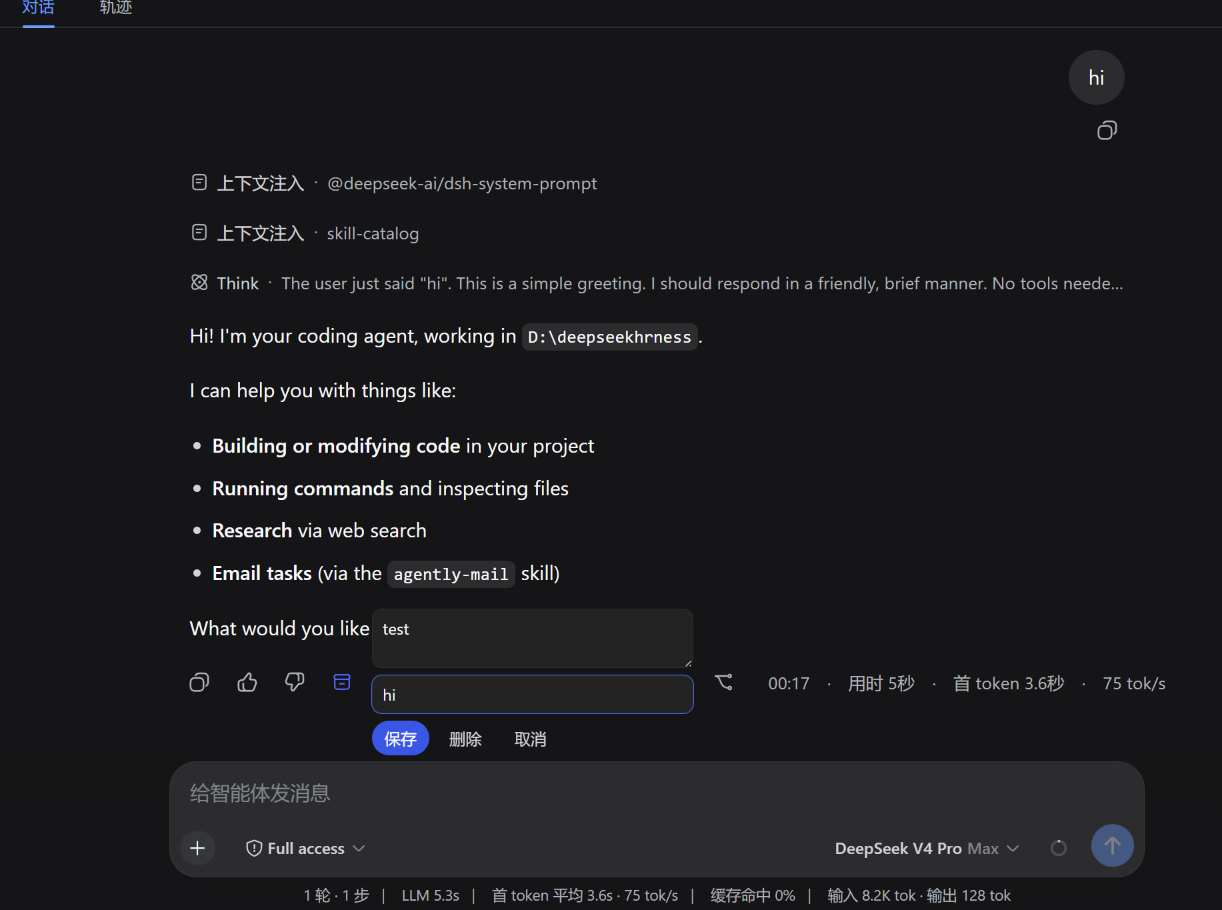
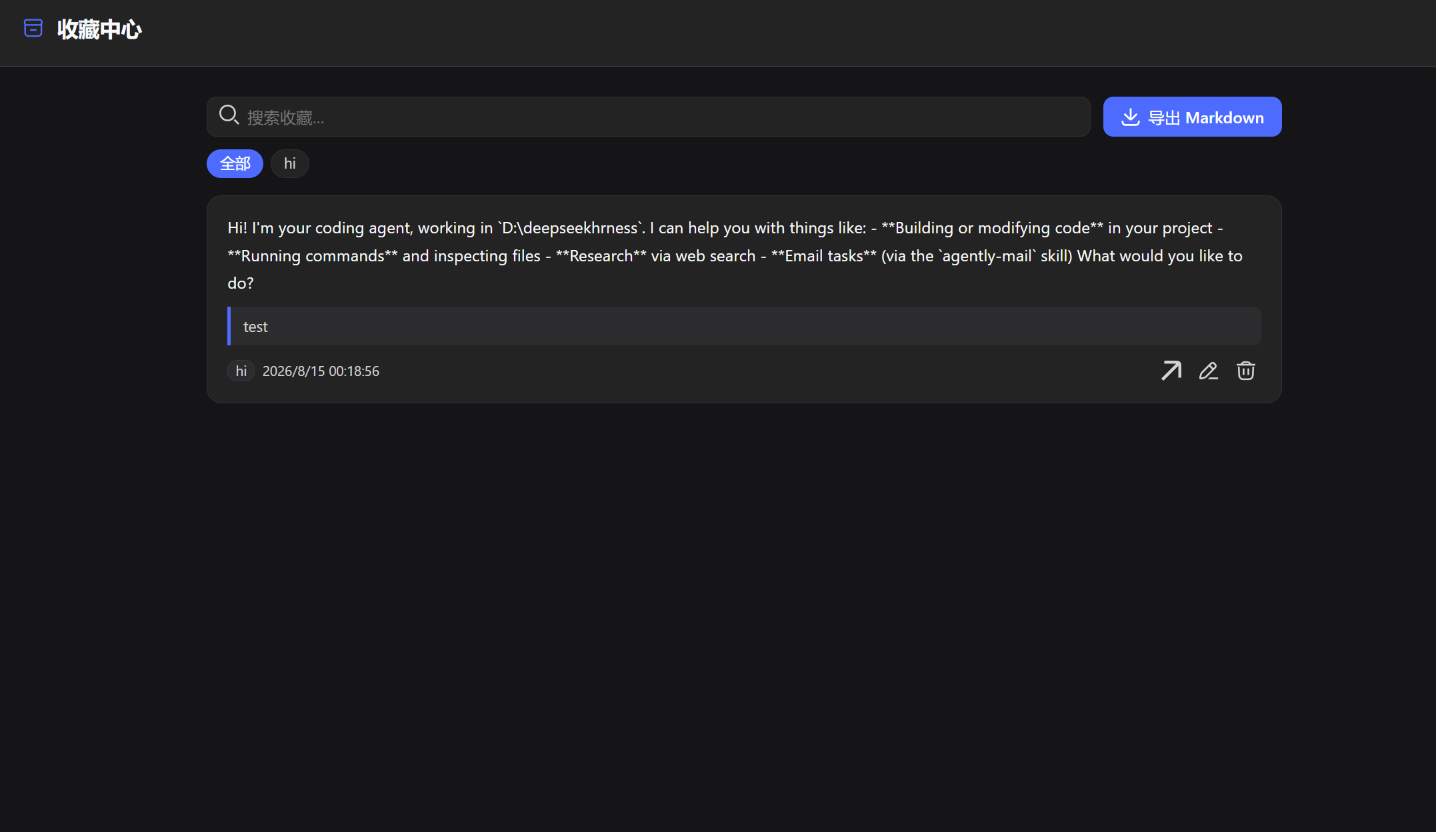
Bookmark assistant replies in DeepSeek Harness (DSH) Web UI: bookmark any finalized assistant reply with a note and tags, browse every bookmark from every session in one center panel, and export them to Markdown in one click.
Screenshots
Features
- Per-message bookmark — an archive button on each finalized assistant reply (right next to the 👍/👎 feedback buttons), with an inline editor for a note and comma-separated tags.
- Server-derived snippet — the bookmark stores a text preview of the actual reply, so the center stays useful even without a note.
- Cross-session center — one panel listing bookmarks from all sessions and workspaces, with full-text search, tag filter, inline editing and deletion.
- Jump back — every entry opens its session in one click.
- Markdown export — one click downloads all bookmarks as
dsh-bookmarks.md. - Keyboard —
Alt+Btoggles the center from anywhere. - Safe writes — per-item compare-and-set versions (multi-tab safe), server-side validation, and durable storage via the DSH storage domain.
Install
dsh plugin --profile web add dsh-bookmarks
Then restart DSH (dsh web). The plugin appends itself to the profile bundle layer automatically; nothing else to configure.
For a local checkout:
# from the plugin repo
dsh plugin --profile web add file:./        # relative file spec, anchored to your cwd
Config
The bundle row exposes three limits (all optional):
| Key | Default | Meaning |
|---|---|---|
maxNoteBytes |
4096 |
Max UTF-8 bytes of one note ("" clears a note; omitting the field keeps it). |
maxSnippetChars |
300 |
Max characters of the server-derived reply snippet. |
maxTags |
8 |
Max tags per bookmark; each tag ≤ 32 chars, trimmed and deduplicated. |
Override them in the profile patch layer ($DSH_HOME/profiles/web/cordis.patch.yml):
- id: bookmarks
  config:
    maxNoteBytes: 2048
    maxSnippetChars: 200
    maxTags: 5
How it works
One npm package hosts both halves of the plugin:
- Host half (
lib/index.js) — thebookmarksRemote service (Typert), backed by a storage-domain table ($DSH_HOME/storages/bookmarks.json).putinspects the persisted session log to validate the target reply and derive its snippet, mirrors the officialmessage-feedbackdurability barrier, and serializes mutations with per-item version tokens. - Browser half (
src/client, bundled tolib/client.js) — mounts the Remote contribution throughctx.remote.$mount, then registers two UI slots:conversation.chat.assistant-actions(the per-message button) andsidebar.footer.action(the center toggle).
Development
npm install            # zod + esbuild (dev only)
npm run build          # bundles src/client into lib/client.js
lib/client.js is committed and shipped; no build step runs on install.
Limitations
- Bookmarks are stored in one global row: fine for personal use, not a shared multi-user store.
- The center panel jumps to the bookmarked session; it does not auto-scroll to the exact message yet.
- The panel toggle lives in the sidebar footer; use
Alt+Bwhen the sidebar is collapsed.
License
Acknowledgements
This project is promoted on the LINUX DO community.
More in Sessions & Messages
dsh-mnemon
by omdsh-dev
Cross-agent, local-first persistent memory plugin for DeepSeek Harness (DSH), powered by Mnemon. It shares long-term memory across Mnemon-enabled agents and adds runtime memory, searchable project documents, semantic recall, knowledge graph, and a Sidebar UI.
dsh-suite
by whyihaveyou
Export the append-only session log as human-readable Markdown or HTML, grouped by trajectory source.
dsh-message-edit
by moeblack
基于事件溯源的消息编辑/重生成/重试/版本时间线:从回合边界分支创建新会话版本,undo/redo 与 Timeline 标签页。
dsh-emoji
by hellodigua
自动表情呈现、素材管理和输出改写