
README
DSH Skin Market
Search for skins inside DeepSeek Harness and install them with one click.
Install it once, and changing skins never sends you back to the terminal.
dsh.a2hmarket.ai — where the skin catalog comes from, no login required


English · 简体中文
If this is useful to you, a Star goes a long way
Three tabs
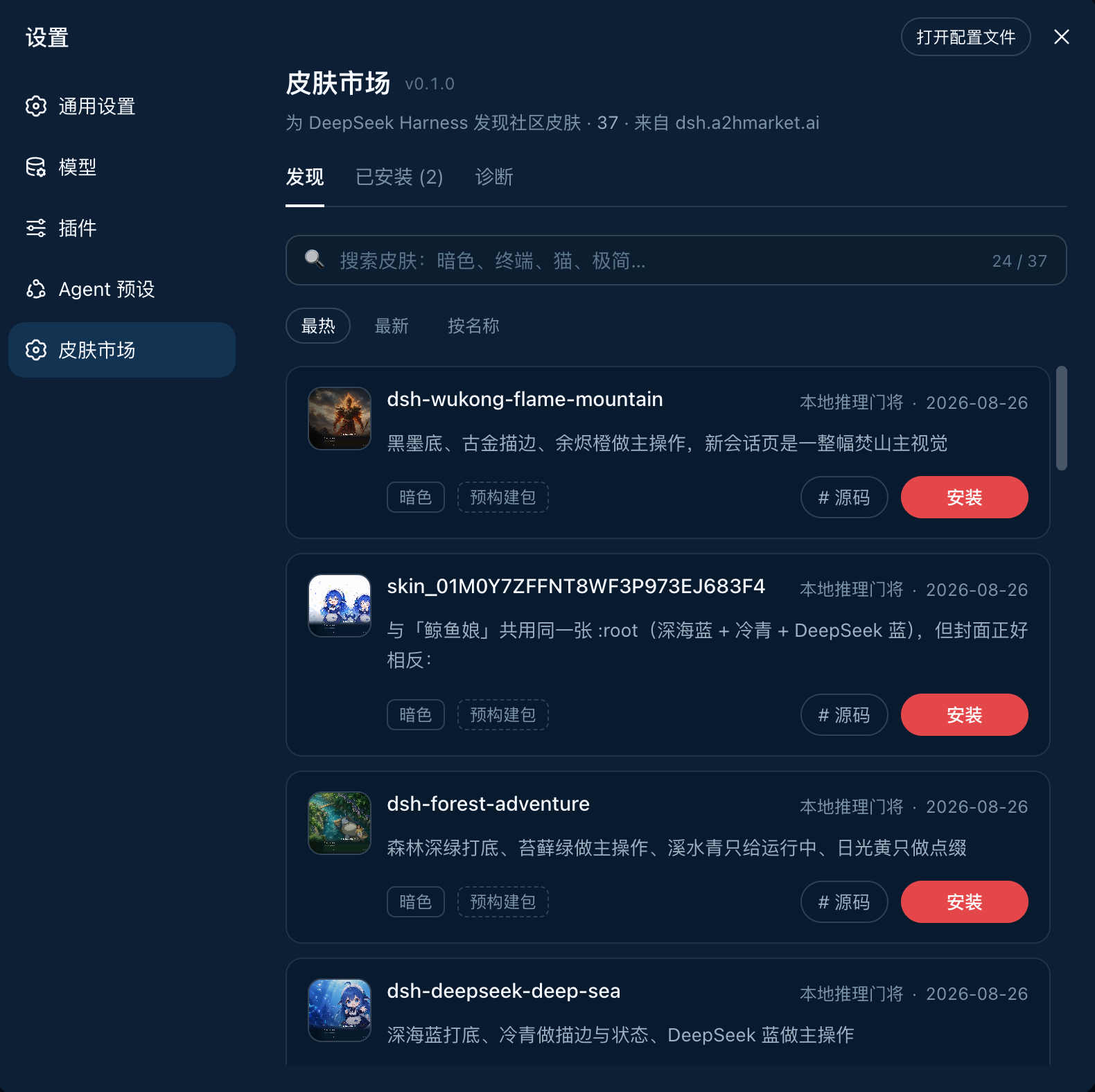
|
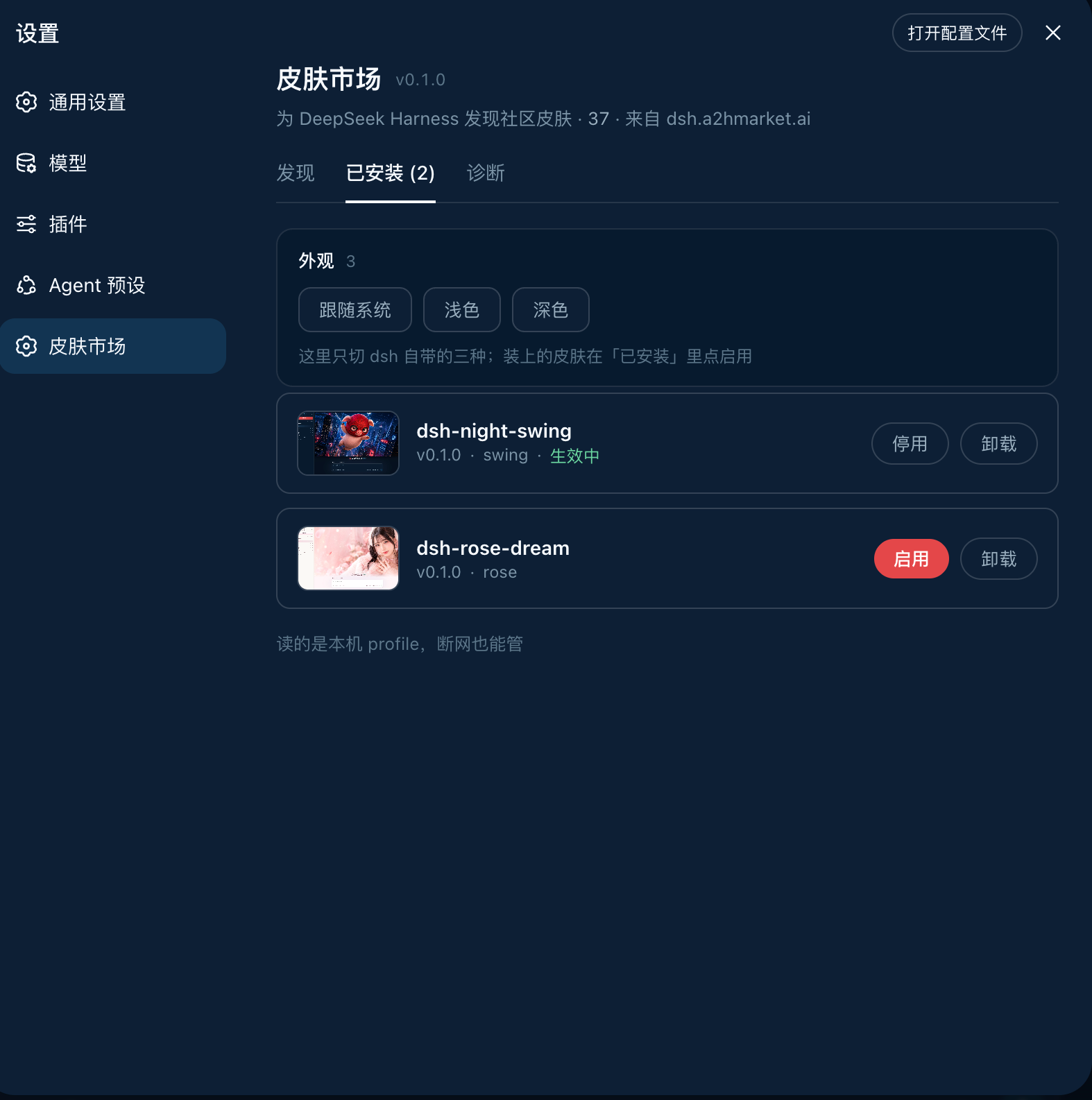
|
DiscoverSearch, sort, install in one click. Each card states whether the skin is a prebuilt package or built from source — so you know whether the click costs seconds or minutes before you make it. |
InstalledVersion, theme id, enable / disable, uninstall. It reads the local profile, so it works offline — even the previews are served locally, with no extra network use. |
Diagnostics · pnpm, the profile path, registry connectivity and the full output of the last install — the first screen to check when something will not install, and far more useful than a screenshot
The source of every official skin on the site lives in dsh-skin-pack.
Install
dsh plugin --profile web add -w github:keman-ai/dsh-skin-market
Restart dsh once, then open Settings → Skin Market.
dsh --profile web
From then on, installing a skin only takes a page refresh — no restart, no commands.
-wis not optional. The profile directory ships apnpm-workspace.yaml, so pnpm reads it as a workspace root and refuses to install (ERR_PNPM_ADDING_TO_ROOT).-wis the "yes, install into the root" declaration, anddsh pluginforwards it to pnpm verbatim. Both pnpm 8 and 10 need it.
The repository ships its build output (lib/) and has no prepare script, so pnpm runs no build script when installing from a git source and you never have to grant allowBuilds.
If you run harness from source, replace both dsh commands above with pnpm dsh inside the harness directory.
Uninstall
dsh plugin --profile web remove dsh-skin-market
Skins installed through the market do not disappear with it — they are independent dependencies in the profile, uninstalled individually from the market's Installed tab.
Requirements
Browsing needs only dsh and a network. Installing is what needs the command-line tools, because installing is fundamentally running pnpm on your behalf.
| Dependency | Requirement | What happens without it |
|---|---|---|
| DeepSeek Harness | 0.1.0-rc.6+ (tested on rc.7) |
Earlier versions lack settings.section and the browser module table, so the plugin cannot mount |
| profile | Must be the web profile | headless / tui bundles have no webServer, so the plugin never activates |
| Node.js | >= 20 (tested on 24) |
dsh's own requirement; the plugin does not raise it |
| pnpm | On PATH (tested on 8.15 and 10) |
Affects installing only. Diagnostics flags it red and the install button reports a clear error, while browsing and search continue |
| git | Only for GitHub-source skins | Most catalog skins now use Release tarballs (no git needed); only a few remain github:owner/repo sources |
| Network | dsh.a2hmarket.ai; also github.com for GitHub-source skins |
An unreachable registry falls back to the cache or bundled snapshot, and the page says so |
| Browser | Installing requires a direct local connection (loopback) | Remote access can browse and search; installing is refused |
The plugin itself has a single runtime dependency: yaml, used to read and write the profile's patch file.
Configuration
No configuration is needed by default. To change something, append a section to the profile's cordis.patch.yml ($DSH_HOME/profiles/web/cordis.patch.yml) overriding this plugin's row by id:
- id: skin-market
  name: dsh-skin-market
  config:
    # Point at a different registry (for a self-hosted catalog). Include the context path.
    catalogOrigin: https://dsh.a2hmarket.ai/dsh-skin
    # Turn this off for a read-only market: browsing and search work, and the install
    # button no longer touches your machine.
    allowInstall: true
Development
pnpm install
pnpm build     # → lib/index.js (host half) + lib/client.js (browser half)
pnpm check     # type check
pnpm test      # unit tests
After changing code, run pnpm build again and restart dsh. When the plugin is installed into a profile with link:, there is no need to add it again.
更多「主题与皮肤」插件
dsh-qq2006
作者 laplaceyoung
DSH (DeepSeek Harness) 的 QQ2006 皮肤插件:注册 qq2006 主题、镜像 body[data-ds-skin]、全局皮肤表与完整素材
dsh-beauty-skins
作者 xierw
给 DeepSeek Harness 用的美女系列皮肤:设置里从 哲风壁纸 拉预览网格,点一张即应用,配色从壁纸提取。支持动态壁纸,也保留自定义选图。
deepseek-harness-skin
作者 heigeai
DeepSeek Harness 换肤系统:21 套内置皮肤 + 一张图生成整套配色的自定义皮肤。数据源驱动,保对比度推导,构建期校验可读性。
whaleisle
作者 chisaalter
鲸屿 Whale Isle · DeepSeek Harness 开源社区桌面版:AI 对话、终端与 Git、鲸桥 API/订阅接入、主题壁纸、鲸鱼娘桌宠、用量统计与手机远程连接。Community-enhanced DeepSeek Harness desktop client.