
dsh-jenkins
精选清单收录维护状态: 活跃jsoncode/dsh-jenkins
可以在DeepSeek Harness中,快捷配置和管理多台 Jenkins 服务器与 Token, 支持设置页配置、模型工具触发构建、工作区级「执行 Jenkins Job」入口。无硬编码路径、 全量 TypeScript、可发布到 npm / GitHub。界面文案中英双语(跟随主界面语言)。
$ dsh plugin add dsh-jenkins3
星标
1
Fork
JavaScript
语言
2026-08-16
创建于
2026-11-11
最近推送
README
dsh-jenkins
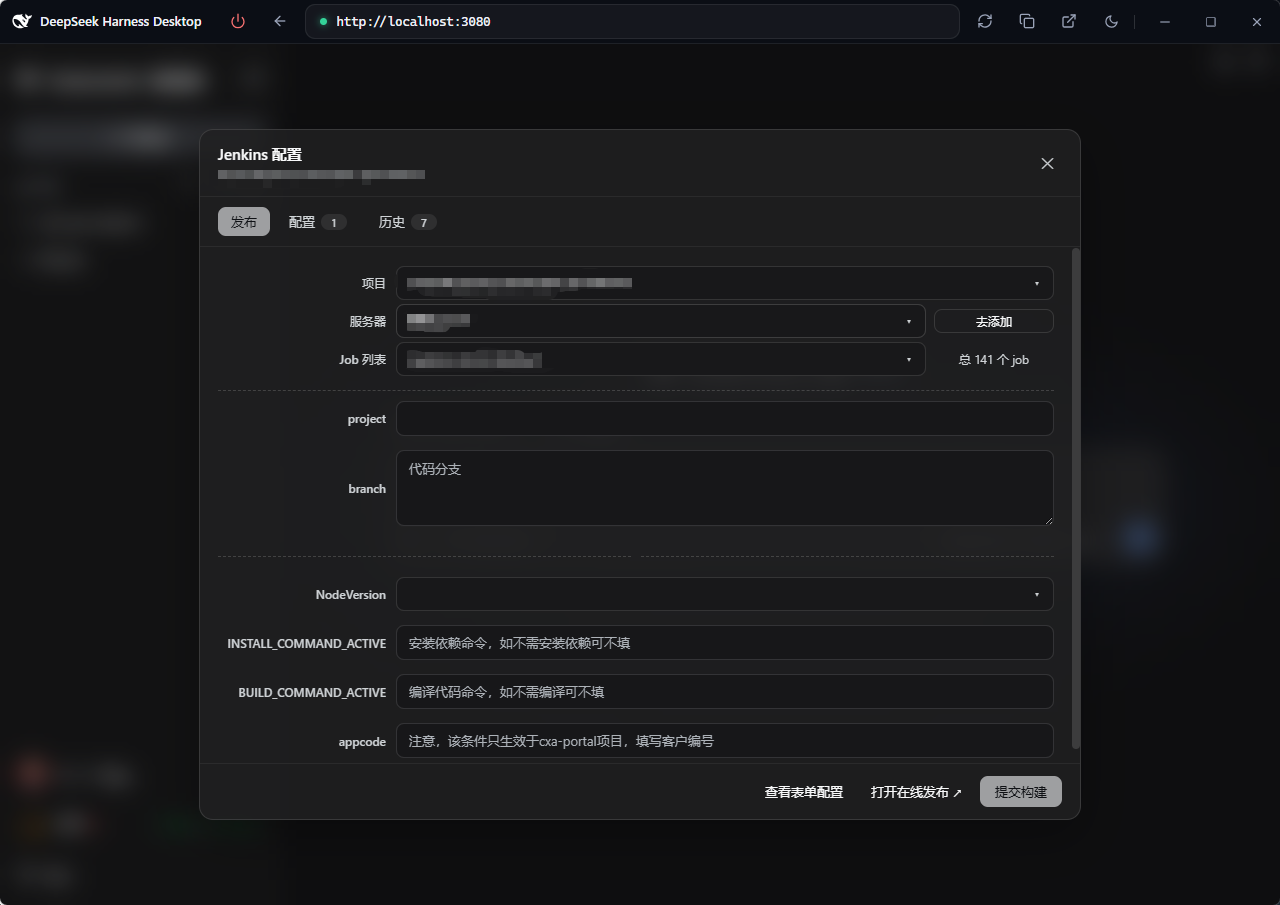
dsh-jenkins is a Jenkins management plugin built on the DeepSeek Harness (DSH) host, centralizing multiple servers and jobs for fast build publishing.
- Multi-server / multi-job management — configure and manage multiple Jenkins servers and jobs in one place
- One-click publishing — trigger parameterized builds, track queue → building → result in real time
- Logs & operations — view build logs, stop or cancel builds at any time
- Bilingual UI — follows the host interface language (中文 / English)
Available from the Settings page (the single UI entry since DSH 0.2.2-rc.1) and model tools.
Preview
Screenshots of the Settings page, workspace entry and run/history modals: see preview.md.
Features
- Settings → Jenkins Config page (
settings.section— the single UI entry): a "Jenkins Config" row (with a Jenkins-logo nav icon) in the settings dialog's left menu; the page embeds four tabs — Publish / Config / Local records / Server history. Its title row carries the task status capsules (building / done-unread / "Update" pill) and a workspace picker (defaults to the current session's workspace, manually switchable). Add / edit / delete multiple servers (URL, username, Token), test connections, skip TLS verification. Only Server URL and Token are required (username defaults toadmin). Secondary modals (build log / server editor / project config / update changelog) render as top-level viewport overlays, never clipped by the settings panel. - Project Config (
$DSH_HOME/dsh-jenkins-map.json): every project's publish targets in one file — project name → target array, with elements identical to a workspace config file ({ name?, job, server, environments }). Each env can carry anamedisplay label (e.g.uat环境/prod灰度/prod环境) and the number of envs is unlimited (an empty name falls back to UAT / Prod / Env N). Adsh-jenkins.json/js/tsin a project root is discovered automatically (folder name as the project name, missing-only — nothing you edited is overwritten), so there is usually nothing to maintain by hand; to edit, click Edit map on the Project Config row of the Config tab (form / JSON). See Project config. - Publish tab (inside the settings page): just three rows — project → server →
job — then the parameter form, build triggering and status polling (queued →
building → result, 10-minute timeout). The env has no row of its own: each env
in a project config is a server, so env selection lives in the Server
dropdown — whose labels show only the plugin's server name (never a mix of the
config's env name and the server name), and picking one switches the job / params
to that env. Config
serverrefs are matched against configured servers by name → id → full URL → domain (the domain level ignores scheme, port and context path). The dropdown shows the intersection of the servers referenced by the project config and the servers configured in the plugin; the last parameters are remembered per project and auto-echoed next time. - Model tools (docs/develop/basic/tool):
dsh_jenkins_build,dsh_jenkins_status. - Config (docs/develop/basic/config): Schemastery
Config+ a plugin data file$DSH_HOME/dsh-jenkins.json(server tokens encrypted with the machine-bound key$DSH_HOME/dsh-jenkins.key, cache in plaintext); the project config is its own file$DSH_HOME/dsh-jenkins-map.json(plaintext, hand-editable). Since DSH 0.2.2-rc.1 the legacysettings.yamldocument is migrated by the host framework itself — the plugin no longer reads or writes it (when the data file is missing it is seeded from the bundle entry'sconfig.servers); a legacyprojectsfield insidedsh-jenkins.jsonis migrated into the new file (missing-only). - Packaging (docs/develop/basic/publish):
dsh.bundle+dsh.client(web) manifests.
Structure
├── src/host/*.ts       # Host half: index.ts (entry), jenkins.ts (curl core), ops.ts (op dispatch), project-map.ts (project config file), projects.ts (normalize/merge), workspace-config.ts, types.ts
├── src/client/*.tsx    # Browser half (React TSX): settings.section entry page (embedded 4 tabs), publish/project/history tabs, secondary modals
├── lib/index.js        # Host half build artifact (tsdown, ESM), committed for git installs
├── lib/client.js       # Browser half build artifact (tsdown → __ModuleLoader__ factory), committed
├── lib/types/          # Type declarations (generated by tsc -b)
├── scripts/            # verify-client.mjs (host-seed simulation check) + isolated tests
├── examples/           # sample configs: dsh-jenkins.json (workspace array), dsh-jenkins-map.json (central map)
├── tsdown.config.ts    # tsdown build config (node half + client bundle banner wrapper)
├── tsconfig.json       # solution: references tsconfig.host.json / tsconfig.client.json
├── cordis.patch.yml    # Bundle patch: plugin row referenced by package name (no paths)
├── package.json        # dsh.bundle + dsh.client(web) manifests + peerDependencies
├── README.md           # This file (English)
├── README.zh.md        # 中文文档
└── preview.md          # Screenshot preview (references assets/preview/*.png)
Workspace config file (dsh-jenkins.json / .js / .ts)
Place it in the workspace root. It is an array; each element is one deploy
target (job + server + environments params). .json is parsed directly; .js / .ts
are evaluated with node (CJS module.exports or ESM export default):
[
  {
    "job": "build-app",
    "server": "http://uat.example.com",

[在 GitHub 阅读完整 README →](https://github.com/jsoncode/dsh-jenkins)更多「网页与浏览器」插件
anysearch-dsh
作者 anysearch-team
为 DeepSeek Harness 提供的 AnySearch 网页搜索提供方与高级搜索工具。
dsh-find-plugin
作者 awesome-dsh-plugin
Find DSH plugins inside the agent — live GitHub dsh-plugin topic search, star-ranked / 会话内搜索发现 DSH 插件
fnos-dsh
作者 fnosp
DeepSeek Harness应用与harness插件 monorepo
modsearch
作者 liustack
🥇 The strongest free web search plugin for DeepSeek Harness, and the search bridge for every model without native web access. Free, no signup, no API key. Ask the web or X, get structured JSON evidence. | 🥇 全网最强的 DeepSeek Harness 免费联网搜索插件,免费免注册免 API key。为不能联网的模型补上搜索,问网页或 X,拿回结构化 JSON 证据(搜索、抓取、引用)。