
README
dsh-plugin-mindmap
MindMap — a DeepSeek Harness plugin that distills a conversation into persistent storylines and renders them as an interactive map.
中文文档 | English
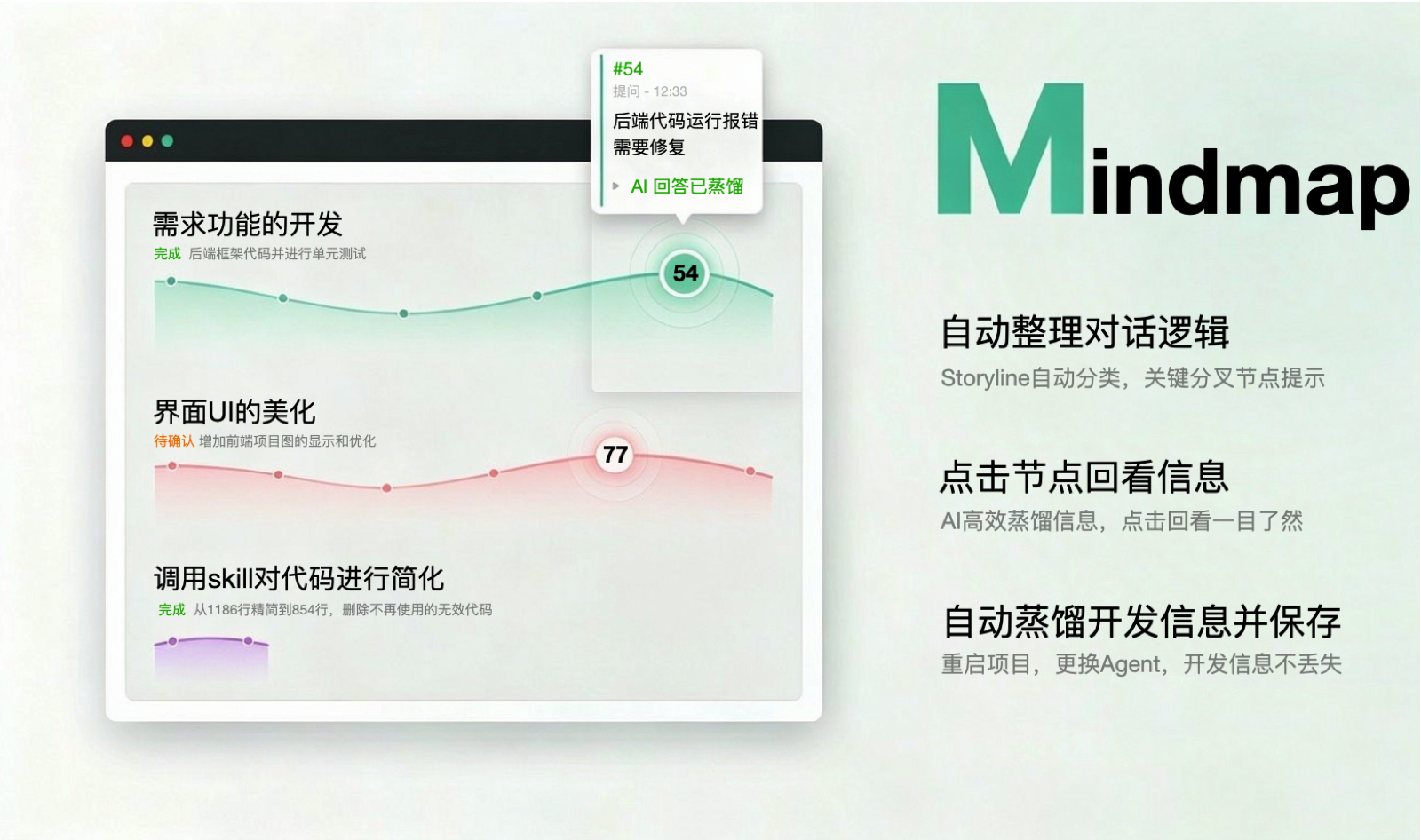
Highlights
- Auto-organizes conversation logic and identifies key forks in thinking. Every storyline is one independent topic; rule-first, LLM-fallback classification runs incrementally — each new message is decided once (append / fork / new), never re-clustered in bulk.
- Click a node to revisit any past Q&A — efficiently distilled. Each node opens a detail card with the question, one-line summaries of tool calls, and the answer. Long storylines fold into multiple rows at semantic breakpoints, with bold labels marking the turns.
- Auto-distilled, persisted development memory. The classification is stored in
DEV_LOG.jsonat the workspace root. Restart the project or switch agents — the map reloads instantly with 0 LLM calls and keeps its memory.
Features
- Storyline map tab (
MindMapin the session view): one row per topic, bezier gradient ribbons, six node shapes (question / decision / feature / bugfix / refactor / research). - Status badges under every title:
进行中(ongoing, green) /有阻塞(blocked, amber) /已完成(done, blue) /讨论结束(discussion ended, gray), followed by a one-line description. - Instant open:
DEV_LOG.jsonexists and its format version matches → no rebuild, 0 LLM; new messages sync in the background and refresh automatically. - Background progress: full rebuilds show a progress bar; incremental syncs show a small hint.
Install
Prerequisite: DeepSeek Harness installed (dsh command available), a web profile in use, and pnpm on PATH (dsh plugin forwards to pnpm; install it with npm install -g pnpm if missing).
dsh plugin --profile web add github:ImCabbage/dsh-plugin-mindmap
-
The command installs the package into the profile with pnpm and adds it to the profile's bundle list automatically (the package declares
dsh.bundle). The host and browser bundles are prebuilt and shipped in this repo — no build step and no build-script allowlist are needed. The install writes into$DSH_HOME/profiles/<name>, so that directory must be writable. -
Restart the web process: stop the running
dsh weband start it again. Refreshing the browser page is not enough — the composition is fixed at boot. -
Verify the row is mounted:
dsh --profile web --dump-config | grep mindmapYou should see
- id: mindmapnext toname: dsh-plugin-mindmap. -
Open any session — a MindMap tab appears in the view tab bar.
The plugin creates
DEV_LOG.jsonin the workspace root of every project you use it with — that file is the distilled memory itself. Add it to the project's.gitignoreif you don't want to commit it.
Troubleshooting
dsh: pnpm not found on PATH— install pnpm first:npm install -g pnpm.- Permission /
EROFS/ read-only errors — the install writes into$DSH_HOME/profiles/<name>; run it from an environment where that directory is writable. - An
allowBuildshint printed bydshafter a pnpm failure — this plugin has no build script (prebuiltlib/ships in the repo), so that hint does not apply and can be ignored; check the real pnpm error above it. - The first open keeps showing "梳理新消息 / syncing" for a long time — the first full distillation needs working model credentials (LLM calls). The tab shows a warning line when LLM calls fail; check your model credentials and network.
Local development
dsh plugin --profile mindmap-test add .
(A separate test profile keeps your daily web profile untouched.)
Usage
- Chat normally; MindMap classifies in the background (progress is shown inside the tab).
- Open the MindMap tab:
- each colored ribbon is one independent topic, nodes ordered left-to-right by time;
- click a node: focus its storyline and open the detail card (question / tool-call summaries / answer);
- click empty space: clear focus;
- the small line under each title is its current status (badge + description).
- The first open (or a
DEV_LOGformat upgrade) runs one full distillation with a progress bar; after that every open is instant.
How it works
- Host half (
src/host): theMindMapGatewayservice (Typert remotesmindmap/graphandmindmap/progress) reads the session log, classifies incrementally (rules + LLM), reads/writesDEV_LOG.json, and runs background sync tasks with progress. - Client half (
src/client): registers theMindMaptab in theconversation.viewslot; fetches the graph throughctx.remote, renders instantly fromDEV_LOG, and polls background progress for auto-refresh. - RPC: Typert protocol, with manifests hand-written in
src/host/typert.host.js(host side) andsrc/host/typert.remote-client.js(client mount side), strict zod codecs.
Develop
npm install
npm run build        # esbuild: lib/index.js (host) + lib/client.js (browser bundle)
Rebuild after changes, then restart the test profile's dsh web. Note: the built lib/ is committed to this repo — git installs use it directly — so commit it together with the source changes.
License
更多「其他」插件
deepwiki-rs
作者 sopaco
基于代码生成结构化技术文档与适合 AI 智能体使用的上下文,方便团队理解和协作。
dsh-plugin-radar
作者 adamplatin123
DSH Plugin Radar — open-source ecosystem radar for DeepSeek Harness plugins: continuous discovery (21k+ candidates), k8s runtime validation (13k+ tests), 15-min snapshots; the catalog is a generated artifact — 开源 DSH 插件生态雷达:持续发现 2.1 万+ 候选、k8s 运行级实测 1.3 万+、15 分钟快照;插件目录为自动生成的产物
dsh-purge
作者 yujunzhixue
DeepSeek Harness 破甲:让所有模型都能破甲,不同模型可换不同提示词;默认提示词面向国模「小码酱」。Jailbreak for every model — swap prompts per model. 求 Star 收藏 ⭐
picgo-core
作者 picgo
强大的图片上传引擎,同时支持 CLI 与 API。