
README

dsh-ds-balance
DeepSeek account balance in the DSH sidebar
把 DeepSeek 账户余额放进 DSH 的左边栏




Per-version changes → Releases (one-to-one with npm versions)
A status ring is pinned to the bottom of the sidebar; clicking it shows the actual balance figures. To change settings, open the Plugins page in the sidebar and pick this plugin. The key and the account both follow the official Models page, and the endpoint is the official one — none of the three is set here.
Data and credentials
The balance is read directly from the official DeepSeek API, not estimated from usage.
- The credential is resolved through DSH's credential channel; the plugin stores no key of its own: a key never lands in a settings file.
- The UI only ever sees a head-and-tail mask (
sk-cf08d*****3b84, the same shape the DeepSeek platform console uses); the full key never crosses the wire, is never logged, and is never written to any file of this plugin. - Only
api.deepseek.comis contacted; no other traffic is proxied or forwarded. - Balance snapshots are stored per credential — changing the key starts keeping records afresh, so old figures are never mixed in.
Getting started
Prerequisites: DSH on its current RC line (specify @next when installing); Node >= 20. The only source for the compatible range is engines.dsh in package.json.
-
Install the host. Neither
latestnoralphais the line we declare, so specify the version line:npm install -g @deepseek-ai/dsh@next -
Install the plugin:
dsh plugin --profile web add dsh-ds-balance -
Start (or restart)
dsh --profile web; the balance entry appears at the bottom of the sidebar.
From source: git clone, then pnpm install && pnpm run build, then dsh plugin --profile web add "$PWD" — the same restart applies.
That pnpm install cannot be skipped: under a path install the repository supplies its own dependencies, and missing them makes the plugin show as "not running".
What it shows
Three surfaces, each with one job:
| Surface | Where | What it does |
|---|---|---|
| Status ring | Pinned to the bottom of the sidebar | See at a glance how much is left and how close you are to the warning threshold |
| Balance popover | Click to expand | See the total, the granted / topped-up split, and how many minutes old the data is |
| Settings card | This plugin's details page under Plugins | Check both ways of reading your balance, and set the currency, the warning thresholds and the refresh cadence |
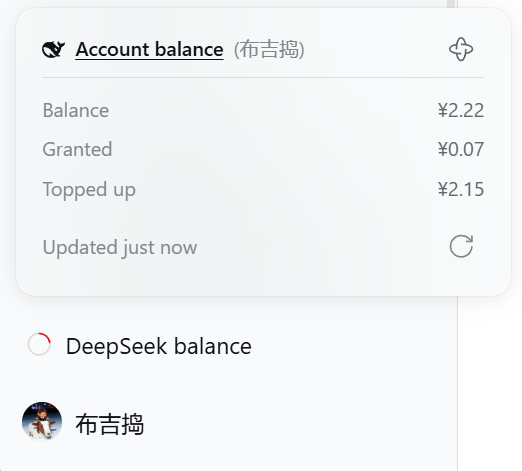
The entry is pinned to the bottom of the sidebar; clicking it opens the balance popover: the total, the granted / topped-up split, how many minutes ago the data was, and manual refresh at the bottom right.
The ring itself is "what is going on right now", five states you can tell apart at a glance:
| The ring | Meaning | What you do |
|---|---|---|
| Coloured ring + an arc | There is a balance; the colour says more or less | Read the number |
| Grey ring + a rotating gap | Fetching, no result yet | Wait |
| Grey ring + a + in the middle | Not connected to your account yet | Configure it |
| Grey, empty ring | Connected to your account, which simply has no balance | Nothing |
| Red ring + a cross in the middle | No usable number here | Check it |
What each thing is
更多「用量与计费」插件
dsh-cost-meter
作者 han-1413141
DeepSeek Harness 会话与当日 API 费用、预算与官方余额统计插件:历史看板、峰谷计价与官方价格一键同步。
dsh-usage-stats
作者 ychris12138
为 DeepSeek Harness Web GUI 提供提供方余额、订阅额度与 Token 用量分析。
dsh-plugin-langfuse
作者 linyp
Langfuse 可观测性插件:以 OpenTelemetry 追踪树导出会话至 Langfuse OTLP 端点
dsh-token-usage
作者 laoyuehanni
贴近 DSH 原生设计风格的 token 用量统计插件:实时记录每次请求的用量与费用,在 Web UI 中提供趋势图表、按模型定价明细和供应商配额显示。