
README
dsh-side-chat
Ask a focused follow-up about selected text without leaving your current DeepSeek Harness conversation.
Compatibility: this release targets
@deepseek-ai/dsh@0.1.0-rc.7exactly.
Install
Install DSH rc.7 if it is not already available. Refresh only this package's registry metadata before adding it, so pnpm cannot reuse an older latest value immediately after a release:
npm install --global @deepseek-ai/dsh@0.1.0-rc.7
pnpm cache delete "@ahggg/dsh-side-chat"
dsh plugin --profile web add @ahggg/dsh-side-chat@latest
Start DSH from the project you want the agent to work in:
cd E:\path\to\your-project
dsh web --port 3080
Open the URL printed by DSH. The plugin loads automatically in the Web client.
Local linked development
When dsh plugin --profile web list shows the plugin coming from a link: workspace, DSH loads the Git-ignored lib/client.js, not src/. Rebuild after switching branches or changing client source, then restart the dsh web process:
pnpm install --frozen-lockfile
pnpm build
Use Side Chat
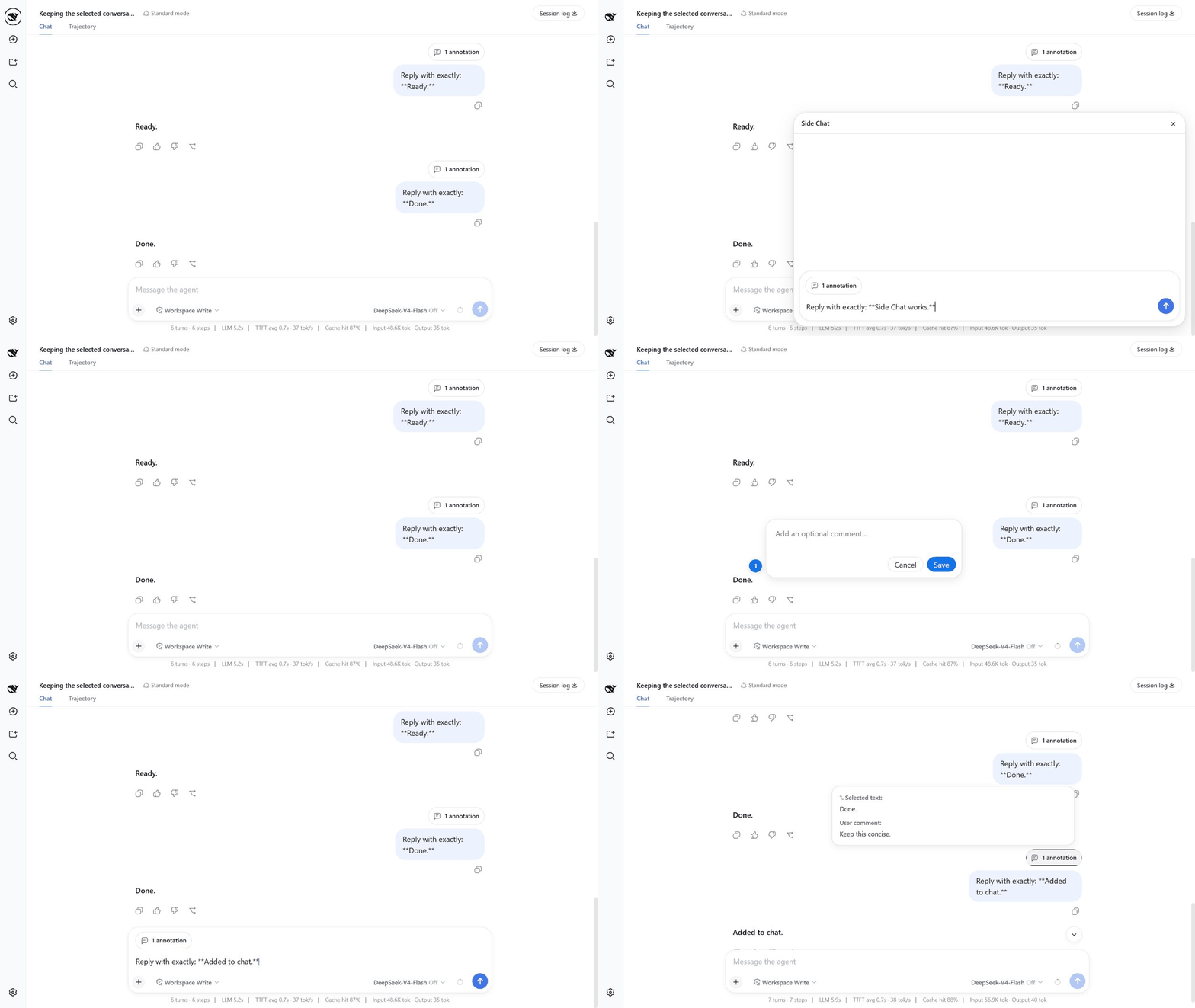
On phones and tablets, long-press text in a completed message to select it. The Side Chat action bar appears below the selection when there is room, leaving the browser's native selection bar above it. Use Add to chat, More details, or Ask in side chat directly from the touch action bar.
- Complete at least one turn in the main conversation.
- Select text inside one completed user or assistant message.
- Click
Add to chatto add an optional comment before attaching the passage to the main composer,More detailsto send an explanation request immediately, orAsk in side chatto write a focused question. - When writing your own message or question, press
Enterto send it. - Press
Escor click×when you are done.
Useful details:
Shift+Enterinserts a newline.- Use the model control beside Send to choose a provider/model and its available reasoning effort. The choice belongs to Side Chat, does not change the main conversation, and becomes the global default for the next Side Chat.
- After clicking
Add to chat, pressEnteror clickSaveto keep the annotation. Click outside the comment box or clickCancelto discard it. Add to chatkeeps any existing draft text and can collect multiple numbered passages, each with its own optional comment, in one annotation capsule.- The input grows with its content and becomes scrollable at its maximum height.
- While a reply is running, the send icon becomes a stop button.
- Assistant replies use DSH's native Markdown rendering.
- Hover over
N annotationsto preview every selected passage and its comment. - Before sending, hover over the annotation capsule and click
×to remove it; after sending, the same capsule appears above the user message. - The main conversation stays visible and is never switched to the child Session.
What happens to the conversation
The first send creates a real DSH Session fork at the selected message. The child inherits the complete event prefix, presets, and workspace. Its initial model choice uses the last accepted Side Chat choice when one is saved, otherwise it snapshots the parent configuration; later model or reasoning-effort changes apply to subsequent child steps without changing or following the parent conversation. Keeping the prefix unchanged is friendly to provider prompt caching, although a cache hit is never guaranteed.
Closing Side Chat stops active work, archives the child Session, and releases its Agent. It does not delete the child's history from disk. The child and copied prefix therefore consume normal DSH Session storage.
The parent and child share the same workspace. File changes, commands, and other tool side effects made in Side Chat are real and are not reverted when the panel closes.
Current limitations
- A selection must stay inside one completed message.
- Attachments and
/sideare not supported yet. - Closed Side Chats cannot be reopened from the panel.
- There is no automatic history cleanup or “keep as normal chat” action.
- An archived child may briefly appear in normal Session lists.
Upgrade or remove
Refresh this package's registry metadata, update to the latest stable version, and restart DSH:
pnpm cache delete "@ahggg/dsh-side-chat"
dsh plugin --profile web update @ahggg/dsh-side-chat --latest
Remove the plugin with:
dsh plugin --profile web remove @ahggg/dsh-side-chat
License
MIT
References
更多「会话与消息」插件
memos
作者 memtensor
面向 LLM 与 AI 智能体的自进化记忆系统,提供超持久记忆、混合检索与跨任务技能复用,可显著节省 Token。
dsh-anchored-standard
作者 xiaobright
DeepSeek Harness 两阶段预设:先最小对齐引导,再启用完整标准工具集。
mem9
作者 mem9-ai
每轮自动回忆 + 后台智能摄取 + 五个记忆工具,为 DSH 加持记忆。
mindmemos
作者 mindscale-noah
为 DSH 智能体提供跨会话持久记忆,每轮自动召回相关上下文并回写经验,通过模式学习与技能蒸馏持续进化。