
README
@addozhang/dsh-discord



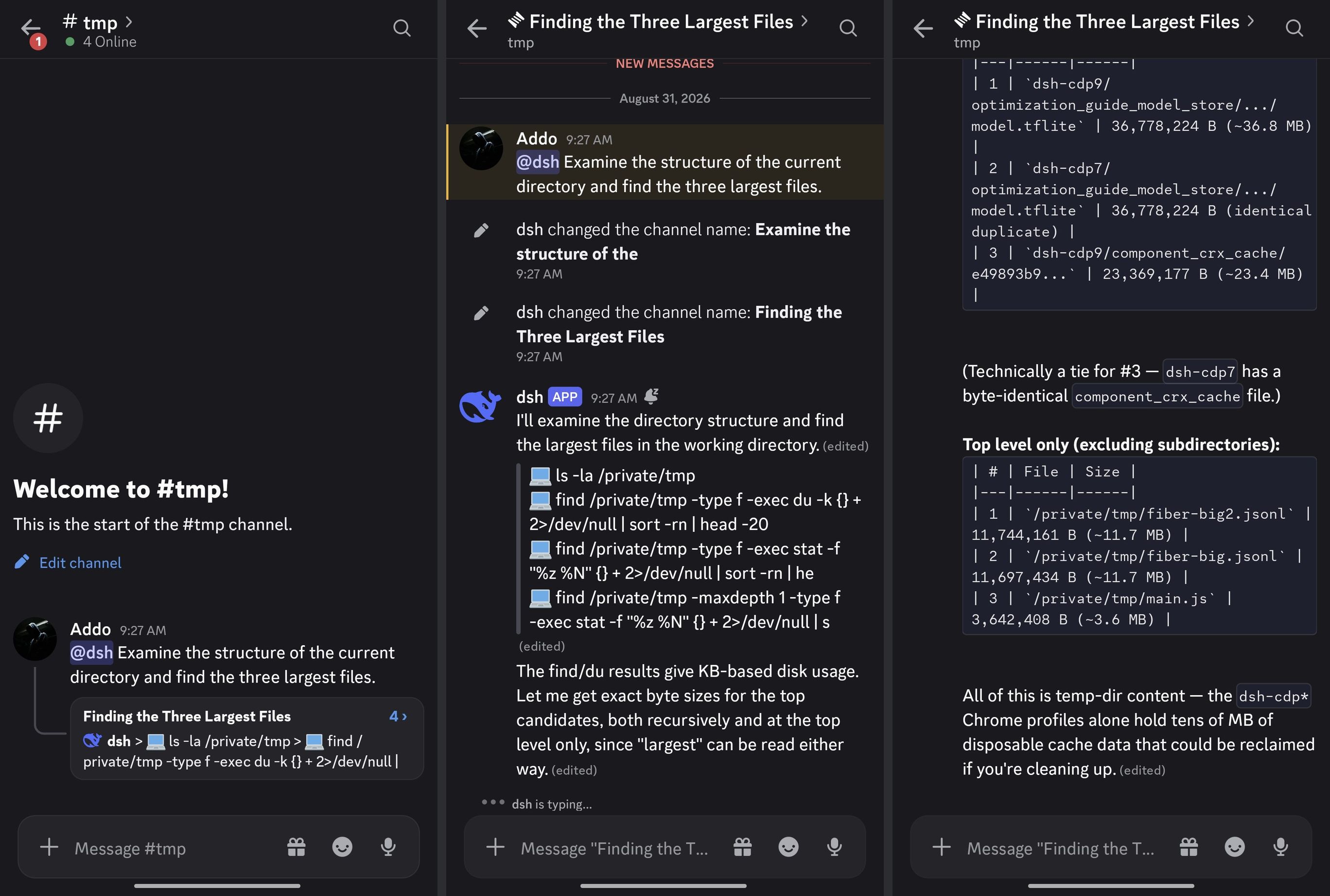
A Discord-first adapter for DeepSeek Harness: run DSH sessions from your Discord guild — mention the bot with a task, a thread opens, the answer streams in, and approvals and questions arrive as buttons you can answer from your phone.
No extra process: the adapter is a DSH plugin that mounts straight onto your dsh web profile. Session state stays in DSH; durable bindings live in the profile's storage domain.
Features
- Mention-driven sessions — an authorized
@bot <task>in a bound channel anchors a thread (your message becomes the first post), creates the DSH session, and submits the prompt at most once. Follow-ups inside the thread queue without a mention. Attached images ride along: they are downloaded from the Discord CDN within strict size/host bounds and submitted as image parts for multimodal models. Text-capable files (text/*plus JSON, XML, YAML, NDJSON, JS/TS, SQL, GraphQL and TOML) ride along as labelled text parts — a file-only message starts a real turn instead of being silently dropped; unsupported binary attachments get a visible notice. - Stream rendering — typing indicator, one head message edited in place, per-tool activity rows, fenced long-answer splitting, one-time finalize; the activity message is deleted when the turn ends.
- Approvals & questions (dual surface) — DSH asks become buttons, select menus, and a free-text modal, mirrored to the web/desktop panel at the same time: the first surface to answer wins and the other auto-retires (Discord carries the ask alone when no web client is connected). Ownership is enforced (the asker — or the thread owner on later turns — clicks), expiry sweeps fail closed, and settled controls grey out in place.
- Session control —
/steer,/stop, and/queue list|removeauthorized by the thread binding (the shared control surface);/project bind|list|infoand/session resumefor guild↔workspace binding and history;/guild forgetfor operator cleanup. - Model selection —
/model showreads the session's live model directory;/model selectwalks an interactive provider → model → reasoning cascade, or applies a typedprovider/modeldirectly. Open to any authorized member by default; restrictable to Host operators. - Adapter status —
/infoshows the adapter version, connection state, and project links (feedback, docs). Works in any channel. - Permission switching —
/permission show/setread and switch the session's permission preset (bundled sandbox + approval tiers) through the Host's own/permissioncommand path, inheriting its journal audit pair;danger-full-accessrequires a button confirmation. - Settings card, bilingual out of the box — token onboarding and connect/disconnect (stored in the Host credential service, never in settings or logs), guild allowlist, auto-archive, and language. Every Discord-visible string ships in Chinese and English; the bot follows the DSH language preference or a pinned choice.
- Hardened by design — deny-first authorization inside an explicit guild allowlist. Mentions are suppressed twice:
allowed_mentionson every request, plus byte-level neutralization of the wire body. DSH submission is at-most-once with unknown-preserving reconciliation — an ambiguous delivery is never blindly resent. Bindings survive restarts, and the READY sweep rebuilds deleted category/control channels while treating a deleted workspace channel as user intent (the mapping retires; the workspace stays bindable).
Requirements
- The dsh CLI, running a web profile. Match the dsh and adapter channels — see Versions.
- Node.js
^22.19.0 || >=24 - A Discord application with a bot user and the MESSAGE CONTENT privileged intent enabled (Developer Portal → your application → Bot → Privileged Gateway Intents)
Versions
Each adapter release follows the dsh host surface it was actually verified against. Pick the adapter and the dsh CLI from the same row:
| Channel | Adapter | dsh CLI | Install |
|---|---|---|---|
| stable (0.2.2 line) | 0.6.10 — npm latest |
0.2.2-rc.5 — npm latest / next |
dsh plugin --profile web add @addozhang/dsh-discord |
| prerelease (0.2.2 line) | npm next still holds 0.6.5-rc.1, which 0.6.10 supersedes — pin an exact version when you need a prerelease |
0.2.2-rc.5 — npm latest / next |
dsh plugin --profile web add @addozhang/dsh-discord@0.6.5-rc.1 |
| Legacy (0.1.7 line) | 0.5.0 — exact version |
0.1.7-rc.1 — exact version |
dsh plugin --profile web add @addozhang/dsh-discord@0.5.0 |
更多「集成与分享」插件
dsh-notification
作者 omdsh-dev
DeepSeek Harness 桌面通知插件,任务完成时提醒,可按结果与关键词规则控制。
dsh-lark-bot
作者 plutokeating
DeepSeek Harness (dsh) 接入飞书/Lark bot,扫码即用:流式卡片、项目工作区、并行任务、多角色 Agent、跨会话通知、对话内模型/密钥管理与安全网守护(dsh 崩溃后飞书仍可自救)。A scan-to-connect bridge bot connecting DeepSeek Harness (dsh) into Feishu/Lark: streaming cards, workspaces, parallel tasks, multi-role agents, cross-session notify, in-chat model/key management, and a safety-net guardian.
dsh-session-notification
作者 dingyi222666
为 Deepseek Harness 提供会话完成等四种状态的通知响应,支持浏览器提示和提示词
dsh-chatgpt-web
作者 wlv-zedd
将标准 ChatGPT Web 直接桥接到 DeepSeek Harness 的 DSH ChatGPT Free 插件。