
DeepSeek Harness upgrade: npm update, verification and rollback for the dsh CLI
A real Windows screen recording, frame by frame: check the version you run, check the registry, update with one npm command, read the receipt, restart and verify — plus the pinned-install command that gets you back out of a bad release.
Last updated: 2026-10-02
The dsh CLI moves fast: release candidates land week after week, and 0.2.0 sits in a pre-release line with real breaking changes. This page walks the whole core upgrade as one calm loop — check what you run, check what's latest, update, read the receipt, verify, restart — using frames from a real Windows recording by coder_Mars. The numbers on screen (0.1.5-rc.1 to 0.1.5-rc.2, changed 520 packages) are examples from that recording, not targets.
One distinction before you start: this page upgrades the dsh CLI itself — the npm global package. Updating the plugins installed into a profile is a separate layer with its own commands, and the two guides link in both directions. That sibling workflow lives in The plugin-update workflow
TL;DR
- ▸Two layers, two jobs: the dsh core updates with npm update -g @deepseek-ai/dsh; plugins update from the Web UI market or dsh plugin update — keep the layers apart.
- ▸The loop: dsh --version and npm view @deepseek-ai/dsh version first, then the update, then dsh --version again and dsh web to prove it boots.
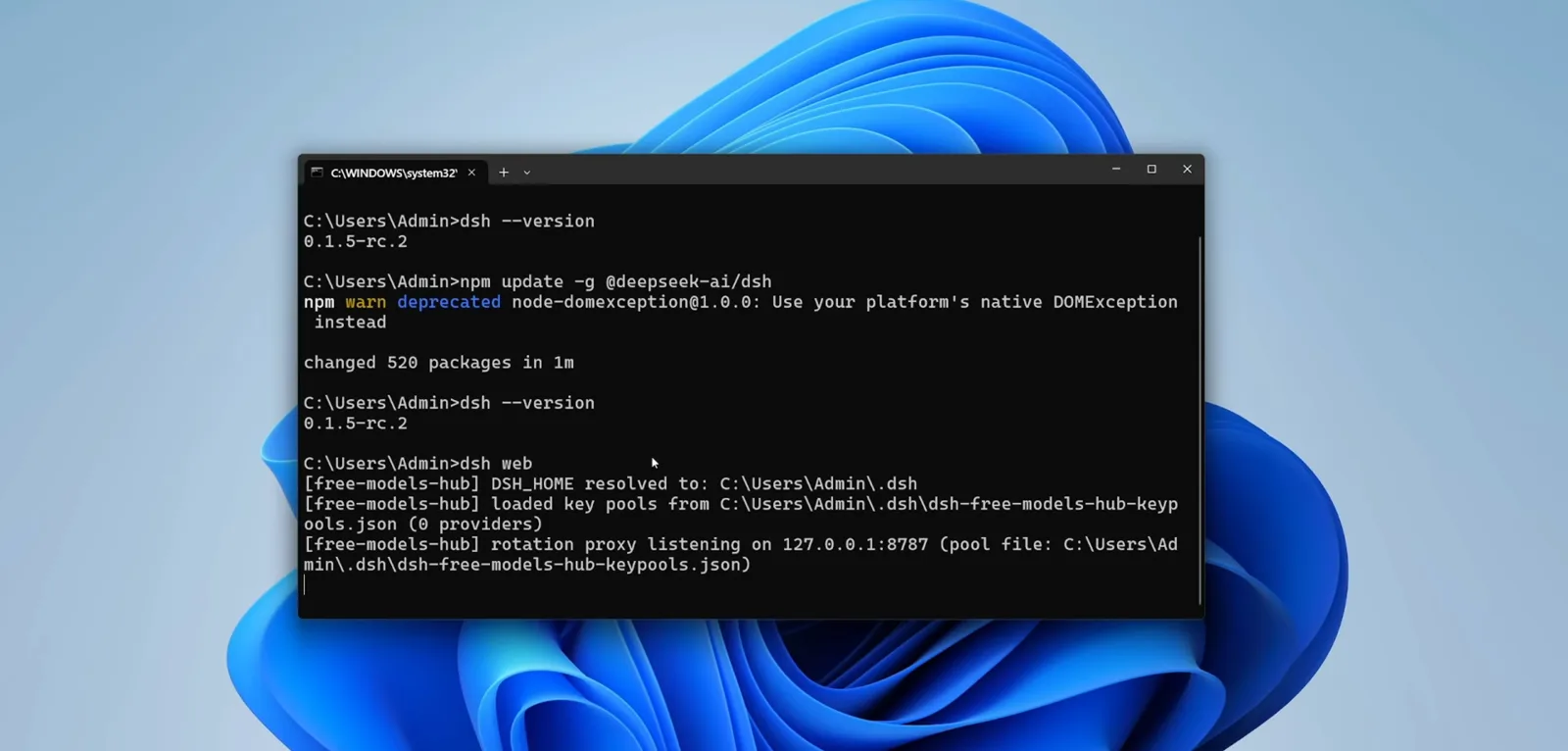
- ▸Warnings are not failures: the recording scrolls past deprecated and EPERM cleanup lines and still ends in changed 520 packages. Judge an update by its receipt line.
- ▸Rollback is one command: npm install -g @deepseek-ai/dsh@<version>. A misbehaving plugin leaves via dsh plugin --profile web remove.
From version check to a proven rollback
Part 1 · Before the upgrade
- 1
Check what you run and what's latest
Two read-only commands open the loop. dsh --version prints the release your machine actually runs — 0.1.5-rc.1 in the recording — while npm view @deepseek-ai/dsh version asks the npm registry for the newest published release, 0.1.5-rc.2 at recording time. Different numbers mean an update is waiting; identical numbers mean you are already current and can stop here.
$dsh --version$npm view @deepseek-ai/dsh version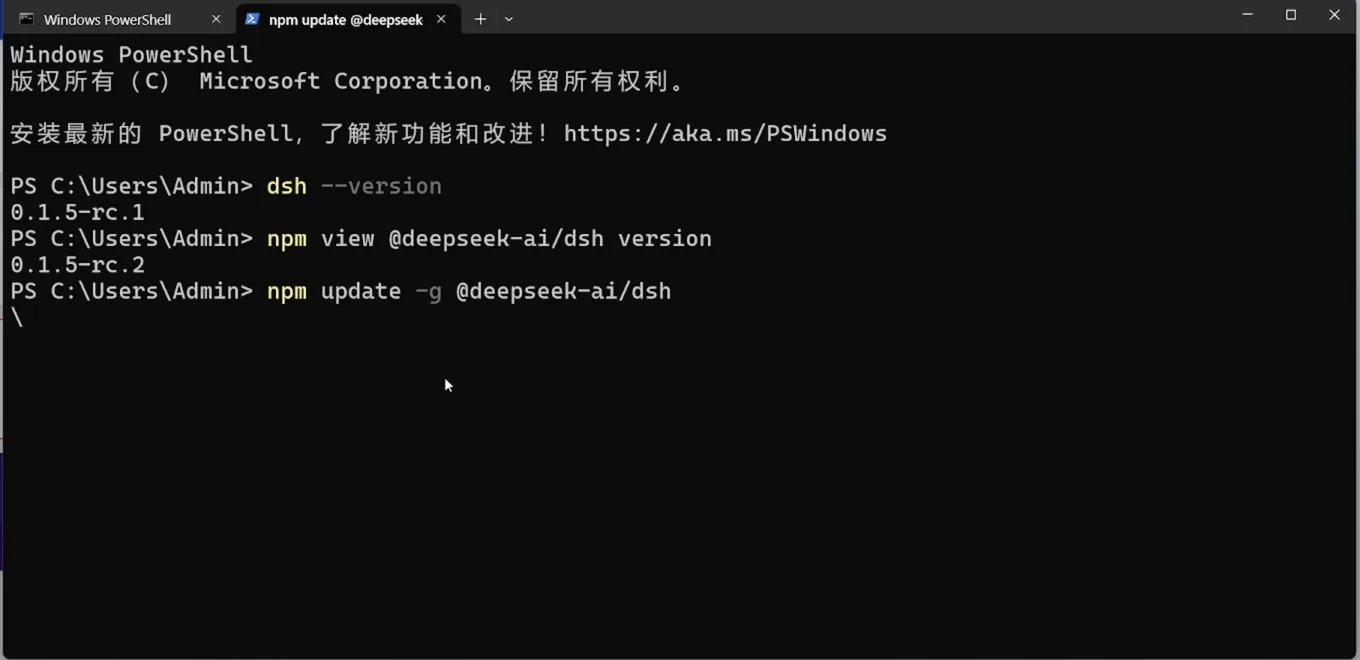
Local 0.1.5-rc.1 vs registry 0.1.5-rc.2 — one look, two versionsWatch at 1:50 - 2
Record a baseline: sessions, plugins, scheduled tasks
Upgrading replaces the program, not your data — config, sessions and installed plugins live in your home directory (the receipt frame shows DSH_HOME resolving to C:\Users\Admin\.dsh). Still, write down what works now: dsh plugin --profile web list prints the installed plugins, and the web UI shows your sessions. If you plan to cross into the 0.2.0 pre-release line, note your scheduled tasks too — the 0.2.0 migration deck is explicit that 0.1.x automation does not migrate automatically. A config backup before a major jump is the cheapest insurance there is.
$dsh plugin --profile web list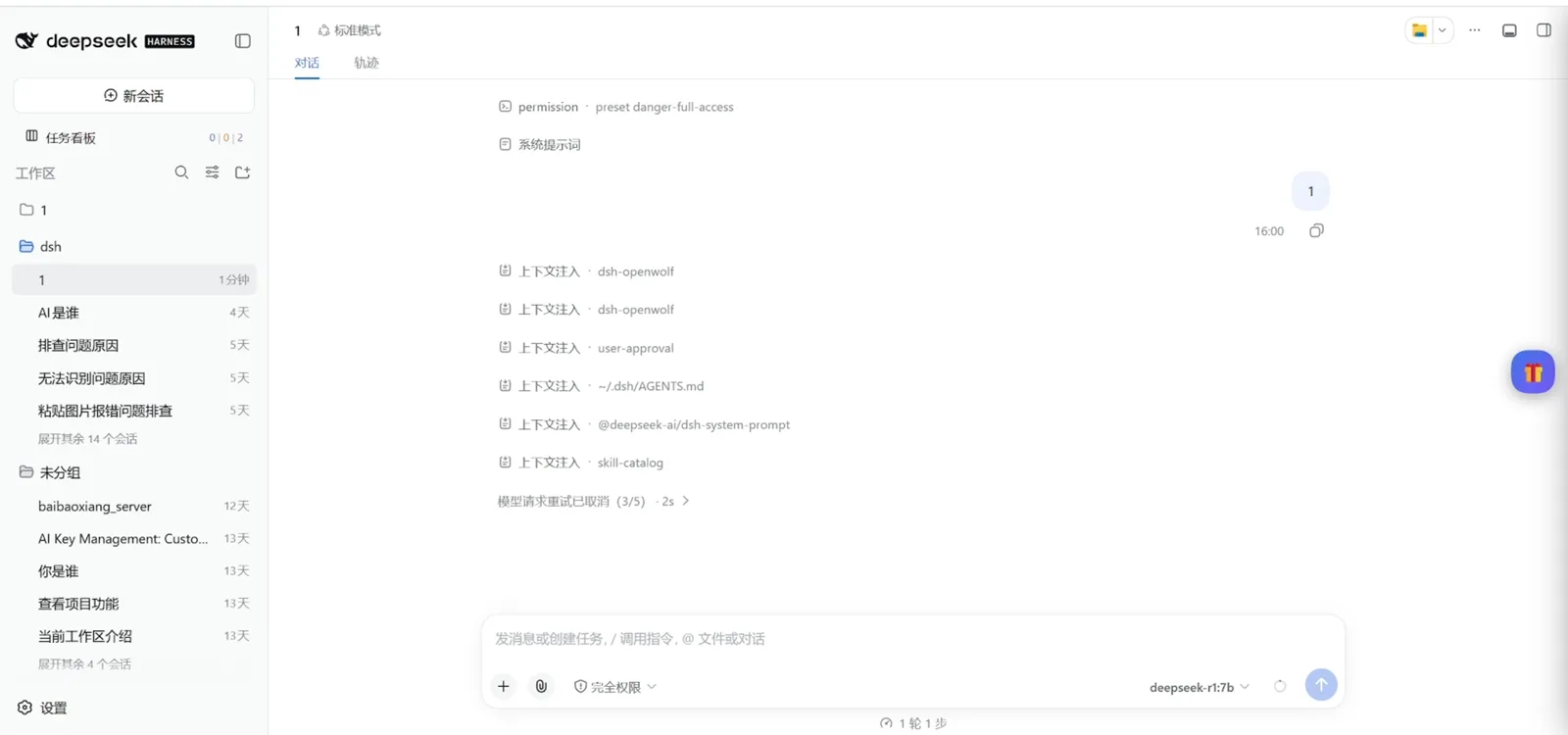
Baseline before updating: sessions and plugins at workWatch at 0:40
Part 2 · Update, warnings, verification
- 3
Run the one-command upgrade
The whole update is npm update -g @deepseek-ai/dsh, typed at the same terminal as everything else on this page. The recording runs it twice — once in PowerShell, then again in a fresh CMD window after a first pass had already moved the CLI forward. Re-running is harmless: npm compares versions and only does work where something differs.
$npm update -g @deepseek-ai/dsh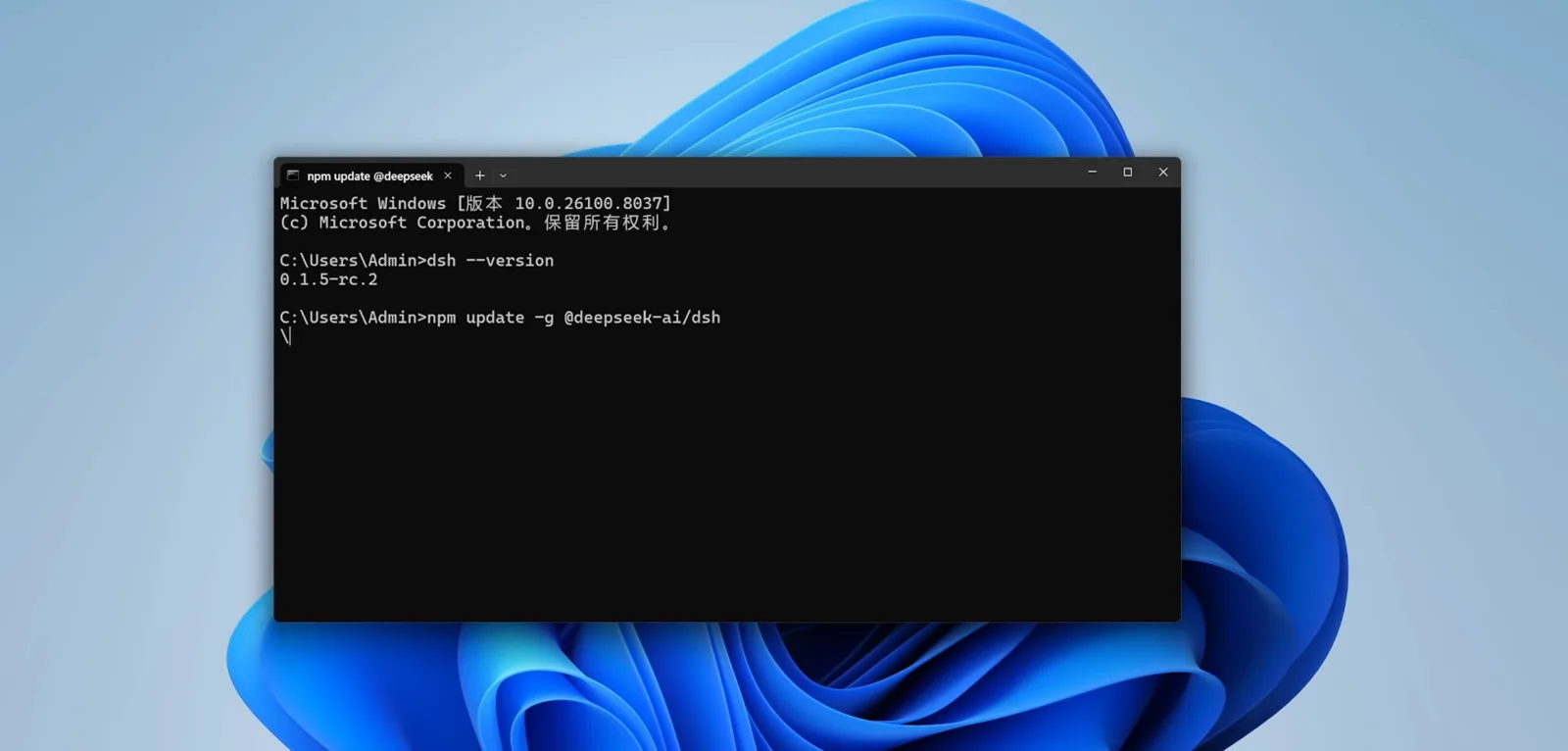
The whole upgrade is one npm commandWatch at 2:50 - 4
Read the warning wall without panicking
Mid-update the terminal turns yellow: an npm warn deprecated line about a transitive package, then npm warn cleanup EPERM lines where Windows refused to unlink an old sharp-win32-x64 DLL from a temp folder. Nothing there stopped the install — the run still finished with changed 520 packages (in 17s on that pass). The lesson: judge an update by its final receipt line, not by the scrollback above it.
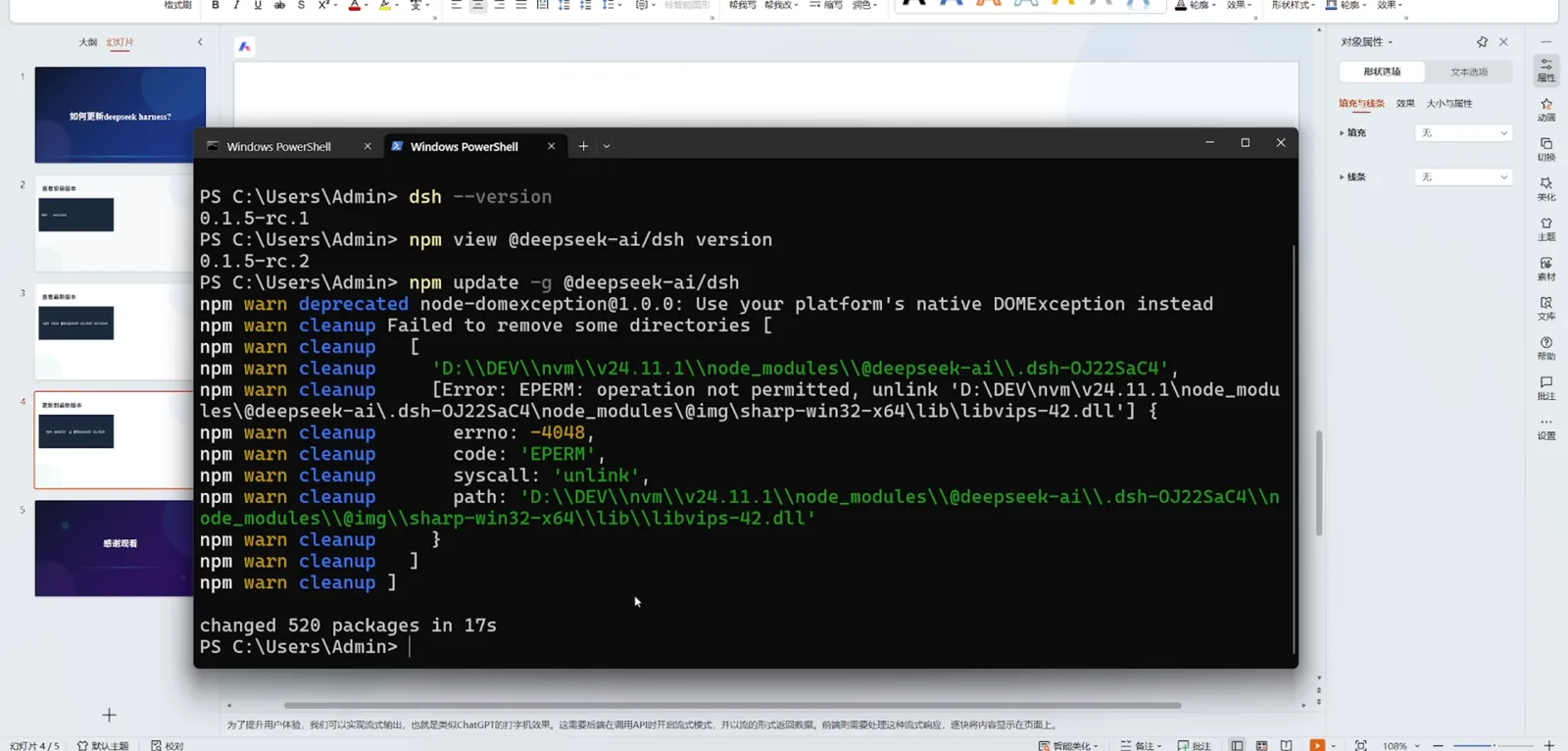
Warnings filled the screen; the install finished anywayWatch at 2:00 - 5
Verify the receipt, then restart dsh web
The receipt frame is the whole contract in one screen: changed 520 packages in 1m, then dsh --version printing 0.1.5-rc.2 again — the same version as before the run, which here means already latest, with nothing newer to install. The author closes the loop by starting dsh web and reading the startup banner: DSH_HOME resolved, key pools loaded, rotation proxy listening on 127.0.0.1:8787. Your port and plugin names will differ; the shape — a version proof, then a boot log — should not.
$dsh --version$dsh webchanged 520 packages in 1m, version unchanged — already latestWatch at 3:16
Part 3 · After: market check, troubleshooting, rollback
- 6
Post-upgrade sweep: the plugin market is a separate layer
After the core upgrade, the web UI's plugin market shows the market itself at v1.40.0, 10 plugins installed and an Update all (5) button — proof that plugins carry their own version track and their own update queue, untouched by the core update you just ran. Refresh plugins from this screen or from the terminal whenever you like; that workflow belongs to the plugin-update guide.
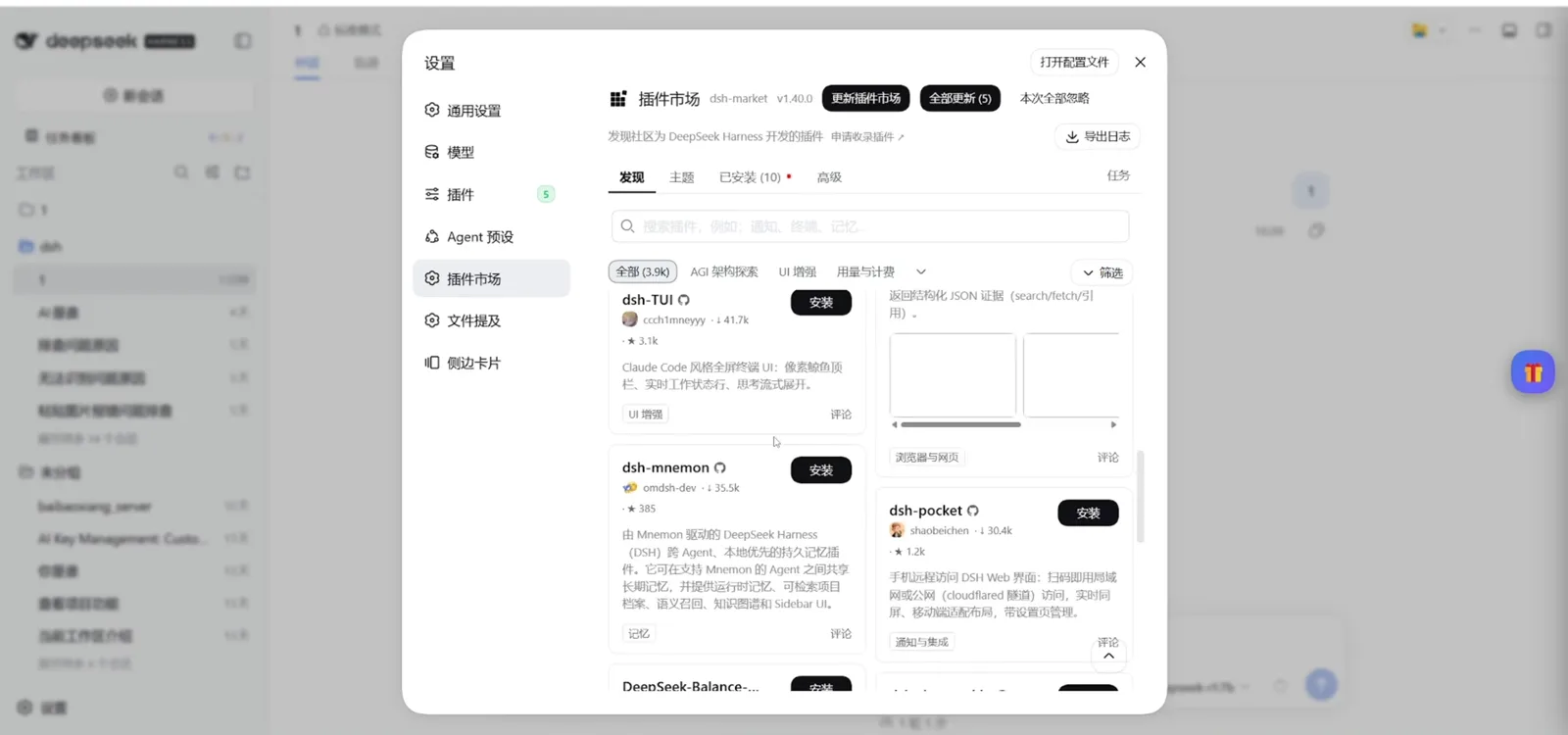
Market v1.40.0: 10 installed, 5 updates queuedWatch at 3:24 - 7
If something breaks, confirm the version first
The troubleshooting recording opens exactly like the upgrade one: a fresh prompt, dsh --version. Before touching plugins or config, know which release is actually running — the fix video's scenario is a machine misbehaving after moving to 0.2.0-rc.1, and its first move is still this read-only check. The version in your terminal is the truth; memory and secondhand tutorials are not.
$dsh --version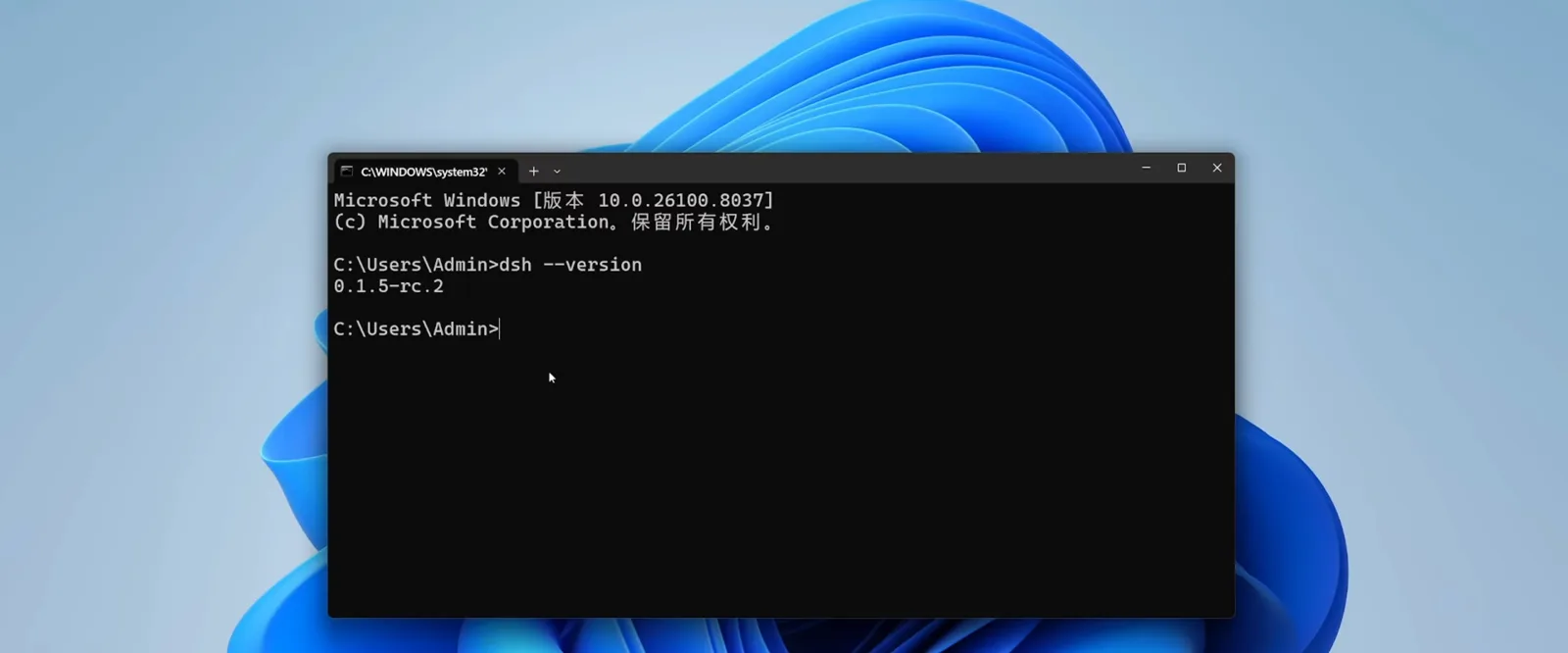
Troubleshooting rule one: read the version firstWatch at 2:05 - 8
Roll back: pin the old release, evict the bad plugin
Two exits, each one line. To put a specific release back, install it by exact version: npm install -g @deepseek-ai/dsh@<version> — the fix video's slide calls it reinstalling a chosen version, and historical tags are listed on the project's GitHub Releases page. If the culprit is a plugin rather than the core, dsh plugin --profile web remove takes it out of the web profile; the same recording notes you can also click uninstall in the Web UI plugin list, and that a plugin bad enough to keep DSH from booting can be cleaned out by hand from the config files. Replace <version> with a real tag — for example the 0.1.5-rc.2 you came from.
$npm install -g @deepseek-ai/dsh@<version>$dsh plugin --profile web remove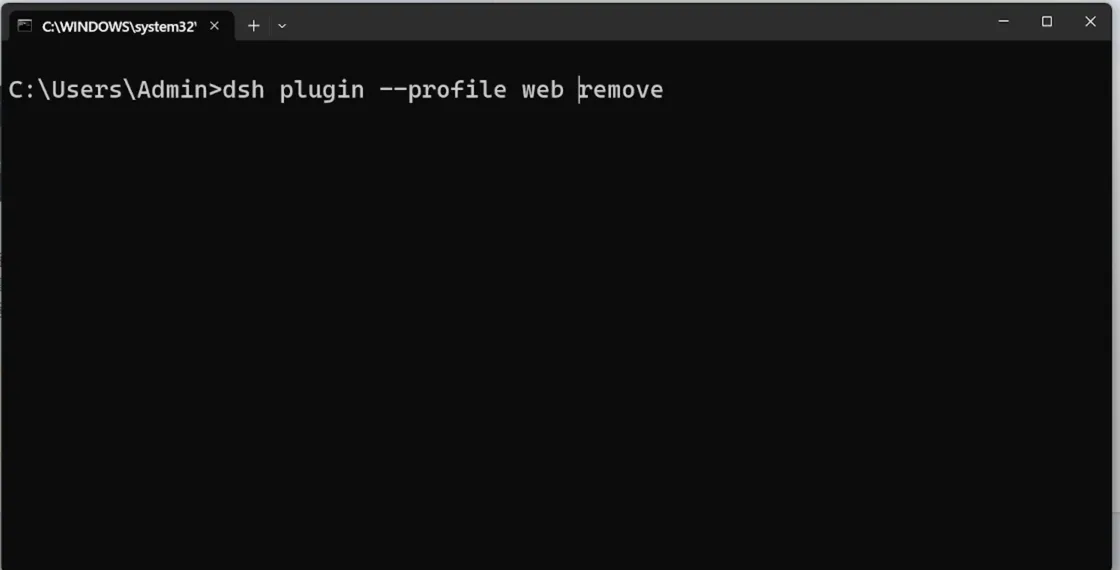
Pull the old release back, or evict the bad pluginWatch at 3:35
The 0.2.0 line: a developer preview, not a destination
As of 2026-10-02, the newest GitHub release of deepseek-ai/deepseek-harness is dsh-v0.2.0-rc.2, published 2026-09-29 and flagged prerelease. Everything on the 0.2.0 line so far is a developer preview carrying breaking changes; the 0.1.x line this page's recording lives on is the steady choice.
The documented breaking change that bites hardest: automation tasks became an optional plugin package, and scheduled tasks configured under 0.1.x do not migrate automatically. The migration deck's three steps: write down your existing scheduled tasks before upgrading; after upgrading, install the automation plugin package from plugin management; recreate each task and verify it on its first run.
Discussion threads collect real upgrade disasters — boots that crash, old versions that refuse to come back. That is not a reason to skip updates forever; it is a reason to keep the two habits on this page: a config backup before the jump, and the pinned-install command in your back pocket. When a release goes sideways, the troubleshooting playbook and the common-errors page already have the failure modes written up.
FAQ
What readers ask before letting npm touch a working install.
Will upgrading wipe my config, sessions or plugins?
The npm package and your data live in different places: the update replaces the global program, while config, sessions and installed plugins stay in your home directory — the recording's boot log shows DSH_HOME resolving to C:\Users\Admin\.dsh, and after the upgrade the market still lists 10 installed plugins. The exception is crossing into 0.2.0: automation tasks became a plugin package and 0.1.x scheduled tasks do not migrate by themselves. Back up your configuration before any major-version jump.
How do I roll back to an older dsh version?
Install the exact release again: npm install -g @deepseek-ai/dsh@<version>, replacing <version> with a real tag such as 0.1.5-rc.2. Historical releases and their tags are listed on the GitHub Releases page. If a plugin triggered the trouble rather than the core, remove it first with dsh plugin --profile web remove — upgrading over a broken plugin mostly reproduces the same breakage.
Is 0.2.0 stable? Should I upgrade to it?
Not yet. As of 2026-10-02 the newest release is dsh-v0.2.0-rc.2, flagged prerelease and published 2026-09-29 — the whole 0.2.0 line is a developer preview with breaking changes, such as automation tasks moving into a plugin package without automatic migration. On a machine you depend on, stay on the 0.1.x line; if you want the preview, back up first, follow the three migration steps, and verify each recreated task on its first run.
After upgrading, my plugins are gone or erroring — what now?
Separate the layers first: a core upgrade does not remove plugins — the recording ends with the market still showing 10 installed. If a plugin errors on the new core, remove just that plugin (dsh plugin --profile web remove), restart, then reinstall it current. To bring every plugin up to date, use the plugin-update workflow instead — and if DSH will not boot at all, the troubleshooting playbook walks startup failures including plugin-caused ones.
The terminal printed a wall of npm warnings — did the update fail?
Almost certainly not. In the recording, deprecated-package and EPERM cleanup warnings scrolled straight into a changed 520 packages receipt. npm warnings are commentary; the receipt line and a follow-up dsh --version are the verdict. If the version truly did not move, run npm update -g @deepseek-ai/dsh once more — the author does exactly that in the video.
Related guides
Every layer around the core upgrade.
The plugin-update workflow
The sibling layer: refresh installed plugins from the terminal or the Web UI market, pin versions, isolate a test profile — where this page's step 6 hands over.
Read the guideDSH troubleshooting playbook
Symptom, cause, fix for boots that fail after an update — pair it with the pinned-install rollback above.
Read the guideCommon errors, hands-on fixes
Match your post-upgrade symptom against real screenshots and commands cross-checked with official discussions, including plugin-caused startup crashes.
Read the guideThe dsh CLI cheat sheet
Every command on this page next to the rest of the CLI: profiles, plugin management, version checks.
Read the guideProfiles, patches & presets
What the npm update touches — and what it never does: your config layers, and how to back them up first.
Read the guideSources and credits
All screenshots are frames from coder_Mars's Bilibili recordings, each deep-linked to its own second. The 0.2.0 facts come from the official GitHub Releases (queried 2026-10-02) and two slide-only videos credited below — slides are used as fact sources only; no frames were taken from them.