
Customize a DeepSeek Harness Business Agent: Full-Cycle Walkthrough
Twelve screenshot-verified steps from a plain-language requirement to an accepted finance agent — an Agent Preset, plugin packaging, a one-time danger-full-access approval, restart checks, and a 1,800-row summary verified down to 600 matching rows.
Last updated: 2026-09-23

This guide replays a full customization from 博学谷's lesson: one business agent — a finance expense summarizer — taken from a plain-language requirement to an install that survives restarts and passes acceptance. The lesson has no subtitles, so every quoted interface string below was read off the frames, and each step carries the original screenshot.
A note on scope: this page is about customizing a single agent — one preset plus one plugin. It is not the official Agent Teams multi-agent experiment and does not replace it; if you want several specialized agents working in parallel, see the subagents guide at the end.
The short version
- ▸One conversation turns a plain-language finance brief into a spec with its own acceptance checklist — the agent writes the standard before writing the code.
- ▸The deliverable is a portable tar.gz: the plugin, the 财务模式 preset, and a README that lets another DSH install everything from one sentence.
- ▸Installing needs one danger-full-access approval; after a restart the preset appears on its own, and a 1,800-row run ends with 600 matching rows, all checks green.
The full customization, step by step
From requirement to acceptance bar
- 1
Hand the agent your business requirement as a document
The lesson opens with a plain-language finance brief: summarize expense sheets into 汇总表.xlsx. The agent turns it into a spec — an acceptance baseline, seven AND-combined filters (a date range of 2026-01-01 to 2026-06-30, a tax-inclusive amount of at least 1,000, and more) and the exact output field mapping. That document becomes the single source of truth for everything that follows.
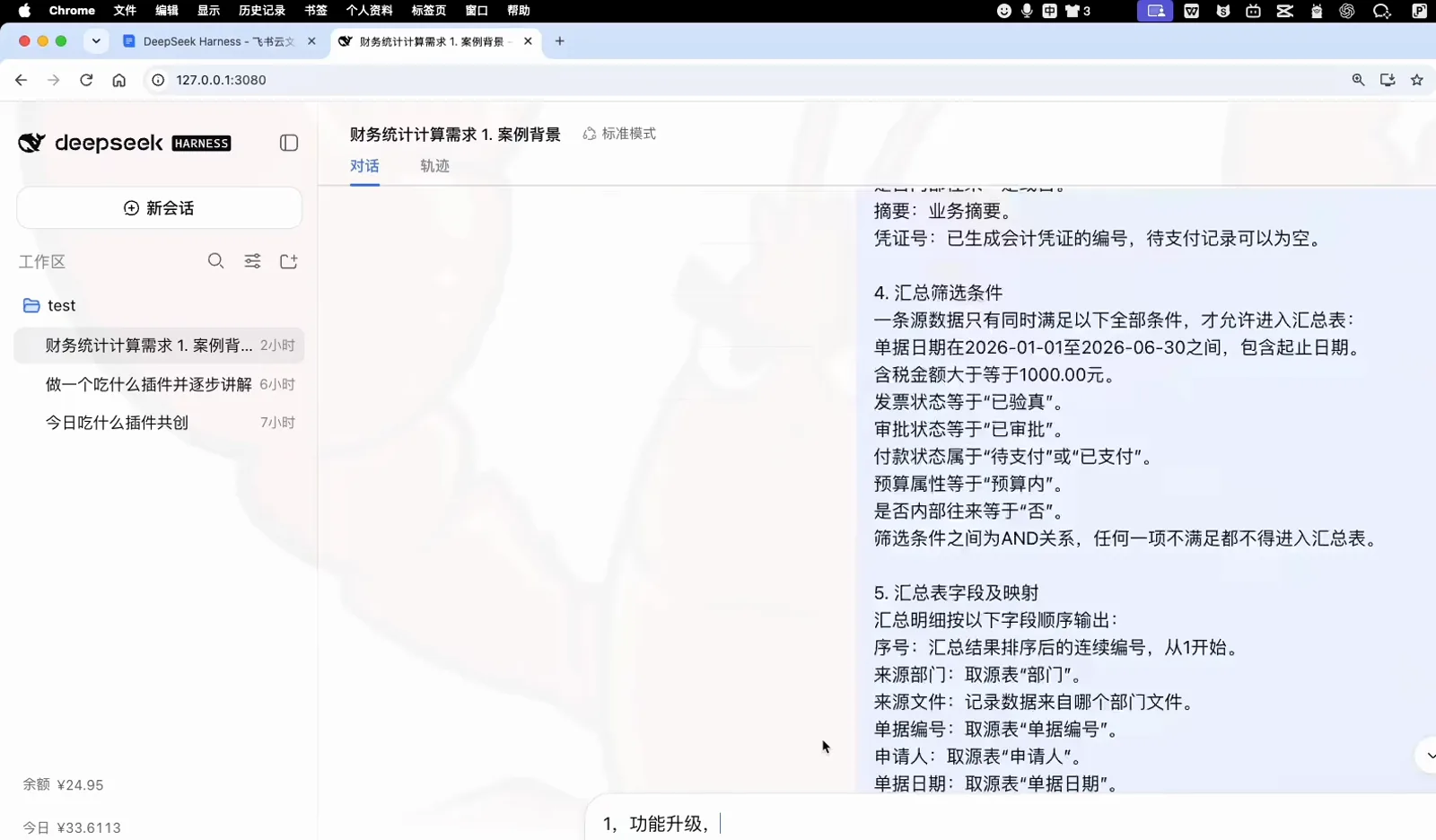
The requirement doc: filters first, then the exact output columnsWatch at 1:40 - 2
Agree on the acceptance checklist before any code
Instead of jumping to implementation, the agent proposes the checks it will be graded on: 600 detail rows with the header excluded (at least 300 required), every row passing all filter conditions, unique document numbers in a continuous 1–600 sequence, zero tax-calculation error per row, department totals equal to the grand total, and a zip archive that opens cleanly in openpyxl, Excel and WPS.
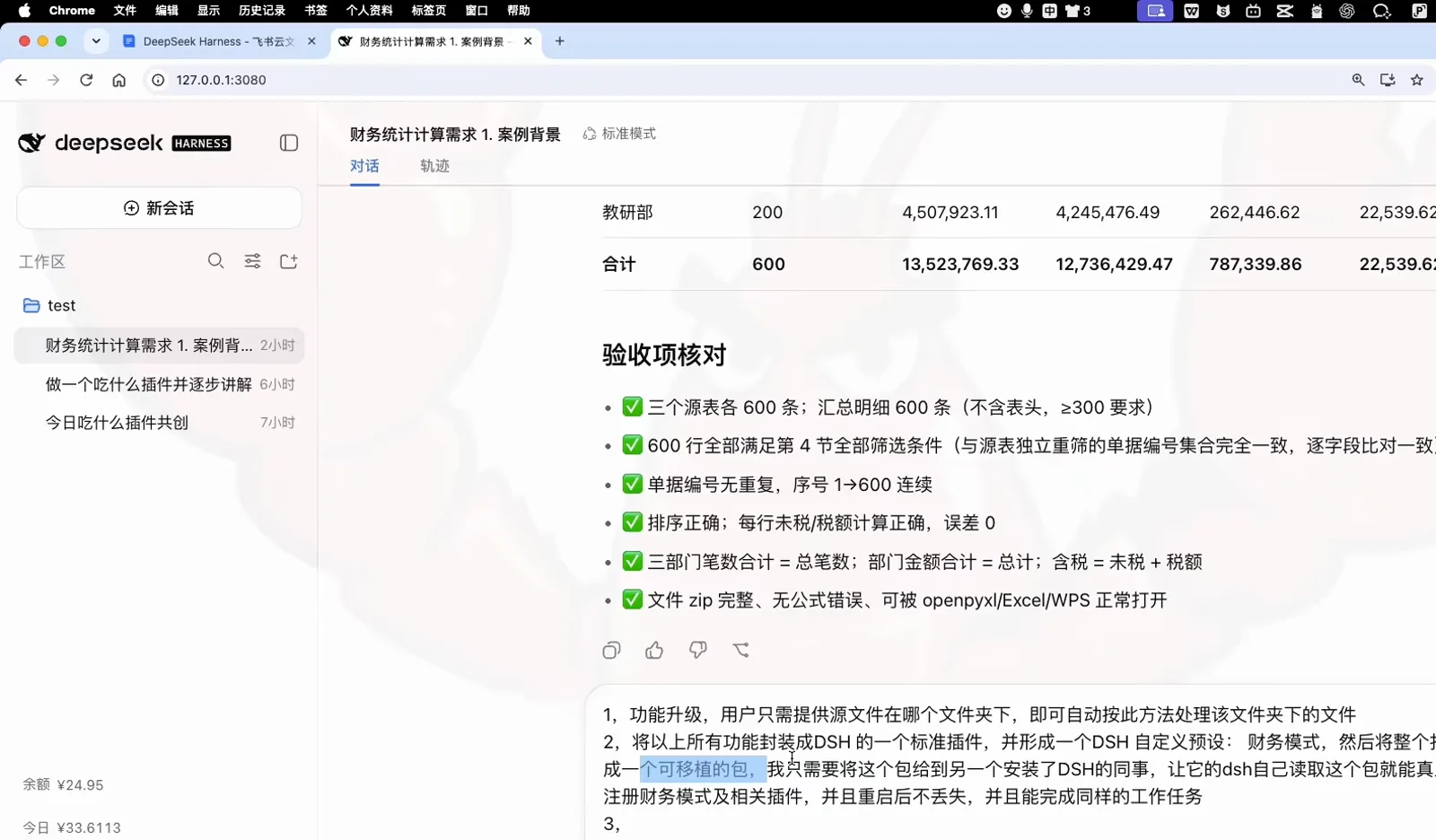
The agent grades its own work against the agreed checksWatch at 4:05
From plan to portable package
- 3
Get a three-part plan instead of a wall of code
The agent answers with a plan: add a finance_summarize tool that scans a folder of source sheets and computes the summary, package it as a standard DSH plugin registered through cordis.patch.yaml plus lib/index.js, and wrap everything in a portable archive whose install.sh copies the plugin and preset into ~/.dsh and runs pnpm install.
finance_summarize.pycordis.patch.yaml + lib/index.jsinstall.sh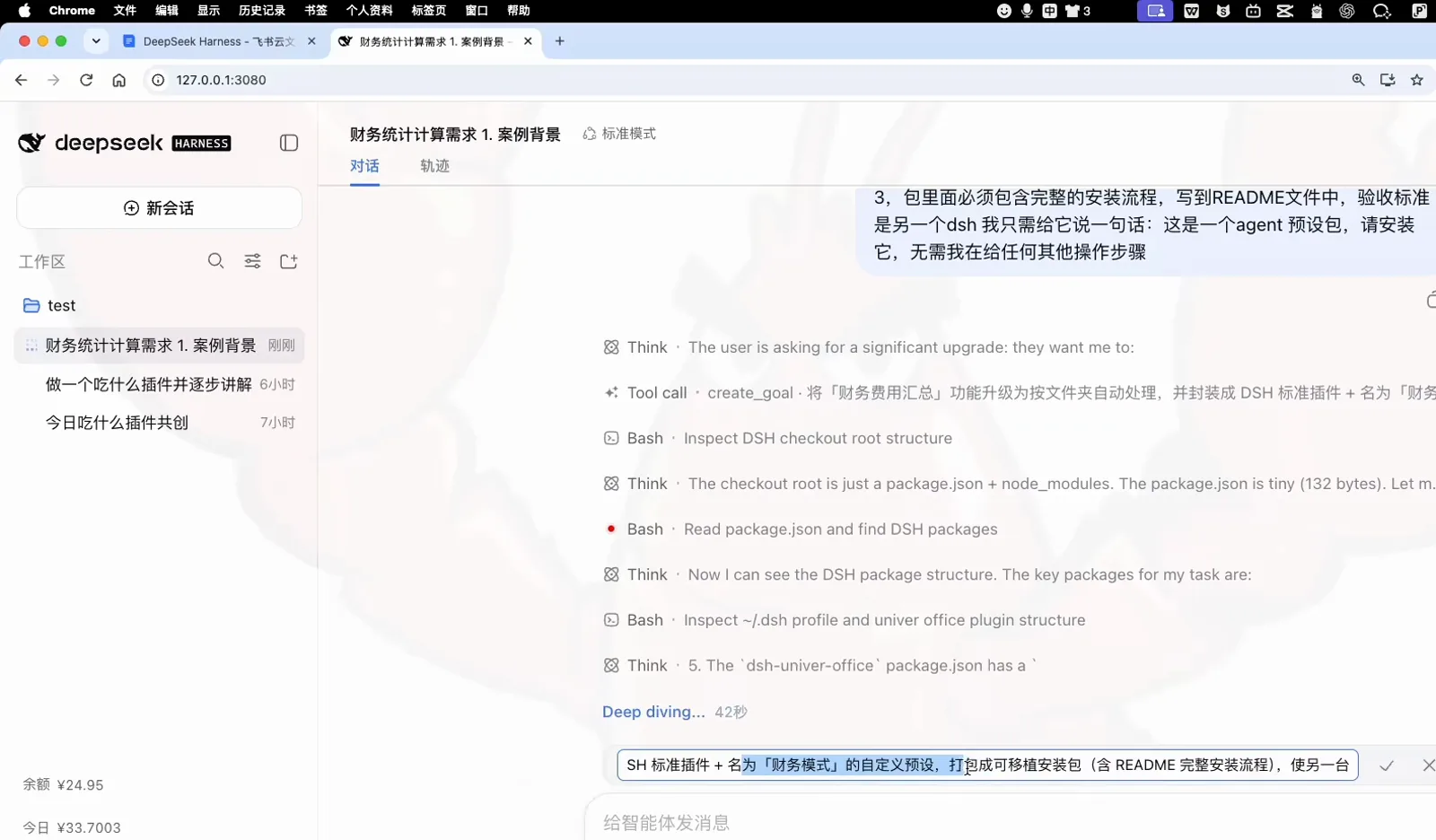
Tool, plugin, portable package — one plan, three deliverablesWatch at 5:35 - 4
Lock the goal and the one-sentence install bar
A create_goal call pins the target — folder-driven finance summarization, packaged as a DSH plugin plus a 财务模式 preset. The README must carry the complete install flow so that another DSH accepts a single sentence and needs no manual steps.
这是一个 agent 预设包,请安装它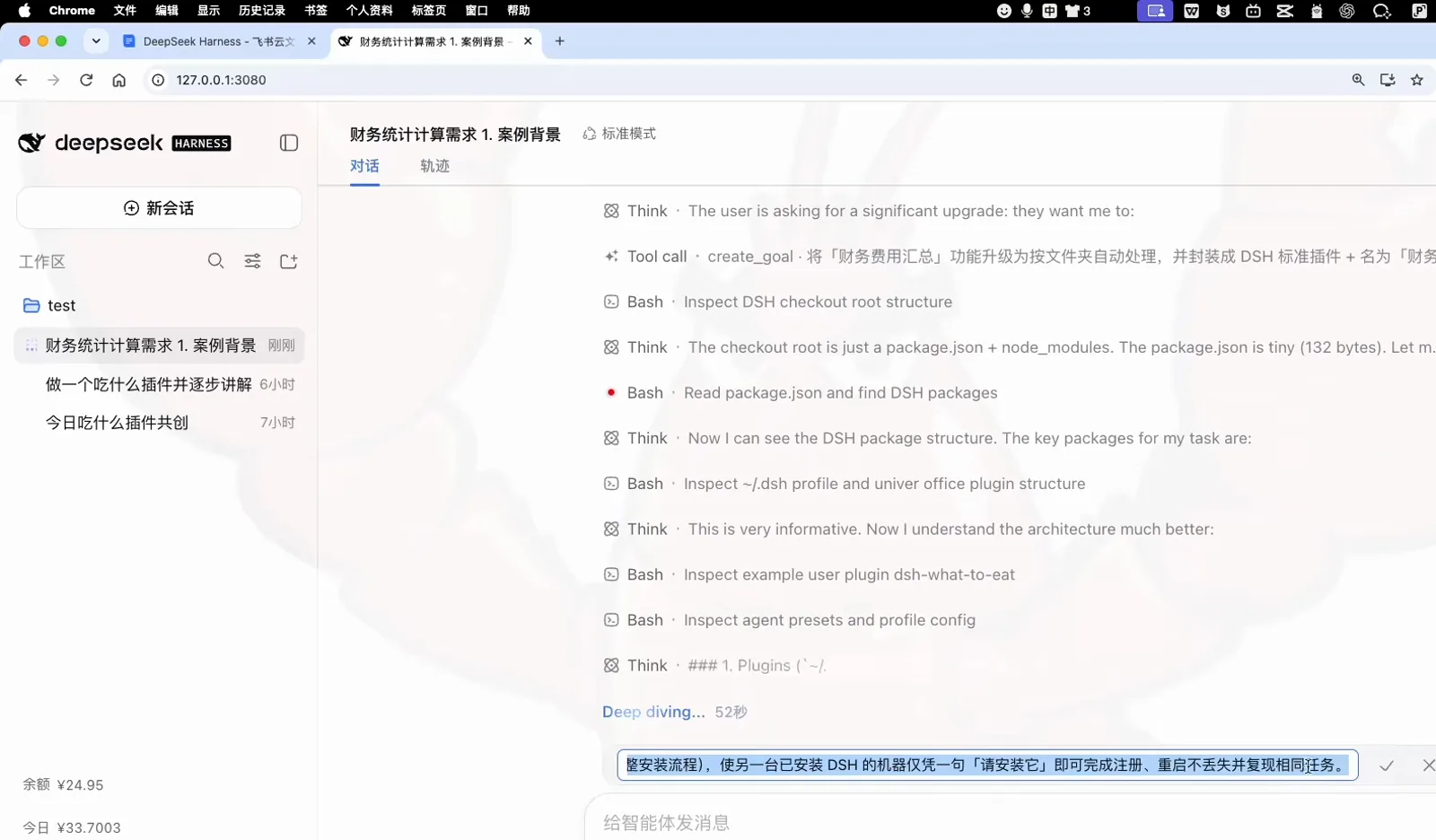
The goal is set; the README must make installs one sentence longWatch at 5:45 - 5
Receive the deliverables in your workspace
The finished work lands in the workspace test folder: dsh-finance-mode.tar.gz as the recommended hand-off, plus the dsh-finance-mode/ source tree — README.md, install.sh, the plugin folder, package.json, and the cordis patch that wires up the loader.
dsh-finance-mode.tar.gzdsh-finance-mode/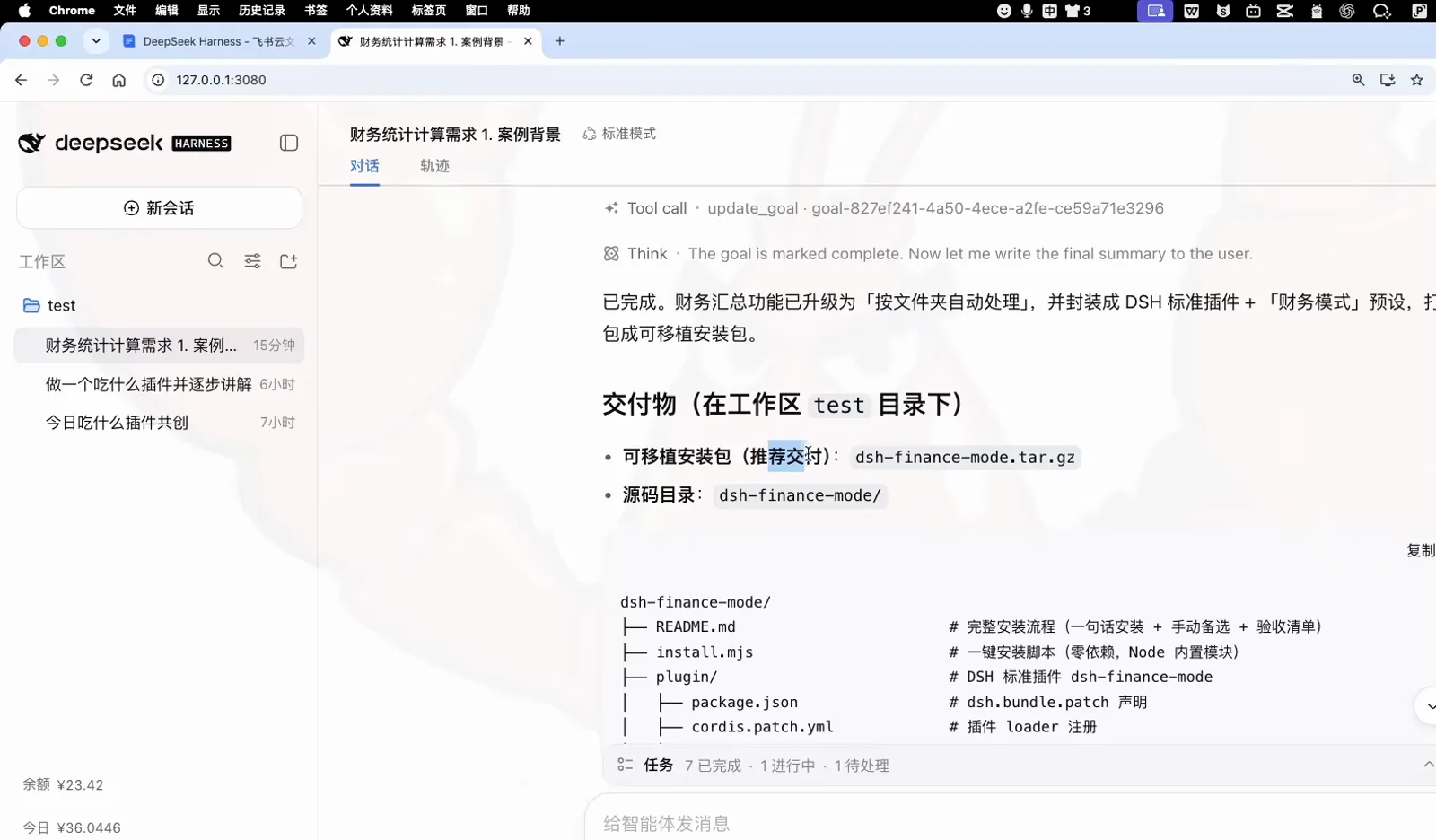
What lands in your workspace: one archive, one readable source treeWatch at 6:05
Escalation, install and restart
- 6
Approve the one-time danger-full-access escalation
The agent refuses to touch your live ~/.dsh on its own. It explains that the installer must write to ~/.dsh/plugins, ~/.dsh/agent-presets and the profile's package.json — all outside the current workspace — and raises an escalation. The permission dialog offers workspace-only writes or 完全权限; full access is granted once, and the agent backs up your profile before running anything.
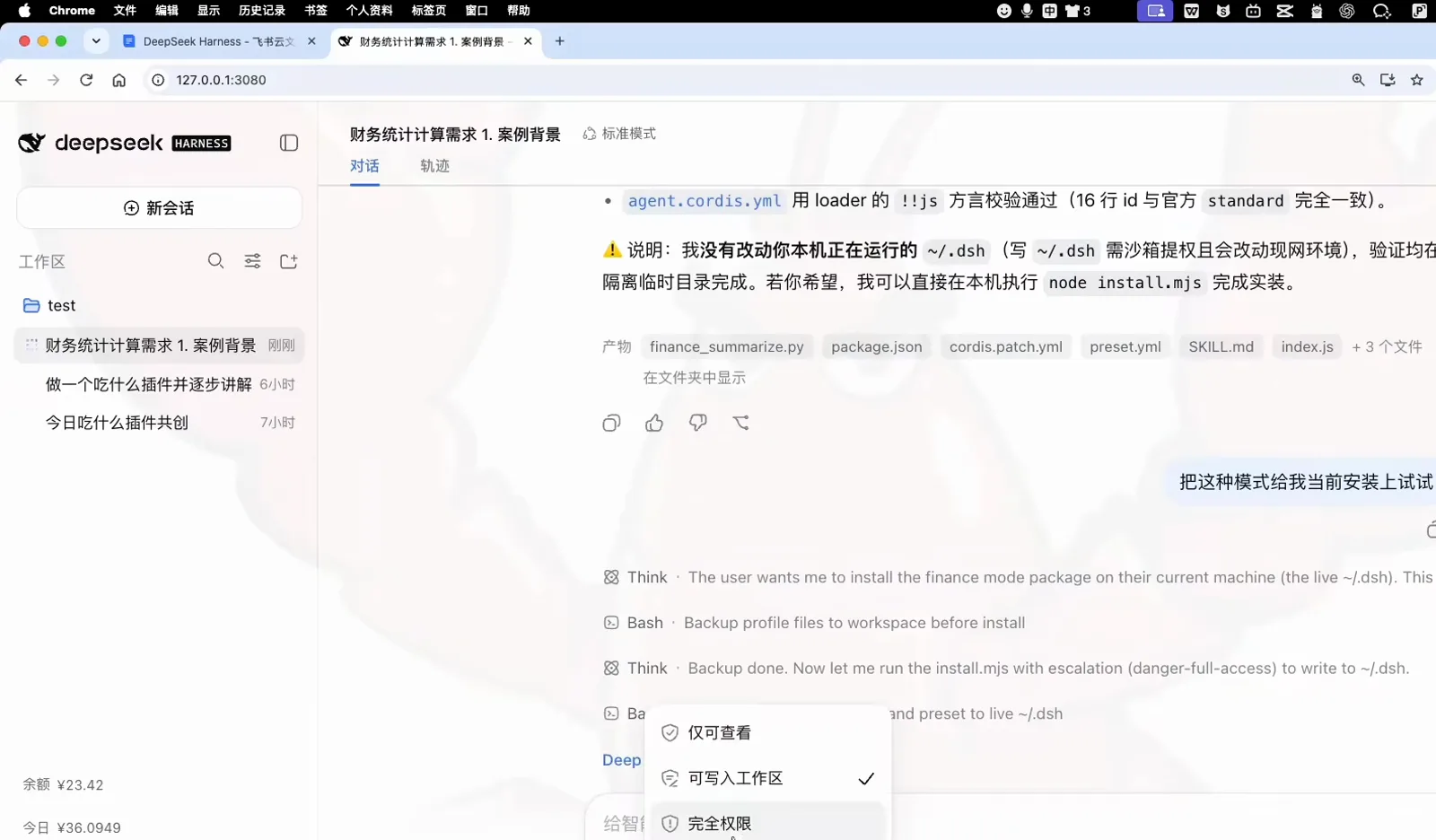
The one permission prompt: workspace writes or full accessWatch at 8:04 - 7
See the 财务模式 preset appear in settings
After the restart, open the settings' Agent preset panel: the new preset sits beside the built-in modes, described as the assistant that watches a folder of expense sheets and produces the summary workbook. Nothing was configured by hand.
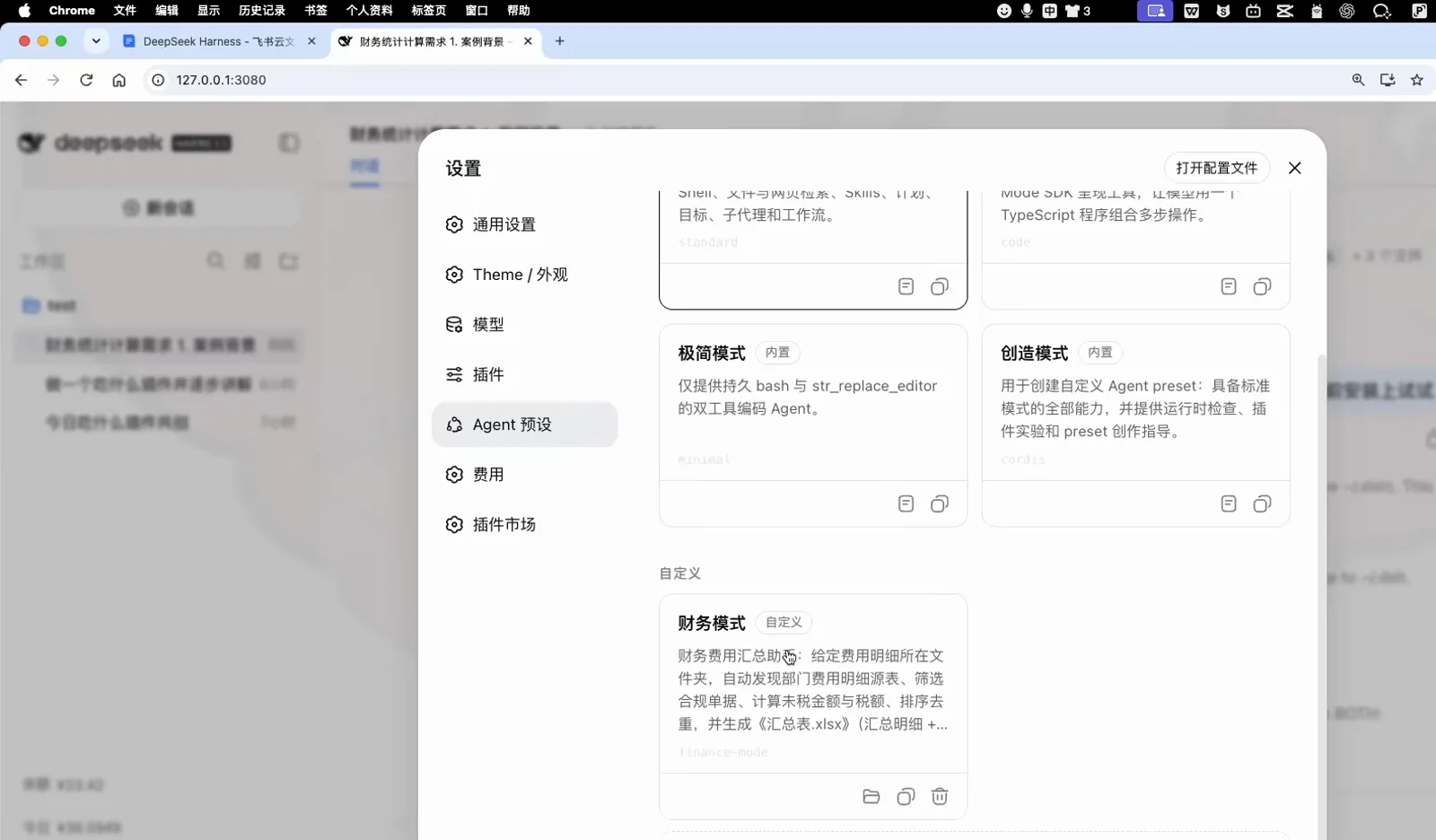
Proof after restart: the preset ships beside the built-insWatch at 8:20 - 8
Read the install verification log
The install chat prints its own proof: the plugin module loads with apply / inject / name exports, cordis.patch.yaml parses, agent.cordis.yaml matches the official standard preset dialect, and the prerequisites — Node, pnpm, Python with openpyxl — are all in place.
apply / inject / name ✓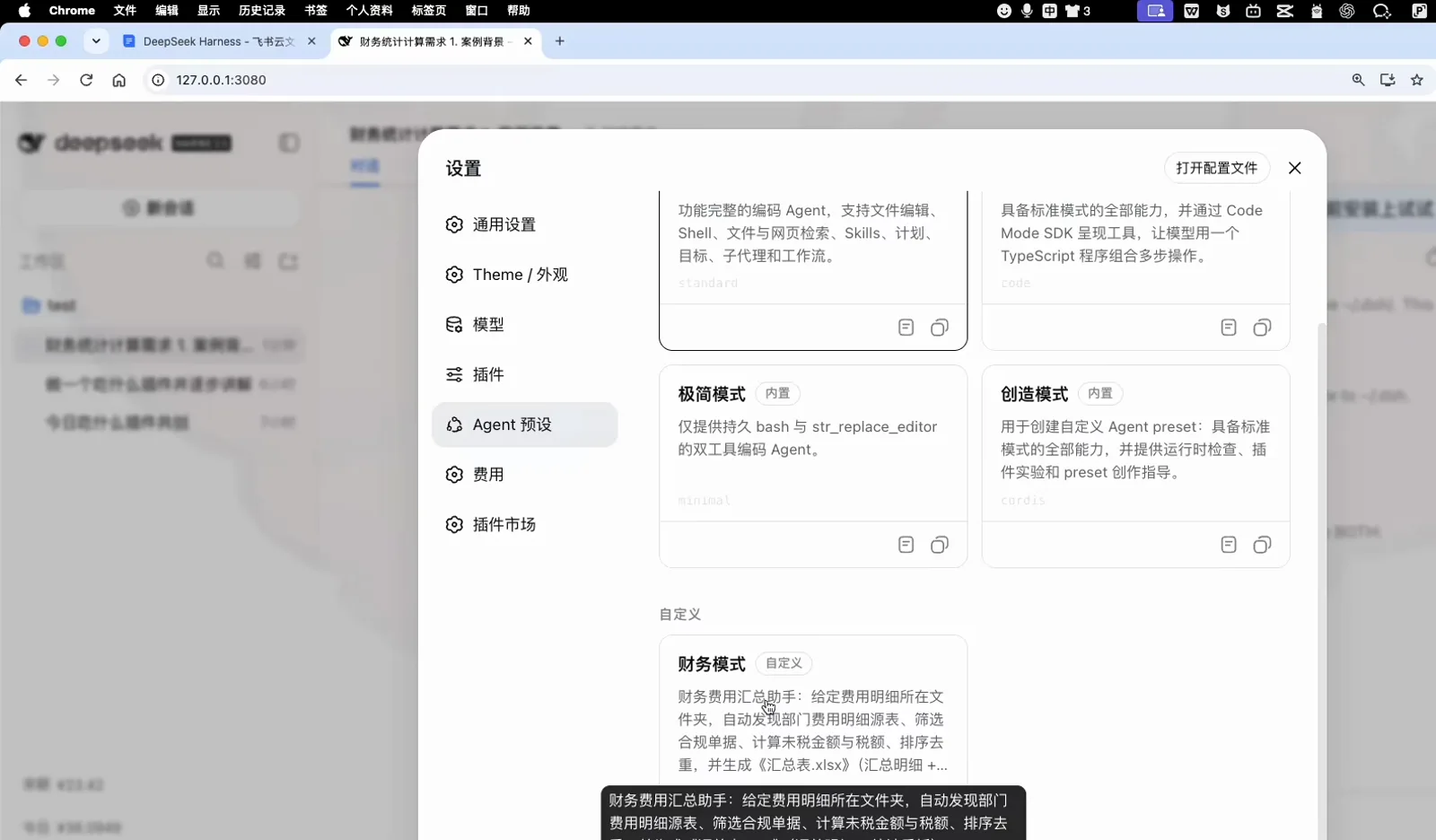
Registration is not a feeling — it is a row of green lightsWatch at 8:35 - 9
Confirm the plugin is enabled
In the settings' plugin panel, the list shows finance-mode with its enabled toggle on — the plugin half of the package survived the restart just like the preset.
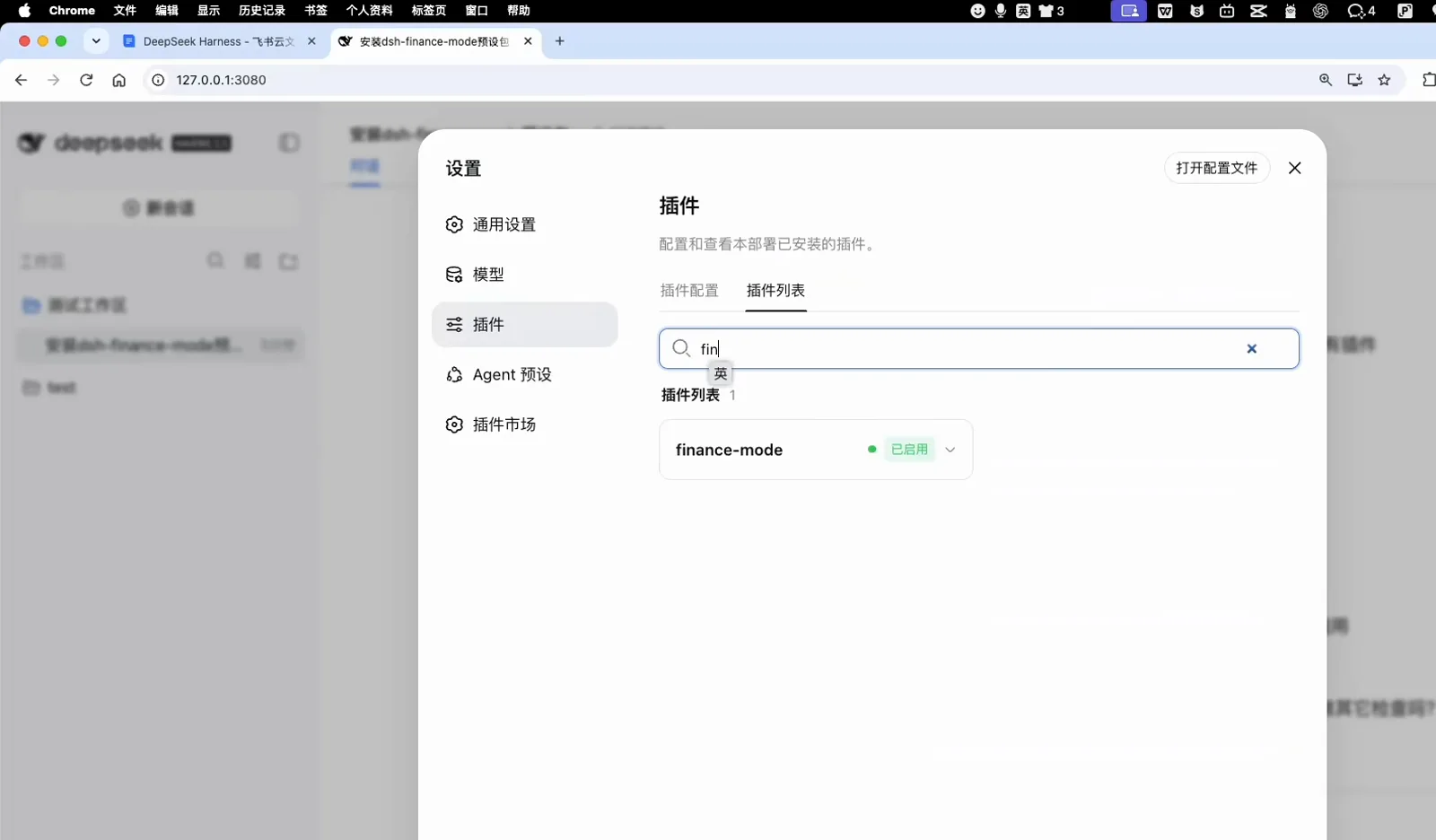
The plugin half of the package survived the restartWatch at 13:03
Real-machine run and result checks
- 10
Dispatch the task from the explore screen
On the 探索未至之境 home screen, the new chat already carries the 测试工作区 workspace and the 财务模式 preset chip. Typing one plain sentence — finish the finance summary task in the current workspace — is the entire dispatch.
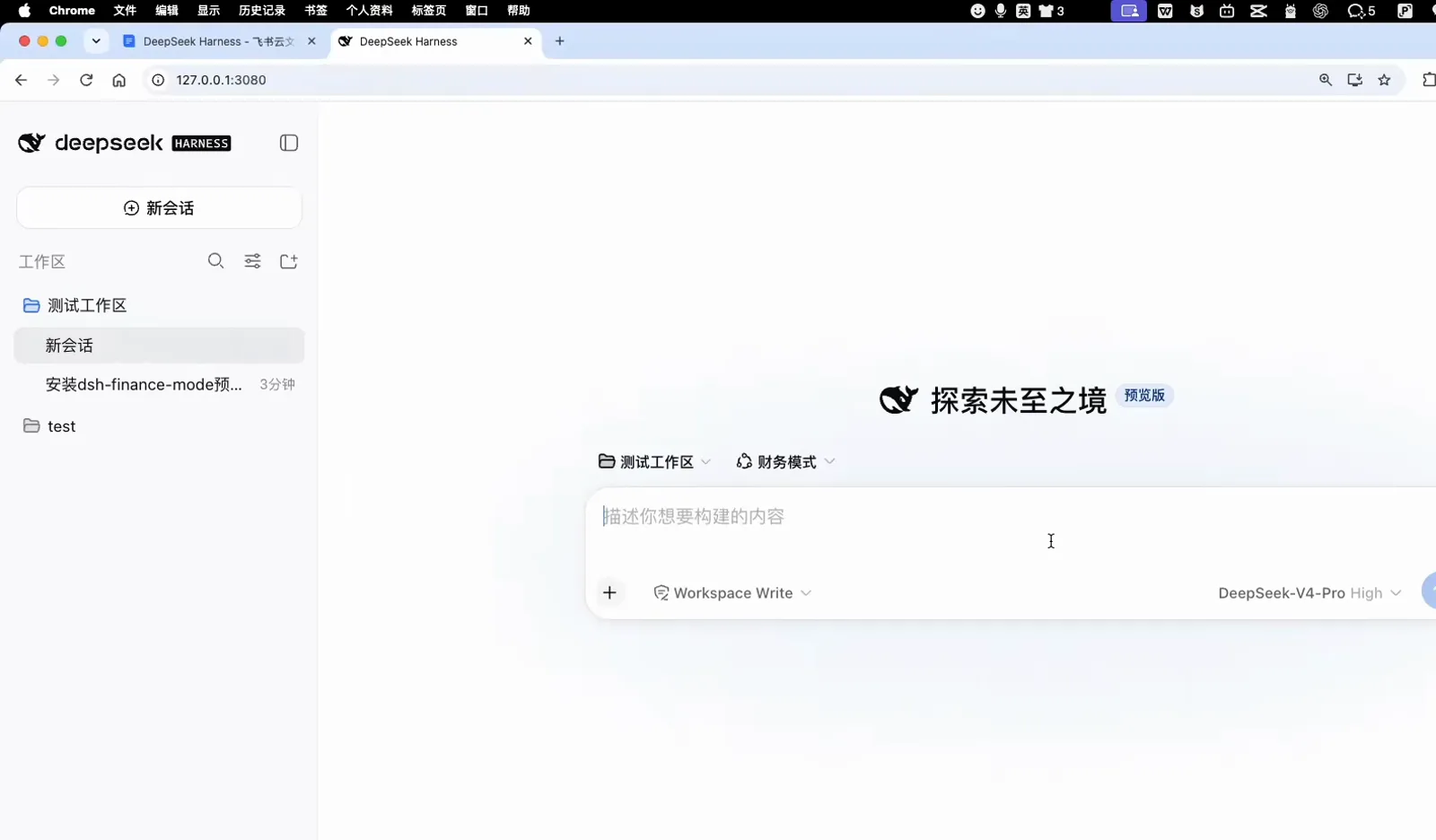
New chat, right workspace, right preset — just type the taskWatch at 13:23 - 11
Check the numbers in the result report
The finished run reports exactly what happened: 汇总表.xlsx written into the workspace, three source files auto-detected, 1,800 source rows filtered down to 600 matches through all seven conditions, followed by per-department statistics.
汇总表.xlsx · 源记录 1800 条 → 符合 600 条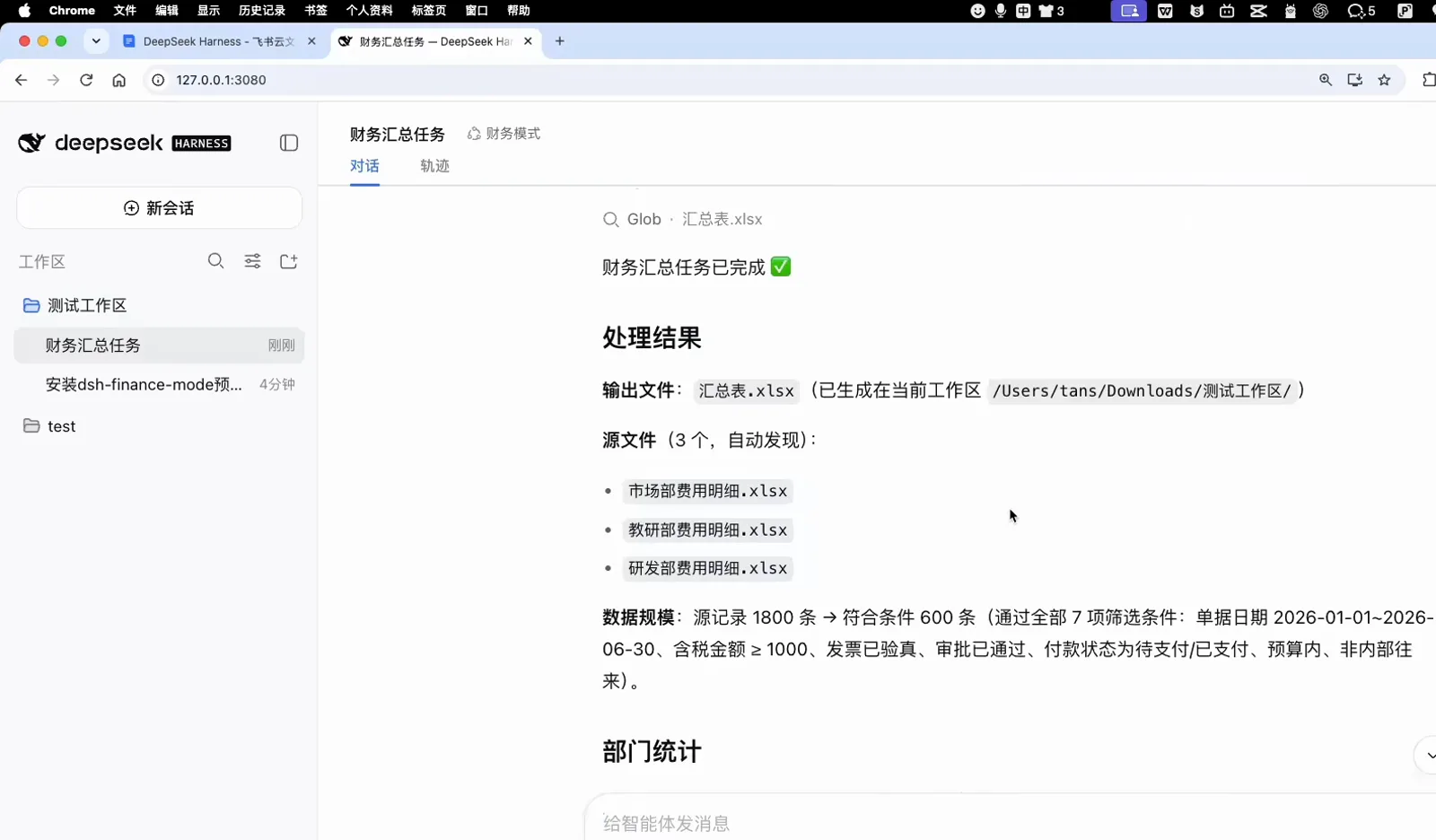
1,800 rows in, 600 out — every filter accounted forWatch at 14:05 - 12
Close the loop with the tool trace
The task chat shows the full trace — the dispatched sentence, the finance_summarize tool call, the generated 汇总表.xlsx, and a green 财务汇总任务已完成 check. The checklist from step 2 now passes on the real machine.
finance_summarize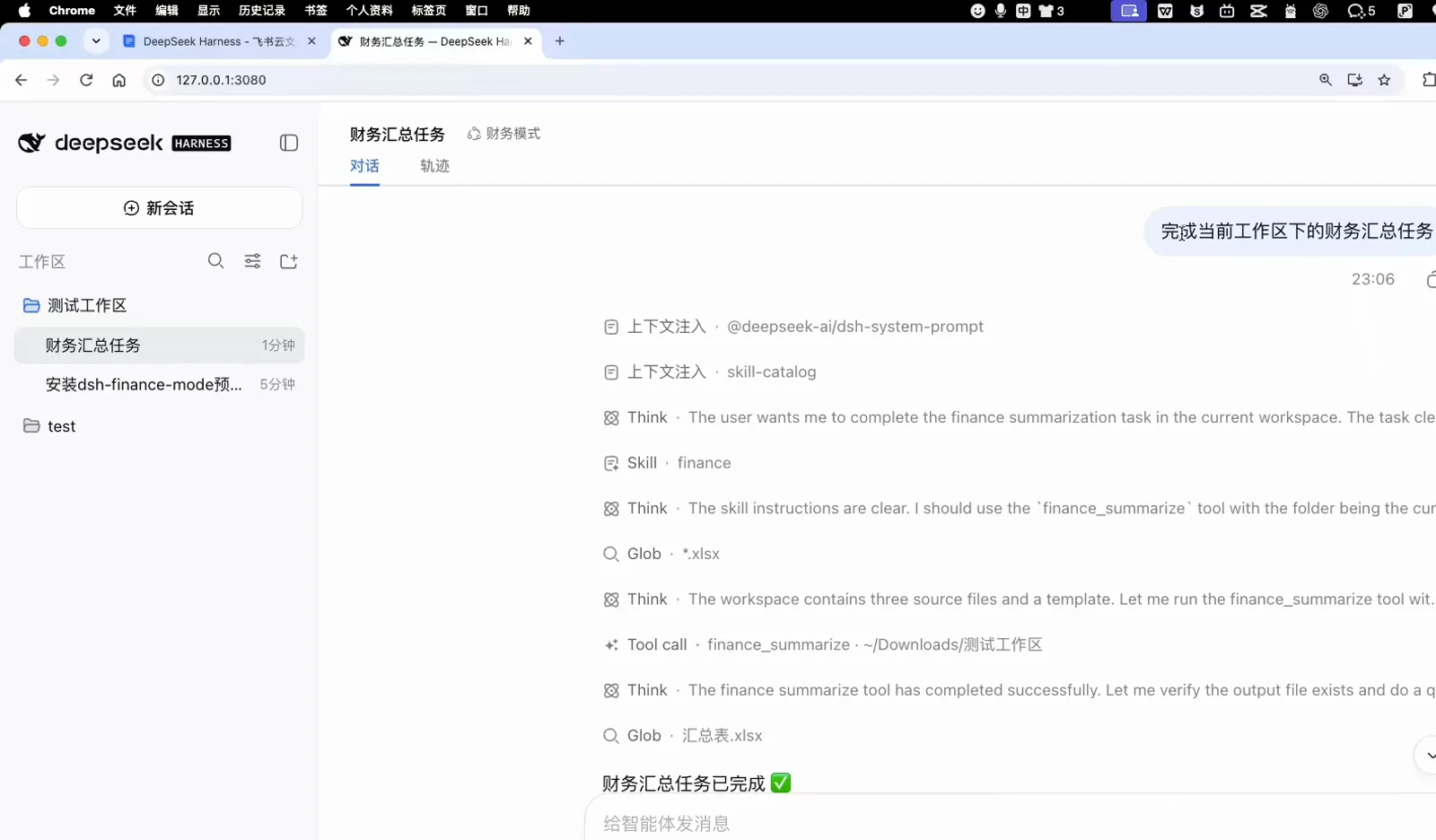
Dispatch, tool call, done — the whole loop on one screenWatch at 15:05
Grade the result like the video does
The lesson's acceptance checklist is worth stealing for any agent deliverable — four of its checks generalize beyond finance:
Rows and uniqueness
The summary holds exactly 600 detail rows with the header excluded; document numbers are unique and the sequence runs 1–600 without a gap.
Math with zero error
Untaxed amounts, tax and totals are recomputed per row with an error of exactly 0, and the department sums add up to the grand total.
Filters you can replay
Every output row passes all seven AND conditions, and the matching set equals an independent re-filter of the three source sheets.
A package that travels
The zip opens cleanly in openpyxl, Excel and WPS, and the README lets another DSH install everything from one sentence.
The same 1,800-row finance case is documented as its own guide — read the Excel report walkthrough
FAQ
Questions the screenshots do not answer on their own.
Do I need to write code to follow this flow?
No. Every artifact in the lesson — the spec, the tool, the plugin, the install script — is produced by the agent in conversation. Your jobs are to state the requirement, approve the permission prompt, restart DSH and read the verification log.
Is the danger-full-access prompt safe to approve?
It is a real escalation: the installer writes outside the workspace, into ~/.dsh/plugins, ~/.dsh/agent-presets and the profile's package.json. In the video it appears exactly once, the agent backs up the profile to the workspace first, and the install log lists every path it touched. If you do not recognize the paths, decline and ask for a workspace-only dry run.
What is the difference between the 财务模式 preset and the plugin?
The plugin (dsh-finance-mode) carries the finance_summarize tool and the loader patch; the preset packages the prompt and defaults that make the agent use it. The tar.gz ships both, and the verification log checks each half separately.
Can I reuse this flow for a non-finance business?
Yes — the skeleton is generic: requirement document, acceptance checklist, three-part plan, portable package, one-time escalation, restart verification. Swap the field mapping and filter conditions, and the same twelve steps apply to invoices, tickets or inventory.
Do I have to use the explore screen to run the task?
No. After the restart you can open any chat, pick the 财务模式 preset and say one sentence about which folder to process. The explore screen is just a convenient entry that pre-attaches the workspace and the preset.
Is this the same thing as Agent Teams or multi-agent?
No. This page is about customizing a single business agent — one preset plus one plugin doing one job well. Running several specialized agents in parallel is a different feature; see the subagents guide for that.
Related guides
Adjacent tracks in the DSH learning path.
DeepSeek Harness Agent Presets, Step by Step
The Creator-mode basics: build a custom preset from scratch and wire plugins into it.
Read the guideBuild a DSH Plugin by Chatting (No Code)
One idea sentence becomes a spec, a version approval and a working plugin — the co-creation flow behind this lesson.
Read the guideConsolidate Excel Reports with DeepSeek Harness
The same 1,800-row finance case as a standalone guide: merge, filter and total three department sheets.
Read the guideBuild a Real Project with DeepSeek Harness
From a one-line requirement to a delivered CLI tool — the broader workflow this agent lesson fits into.
Read the guideDeepSeek Harness Subagents: A Hands-On Tutorial
Need several specialized agents instead of one? That is the multi-agent track — a different feature from this lesson.
Read the guideSource and credits
All screenshots come from 博学谷's lesson on Bilibili, and every image deep-links back to the exact second of the video. Want to build a plugin like this from scratch? Read the plugin creation guide