
README
dsh-quota-panel
English | 中文
dsh-quota-panel is a provider quota / balance status widget for the
DeepSeek Harness (DSH) web surface (dsh web). It sits in the
bottom-right corner of the product UI, watches every AI provider whose API
key you have configured, and tells you at a glance how much balance /
quota is left — DeepSeek, OpenRouter, SiliconFlow, Moonshot, StepFun,
xAI, Zhipu GLM, OpenCode Go, Volcengine Ark (Agent/Coding Plan), plus one-api / new-api style aggregators,
and the coding plans (智谱 GLM Coding, Z.AI, Kimi Coding, MiniMax
Coding global/CN) with 5-hour / weekly usage windows and MCP monthly quota.
xAI, Zhipu GLM, OpenCode Go, ChatGPT subscription (Plus/Pro via Codex
login), plus one-api / new-api style aggregators, and the coding
plans (智谱 GLM Coding, Z.AI, Kimi Coding, MiniMax Coding global/CN)
with 5-hour / weekly usage windows and MCP monthly quota.
Since v0.5 it is a dual-face plugin with a built-in provider catalog
and auto discovery: install it, restart dsh web, and every provider
whose key resolves automatically appears on the panel — zero configuration.
It needs no npm dependencies and asks for no allowBuilds authorization.
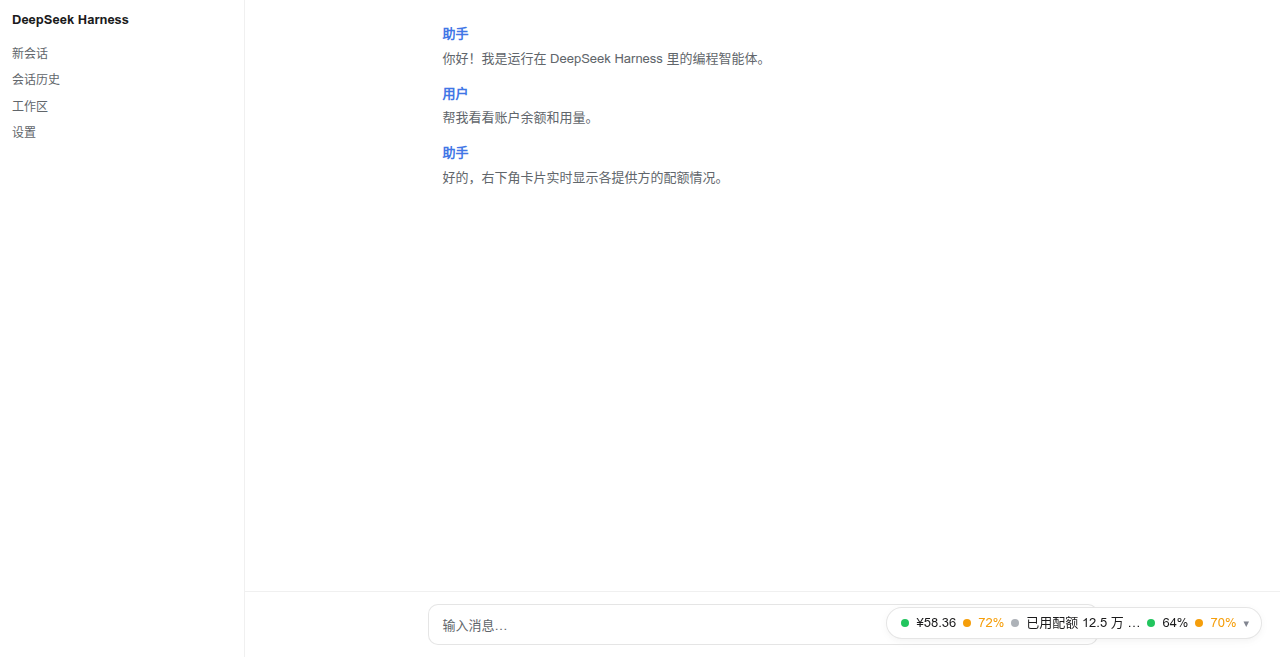
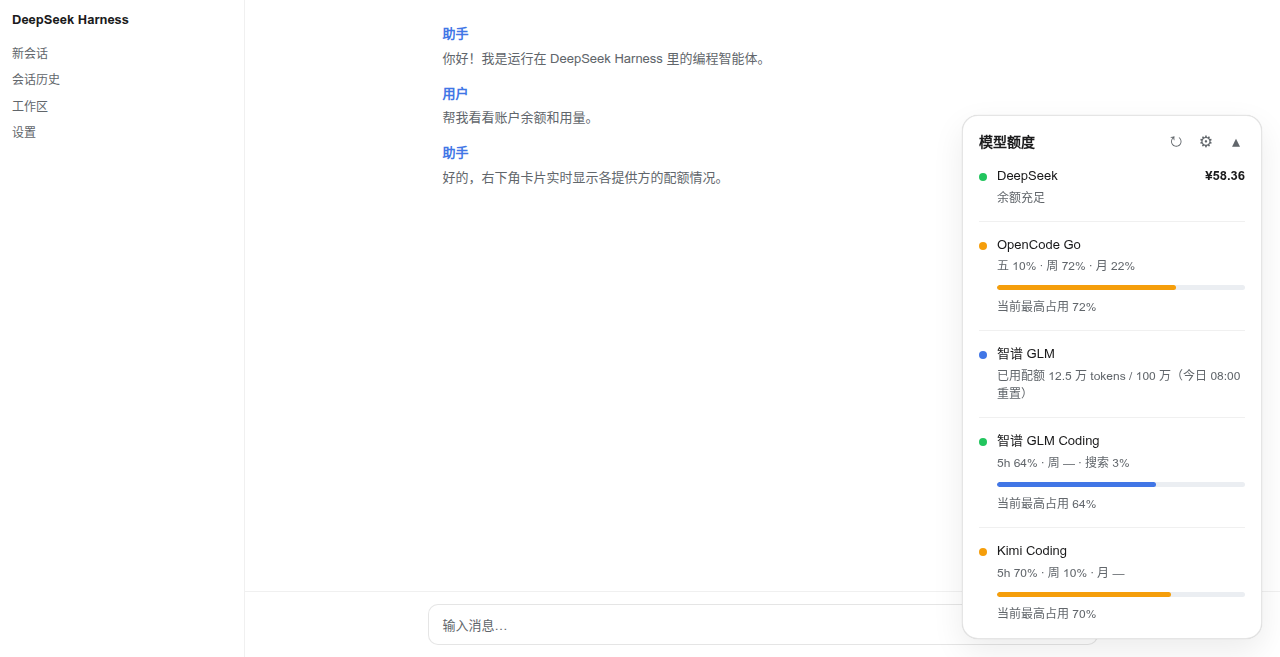
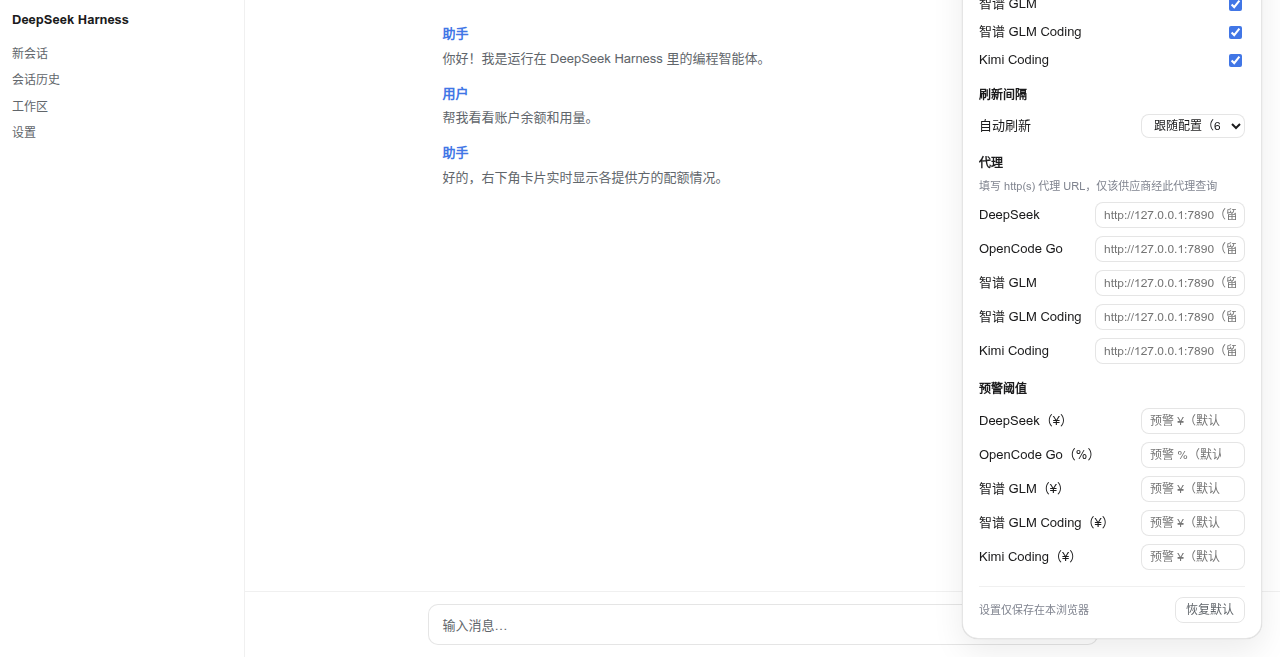
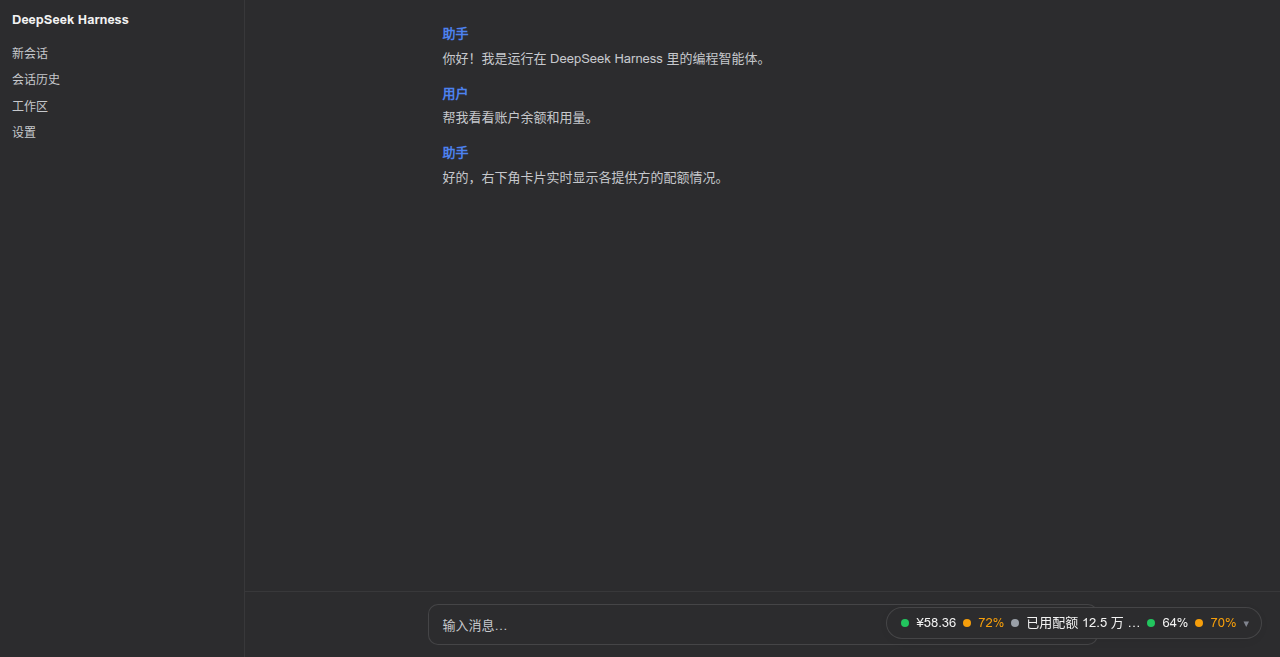
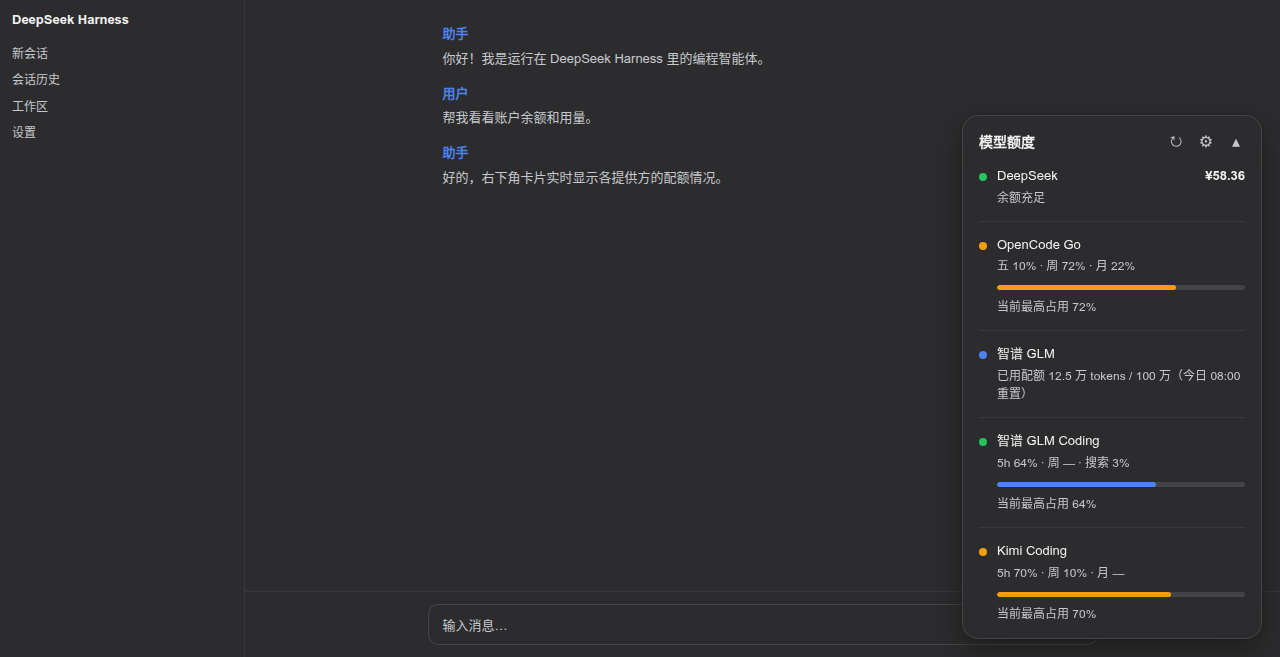
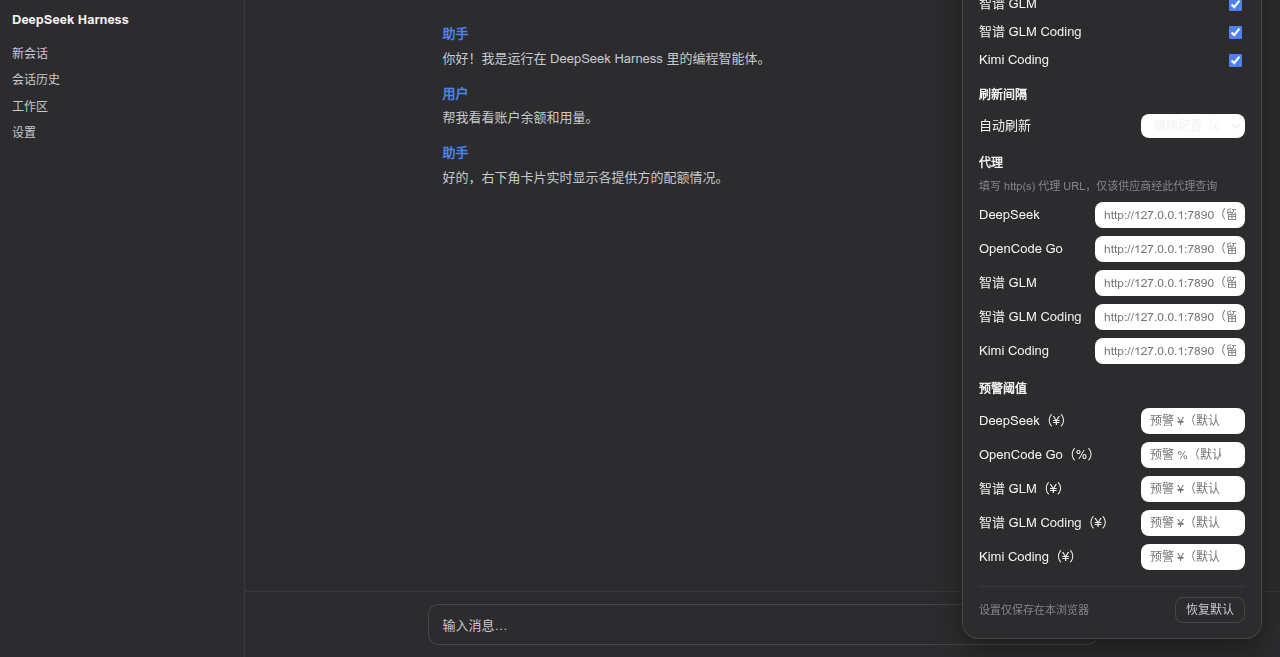
Screenshots (real browser rendering)
Collapsed capsule, light theme:
Expanded card, light theme:
Settings panel (⚙), light theme:
Collapsed capsule, dark theme:
Expanded card, dark theme:
Settings panel (⚙), dark theme:
Supported features
- Auto discovery — the host half ships a catalog of well-known
providers; each entry names the provider's standard credential
references, and every provider whose key resolves
(
$DSH_HOME/.credentials.yaml/.env/ environment variables) appears on the panel automatically, with zero config. Remove the key and the row disappears. No credential enumeration API exists in DSH, so the catalog is probed each refresh cycle. - Coding-plan usage windows — GLM / Z.AI / Kimi / MiniMax coding
plans render as usage rows: 5-hour window, weekly pool and (GLM/Z.AI)
the MCP monthly lane, each with its own reset countdown; windows the
plan does not carry show
—instead of a fabricated 0%. - Two sizes — collapsed: a minimal capsule with one independent
"status dot + value" pair per account (
● ¥58.36 · ● 45%); expanded: a full card with a row per provider (status dot, name, primary value, secondary info, progress bar for usage-kind providers). - Auto refresh — follows the configured interval (default 60 s), paused while the page is hidden; the refresh button spins during a fetch and repeated clicks never fire concurrent requests.
- Per-account status — balance rows are graded by tier
(
critical <= warn <= healthy), usage rows by percent (error >= warn); the offending dot/value alone recolors, others stay calm. Usage percentages use battery-style three-color grading, independent of the status dots. - Settings panel (⚙) — per-provider visibility, refresh interval, per-provider warning thresholds, per-provider HTTP(S) proxy URL, the capsule display mode (auto = highest window — the default — / 5h window / weekly window / highest), and "restore defaults". All local settings apply immediately, persist to browser localStorage, and are never written to the profile or uploaded.
- Per-row HTTP(S) proxy — configure a proxy for providers that cannot be reached directly from your network (see below).
- One-api / new-api aggregators — the built-in
openai-billingformat adapts aggregator dashboards. - Theming — driven entirely by Harness design tokens
(
--dsw-alias-*,--dsw-static-*,--dsw-shadow-*,--dsw-font-*) with sensible fallbacks, so it follows the product theme (light/dark) and ships no palette of its own. - Security by construction — API keys never reach the browser; the
browser talks only to this plugin's methods inside DSH's own
authenticated
/apichannel and receives only normalized views (see "How it works").
Not supported (yet)
- Usage-only providers — OpenAI, Anthropic, Together, Groq, Mistral, Cohere, DashScope, Baichuan expose no public "remaining balance" endpoint, only usage/cost queries (usually admin keys + time windows, "spent" semantics rather than "remaining"). Planned as a separate usage row kind showing monthly spend (Anthropic Admin API and OpenAI usage API first).
- Cookie / CLI-only coding plans — the quota pages of Qwen Token Plan
(Bailian console), Xiaomi MiMo Token Plan, and Qoder expose no API-key
quota endpoint: they require web cookies, the
arkcliCLI, or chat-endpoint rate-limit probes (per CodexBar research). Volcengine Ark / Doubao Agent Plan and Coding Plan are now supported via the AK/SK-signed OpenAPI (see the catalog table above). Other providers on this list cannot be wired in until an API-key endpoint appears. - socks5 proxies — only HTTP/HTTPS proxies are accepted (a socks URL is rejected with a clear per-row error).
- Custom adapters — new upstream formats cannot be plugged in from the
profile; a
formatvalue outside the built-in set fails loud at mount. - Multi-page placements — the widget lives in the
shell.overlayslot only (bottom-right corner), not in sidebars, headers, or the status bar.
Requesting a new provider
Missing a provider? Open an issue with:
- the provider id you want (
^[a-z0-9-]+$, e.g.together), using a-cnsuffix for the China site of a dual-site provider (cf.siliconflow/siliconflow-cn); - the balance API URL — a public endpoint that answers the provider's
standard API key with remaining balance/quota (e.g.
GET https://api.provider.com/v1/user/info, Bearer auth), plus the response shape if you can paste it.
That is all the catalog needs: an id whose standard credential reference resolves, an endpoint, and a format adapter for the response. Providers with only cookie/CLI quota pages (see above) cannot be supported until they expose an API-key endpoint.
How it works
┌─────────────── browser (lib/client.js) ───────────────┐
│  shell.overlay slot → capsule / card / settings panel  │
│  localStorage: visibility · interval · thresholds ·    │
│                proxy URLs (frontend settings)          │
└──────────────┬─────────────────────────────────────────┘
               │ Connection /api channel (browser-session fenced):
               │   POST /api/dsh-quota-panel/specs (render hints)
               │   POST /api/dsh-quota-panel/fetch-all { proxy: {...} }
┌──────────────▼────────────── host (lib/index.js) ──────┐
│  ctx.credentials → API keys (never leave the host)      │
│  catalog probe → auto discovery (15 built-in providers) │
│  per-row fetch → proxy engine (CONNECT tunnel /         │
│                  absolute-URI) → upstream JSON          │
│  normalization → {balance | usage | info} view models   │
└─────────────────────────────────────────────────────────┘
- Host half (
lib/index.js) mounts one exact Fetch route per endpoint on the Connection service's authenticated/apichannel, under thedsh-quota-panelmethod namespace:POST /api/dsh-quota-panel/specs— the resolved rows with render hints only (id, label, row kind, currency, threshold tiers, window labels, configured proxy name). No credentials, no endpoints.POST /api/dsh-quota-panel/fetch-all— fetches every visible row, normalizes each upstream response into a generic view model (balance/usage/info), and returns{rows: [{id, view} | {id, error}], fetchedAt}. Raw upstream JSON stays host-side like the keys; one failing row never affects the others.POST /api/dsh-quota-panel/chatgpt-auth-status/chatgpt-login-start/chatgpt-login-cancel/chatgpt-logout— the optional ChatGPT subscription device-login flow. Requests are fenced by DSH's own/apiroute (trusted host + browser session), so the endpoints are not reachable from another machine or from a client without the page session.
- Auto discovery — because DSH's credential store has no enumeration
API, the host half probes the catalog entries' standard refs each fetch
cycle; every entry whose key resolves joins the panel, and entries with
unresolvable keys are skipped (a missing key yields a clear per-row error
only when it was explicitly configured via
providers). - Proxy engine — zero-dependency hand-rolled
proxiedGetJson: https targets go through an HTTPCONNECTtunnel (TLS over the tunnel), http targets via absolute-URI forwarding. 15 s per-row timeout, 1 MB body cap. Proxy selection precedence: frontend settings panel > profile config > direct. - Threshold judgement happens client-side from the
specshints, so local threshold overrides apply without refetching; profile thresholds ship inspecsand the frontend settings override them locally. - Config validation — the exported
Configschema (vendored schemastery) declares structure and defaults; cross-field constraints (id uniqueness,critical <= warn <= healthy, proxy references, catalog override keys) are validated host-side at mount and fail loud. - DOM safety — the card builds DOM exclusively with
createElement/textContent; API values never touchinnerHTML; technical errors (401, timeout, missing credential, refused proxy) surface only intitletooltips or inline row text. - A broken proxy can never take the host down — every socket and request
the proxy engine opens funnels its
errorevent into the row's result, so an unreachable proxy (e.g. clash stopped,ECONNREFUSED 127.0.0.1:7890) shows as a per-row error instead of an unhandled EventEmitter error.
Configuration
Out of the box: nothing. Install, restart, and any provider whose key resolves appears automatically. The table below is only for tuning.
All keys are optional — the structure and defaults live in the exported
Config schema, so profile patches may omit every defaulted field.
| Key | Meaning | Default |
|---|---|---|
auto |
probe the built-in catalog; providers with a resolvable key join the panel | true |
hide |
row ids to drop (catalog and explicit rows alike) | [] |
proxies |
named proxy definitions {<name>: "http://host:port"}, HTTP(S) only |
{} |
catalog |
partial overrides for auto-discovered rows {<catalog-id>: {...}} |
{} |
refreshMs |
auto-refresh interval | 60000 |
providers |
explicit rows; a same-id entry replaces the catalog row wholesale | [] |
Each catalog override may set: label / endpoint / format /
proxy / refs (credential references to probe, UPPER_SNAKE) /
secretRefs (a second credential reference — required for the Volcengine
AK/SK pair; the row is only discovered when BOTH refs and secretRefs
resolve) / region (Volcengine OpenAPI region; default cn-beijing) /
currency (balance rows: symbol like $ or US$) / balanceTiers /
warnPercent / errorPercent / windowLabels.
Explicit providers fields:
| Field | Meaning | Default |
|---|---|---|
id |
row id (RPC rows align by id), ^[a-z0-9-]+$ |
required |
label |
provider name shown on the card | required |
credential |
credential reference ($DSH_HOME/.credentials.yaml or environment) |
required |
secretCredential |
second credential reference (Volcengine volcengine-agent-usage / volcengine-coding-usage: the SK) |
— |
endpoint |
quota JSON endpoint; base URL for openai-billing |
required |
format |
row adapter (see table below) | deepseek-balance |
proxy |
a proxy name defined in proxies; absent = direct |
— |
region |
(volcengine-agent-usage / volcengine-coding-usage) Volcengine OpenAPI region |
cn-beijing |
currency |
(balance rows) currency symbol, overrides the format default | format default |
balanceTiers |
(balance rows) {critical, warn, healthy} |
{10, 20, 50} |
lowBalance |
legacy alias for balanceTiers.warn |
— |
windowLabels |
(usage-kind formats) labels for the usage windows | {滚, 周, 月} |
warnPercent / errorPercent |
(usage rows) thresholds | 70 / 90 |
Built-in provider catalog (auto discovery)
| Provider | Credential refs probed | Endpoint | Row kind |
|---|---|---|---|
| DeepSeek | DEEPSEEK_API_KEY |
api.deepseek.com/user/balance |
¥ balance |
| OpenRouter | OPENROUTER_API_KEY |
openrouter.ai/api/v1/credits |
$ balance (purchased − used) |
| SiliconFlow (global) | SILICONFLOW_API_KEY |
api.siliconflow.com/v1/user/info |
$ balance |
| SiliconFlow (CN) | SILICONFLOW_CN_API_KEY |
api.siliconflow.cn/v1/user/info |
¥ balance |
| Moonshot / Kimi | MOONSHOT_API_KEY |
api.moonshot.cn/v1/users/me/balance |
¥ balance |
| MiniMax Coding (global) | MINIMAX_API_KEY |
www.minimax.io/v1/token_plan/remains |
5h prompt usage % |
| MiniMax Coding (CN) | MINIMAX_CN_API_KEY |
api.minimaxi.com/v1/token_plan/remains |
5h prompt usage % |
| StepFun | STEP_API_KEY / STEPFUN_API_KEY |
api.stepfun.com/v1/accounts |
¥ balance (hover: cash/voucher) |
| xAI | XAI_API_KEY |
api.x.ai/v1/billing/credits |
$ balance |
| Zhipu GLM | ZHIPU_API_KEY / GLM_API_KEY |
open.bigmodel.cn/api/monitor/usage/quota/limit |
text row (quota remaining/total; no public balance API) |
| 智谱 GLM Coding | ZAI_CODING_CN_API_KEY |
open.bigmodel.cn/api/monitor/usage/quota/limit |
coding-plan windows (5h tokens / weekly / searches) |
| Z.AI GLM Coding | ZAI_API_KEY |
api.z.ai/api/monitor/usage/quota/limit |
coding-plan windows (5h tokens / weekly / searches) |
| Kimi Coding | KIMI_API_KEY |
api.kimi.com/coding/v1/usages |
usage % (5h rate limit + weekly request pool) |
| OpenCode Go | OPENCODE_GO_API_KEY |
opencode.ai/zen/go/v1/usage |
three-window usage % |
| Volcengine Ark Agent Plan | VOLC_ACCESS_KEY + VOLC_SECRET_KEY |
open.volcengineapi.com (OpenAPI, signed) |
usage % (5h / weekly / monthly, GetAFPUsage) |
| Volcengine Ark Coding Plan | VOLC_ACCESS_KEY + VOLC_SECRET_KEY |
open.volcengineapi.com (OpenAPI, signed) |
usage % (session / weekly / monthly, GetCodingPlanUsage) |
Volcengine Ark has two separate subscriptions — Agent Plan and Coding Plan — shown as two independent rows (like two providers) that share the same AK/SK pair. Each row queries only its own plan's API and never falls back to the other, so a plan the account has not subscribed to shows a "not subscribed" message on that row instead of the other plan's numbers. Volcengine authenticates with an AccessKey ID / SecretAccessKey pair using HMAC-SHA256 request signing — not a Bearer token. The inference
ARK_API_KEY(shapedark-...) cannot query usage; only the AK/SK pair has OpenAPI permission. Full setup is in the next section.
Volcengine Ark setup
Ark Agent Plan / Coding Plan usage comes from the control-plane OpenAPI, which requires an AK/SK pair with read-only access. Three steps:
1. Create an AccessKey
Open https://console.volcengine.com/iam/keymanage (Volcengine console → Identity and Access Management → Access Keys) and click New access key. Prefer creating a sub-user key dedicated to this plugin rather than using the primary account key. Save the AccessKey ID and SecretAccessKey when shown — the SecretAccessKey is displayed once.
2. Grant Ark read-only permission
Attach the ArkReadOnlyAccess policy to the sub-user (or role) that owns the
key:
- Open IAM → Users, pick the sub-user, choose Permissions → Add permissions;
- In the Search policy name and remarks box, type
ArkReadOnlyAccess; - The result whose service source is "Volcengine Ark" is the one you need — check it. There are only two same-named policies in the search results, and checking both is harmless too.
ArkReadOnlyAccess alone is sufficient — GetAFPUsage and
GetCodingPlanUsage are read-only actions; ArkFullAccess or account-level
billing permissions are not required.
3. Save the credentials
Add two lines to $DSH_HOME/.credentials.yaml (by default
C:\Users\<you>\.dsh\.credentials.yaml on Windows or ~/.dsh/.credentials.yaml
on Linux/macOS):
VOLC_ACCESS_KEY: AKLTxxxxxxxxxxxxxxxxxxxxxxxxxxxxxxxx
VOLC_SECRET_KEY: xxxxxxxxxxxxxxxxxxxxxxxxxxxxxxxx
You can also use the VOLC_ACCESS_KEY / VOLC_SECRET_KEY environment
variables (DSH's credential resolver falls back to the environment). Restart
dsh web; the "Volcengine Agent" and "Volcengine Coding" rows appear in the
bottom-right panel automatically (whichever plan the account subscribes to
shows data; both rows share the same AK/SK pair) — no providers: block required.
Verifying permissions
After restart, check the panel:
- The Agent row shows three percentages (5h / weekly / monthly) and the Coding
row shows three (session / weekly / monthly) → AK/SK and
ArkReadOnlyAccessare both working (if only one plan is subscribed, the other row shows a "not subscribed" message); volcengine SignatureDoesNotMatch: ...→ the SK was copied wrong (watch the trailing=);volcengine AccessDenied: ...→ the policy is not attached or the wrong source policy was selected;No active Volcengine Ark Agent/Coding Plan subscription→ the signature worked but the account has no subscription to that plan (typical for pay-as-you-go accounts; the two rows report independently — hide the unsubscribed one from the ⚙ settings panel).
Migration (from ≤ 0.9.1, if you pinned the old row): the single catalog row id
volcengineand the format idvolcengine-usagewere replaced byvolcengine-agent(volcengine-agent-usage) andvolcengine-coding(volcengine-coding-usage). Auto-discovered setups need no changes; a hand-writtencatalog:override orproviders:entry that still references the old ids makes the plugin refuse to load with a validation error listing the valid ids — update it to the two new ids.
Security note: an AK/SK pair can read all Ark usage data for the account. Redact it before pasting into chats, tickets, or screenshots, and rotate it from the key management page when no longer needed. | ChatGPT subscription (Plus/Pro) | in-plugin login or
~/.codex/auth.json(no API key) |chatgpt.com/backend-api/wham/usage| weekly usage % (Pro includes a 5h window) |
An additional openai-billing format adapts one-api / new-api style
aggregators: set endpoint to the aggregator base URL and the host half
requests {base}/v1/dashboard/billing/subscription
(hard_limit_usd) plus {base}/v1/dashboard/billing/usage
(total_usage); remaining = limit − used ($). Aggregator domains differ
per deployment, so this format is explicit-config only.
Dual-site provider ids (custom id → site mapping)
Some providers run separate international and China sites with different
endpoints, credential references and currencies. The catalog models each
site as its own provider id, so configuring the matching key is all it
takes — and an explicit providers: entry reusing one of these ids replaces
the catalog row wholesale (same fields, your endpoint/label/currency):
| provider id | Site | Endpoint | Credential ref | Currency |
|---|---|---|---|---|
siliconflow |
SiliconFlow global | api.siliconflow.com/v1/user/info |
SILICONFLOW_API_KEY |
$ |
siliconflow-cn |
SiliconFlow China | api.siliconflow.cn/v1/user/info |
SILICONFLOW_CN_API_KEY |
¥ |
minimax |
MiniMax Coding global | www.minimax.io/v1/token_plan/remains |
MINIMAX_API_KEY |
— (usage %) |
minimax-cn |
MiniMax Coding China | api.minimaxi.com/v1/token_plan/remains |
MINIMAX_CN_API_KEY |
— (usage %) |
zai |
Z.AI GLM Coding global | api.z.ai/api/monitor/usage/quota/limit |
ZAI_API_KEY |
— (usage %) |
zai-coding-cn |
智谱 GLM Coding China | open.bigmodel.cn/api/monitor/usage/quota/limit |
ZAI_CODING_CN_API_KEY |
— (usage %) |
Both sites of one provider can be on the panel at the same time (configure
both keys); hide: ["siliconflow"] drops either row individually.
The currency symbol for balance-kind rows comes from the format by default
(siliconflow-balance renders ¥) and can be overridden per row: catalog
rows carry currency (the global SiliconFlow row sets $), a catalog:
override may set it, and explicit providers: entries accept a currency
field (e.g. "US$").
ChatGPT subscription (Plus/Pro)
ChatGPT subscription usage is not API billing — there is no public balance/usage API. This plugin calls the same internal usage endpoint Codex uses, with a ChatGPT OAuth token, and shows the weekly window (and the 5-hour window on Pro) as a used-percentage row. Two login methods are supported, pick whichever you prefer:
⚠️ Experimental. The endpoint (
chatgpt.com/backend-api/wham/usage) is an undocumented internal API used by the Codex CLI; its response shape may change. The plugin only performs read-only queries.
Option A: in-plugin login (recommended — no Codex CLI install required)
- Restart
dsh weband open the panel settings (gear icon) in the bottom-right corner; - In the "ChatGPT account" section at the top, click "Log in to ChatGPT";
- The plugin starts an OAuth device-code flow and displays a one-time code
plus the sign-in URL
https://auth.openai.com/codex/device; - Open the URL in your browser, sign in with your ChatGPT Plus/Pro account, and enter the code;
- Once authorized, a "ChatGPT" row appears automatically (no restart). Hover
to see
plan: plus/proandweekly: N%(Pro also shows a 5h window).
Tokens are stored in $DSH_HOME/dsh-quota-panel/chatgpt-auth.json
(C:\Users\<you>\.dsh\dsh-quota-panel\ on Windows, file mode 0600). When the
access token expires the plugin refreshes it with the refresh token and writes
it back. Click "Log out" in the same section to delete the local token.
Option B: reuse a Codex CLI login
If you have already logged in via the Codex CLI
(ran codex and completed the browser sign-in), the plugin automatically reads
~/.codex/auth.json (or $CODEX_HOME/auth.json) — no extra configuration
needed. With this method, refreshed tokens stay in the plugin process memory
only and are never written back to auth.json (that file is owned by the
Codex CLI).
When both are present, the in-plugin login takes precedence. When neither
exists the ChatGPT row is hidden. If the token is invalidated by a login
elsewhere, the row shows an error — run Option A again, or codex login, to
recover.
Built-in formats
更多「用量與計費」外掛
dsh-cost-meter
作者 han-1413141
DeepSeek Harness 會話與當日 API 費用、預算與官方餘額統計外掛:歷史看板、峰谷計價與官方價格一鍵同步。
dsh-usage-stats
作者 ychris12138
為 DeepSeek Harness Web GUI 提供提供方餘額、訂閱額度與 Token 用量分析。
tokdash
作者 jingbiaomei
智慧體儀表盤:以熱力圖、成本追蹤與 Token 計數視覺化各提供方的會話與配額用量,幫助分析與最佳化。
dsh-balance-meter
作者 ghost011118
在 DSH Web 輸入框下方即時顯示 DeepSeek 賬戶餘額與本場會話花費,自動抓取官方價格並支援峰谷計價。