
dsh-session-tree-extension
精選清單收錄維護狀態: 活躍robiteame/dsh-session-tree-extension
為 DeepSeek Harness 提供追加式、多分支會話樹:歷史節點不可變且可隨時分叉,支援標準訊息重建、版本化 JSON 快照,以及嵌入聊天編輯器的 WebUI 樹面板。
$ dsh plugin add dsh-session-tree-extension20
星數
1
Fork
TypeScript
語言
MIT
授權條款
2026-08-27
建立於
2026-10-24
最近推送
README
dsh-session-tree



Append-only, multi-branch conversation trees for DeepSeek-Harness — fork any historical node, clone a branch into a new session, and browse the whole lineage as one merged WebUI graph. Old history is never edited or deleted.
Three commands:
| Command | What it does |
|---|---|
/tree |
Open the merged lineage graph: every non-subagent session and node, clickable and bindable |
/fork |
Branch from any historical node — the fork appears in the graph and as an inline menu under its source session |
/clone |
Duplicate the current conversation into an independent new session under the same project |
Screenshots
Tree panel (light and dark) with the sidebar's inline fork-branch menu:
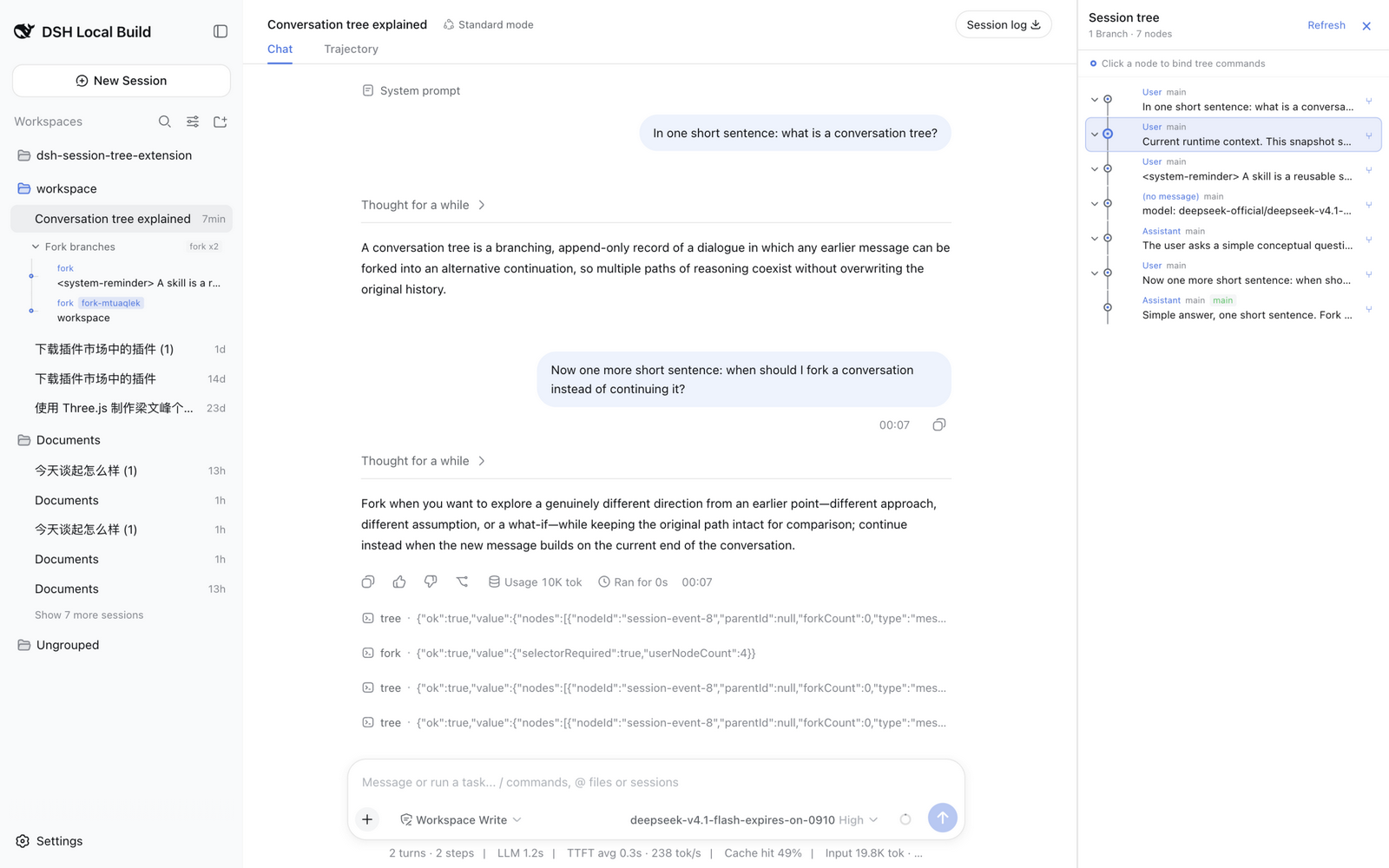
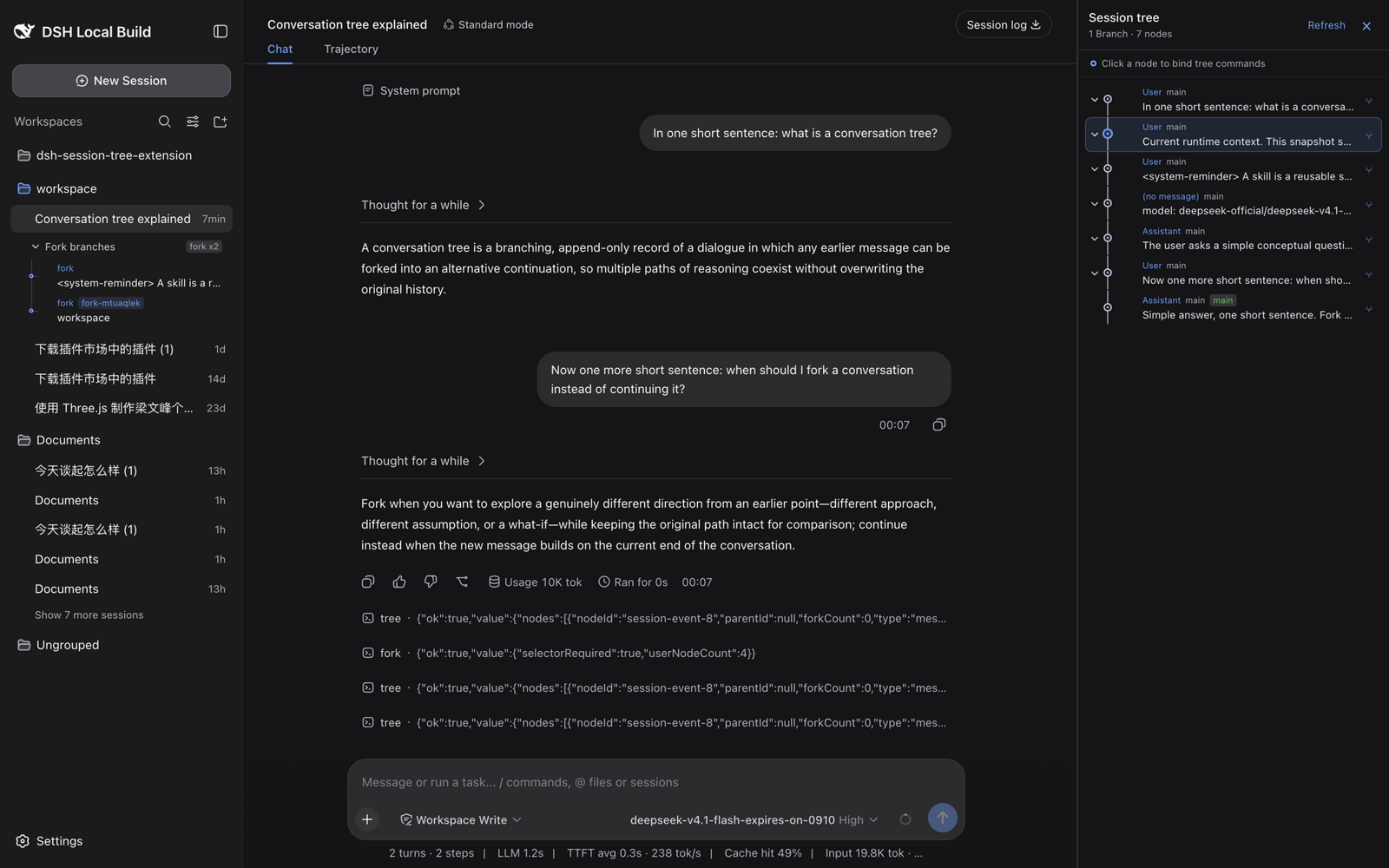
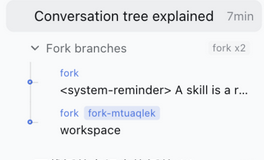
The inline /fork branch menu beneath its source session:
Published as four npm packages under the @robiteame scope:
| Package | Role |
|---|---|
@robiteame/dsh-session-tree |
Carrier Bundle: one install mounts everything below through its composition layer |
@robiteame/dsh-pi-agent-session-tree |
Host domain service: the SessionTree/SessionTreeStore domain model and the sessionTree Remote |
@robiteame/dsh-tool-session-tree |
Command surface: the /tree /fork /clone commands |
@robiteame/dsh-client-ui-session-tree |
WebUI tree panel: a native tab in the Harness 0.2 right Sidebar, with an additive overlay fallback for older stock builds |
Install (users)
DeepSeek Harness Desktop
Open Settings → Plugins → Market, search for
@robiteame/dsh-session-tree, install it, and restart the desktop app. The
desktop plugin manager activates the carrier bundle, so the next boot composes
the three rows (pi-agent-session-tree, tool-session-tree,
ui-session-tree) that load the Host service, the commands, and the browser
panel.
On older desktop builds bundling the 0.2.1-rc.2 CLI, the dsh plugin
command only forwards to pnpm and does not activate a newly installed bundle.
Use the in-app market there; after the restart, /tree opens the panel.
CLI (0.2.1-rc.3 and newer)
On a CLI that ships the 0.2.1-rc.3 plugin manager, one command installs and
activates the bundle:
dsh plugin --profile <profile> add @robiteame/dsh-session-tree
Prebuilt tarballs install the same way and need no build scripts:
dsh plugin --profile <profile> add robiteame-dsh-session-tree-0.7.2.tgz
After installing, restart the profile. Verify the composed layer:
dsh --profile <profile> --dump-config # should list the three session-tree rows
Requires DeepSeek-Harness ^0.2.1-rc.2 and Cordis ~4.0.5; the target
installation provides those peers. The current development and verification
baseline is the published 0.2.1-rc.5 release. No install
scripts run — the tarballs ship prebuilt lib/ artifacts.
The three commands
/tree — open the tree panel
/tree opens the right-side panel as one merged graph for the current
session's lineage: ancestors, forks, and clones appear in a single git-style
view, with user messages, assistant replies, tool calls, and model switches
shown as connected nodes. Shared copied prefixes are deduplicated, fork points
carry session badges, and the current session's path stays highlighted. Click
a node to bind it; clicking a node owned by another session opens that session
first. Collapse individual subtrees or whole session branches to focus the
graph.
/fork — branch from any historical node
/fork picks an earlier user prompt and grows a new branch from there: the
conversation continues along the new path while the original one stays intact.
The fork is created through the official native fork API, so it appears in the
session list with real parent linkage. The plugin adds the new branch to the
merged graph and also renders it as an inline collapsible menu directly beneath
its source session's row. Both views follow the official reactive session list,
so new branches appear without a refresh.
/clone — duplicate into a new session
/clone copies the current conversation — through its root path — into an
independent Session under the same project. The source history stays
read-only; the clone is yours to continue separately.
Branch switching and graceful degradation
The plugin never modifies Harness core files. It capability-detects the optional branch-selection engine API at runtime:
更多「Agent、自動化與工作流程」外掛
archify
作者 tt-a1i
為編碼智慧體生成美觀可驗證的架構圖、時序圖與資料流圖,輸出自包含 HTML,支援動效與清晰匯出。
openviking
作者 volcengine
為 AI 智慧體打造的自進化上下文資料庫,統一智慧體記憶、知識 RAG 與技能。
learn-harness-engineering
作者 walkinglabs
Harness 工程新手教程,從 0 到 1 系統學習智慧體工作流框架。
browserskill
作者 tencent
讓 AI 智慧體使用你已登入的真實瀏覽器而不打擾工作,CLI 與擴充套件雙形態,支援任意可呼叫 shell 的智慧體。