
README
dsh-magpie-connector
English · 简体中文
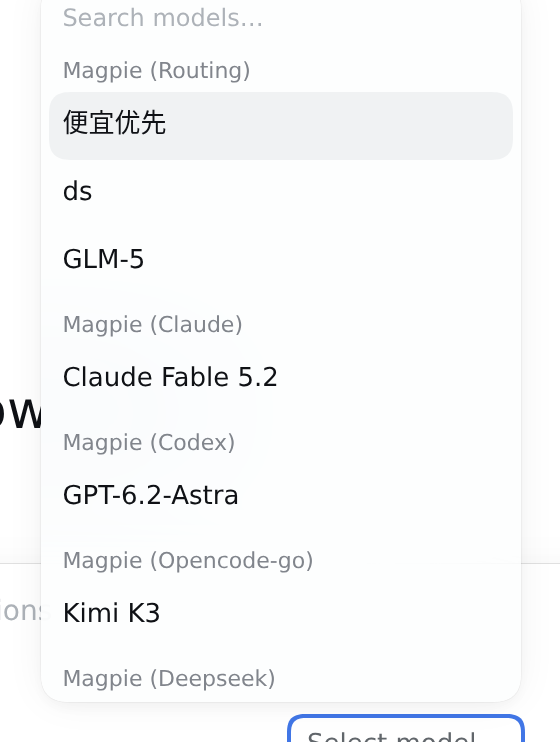
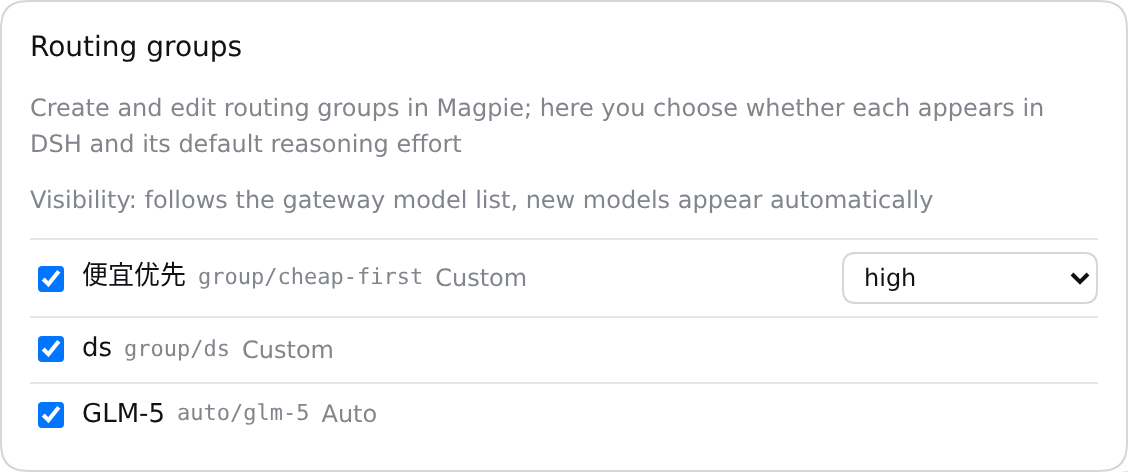
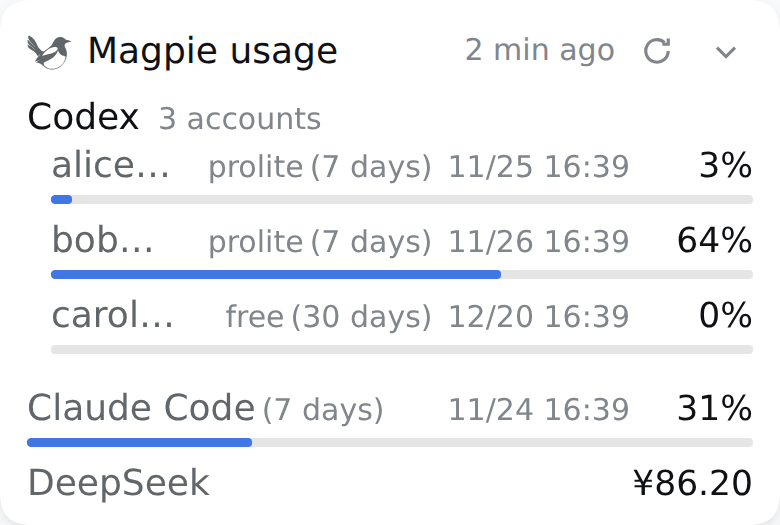
Top: model picker — routing groups in their own Magpie (Routing) group, everything else grouped by upstream provider. Middle: Settings → Magpie, the Routing groups section (visibility, type and default reasoning effort). Bottom: the resident sidebar usage card (click its header to expand every window). Captured from an isolated DSH host (English UI) with a local mock Magpie gateway; gateway address, models, account and readings are synthetic.

Connect a self-hosted Magpie gateway to DeepSeek Harness with one provider route per upstream owner: models grouped by upstream provider on stock DSH, usage cards (you can spend a Codex reset from them), and a per-session fast mode. Magpie keeps managing logins, accounts, routing and provider egress; this plugin adds the DSH side.
Product direction: Make Magpie's usage information and existing model/routing entry points easier to consume from DSH. Account pools and routing strategies stay in Magpie. See product positioning and design boundaries.
What you get
| Capability | What it does |
|---|---|
| Gateway lines (basic) | Each line has its own URL and gateway key. The model catalog comes from the gateway's GET /models; Responses-capable models use Responses, everything else uses Chat Completions. Text, tool round trips, images, usage, cancellation and DSH-managed retries go through. |
| Check a line before saving (0.4.0) | Every line card has “Check line”: one real GET /models with that card's address, access mode and key (empty credentials fall back to the line's saved values), rendered as a read-only snapshot — result kind, latency, model count and, when the host has a cached catalog with a sync time, the model ids extra to or missing from that cache. It never changes the active line, writes credentials/settings, syncs the catalog or registers a route; the diff is against the cached catalog, so it never claims to match the current line. |
| Automatic multi-line failover (signature) | Empty on first install; normally one line; add backup lines and let the order decide priority. Before every gateway operation the plugin picks the first reachable complete line with a ≤600ms TCP probe (10s positive / 15s negative in-memory cache, no background polling), so home uses the LAN while outside falls back to the public endpoint. Switching lines carries the catalog over (no flash), clears usage cards and re-syncs the new line; single-line users keep 0.1.x behavior. |
| Grouped by upstream provider (signature) | Works on stock DSH, no Host extension needed: the plugin registers one real provider route per gateway owned_by (dsh-magpie-connector-claude, -codex, -opencode-go, …; missing or invalid ownership goes to -other), so the official model picker shows Magpie (Claude), Magpie (Codex), Magpie (Opencode-go), Magpie (Other) groups. Settings and usage cards use the same grouping, and a provider that only appears in usage is never dropped. |
| Routing groups (0.7.1) | Magpie routing entries — custom groups (group/…) and auto-discovered groups (auto/…) — get their own Magpie (Routing) group in the picker instead of landing under their first member's vendor, and a 「Routing groups」 section at the top of Settings with visibility (its own 「Follow the gateway list」), type (custom / auto) and the default reasoning effort the gateway advertises. Entries are recognised by id prefix only. The plugin sends the group id as-is; Magpie picks the member, vendor and account (a group's effort may change which member serves). Create and edit groups in Magpie. |
| Line panel and latency | Configured lines start collapsed; click a row header to edit it, and reorder/delete are always-visible DSH product-icon buttons with tooltips. Opening Settings measures every saved line with a parseable address once (parallel TCP connect time, ≤600ms per line, no HTTP, no credentials) and shows a 4-bar signal plus milliseconds; timeouts show a timeout reading and failures or older hosts degrade to a dash. Display-only: it never affects automatic line selection, is not persisted, and never polls. |
| Per-line Cloudflare Access | Each line independently chooses Direct or Cloudflare Access. Access-enabled line requests carry the service token pair plus the bearer key; the token is never sent to a plain-HTTP line. |
| Usage cards | Each upstream account shows plan, expiry, window readings and, when the gateway provides them, its Codex reset credits: a folded Usage limit resets · N available line that expands to each credit with its expiry and how far off the soonest is (expires in N days); plans that hand out one kind per window show 2 five-hour · 1 weekly in the summary instead. Cards are read once when settings open and only re-read when you press Refresh on that card; bars turn orange above 70% and red at 90%. |
更多「整合與分享」外掛
dsh-notification
作者 omdsh-dev
DeepSeek Harness 桌面通知外掛,任務完成時提醒,可按結果與關鍵詞規則控制。
dsh-lark-bot
作者 plutokeating
DeepSeek Harness (dsh) 接入飛書/Lark bot,掃碼即用:流式卡片、專案工作區、並行任務、多角色 Agent、跨會話通知、對話內模型/金鑰管理與安全網守護(dsh 崩潰後飛書仍可自救)。A scan-to-connect bridge bot connecting DeepSeek Harness (dsh) into Feishu/Lark: streaming cards, workspaces, parallel tasks, multi-role agents, cross-session notify, in-chat model/key management, and a safety-net guardian.
dsh-session-notification
作者 dingyi222666
為 Deepseek Harness 提供會話完成等四種狀態的通知響應,支援瀏覽器提示和提示詞
dsh-chatgpt-web
作者 wlv-zedd
將標準 ChatGPT Web 直接橋接到 DeepSeek Harness 的 DSH ChatGPT Free 外掛。