
dsh-token-usage
Curated pickMaintenance: Activelaoyuehanni/dsh-token-usage
按请求粒度记录模型 token 用量(按天 JSONL,首次启动自动补齐历史),Web 设置面板「Token 用量」统计页(GET /token-usage/stats 路由)
$ dsh plugin add dsh-token-usageInstall
dsh has no central install command — add this plugin’s entry (documented in its README below) to your profile or patch config, then restart.
How installs work13
stars
2
forks
TypeScript
Language
MIT
License
2026-08-14
Created
2026-09-29
Last push
README
dsh-token-usage

简体中文 | English
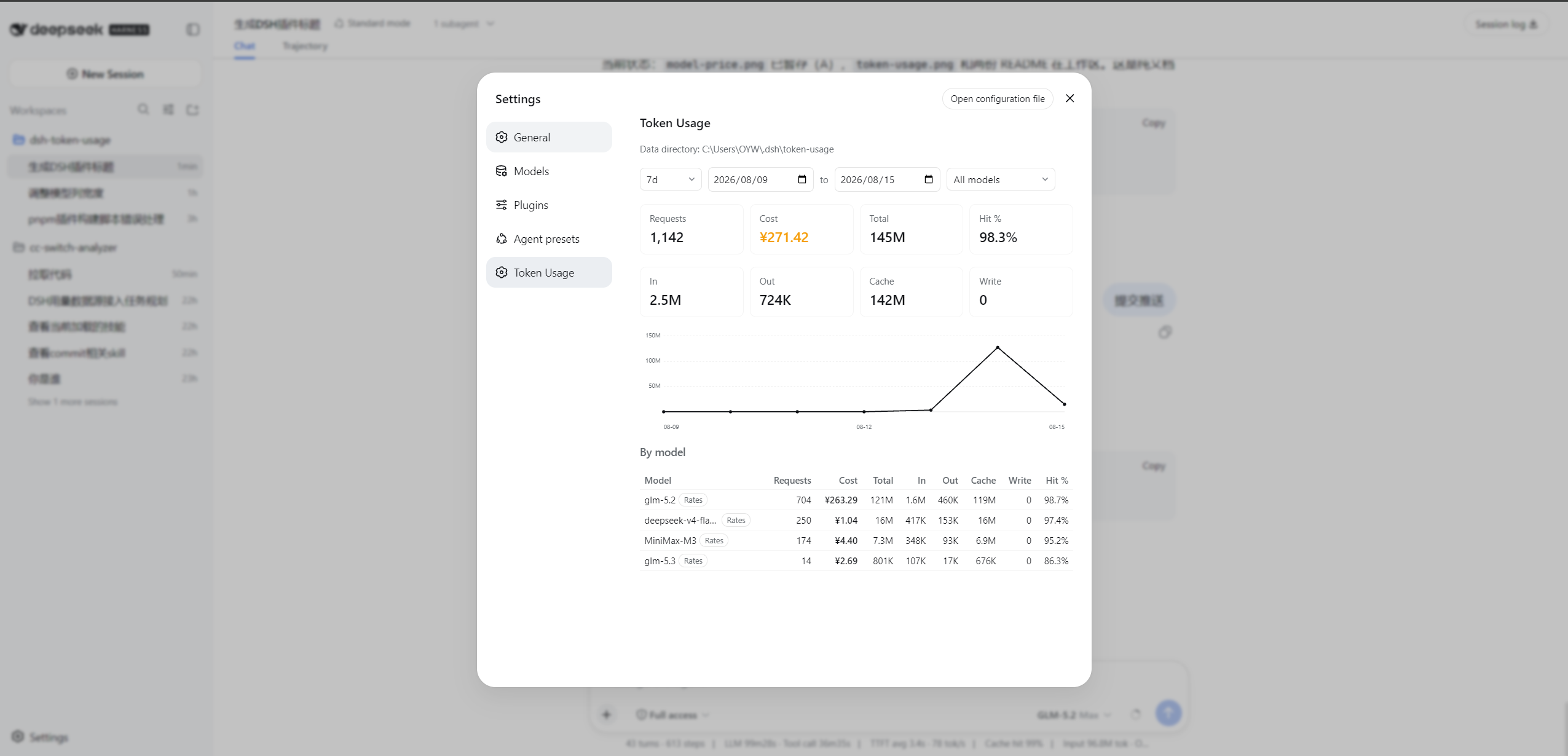
A dsh usage plugin that displays model token usage right in the Web UI. After installation, open Settings (the gear icon in the sidebar) and you'll find the Token Usage page — summary cards (with cost), a daily total-token line chart, a per-model / per-session breakdown, and per-model pricing dialogs, all filterable by date range and model, exactly as shown in the screenshot above.
Repo: https://github.com/LaoYueHanNi/dsh-token-usage
[!IMPORTANT] GitHub direct installs have ended — the repository no longer carries prebuilt output. Install from npm instead:
dsh plugin --profile web add @laoyuehanni/dsh-token-usageUpgrading from a legacy
github:install (≤ 0.3.7, package namedsh-token-usage)? An in-placeupdatefails to load — remove the old name first, then add again. Usage data under$DSH_HOME/token-usage/carries over untouched.
Features
- Live recording: every provider-billed model call is recorded as it happens — tokens, cost, model, session — context-compaction calls included.
- Web stats page: filters (date range + model +
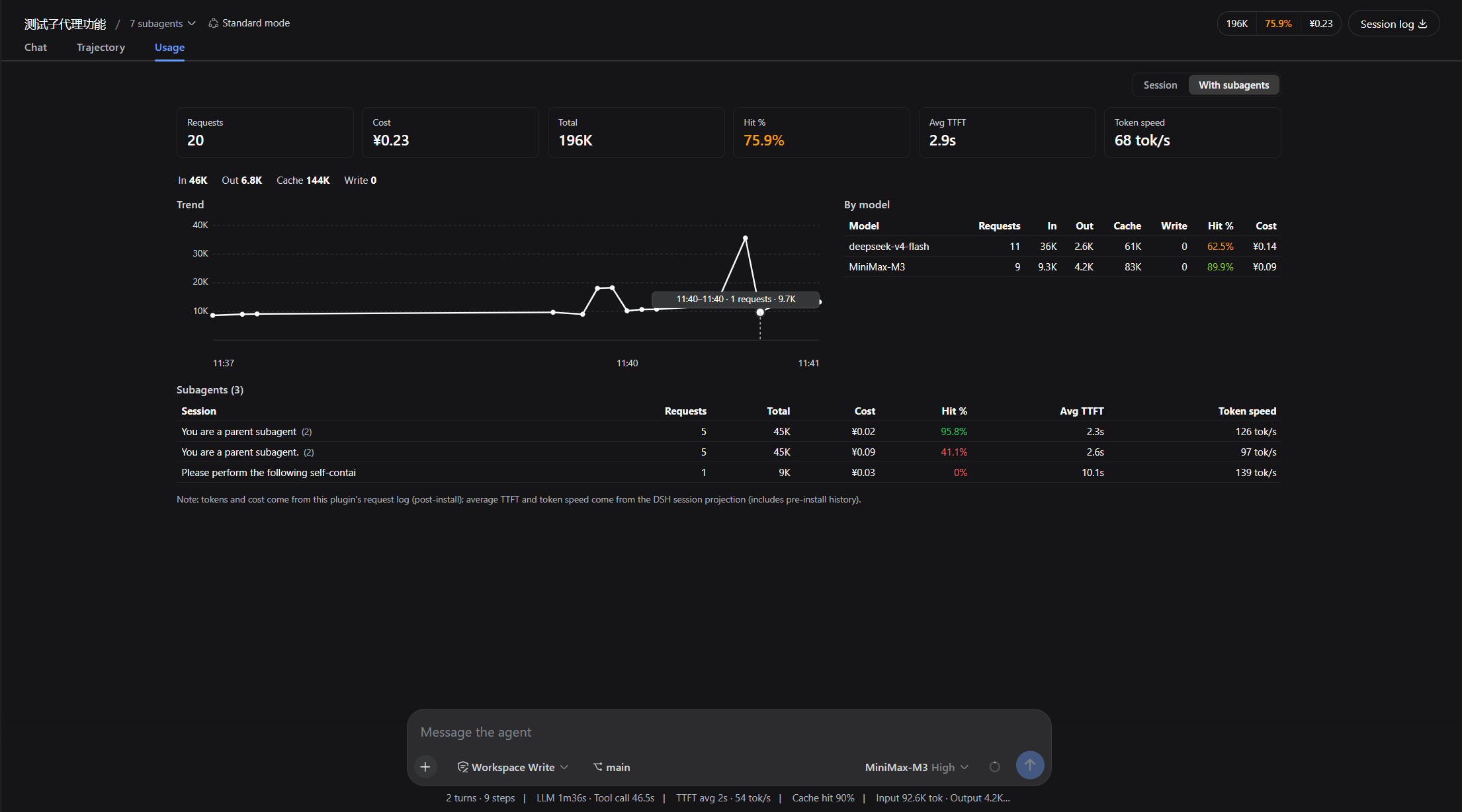
1d/7d/30dshortcuts), summary cards, daily trend chart (hover a day for its total), per-model table. The table block toggles between per-model / per-session: the session table groups by working directory (switchable to a flat list), sorts by total tokens / cost / recent activity on header click, and Ctrl+click on a session row jumps straight to that session's usage tab. - Session usage tab: the conversation pane gains a Usage view tab (beside Chat / Trajectory) with the active session's dashboard — six stat cards (successful requests with a failure pill, cost, cache hit rate, average time-to-first-token, generation throughput, total tokens), a 4-bucket token strip, an hourly trend chart, and a per-model table. A scope switch toggles Session / With subagents, and the subagent table drills into each child and back. Hovering the failure pill breaks failures down per class (rate limited, server error, context exceeded, …).
- Cost figures & model pricing: per-request cost is computed live from per-model rates (¥ per million tokens); unpriced models warn and count as ¥0. Every priced model's name carries a rates button opening its full price table, and the filter row carries a pricing table entry opening an overview of every model in the cloud feed — searchable, with simulated billing and expandable effective rates. Rates sync from the cloud feed on every startup — see Model pricing.
- Provider quota: an input-bar button (left of the model chip) shows the selected provider's remaining quota. See Provider quota.
- History backfill: the first startup syncs requests that happened before installation (idempotent); unreadable session logs are skipped and counted, never fatal to the sync.
Model pricing
Costs are billed per record at its own timestamp, and a rates update re-prices the whole history instantly. The single source is a cloud mirror auto-synced on every startup — pricing corrections belong upstream in the model-price-table feed, so every user benefits at once. A hand-edited pricing.json is no longer read; if you maintain one it is silently ignored after upgrading (the file is left on disk). Upgrading from 0.4.1 or earlier to 0.4.2 triggers a one-time full rebuild of the usage rollup the first time the stats page is read — the larger the history, the longer it takes; this is expected. Broken mirrors degrade the affected models to unpriced without breaking the stats page. Default location: ~/.dsh/token-usage/. Billing rule chain, cloud feed format, and self-hosted mirror URLs: docs/pricing.md.
Configuration
Data directory
Editable on the web card (Settings → Plugins → Token Usage): saving an absolute path takes effect immediately — history migrates automatically, no restart, no manual move. Blank keeps the default ~/.dsh/token-usage/. A save is refused while a conversation is in progress; wait for it to end, then save again. Or set it directly:
plugins:
  token-usage:
    path: D:/data/token-usage   # default: ~/.dsh/token-usage/
Pricing region
The pricing mirror follows your region: Gitee by default (fast inside mainland China) or the GitHub mirror of the same table — pick once on the web card's Pricing region dropdown or via config. The pick also drives the display currency (¥ RMB vs $ USD at the table's exchange rate).
plugins:
  token-usage:
    pricingRegion: overseas   # default: domestic
Provider quota
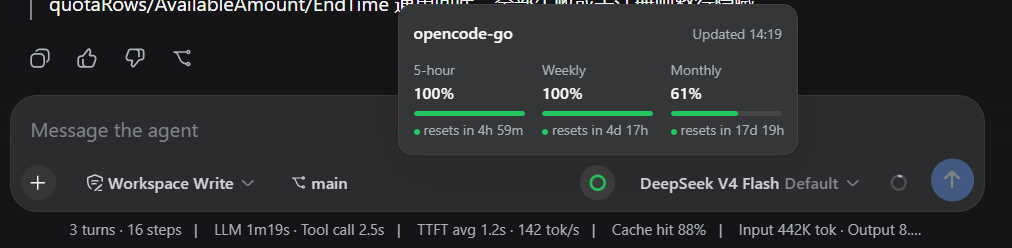
The input-bar button follows the currently selected provider and opens a panel with remaining quota (the same API key as inference):

| Provider | Shows |
|---|---|
| Zhipu GLM Coding Plan (CN / international) | 5-hour, weekly (some plans also monthly) |
| Kimi For Coding | 5-hour, weekly |
| MiniMax Coding Plan (CN / international) | 5-hour, weekly |
| OpenCode Go | 5-hour, weekly, monthly |
| DeepSeek (official) | ¥ account balance |
| OpenRouter | $ remaining credits |
Unsupported providers hide the button; a failed query can be retried from the panel. On by default; turn it off with quota.enabled: false. Not supported yet: Volcengine, ZenMux, Zhipu Team plan, Claude / Codex / Gemini / Grok official subscriptions, GitHub Copilot.
Install
dsh plugin --profile web add @laoyuehanni/dsh-token-usage
The package declares
dsh.bundle, soaddwires the plugin into the profile automatically — installs work out of the box, and the first startup backfills pre-install history.
Update
dsh plugin --profile web update @laoyuehanni/dsh-token-usage
Remove
dsh plugin --profile web remove @laoyuehanni/dsh-token-usage
Data files under $DSH_HOME/token-usage/ are kept — delete them manually if you no longer need them.
Development
Build once, install a symlink, iterate:
pnpm install
pnpm build:all
pnpm test                # vitest
dsh plugin --profile web add link:D:/plugins/dsh-token-usage
Rebuild and restart dsh web to apply changes (pnpm watch:client in the plugin directory hot-reloads the client). No prepare script by design — lib/ never enters the repo; pnpm publish builds it fresh into the tarball.
Temporary host-only mount (this launch only, no profile changes): copy cordis.example.yml to cordis.yml, point name at the absolute file:// URL of your lib/index.js, then dsh web --patch <plugin-dir>/cordis.yml. Data recording works in this mode; for UI work use the link: install above.
More in Usage & Billing
dsh-cost-meter
by han-1413141
Cost tracking for DeepSeek Harness: session and model costs, token usage, budgets, provider balances, and coding-plan quotas. Bilingual English/Chinese UI.
dsh-usage-stats
by ychris12138
Provider balances, subscription quotas, and token-usage analytics for the DeepSeek Harness Web GUI (dsh web).
tokdash
by jingbiaomei
Agent Dashboard: Visualization and analytics for Sessions and Quota Usage. Track, analyze, and optimize token usage across providers with heatmaps, cost tracking, token counting and quota resets..
dsh-balance-meter
by ghost011118
DeepSeek account balance and session cost readout for the DeepSeek Harness Web GUI