
README
dsh-visual-plugin






A local-first visual media plugin for DeepSeek Harness.
Validate, transcode, and extract video keyframes locally; understand images and
videos with DSH's current vision model, view image history, and play videos in the right panel.
A plugin for DeepSeek Harness.
Video preprocessing and plugin-owned media storage stay on the machine running DSH. Images and extracted keyframes are sent through DSH to your selected model; whether inference runs locally depends on your DSH model configuration.
Features
- Native image understanding — uploaded images stay on DSH's native attachment and model path; the plugin does not configure or call a separate vision model.
- Copyable image history — the right panel records the current DSH model's final answer beside each image thumbnail, with expandable history and one-click copy.
- Plugin-owned video upload — accepts MP4, M4V, MOV, AVI, MPG/MPEG, MKV, and WebM only when extension, signature, and FFprobe agree.
- Scene-aware video analysis — normalizes to H.264/yuv420p MP4, extracts keyframes with PySceneDetect, and sends ordered timestamped images to the current DSH vision model.
- Right-side panel — switch between image/video views, play normalized videos directly, and stage a selected video in the chat draft.
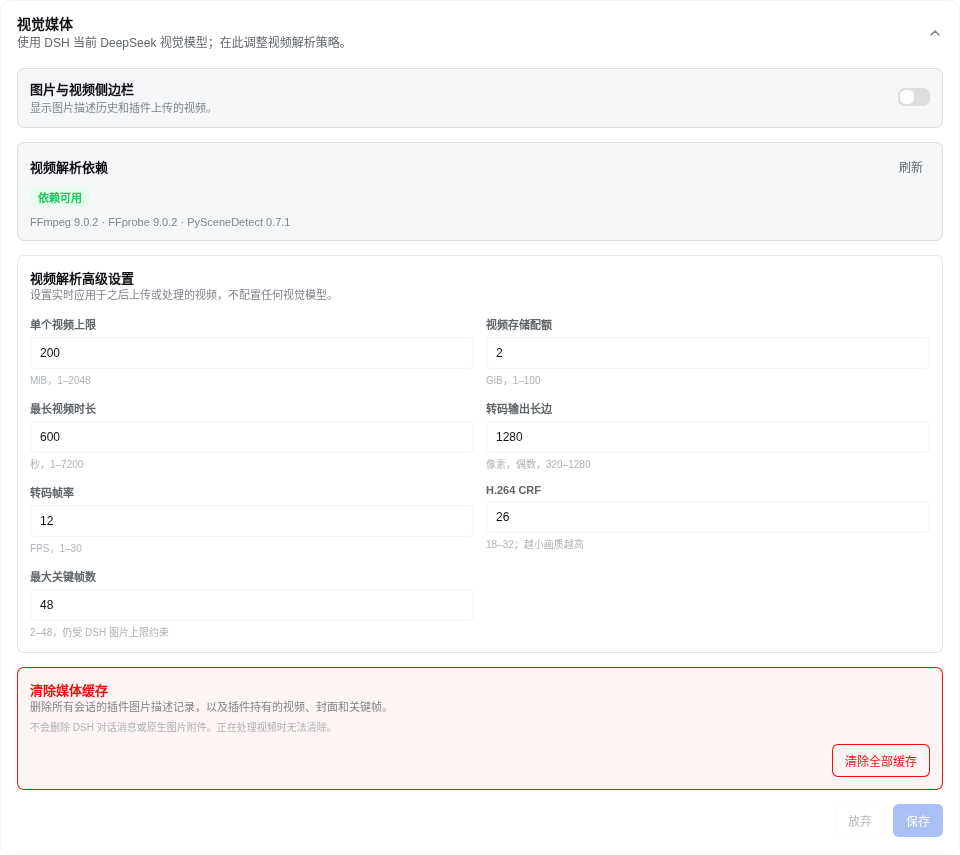
- Advanced video settings — tune upload size, storage quota, duration, output size, FPS, CRF, and keyframe count from the plugin settings card.
How it works
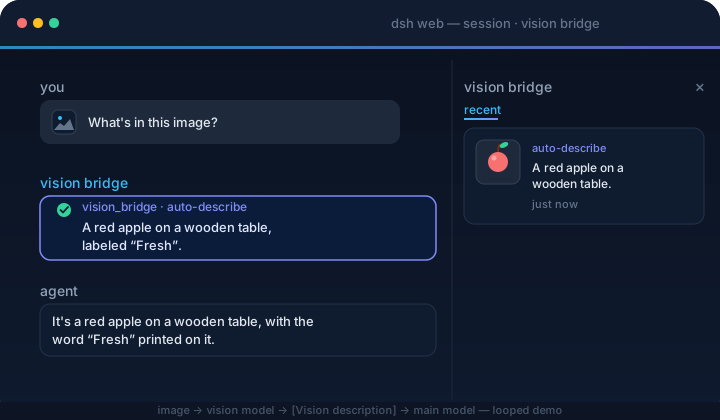
image → DSH native attachment → current image-capable model → final answer
  → /vision-bridge/recent → panel thumbnail + copyable description

video → container validation → H.264/yuv420p normalization → PySceneDetect
  → timestamped keyframes → DSH native image attachments → current model answers
The plugin never rewrites model messages or calls a private vision endpoint. Select an image-capable model in DSH before sending images or asking about a video.
Quick start
Plugin 0.4.x targets DSH 0.2.0-rc.2; keep plugin 0.3.2 for DSH 0.1.x. No exact-version risk exemption is needed.
1. Install host dependencies
Image features work without these tools. Video support requires FFmpeg/FFprobe >= 6.1 from the same major release, an FFmpeg build with libx264, and PySceneDetect >= 0.7.1 < 0.8.
Install the tools on the machine and under the user account that runs dsh web. The commands ffmpeg, ffprobe, and scenedetect must be available on that process's PATH, from any directory. If DSH runs in Docker, WSL, or on a remote server, install the dependencies inside that environment.
macOS (Homebrew)
Install Homebrew first if needed, and follow its post-install instructions to add brew to your PATH. Then install FFmpeg, which includes FFprobe, and uv:
brew install ffmpeg uv
Arch Linux (pacman)
Install the official FFmpeg and uv packages:
sudo pacman -Syu ffmpeg uv
Windows (PowerShell, WinGet)
Open PowerShell and confirm WinGet is available with winget --version. If it is missing, install or update App Installer using the instructions in that link. On Windows x64, install FFmpeg (including FFprobe) and uv:
winget install --id Gyan.FFmpeg --exact
winget install --id astral-sh.uv --exact
Close and reopen PowerShell before continuing so the new PATH takes effect. If WinGet is unavailable, use a Windows build linked from the FFmpeg download page, extract it to a permanent directory such as C:\Tools\ffmpeg, and add the directory containing ffmpeg.exe and ffprobe.exe (usually bin) to your user Path in Environment Variables. Install uv using its official Windows instructions.
Install PySceneDetect with uv (all three systems)
Run the following in your terminal or PowerShell:
uv tool install --python 3.12 "scenedetect>=0.7.1,<0.8"
uv tool update-shell
This installs PySceneDetect as a persistent command in an isolated environment for the current user. uv downloads Python 3.12 if needed; the standard scenedetect package includes its OpenCV dependencies. You do not need to activate a virtual environment before starting DSH. See the uv tool guide and PySceneDetect installation guide.
2. Verify dependencies
Close and reopen your terminal after uv tool update-shell. In the same environment you will use to start DSH, run:
ffmpeg -version
ffprobe -version
ffmpeg -hide_banner -encoders
scenedetect version
Confirm FFmpeg and FFprobe are both >= 6.1 and have the same major version, the encoder list includes libx264, and PySceneDetect is >= 0.7.1 < 0.8.
If a command is missing, locate it with command -v ffmpeg ffprobe scenedetect on macOS/Arch, or Get-Command ffmpeg, ffprobe, scenedetect in PowerShell. For PySceneDetect, uv tool dir --bin shows the directory that must be on PATH. Services and containers must also receive this PATH; restart the DSH process after changing it.
The plugin never downloads these tools or runs installers. The settings card reports video dependency issues while image features remain available.
3. Install the plugin
dsh plugin --profile web add dsh-visual-plugin # or: github:jyh20030112/dsh-visual-plugin
When developing this checkout against a local DeepSeek Harness source tree, install the local package instead:
cd /absolute/path/to/dsh-visual-plugin
npm run bootstrap
dsh plugin --profile web add link:/absolute/path/to/dsh-visual-plugin
bootstrap requires an installed, built dsh-v0.2.0-rc.2 Harness checkout and automatically finds a sibling or ancestor-adjacent checkout.
For another layout, set its location explicitly:
HARNESS=/absolute/path/to/deepseek-harness npm run bootstrap
4. Restart and use
Restart dsh web from the environment where the dependency checks passed, then:
-
Open Settings → Plugins, then the dsh-visual-plugin detail page and its Visual Media configuration. Use Sidebar to show or hide the right panel and adjust advanced video settings. Changes apply immediately, persist in the current profile across restarts, and recover valid archived video preferences without overwriting new settings during upgrades.
-
Select an image-capable model in DSH; there is no separate vision-model configuration in this plugin.
-
Send an image. The current model answers natively, and the image panel records the thumbnail and final answer for copying.
-
Upload a video from Upload video beside the composer. Once processing finishes, select Videos in the right panel to play it; Ask in chat stages a draft and never submits automatically.
Vision model
Image and keyframe understanding use the image-capable model currently selected in DSH. Model providers, endpoints, and credentials are managed by DSH rather than this plugin.
Uninstall
dsh plugin --profile web remove dsh-visual-plugin
Restart dsh web. The command forwards to pnpm remove inside the profile, and the bundle layer list reconciles to drop the plugin automatically.
Project layout
src/
  index.ts      native image history, video_describe tool, settings, and HTTP routes
  config.ts     advanced video-processing settings and runtime policy
  video/        upload, container probing, transcoding, scene detection, keyframes, and HTTP Range playback
  client/       image/video panel, upload controls, advanced settings, locales, and CSS
cordis.patch.yml  bundle patch layer
Build
npm run bootstrap && npm run typecheck && npm run build # needs a local harness checkout
Prebuilt lib/ is committed, so consumers never build.
CI/CD
ci.yml verifies artifacts and the pack contents on every push/PR. release.yml (tag v*) checks the version, packs, creates a GitHub Release, and publishes to npm.
Resources
- DeepSeek Harness — the plugin host this project extends.
- PySceneDetect — scene detection used to select video keyframes.
- awesome-dsh-plugin — the curated DSH plugin list where this plugin is registered.
Friendly Links
Thanks
- HsiangNianian — for their help and insights during development.
- tingfeng347 — for the build-stability and local-harness-setup fixes.
- dsh-auto-continue — a DSH Web UI plugin that auto-resumes interrupted requests with 「继续」 (error classification, adaptive backoff, browser notifications); a handy companion.
License
更多「設計、媒體與視覺」外掛
modlens
作者 liustack
The first vision plugin for DeepSeek Harness, and the vision bridge for every text-only coding agent. Paste an image, get structured JSON evidence (OCR, layout, semantics). | 全網最強 DeepSeek Harness 外掛視覺外掛,為 DeepSeek、GLM 等純文本模型外掛視覺能力,貼上圖片即得結構化 JSON 證據(OCR、版面、語義)。
agent-vision-toolkit
作者 anionex
為純文本模型"看圖“設計更好的視覺工具箱和技能,支援多圖理解,圖片問答,前端UI還原、GUI 自動化等,並可選無縫接入多個主流agent,直接識別貼上圖片| A vision toolkit and skill designed for text-only llms — image Q&A, long-screenshot OCR, frontend UI restoration, and GUI automation, with optional seamless integration for Codex, Claude Code, Pi, Oh My Pi, and OpenCode
dsh-vision-router
作者 ysr666
為純文本 DeepSeek Harness 智慧體提供「視覺」能力,內建免金鑰視覺鏈路與畫素級視覺工具,一條命令安裝,無需 Python。
dsh-vision-toolkit
作者 anionex
[dsh]為純文本模型設計更強大的視覺工具箱:一行安裝使用、貼上圖片直接識別、多張圖片問答、截圖到前端UI 還原等|DeepSeek Harness-native integration for agent-vision-toolkit: image Q&A, long-screenshot OCR, UI restoration, grounding, pixel diff, Artifacts, and Web UI.