
dsh-image2-draw
編輯精選維護狀態: 活躍junelearn/dsh-image2-draw
DeepSeek Harness Image2 生圖外掛,通過第三方 OpenAI Images 相容介面呼叫 gpt-image-2,只需配置 baseURL 和 API Key。 | Image2 generation plugin for DeepSeek Harness via third-party OpenAI Images-compatible APIs.
$ dsh plugin add dsh-image2-draw10
星數
0
Fork
JavaScript
語言
MIT
授權條款
2026-08-14
建立於
2026-08-16
最近推送
README
DSH Image2 Draw
Unable to generate images directly in DeepSeek Harness? This plugin adds Image2
generation through a third-party relay that exposes an OpenAI Images-compatible
API. Configure only a baseURL and an API Key, then use gpt-image-2 for
text-to-image and image-to-image tasks in chat.
Third-party service recommendation (referral link)
If you are looking for an OpenAI-compatible API relay, you can take a look at WPIronman API. This is my referral link, and I may receive a referral benefit if you register through it; any promotion or benefit is subject to the provider's current terms. This plugin is independent of that service and does not require any particular relay. Evaluate pricing, reliability, and privacy terms before choosing a provider.
New users can redeem the gift quota with code
99F509ABC6C38F77.
Related project
Need independent reasoning-effort controls for third-party models in DeepSeek Harness? See my other plugin: DSH Reasoning Settings. It configures reasoning levels, provider defaults, and API wire values for custom providers and models.
Features
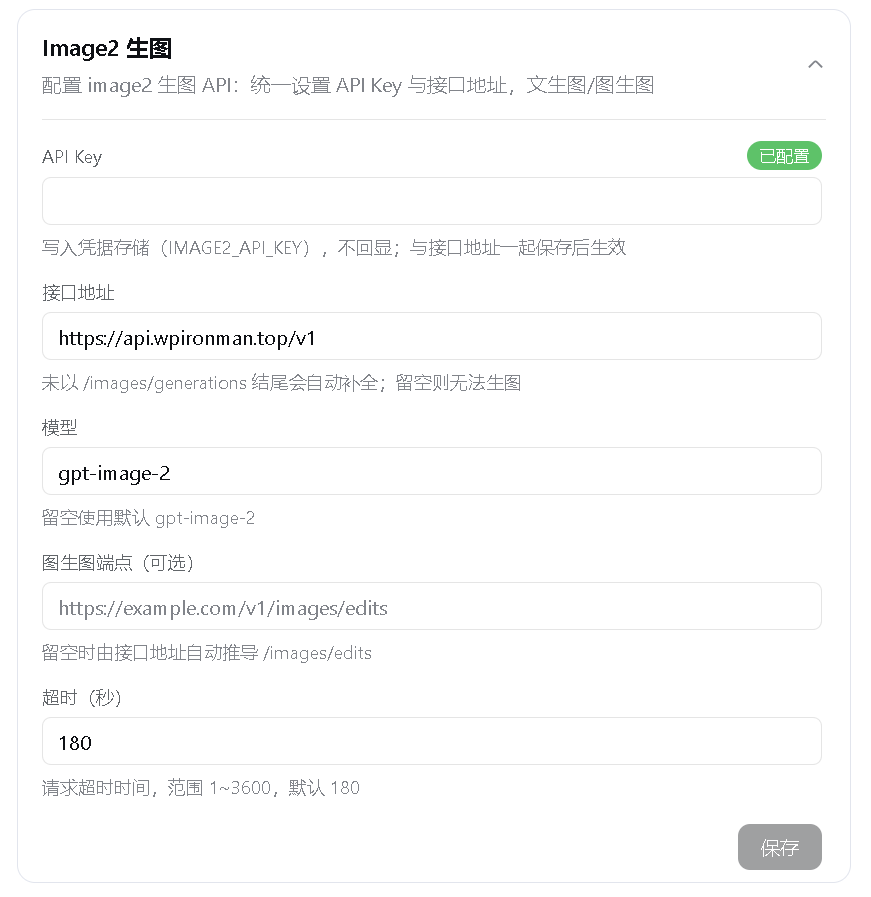
- Adds an Image2 Draw card under Settings > Plugins > Configurable plugins.
- Requires only a
baseURLand anAPI Key; the default model isgpt-image-2. - Accepts a short base URL such as
https://example.com/v1and appends/images/generationsautomatically. - Derives the image-edit endpoint as
/images/edits, with an optional expliciteditURLoverride. - Provides
image2-generatefor 1-8 sequential text-to-image generations. - Provides
image2-editwith 1-8 PNG, JPEG, or WebP reference images. - Supports adaptive portrait, landscape, and square sizes as well as validated custom dimensions.
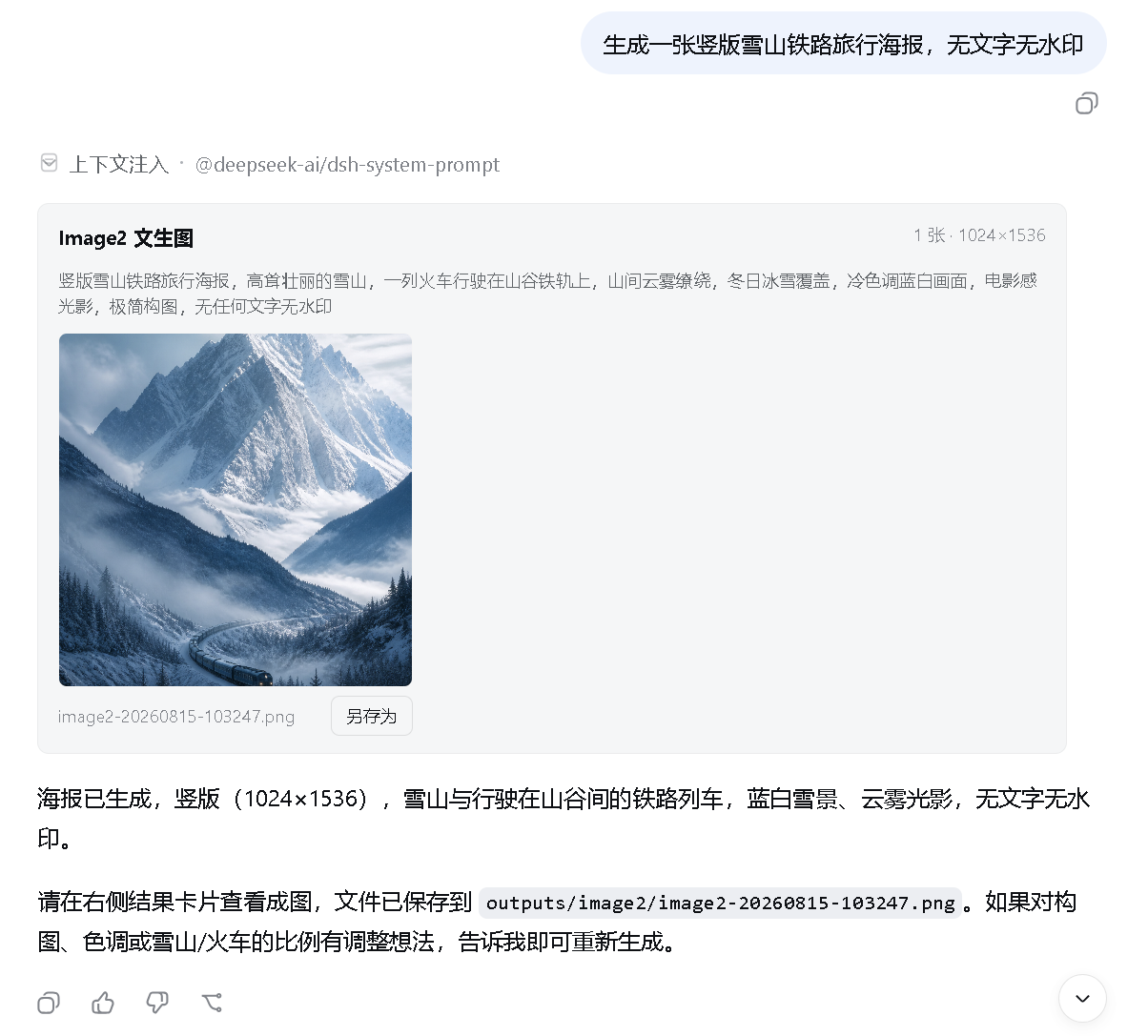
- Displays generated images directly in the conversation with a dedicated tool card for thumbnails, zoom, and Save As actions.
- Resolves image attachments in the client card without injecting image content into DeepSeek model context that does not support vision input.
- Also saves images under
outputs/image2/in the current session working directory and numbers duplicate names instead of overwriting files. - Stores API keys only in DSH credentials. Keys never enter the regular settings document and are never returned by the plugin state endpoint.
- Validates settings writes, response sizes, timeouts, and input images. HTTP 524 and timeout failures are not retried automatically, preventing duplicate charges when the upstream service has already generated an image.
Live demo
In-conversation result
Plugin settings
Installation
Prerequisites
- Install Node.js. DSH currently supports Node.js 22.19.x
or version 24 and newer; Node.js 24 LTS is recommended. Node.js includes
npmandnpx. - Install Git so the plugin can be fetched from GitHub.
- Install pnpm. Both methods require pnpm because
dsh plugininvokes it in the profile directory to install or remove plugins. - Your network must reach
registry.npmjs.organdgithub.com. Configure a working network proxy if npm or GitHub is unavailable or unstable. - Method 1 does not require a DeepSeek Harness source checkout. Method 2 additionally requires that checkout.
Check the basic environment first:
node --version
npx --version
git --version
corepack enable
pnpm --version
If corepack enable fails with a permission error, run it once from an
Administrator PowerShell. Alternatively, use another option from the
pnpm installation guide.
If downloads remain on a spinner or fail with ECONNRESET, ETIMEDOUT, or a
GitHub connection error, set a proxy for the current PowerShell window. Port
7890 is only an example; replace it with your proxy's actual port:
$proxy = "http://127.0.0.1:7890"
$env:HTTP_PROXY = $proxy
$env:HTTPS_PROXY = $proxy
$env:npm_config_proxy = $proxy
$env:npm_config_https_proxy = $proxy
These variables only affect the current PowerShell window and disappear when it is closed.
Method 1: npx (recommended for regular users)
This method does not require a DeepSeek Harness source checkout or a global
dsh installation, but Git and pnpm must already be available. On its first
run, npx downloads @deepseek-ai/dsh and its dependencies, which can take
several minutes:
npx --yes -p @deepseek-ai/dsh dsh plugin --profile web add github:JuneLearn/dsh-image2-draw
Start Web through the same package runner after installation:
npx --yes -p @deepseek-ai/dsh dsh web
Method 2: pnpm with the Harness source tree (recommended for developers)
Use this method if you already cloned deepseek-harness and want to run its
source directly. First confirm pnpm is available:
pnpm --version
Enter the DeepSeek Harness source root. Install its dependencies once, then install the plugin:
cd D:\deepseek-harness
pnpm install
pnpm dsh plugin --profile web add github:JuneLearn/dsh-image2-draw
Start Web from that source directory afterward:
cd D:\deepseek-harness
pnpm dsh web
The package's dsh.bundle declaration adds the plugin to the Web profile
automatically. Neither method requires editing cordis.patch.yml. Web listens
on http://127.0.0.1:3080 by default; it uses another port only when the default
is occupied or you explicitly select one.
Upgrade
Run the corresponding install command again to upgrade. No uninstall or profile-patch maintenance is required.
npx method:
npx --yes -p @deepseek-ai/dsh dsh plugin --profile web add github:JuneLearn/dsh-image2-draw
pnpm source method:
cd D:\deepseek-harness
pnpm dsh plugin --profile web add github:JuneLearn/dsh-image2-draw
Uninstall
npx method:
npx --yes -p @deepseek-ai/dsh dsh plugin --profile web remove dsh-image2-draw
pnpm source method:
cd D:\deepseek-harness
pnpm dsh plugin --profile web remove dsh-image2-draw
DSH removes both the dependency and its bundle layer. Restart dsh web; the
Image2 Draw card and image-generation tools are removed.
Usage
- Open Settings > Plugins > Configurable plugins > Image2 Draw.
- Enter the API key supplied by your relay.
- Enter the relay endpoint, for example
https://example.com/v1. - Adjust the model, edit endpoint, or timeout if needed; the defaults normally work without changes.
- Click Save and wait for the Saved status.
- Start a new session and ask the model to call
image2-generate, or provide reference image paths and useimage2-edit.
Example prompts:
Call image2-generate to create a portrait cinematic poster of a future city at high quality.
Call image2-edit with D:\images\room.png and restyle the room with light Japanese wood while preserving the layout.
Support for gpt-image-2, image editing, custom dimensions, and quality levels
depends on the relay implementation. If the API returns HTTP 400 or 404, check
the provider's model name and Images endpoint documentation.
Image and request limits
- Text-to-image accepts a count from 1 to 8 and sends one upstream request at a time.
- Image editing accepts 1-8 reference images, up to 4MB each and 32MB total.
- Reference images must be PNG, JPEG, or WebP. Their format is detected from magic bytes rather than trusted filename extensions.
- Relative reference paths resolve from the current session working directory.
- The default timeout is 180 seconds and the configurable range is 1-3600 seconds.
- Generated results must be PNG, JPEG, or WebP. Remote image downloads are limited to 32MB.
Development
npm install
npm test
Compatibility
Built against the public dual-end plugin, settings namespace, credentials, tool
registration, client slot, and WebServer lifecycle interfaces of DeepSeek
Harness 0.1.0-rc.6. Harness is still in Developer Preview; if the plugin stops
loading after an upgrade, check these interfaces and the dsh.client.inject
declaration.
Acknowledgements
Parts of the in-conversation attachment and dedicated tool-card implementation were adapted from the MIT-licensed dsh-multimodal. See THIRD_PARTY_NOTICES.md for the complete third-party copyright and license notice.
License
更多「設計、媒體與視覺」外掛
modlens
作者 liustack
The first vision plugin for DeepSeek Harness, and the vision bridge for every text-only coding agent. Paste an image, get structured JSON evidence (OCR, layout, semantics). | 全網最強 DeepSeek Harness 外掛視覺外掛,為 DeepSeek、GLM 等純文本模型外掛視覺能力,貼上圖片即得結構化 JSON 證據(OCR、版面、語義)。
agent-vision-toolkit
作者 anionex
為純文本模型"看圖“設計更好的視覺工具箱和技能,支援多圖理解,圖片問答,前端UI還原、GUI 自動化等,並可選無縫接入多個主流agent,直接識別貼上圖片| A vision toolkit and skill designed for text-only llms — image Q&A, long-screenshot OCR, frontend UI restoration, and GUI automation, with optional seamless integration for Codex, Claude Code, Pi, Oh My Pi, and OpenCode
dsh-vision-router
作者 ysr666
為純文本 DeepSeek Harness 智慧體提供「視覺」能力,內建免金鑰視覺鏈路與畫素級視覺工具,一條命令安裝,無需 Python。
dsh-vision-toolkit
作者 anionex
[dsh]為純文本模型設計更強大的視覺工具箱:一行安裝使用、貼上圖片直接識別、多張圖片問答、截圖到前端UI 還原等|DeepSeek Harness-native integration for agent-vision-toolkit: image Q&A, long-screenshot OCR, UI restoration, grounding, pixel diff, Artifacts, and Web UI.