
README
dsh-herdr-bridge
English | 简体中文
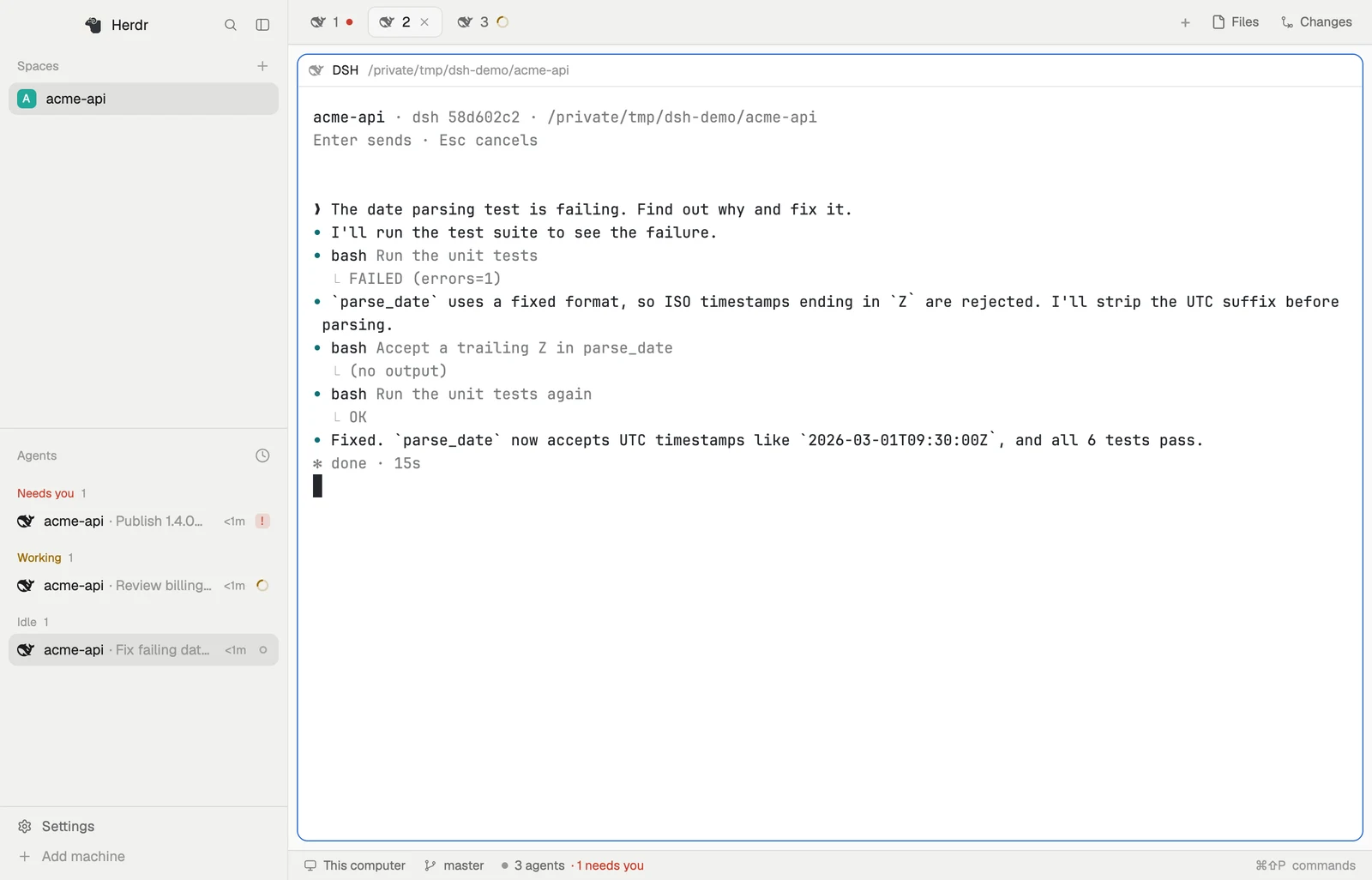
A DeepSeek Harness (DSH) plugin that brings DSH sessions into Herdr Core (hc). Each session becomes an hc terminal, so agents in Herdr can read and drive DSH the way they drive Claude Code or Codex. Works with DSH Desktop and dsh web.
- See DSH sessions in Herdr, with live status: working, done, needs you, error.
- Let other agents use DSH: start a session with a task, send follow-ups, read the replies, or take over a session you started in DSH.
- Let DSH use other agents: the model in a DSH session can start Claude Code, Codex or another DSH session and get their reports back.
- Answer approvals on either side: in the DSH window or from hc. The first answer wins.
Requirements
| Tested with | |
|---|---|
DSH Desktop or dsh web |
0.2.2-rc.3 |
herdr-core (hc) |
0.1.21, on your login shell's PATH |
| Herdr App | 0.1.15 (optional) |
Tested on macOS. Windows and Linux are implemented but untested. DSH's plugin interfaces are still changing, so a DSH upgrade may need a plugin update.
Install
Quit Desktop (⌘Q) or stop dsh web, then add the plugin to the profile you use, desktop or web:
dsh plugin --profile desktop add dsh-herdr-bridge
Open DSH again and send a message in any session. A dsh-<short id> terminal appears in Herdr App and in hc ls, and hc templates lists dsh.
Usage
Use DSH as usual. A session shows up in Herdr the first time it runs. To bring in one that hasn't run yet, type /herdr in it.
Have an agent run DSH. Any agent that knows hc (through the herdr-core skill) can start DSH like any other agent:
hc run --bg --name fix --cwd ~/repo dsh "Fix the failing test in x.rs"
hc wait fix
hc read fix
hc send --wait fix "Also cover the edge cases"
hc interrupt fix                         # cancel the current turn
A message sent while the session is working joins the current turn, like steering in DSH.
The session also appears in DSH, and in Herdr App it shows under the agent that started it.
Take over a session you started in DSH.
~/.dsh/herdr-bridge/bin/dsh-hc ls                                        # recent sessions
hc run --bg --name login ~/.dsh/herdr-bridge/bin/dsh-hc attach 3b729fc9  # by id or part of the title
Let DSH start other agents. hc works in a DSH session's shell the same way it does for an agent running in hc: helpers it starts show under it and report back to it.
Approvals
When a session asks for approval or asks you a question, you can answer in the DSH window or from hc. Whichever answers first wins, and the other side's dialog closes.
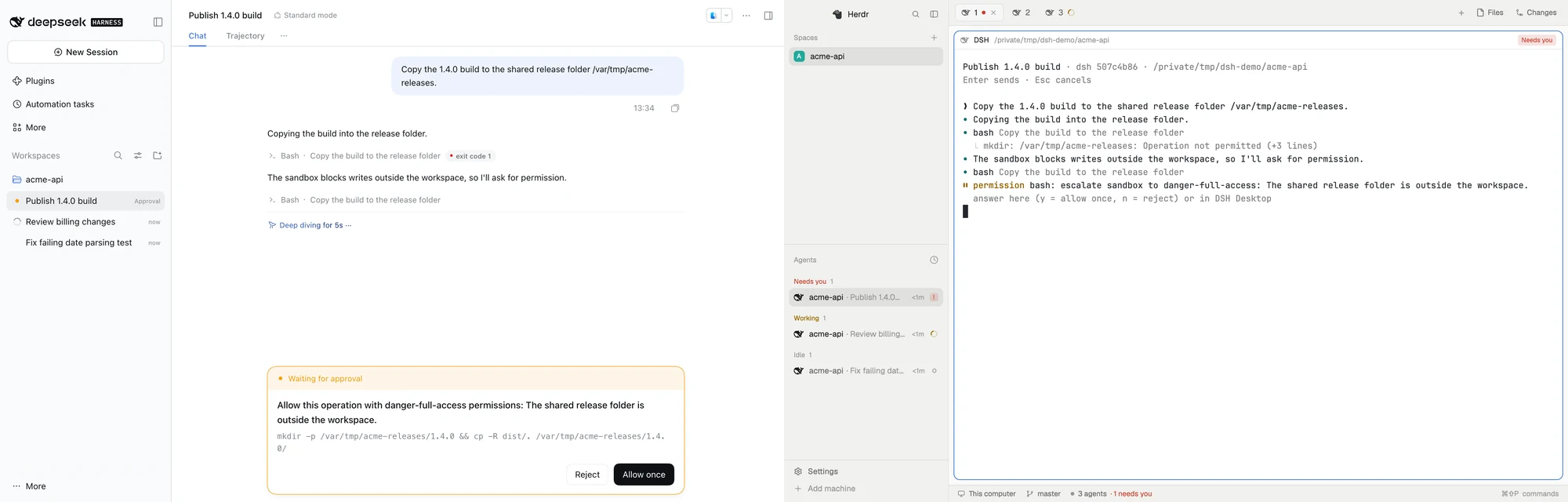
hc send --force fix y      # allow once; n rejects
hc send --force fix 1,3    # answer a question by option number, or with text
As with every agent in hc, answering a waiting session takes --force. Anything that can use your hc can drive a DSH session, and messages sent through hc reach the model as user messages.
Settings
In DSH, open Plugins → Herdr Bridge to choose where sessions you start in DSH appear in Herdr App: grouped by folder (default), all in one space named DSH with a tab per session, or not at all. You can also set these in ~/.dsh/profiles/<profile>/cordis.patch.yml:
- id: herdr-bridge
  config:
    herdrPlacement: folder      # folder, dsh, or none
    herdrSpace: sp123           # a fixed Herdr App space id instead
    reconnectGraceSeconds: 30   # how long a terminal waits for DSH to come back
    hc: /path/to/hc             # if hc isn't on your login shell's PATH
Troubleshooting
The log is ~/.dsh/herdr-bridge/bridge.log.
| Problem | What to do |
|---|---|
Sessions don't appear in hc ls |
Check the log. Make sure DSH can find hc (set hc in the config if needed) and that Desktop and dsh web aren't both running |
Sessions are in hc ls but not in Herdr App |
Check that the placement setting isn't "not at all" |
hc templates doesn't list dsh |
The plugin didn't load; check the log. If you wrote your own dsh template, it's kept |
| A terminal reports a protocol version mismatch | It's from before a plugin upgrade. Close it and attach again |
| The plugin stops working after a DSH upgrade | Open an issue with the log |
Known limitations
- Only one of Desktop and
dsh webcan be connected to Herdr at a time; the one started first wins. - Seeing a session in Herdr doesn't clear DSH's own sidebar reminder.
- Terminals opened before a plugin upgrade keep the old version until you reopen them.
Uninstall
Quit DSH, run dsh plugin --profile <profile> remove dsh-herdr-bridge, and remove any herdr-bridge entry from cordis.patch.yml. Then delete ~/.dsh/herdr-bridge/, ~/.config/herdr-core/templates/dsh.md, the dsh entry in ~/.config/herdr-app/programs.json, and ~/.config/herdr-app/icons/dsh-herdr-bridge.svg.
Learn more
- How it works (in Chinese): design, status mapping, rejected approaches, test coverage
- Development (in Chinese) and AGENTS.md: working on this repo
- TODO.md: plans and untested paths
License
更多「命令列與終端機」外掛
deepseek-harness-docker
作者 runzhliu
社群 Docker 與 Kubernetes 打包,含加固映象、Compose、Helm、Web UI 與無頭 CLI。
deepseek-harness-android
作者 dphmoblie
dsh安卓版:整合 DeepSeek Harness、Ubuntu 執行環境、外掛與檔案管理,以及使用者授權的 Shizuku 和無障礙自動化。
dsh-subagent-codex
作者 mjylfz
讓 DeepSeek Harness 以 Codex CLI 作為子代理的外掛,在對話中複用 Codex 的編碼與推理能力。
mnemon
作者 mnemon-dev
LLM 監督的持久記憶系統,基於圖結構召回、跨會話知識共享,單個二進位制檔案,相容 DeepSeek Harness 等執行時。