
README
Harness Pet
A tiny whale that lives inside DeepSeek Harness.
A tiny whale that lives inside DeepSeek Harness.
This is an unofficial community project. Not affiliated with, endorsed by, or maintained by DeepSeek. DeepSeek and related marks belong to their respective owners.
dsh plugin --profile web add github:cakeni/harness-pet
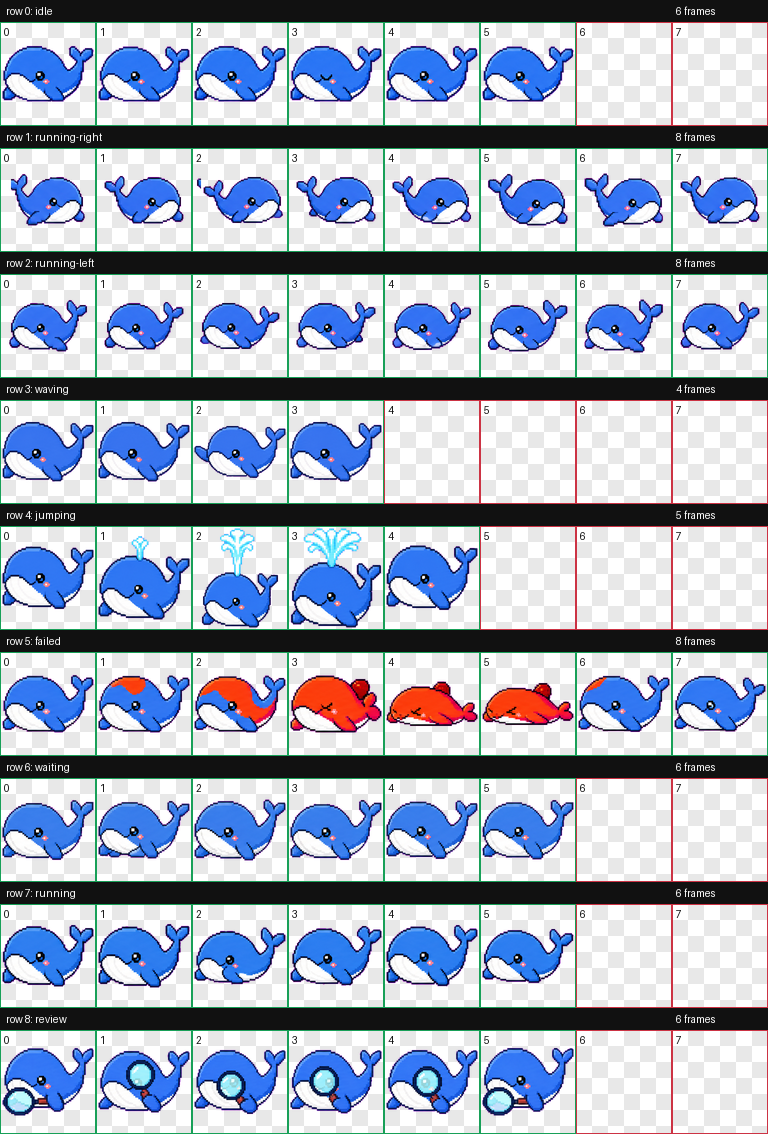
Harness Pet is an open-source, native DSH web plugin—not a browser extension. It renders an original pixel whale inside the Harness page and reacts to structured session signals exposed by the official client runtime.
Features
- Nine visual states: idle, thinking, working, searching, bash, editing, waiting, error, and success.
- A QA-validated 8×9 atlas with fixed 192×208 cells: calm idle, directional drag movement, wave/click, connected water-spout success, red-hot fault/error, waiting, active work, and magnifying-glass search animations.
- A Codex Pet-style card above the whale showing the latest local user prompt, live/final Harness reply, and progress; long streams follow the newest text while remaining scrollable, and displayed text is never persisted.
- Dragging uses dedicated left/right swimming rows; clicking plays a short flipper wave without sprite overflow.
- Optional Chromium desktop-window mode keeps the pet visible in an always-on-top Document Picture-in-Picture window while the main Harness window is minimized.
- Draggable, viewport-clamped position saved in
localStorage. - Pet size, opacity, enable/disable, reset position, and reduced-motion controls.
- Instant, persisted interface switching between English (default), Simplified Chinese, Japanese, and Korean.
- Debug state override, automatic state cycling, and a live status badge.
- Original pixel sprites embedded directly into the client bundle, with the procedural Canvas whale retained as a fallback.
- Full cleanup for subscriptions, timers, animation frames, media listeners, and resize listeners.
Install
Harness 0.1.0-rc.6 and pnpm on PATH are required. Installing or removing a plugin changes the host roster, so restart the dsh web process after one of these commands. A code-only rebuild of an existing link installation needs only a page refresh.
npm
The package name is reserved for a future npm release. Until it is published, use the Git or local-link installation below.
dsh plugin --profile web add harness-pet
Git
dsh plugin --profile web add github:cakeni/harness-pet
Git dependencies run this package's prepare build. If pnpm blocks that build, add the exact package key printed by the CLI to the profile's pnpm-workspace.yaml, for example:
allowBuilds:
  harness-pet: true
Then repeat the install command. The profile is normally under $DSH_HOME/profiles/web.
Local development link
Run this from the repository's parent directory:
dsh plugin --profile web add link:../harness-pet
Build and refresh during development:
cd harness-pet
pnpm bundle
Do not run more than one link installation for the same profile.
State detection
The adapter subscribes to the current ctx.sessions list and SessionFace snapshot. It also observes ctx.connection.hostDescription; after a connection has existed, that structured value becoming absent indicates reconnecting. It never matches translated UI text or scrapes the DOM.
Priority is: error > success > waiting > searching/bash/editing > working > thinking > idle.
| Pet state | Structured detection | Confidence | Failure degradation |
|---|---|---|---|
idle |
No higher-priority signal | High | Remains idle |
thinking |
partial is present and no tool is running |
High | Idle if the field is absent or malformed |
working |
running === true, or non-empty unknown runningCalls |
High | Idle after all running signals clear |
searching |
Running tool name matches the adapter's web-tool table | Medium | Unknown tool names degrade to working |
bash |
Running tool name matches the adapter's shell-tool table | Medium | Unknown tool names degrade to working |
editing |
Running tool name matches the adapter's file-write/editor table | Medium | Unknown tool names degrade to working |
waiting |
Non-empty pending, or a queue item with placement: 'queued' |
High | Falls through to the active lower-priority state |
error |
promptError, latest turn-error, lastAgentError, or reconnecting |
High | Falls through when the structured error clears |
success |
Derived from a clean running: true → false edge for about 3 seconds |
Derived | Returns to the latest real state, usually idle |
The tool-name table is intentionally isolated in src/adapters/deepseek-harness.ts. Pre-1.0 Harness releases may rename tools; an unrecognized active tool is reported only as working, never fabricated as a specialized state.
Controls
更多「純屬好玩」外掛
dsh-pet
作者 pc2005-cloud
DSH 桌面宠物:一行命令装好即用的透明动画小桌宠,支持多开、大小位置随心配置;还内置 DIY 素材链,能用 AI 视频自造专属宠物
dsh-tavern
作者 flizzywine
基于DSH的Agent酒馆。类酒馆文字游戏Agent。兼容SillyTavern生态,人物卡直接导入就能玩。更快、更稳、更鲜活。所有模型都能用。手机也能玩。
dsh-dafeiyu
作者 qcytsn
DeepSeek Harness 的桌面原生大飞鱼陪伴插件,实时展示智能体状态,Windows 上置顶显示。
dsh-meme
作者 yyh-001
DeepSeek Harness 表情包插件:输入框一键发图、文字 token 斗图、情绪主动发图、AI 自动学图,图库市场一键安装。 · Meme/sticker plugin for DeepSeek Harness: one-click picker in the composer, text-token memes, mood-driven sending, AI learns your images, marketplace packs.