
DeepSeek Harness Subagents: A Hands-On Tutorial
Eight screenshot-verified steps to running subagents in DSH — define agent roles in a spec, launch a parallel squad, read every report, and pin each child to its own model.
Last updated: 2026-09-15
A subagent in DeepSeek Harness is a child agent that the main chat spawns with the built-in subagent tool. It works on one assigned task in its own context window, in the background, and reports back to the agent that invoked it. That division of labor is why the community talks about "agent teams": the main agent plans and triages, while cheap focused children do the reading, building and verifying.
This walkthrough follows a real screencast (credited below) that builds a small bookmark app with a two-verifier subagent setup, stress-tests the mechanics with five no-op subagents, and experiments with pinning children to different model providers. Every frame was verified against the video and deep-links to the exact second it was taken.
Run DeepSeek Harness subagents in eight steps
- 1
Write the subagent roles into your spec
In vault/spec.md, add a subagents section that names each child and its job. The video adds two: a mobile verifier that uses Chromium to confirm visuals and UX, and a verifier that checks each capability however it sees fit. The same spec asks for two checkboxes per feature — one for initial implementation, one for separate subagent verification — so a subagent focuses on just its task, separate from the main chat.
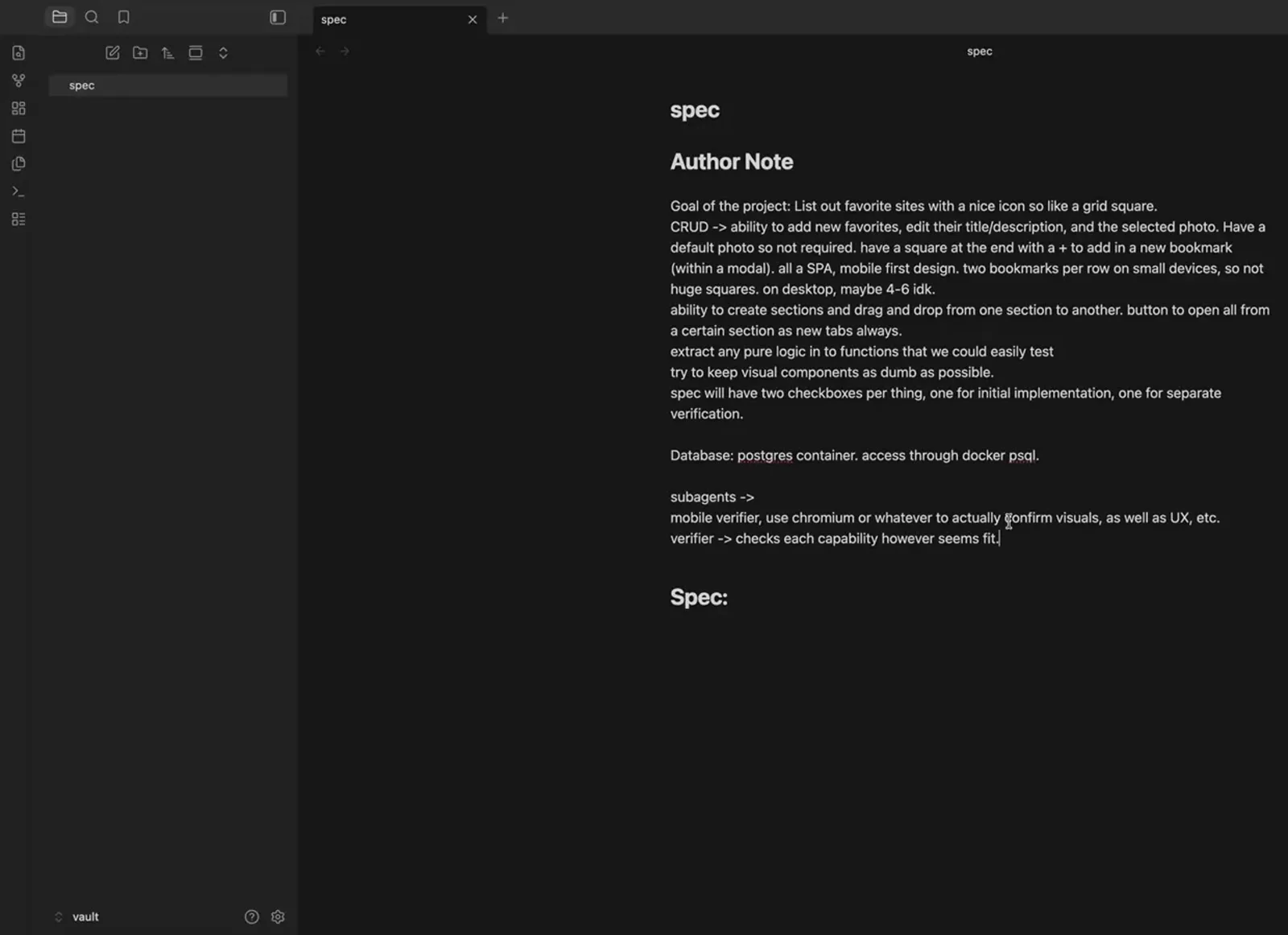
Subagent roles start as plain notes in the spec: who verifies what, and how.Watch at 30:48 - 2
Let the main agent refine them into contracts
Ask DeepSeek Harness to refine the subagents and keep them simple. It rewrites your notes as contract-driven agents: the verifier runs pure-function unit tests, boots the API, checks every endpoint contract and the database state via docker exec psql, and reports PASS or FAIL; the UI verifier drives Playwright through mobile viewports, dark mode and drag-and-drop persistence. DSH also asks clarifying questions here — stack choice, drag-and-drop approach — before anything is written. From now on the main agent spawns the verifiers and triages their reports.
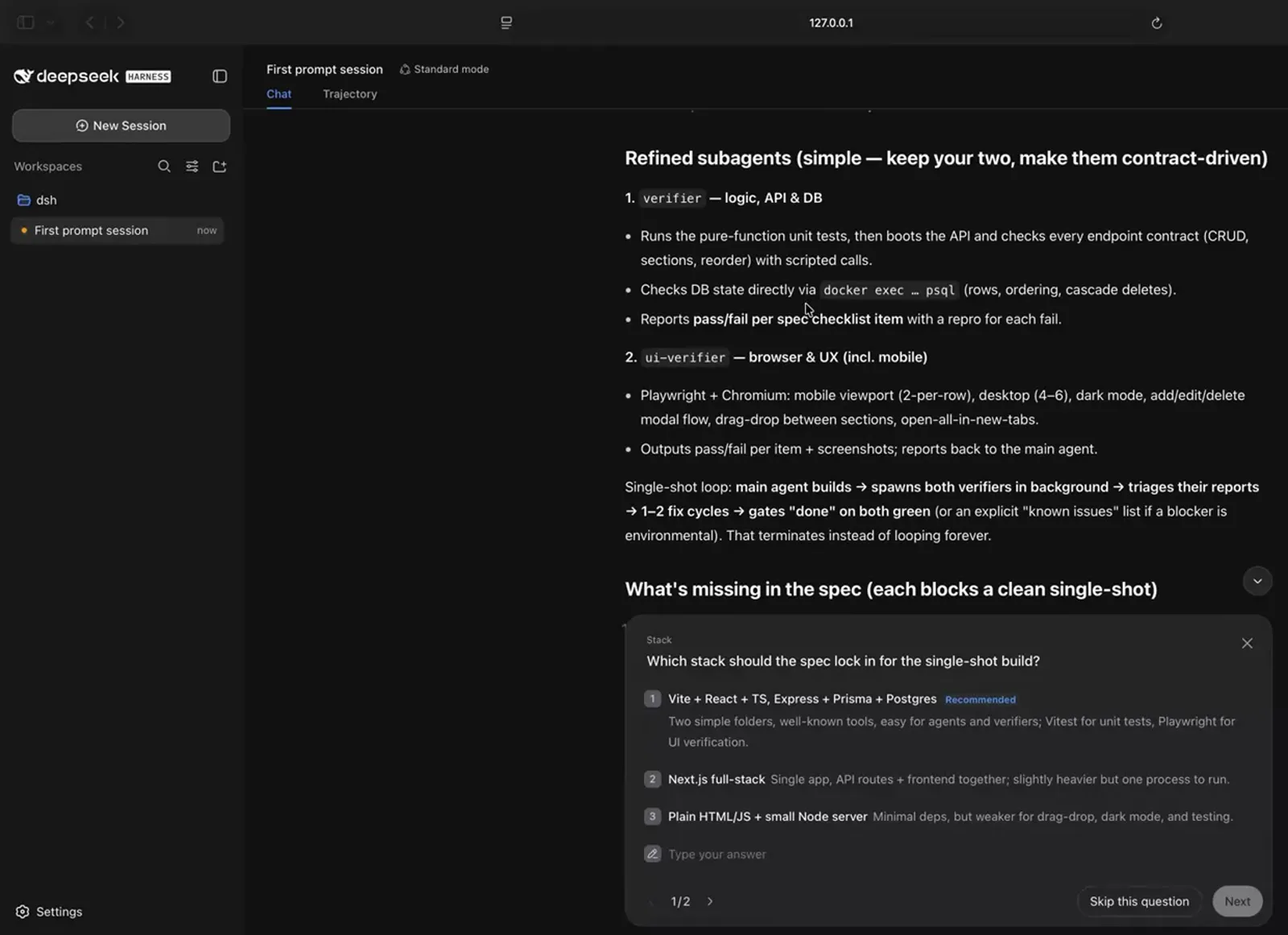
DSH turns rough roles into pass/fail contracts and asks clarifying questions before writing the spec.Watch at 31:48 - 3
Build the implementation-ready spec, then hand off
Prompt DSH to build the spec as thoroughly as possible so general subagents could implement it. The reply is a pinned eleven-part plan: stack, prerequisites, repo structure, env and run commands, data model, API contract, frontend behavior with an implement/verify checkbox per feature, pure logic, verification, build workflow and definition of done. A common pattern from the video: burn a stronger model on the conversation, spec and planning, then delegate the mechanical work to cheaper subagents that are easy to verify.
$commit, then implement with subagents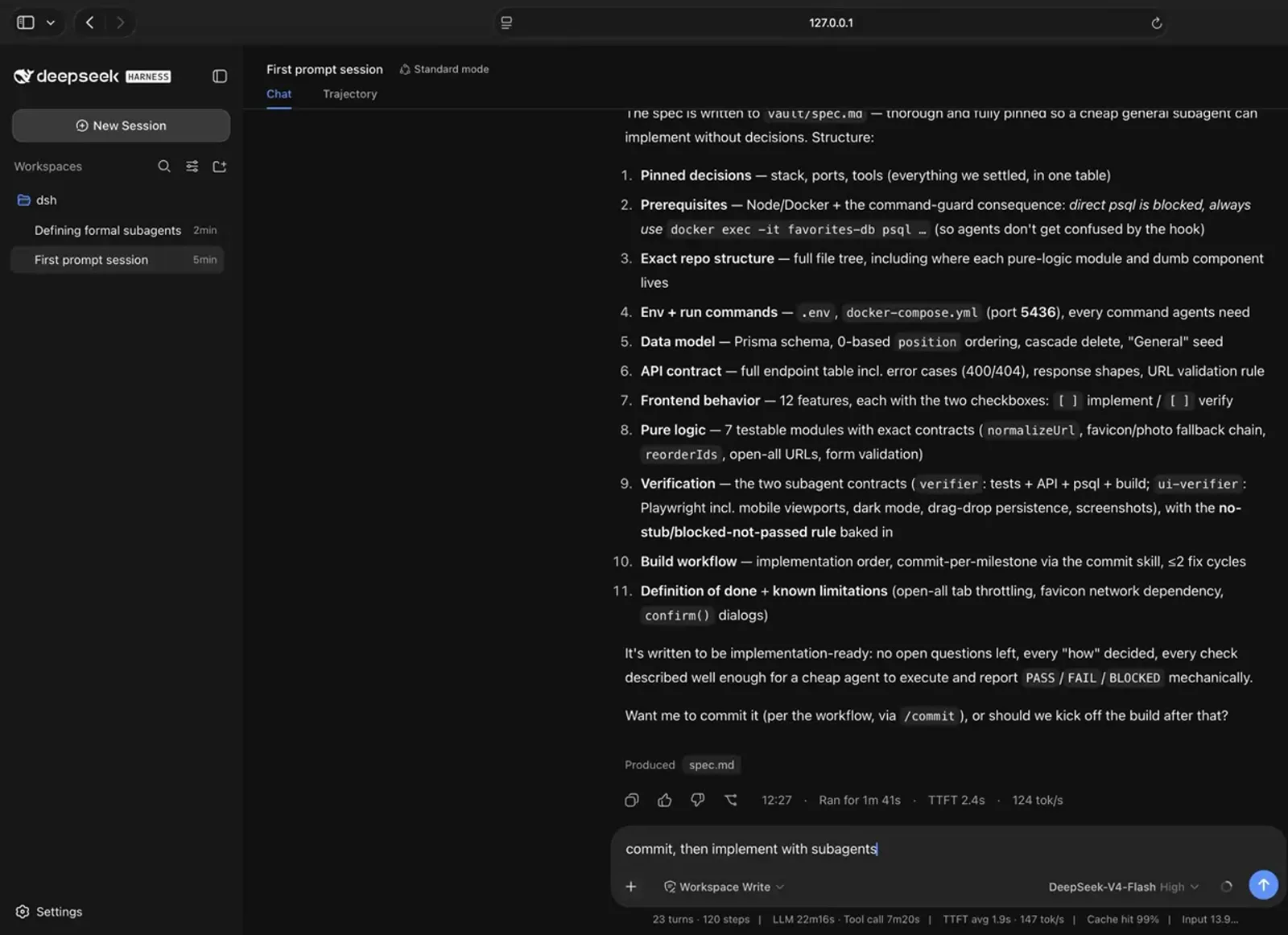
The spec is implementation-ready — every decision pinned, so cheap subagents can execute without asking.Watch at 36:40 - 4
Fire a no-op squad to see the subagent tool
Before trusting a real build, watch the mechanics with a throwaway prompt. The main chat answers by calling the subagent tool five times — once per child — and each one runs in the background (here, sleeping for 60 seconds), each with its own subagent ID. The chat prints a status table: all five running in parallel, no polling needed, the runtime notifies the main agent as each settles.
$Create 5 subagents that all have to wait 60 seconds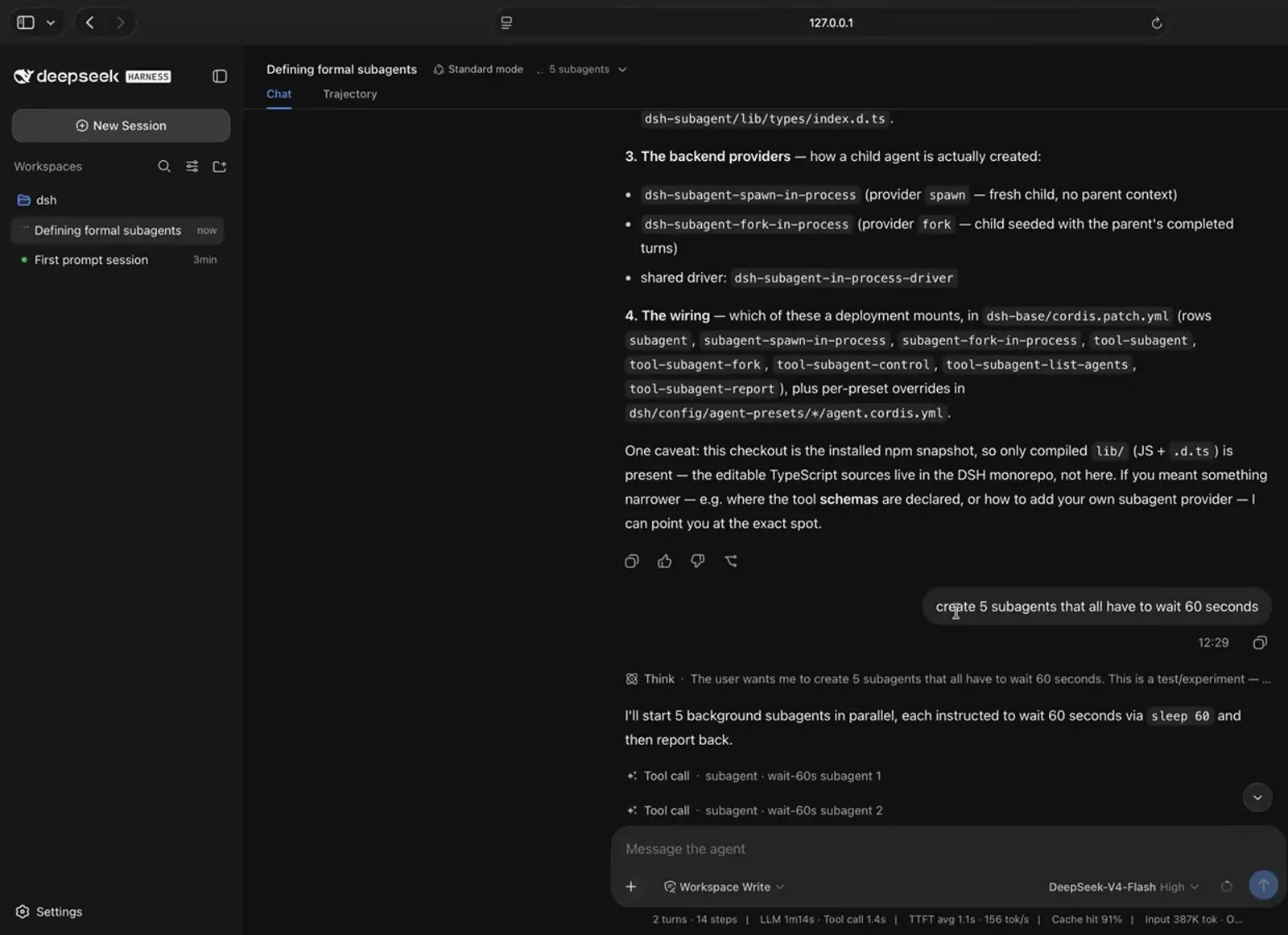
One prompt, five subagent tool calls — each child starts in the background with its own task.Watch at 34:35 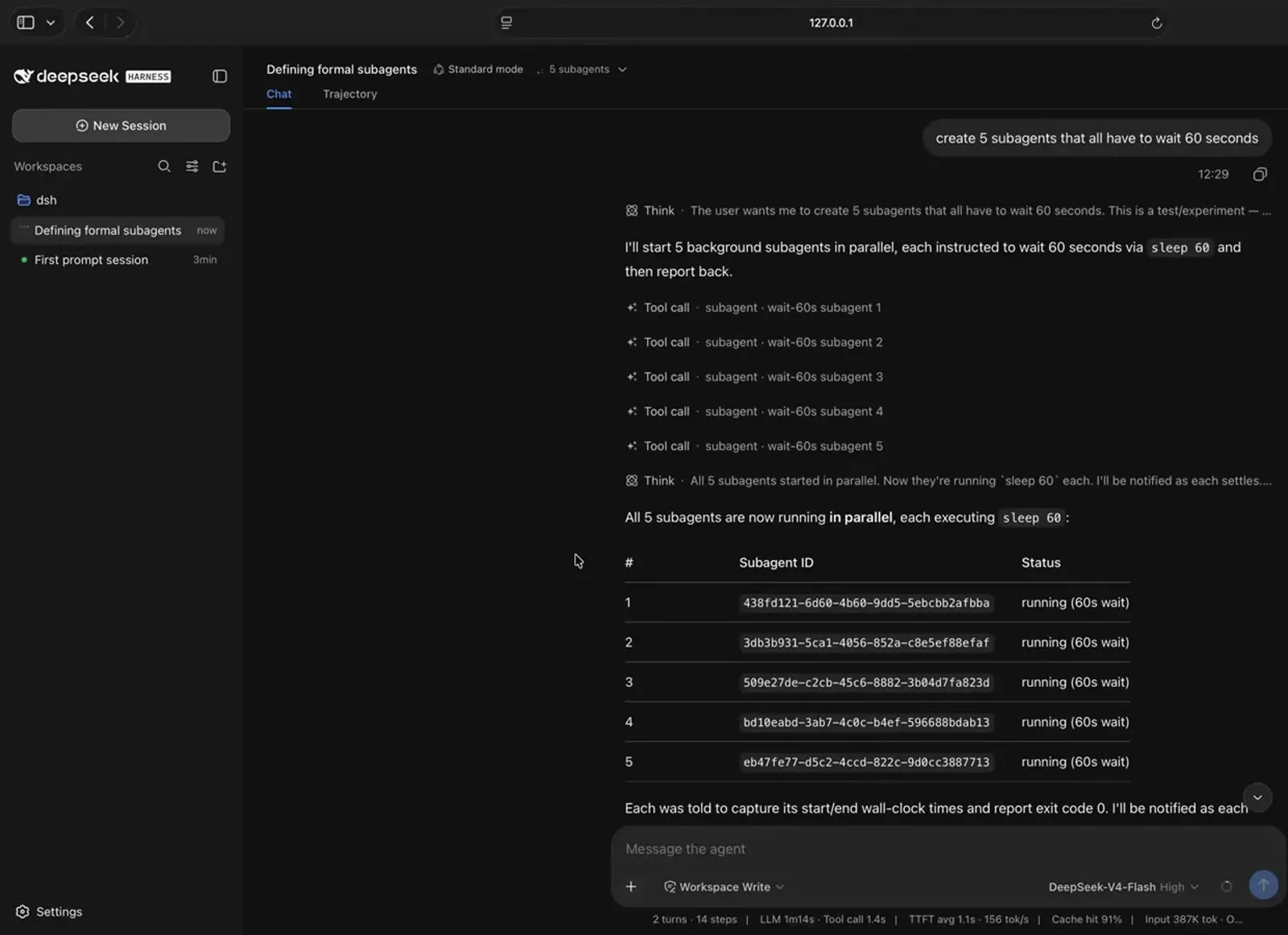
Five children, five IDs, one status table — running in parallel without polling.Watch at 34:42 - 5
Monitor the squad from the session header
While children run, the session header shows a subagent counter. Open it and you get every child's name, its prompt, its own token usage and its elapsed time. This is where the cost trade-off is visible: every subagent bills tokens separately, but each one also keeps its context window clean, which keeps the main chat focused and often saves tokens overall.
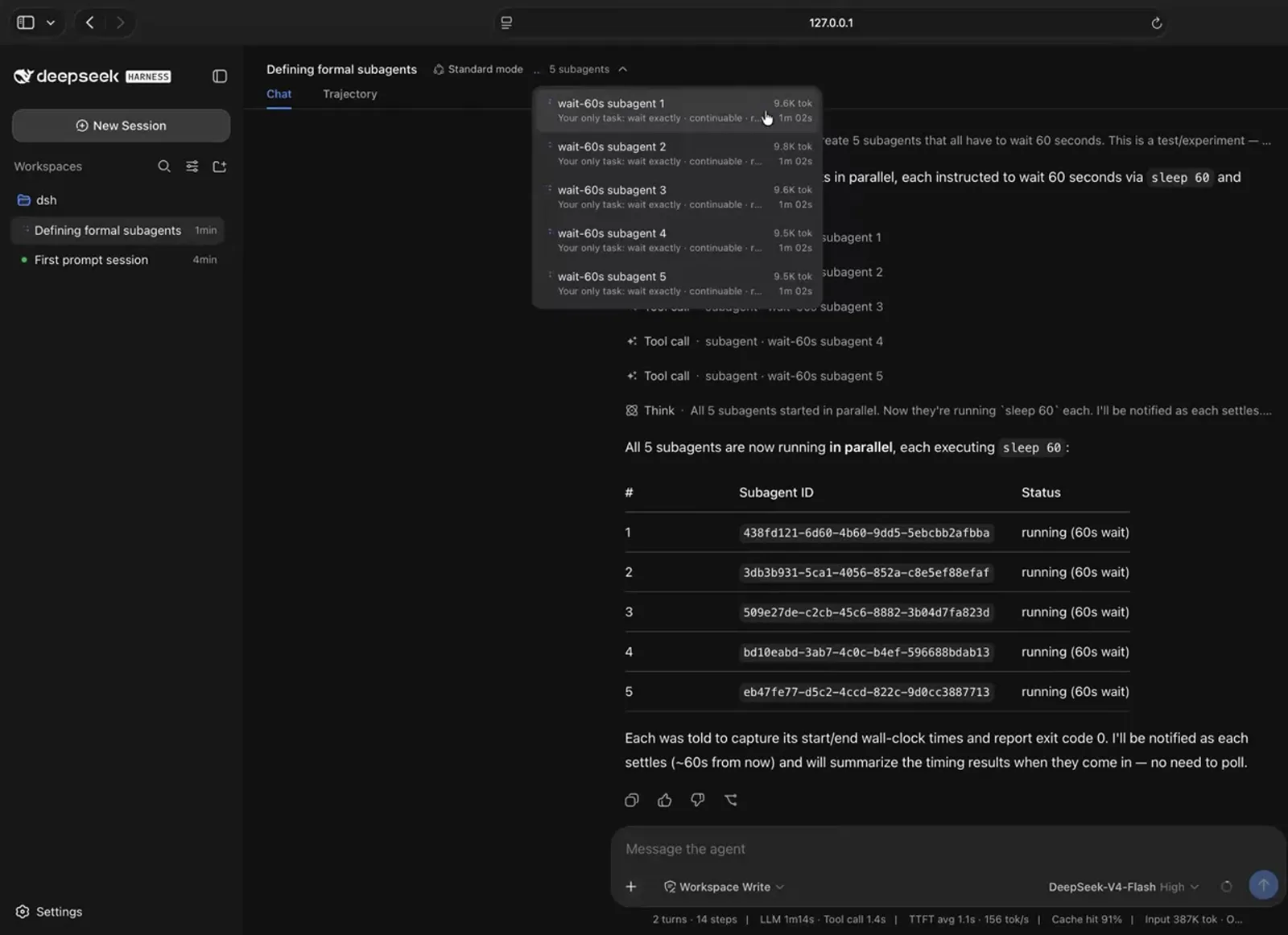
Every child bills its own tokens — check them per subagent from the header dropdown.Watch at 34:52 - 6
Read the reports that come back
Each finished child reports back to its invoker — the main agent — as a subagent-report context injection, and the chat summarizes the results: in the demo, all five subagents completed their 60-second waits with exit code 0. Click any subagent in the header dropdown to inspect the input it was given and what it reported. The session's Trajectory tab holds the full execution record if you need to go deeper.
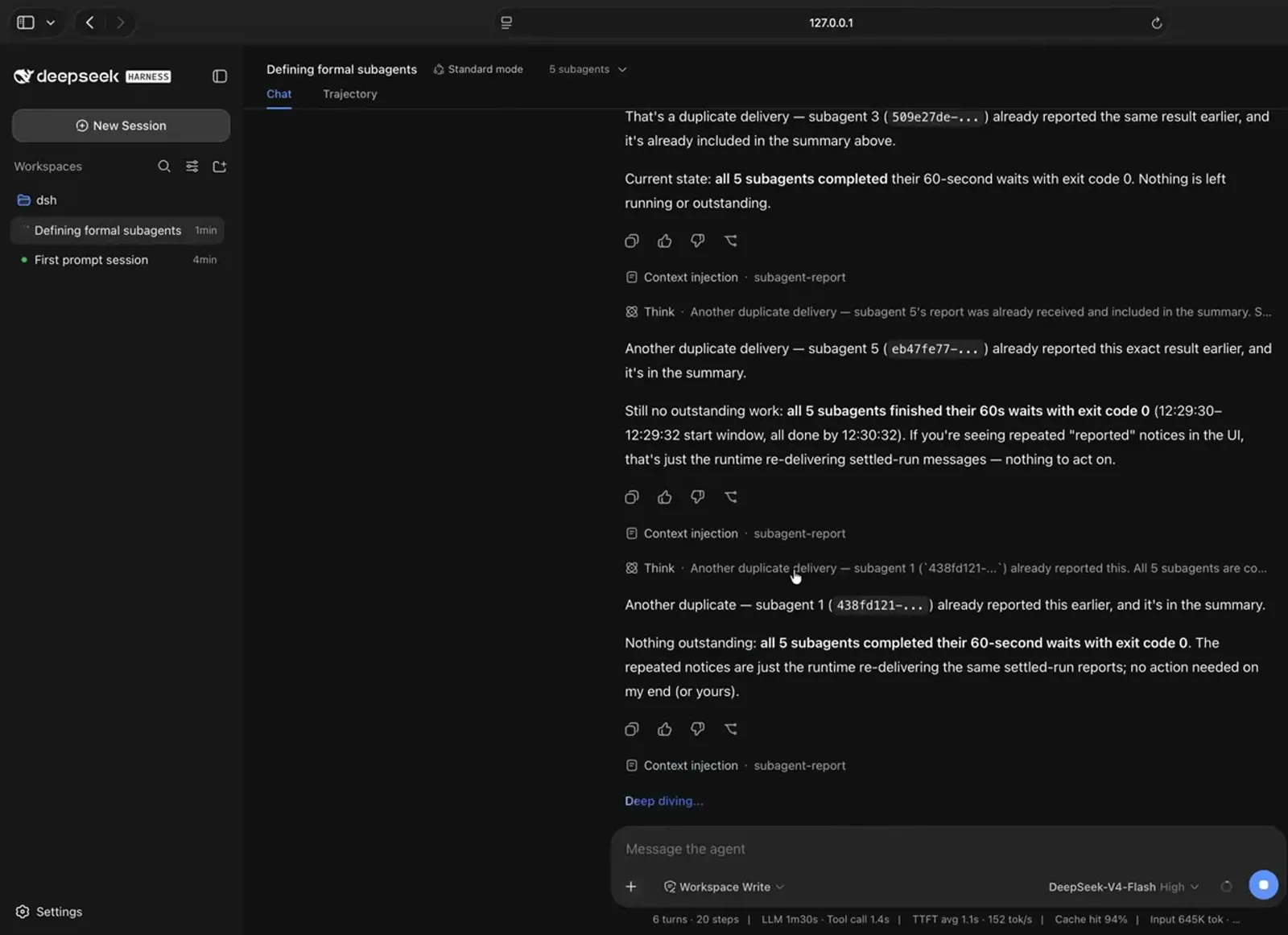
Finished children report back to the main agent as subagent-report injections, summarized in chat.Watch at 35:05 - 7
Pin each subagent to a different model
By default a child inherits the session's provider and model — the plain subagent tool has no per-call model parameter. So when the video asks for two subagents, one on Claude Opus and one on a local Qwen 3 through Ollama, DSH lays out the options: the recommended route is the workflow tool with model overrides, whose agent() hook accepts independent provider/model settings per child; the alternatives are adding per-model subagent tool instances to your config (then restarting) or simply keeping both children on the inherited model.
$Create two subagents both waiting 1 minute. One using opus, one using qwen3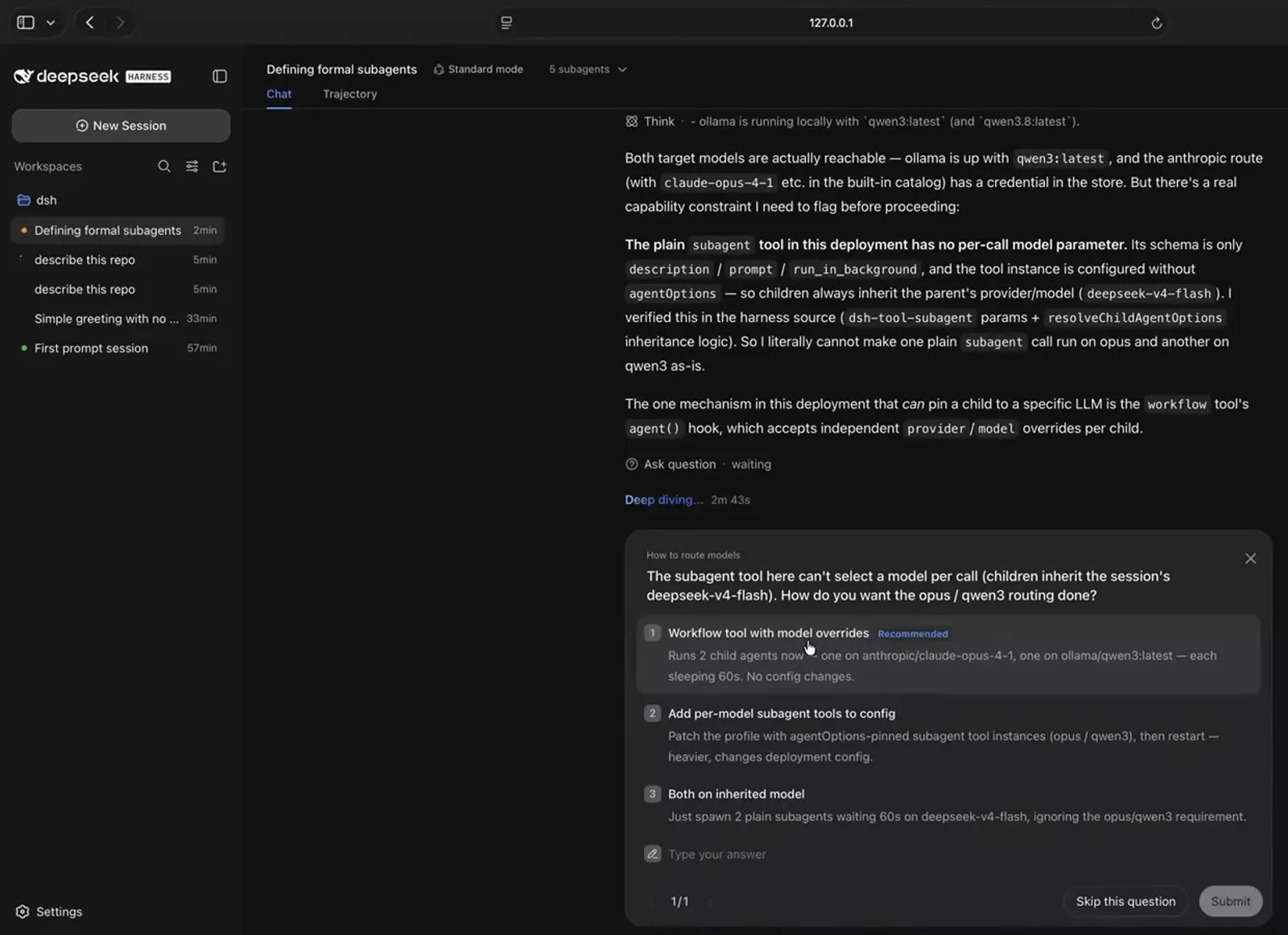
Want one child on Opus and one on local Qwen? DSH recommends the workflow tool's per-child model overrides.Watch at 42:10 - 8
Read the run summary — the payoff
A long-running autonomous build ends with an outcome card: the full spec → build → verify pipeline ran end-to-end as a single run with background subagents producing a working, verified app — a backend subagent on Express, Prisma and Postgres, a frontend subagent on Vite and React, and verification subagents running the checklist — with the tree committed and clean. Then do what the video does: click around the app the team built and confirm the spec's features actually work.
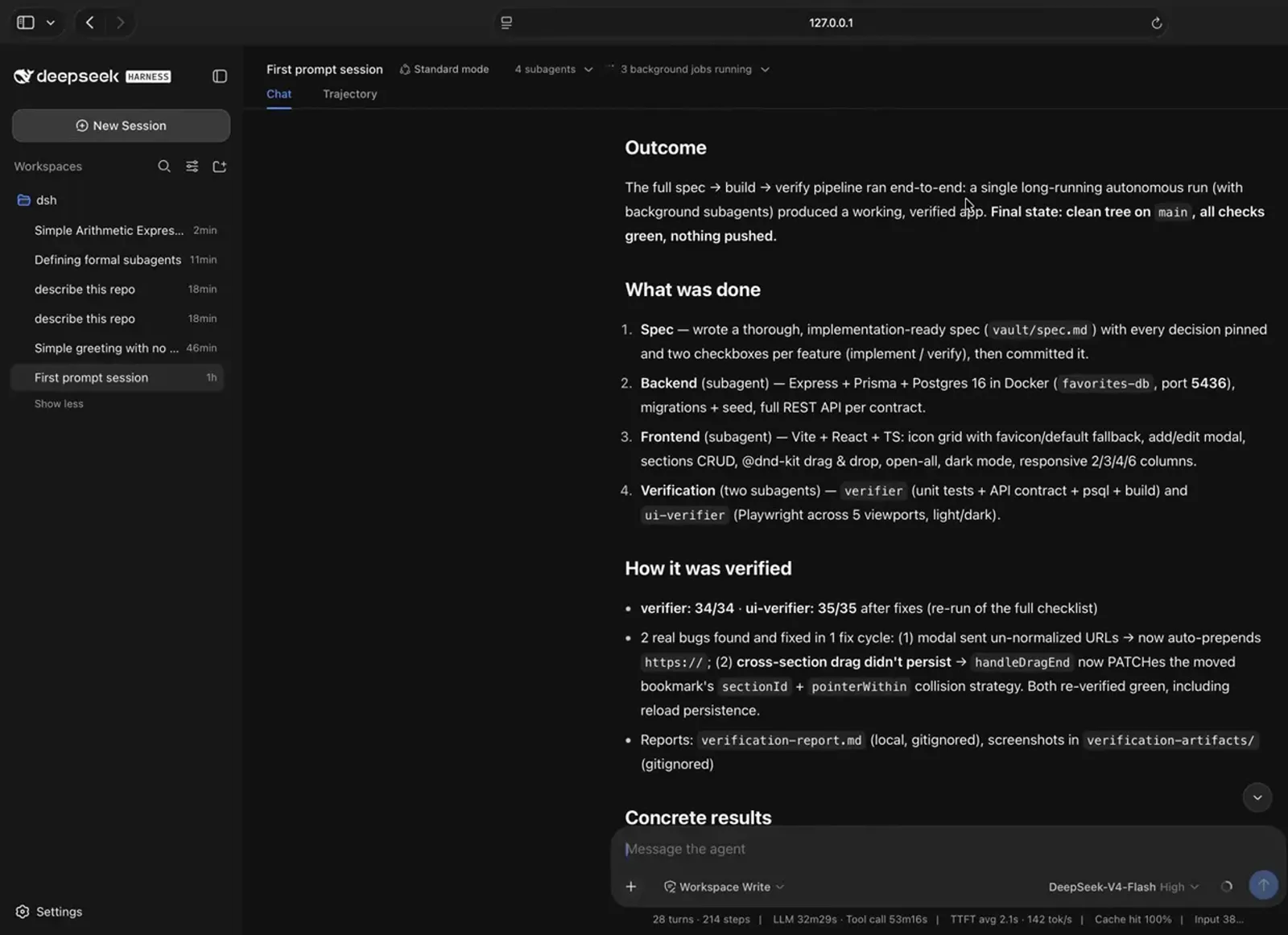
The payoff card: spec to build to verify, end to end, by background subagents.Watch at 43:32 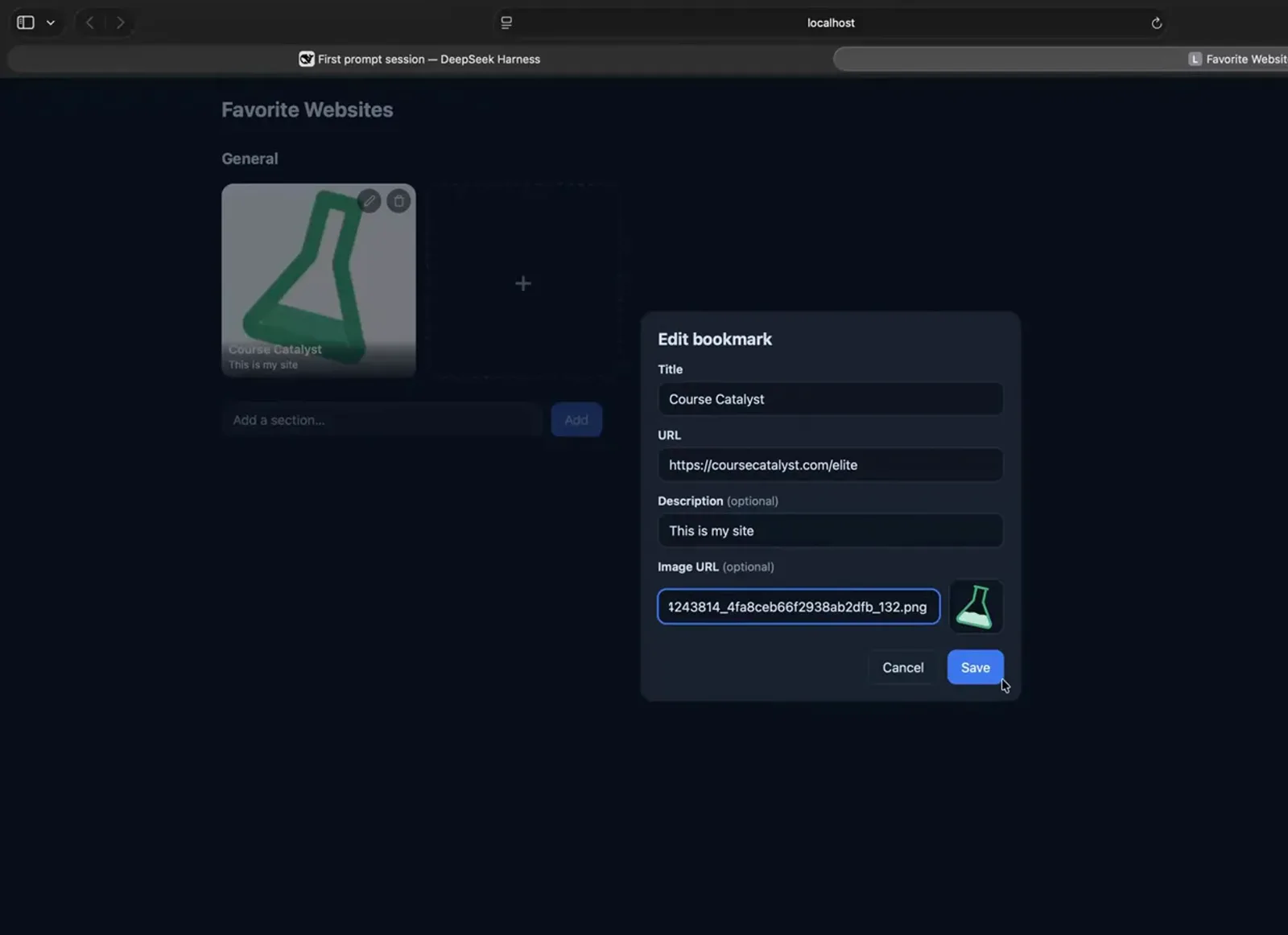
The team's deliverable: a working bookmark app you can click through and verify yourself.Watch at 44:13
DeepSeek Harness subagents FAQ
Quick answers about subagents, cost, models and monitoring in DSH.
What is a subagent in DeepSeek Harness?
A child agent that the main chat spawns with the built-in subagent tool. It works on one assigned task in its own context window, runs in the background, and reports back to the agent that invoked it. The main agent stays in charge: it spawns children and triages their reports.
Do subagents cost extra tokens?
Yes — every subagent has its own token usage, visible per child in the header dropdown, so a squad of five bills five separate runs. The offset is a much cleaner context window: the main chat only receives each child's report instead of every intermediate step, which the video credits with better results at lower overall token use.
Can different subagents use different models?
Not with the plain subagent tool — its schema has no per-call model parameter, so children inherit the session's provider and model. The supported route is the workflow tool with model overrides: its agent() hook accepts independent provider/model settings per child. You can also add per-model subagent tool instances to your deployment config and restart.
Do I need a spec before using subagents?
No. A one-line prompt like "create 5 subagents that all have to wait 60 seconds" works fine for experiments. The spec matters for real work: naming verifier roles and implement/verify checkboxes in vault/spec.md is how the video gets a single-shot, verified build instead of back-and-forth babysitting.
How many subagents can run in parallel?
The demo runs five in parallel without issue, and the video shows no hard cap — the practical limit is your provider's rate limits and how independent the tasks are. Verification-style subagents (tests, UI checks) parallelize well; deeply dependent steps are better left in the main chat.
Where can I see what each subagent did?
Three places: the session header dropdown lists every child with its prompt, token usage and elapsed time; each child's result lands in chat as a subagent-report context injection; and the Trajectory tab records the session's full execution if you want the complete trail.
Related DeepSeek Harness guides
Keep going: presets, planning and the rest of the harness, one guide at a time.
Agent presets, step by step
Build a custom DSH agent preset with Creator mode — the same agent.cordis.yml machinery that shapes what your subagents can do.
Read the guideSession replay walkthrough
Replay a finished session step by step — the fastest way to audit what a subagent squad actually did.
Read the guideThe beginner DSH tutorial
New to DeepSeek Harness? Start here: install, connect a model, pick a mode, and take a full tour before running agent teams.
Read the guidePlan mode walkthrough
Plan first, execute second — the planning half of the spec-driven subagent workflow shown on this page.
Read the guideBest DSH skills to install
Package repeatable behavior into skills your main agent — and its subagents — can invoke on demand.
Read the guideSources & credits
Frames in this guide are captured from the screencasts below and remain the property of their creators — each image links back to the exact moment in the source video. The Chinese Agent Teams review was used as a fact source only; no frames were taken from it.