
dsh-channels
Curated pickMaintenance: Activewsz987/dsh-channels
Connect five IM platforms to DSH with QR/bot authentication, unified channel sessions, rich messages, and attachment handling.
$ dsh plugin add dsh-channelsInstall
dsh has no central install command — add this plugin’s entry (documented in its README below) to your profile or patch config, then restart.
How installs work12
stars
1
forks
TypeScript
Language
MIT
License
2026-08-13
Created
2026-09-11
Last push
README
dsh-channels
将微信、QQ、钉钉、飞书和 Telegram 接入 DeepSeek Harness
多渠道集成,统一配置,并在各平台与 Agent 对话
支持图片与文件收发,Agent 可直接读取 PDF、DOCX、XLSX 和文本内容





English | 简体中文
本项目是社区维护的 DeepSeek Harness 渠道扩展,不是 DeepSeek Harness 或各消息平台的官方项目。项目参考各平台面向 OpenClaw 提供的渠道接入方案,结合官方 SDK / API 适配到 DeepSeek Harness;运行时不依赖 OpenClaw。
效果预览
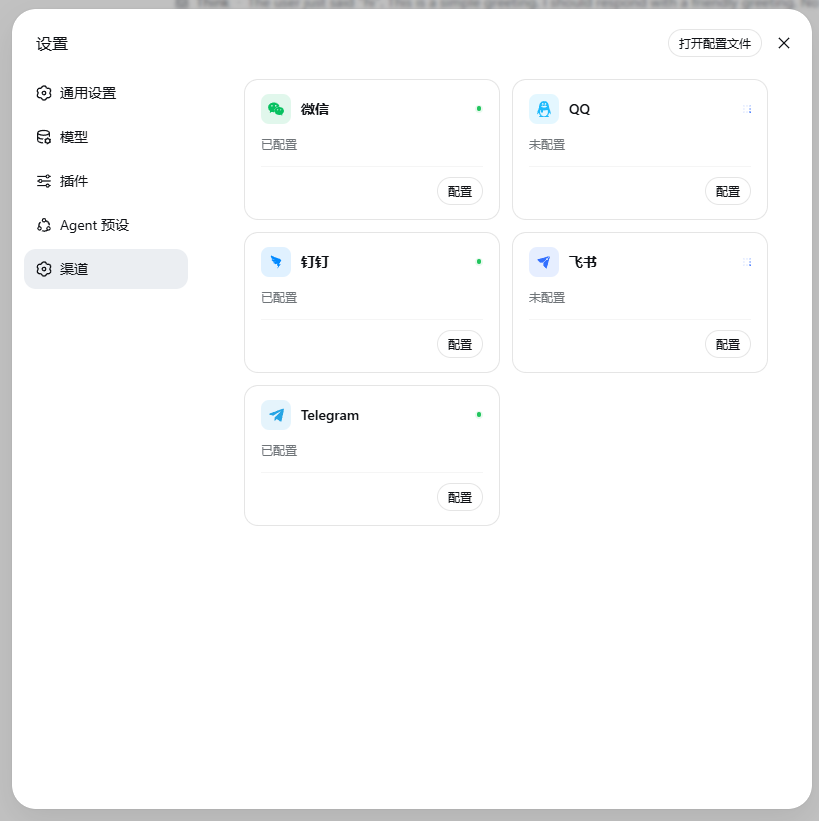
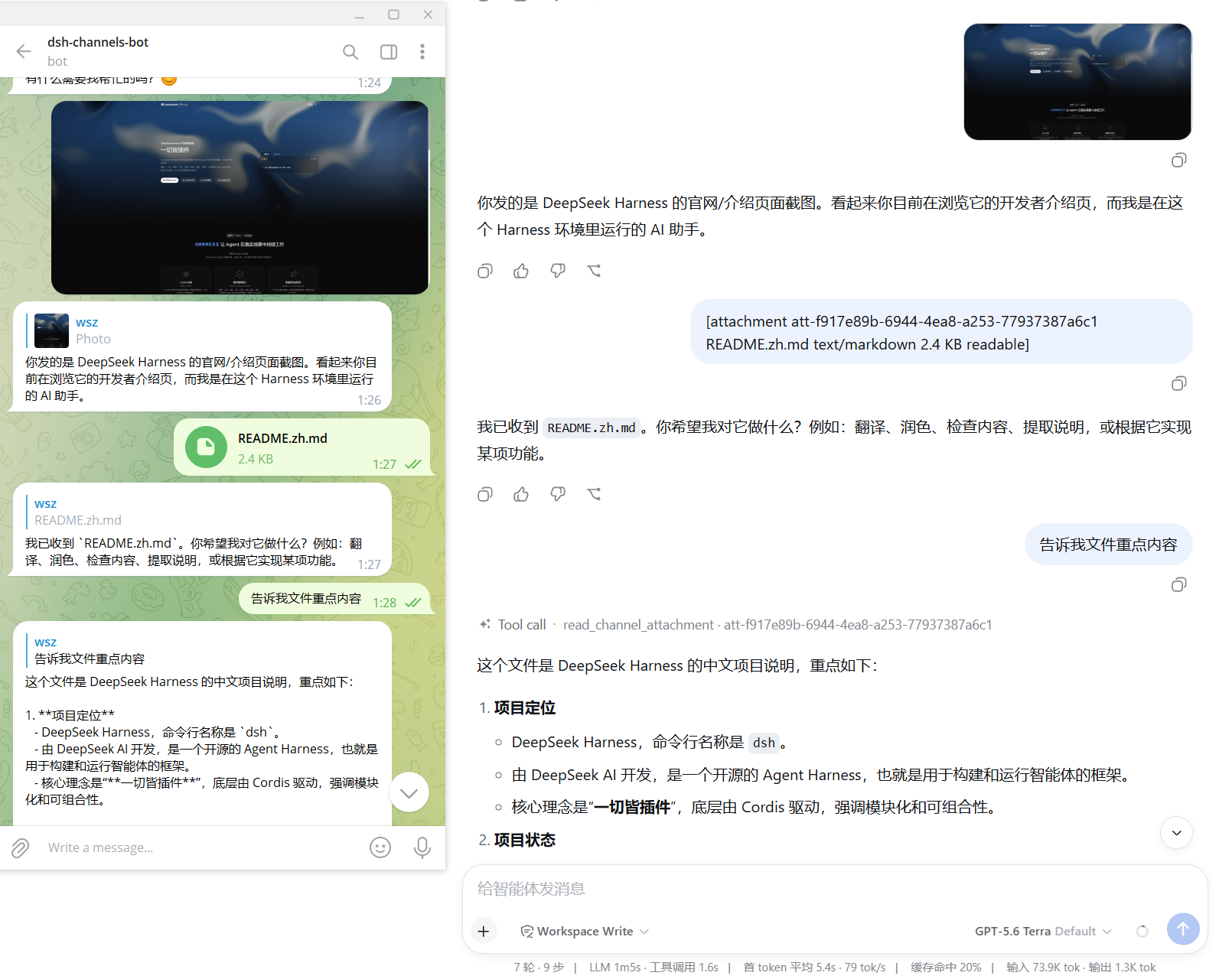
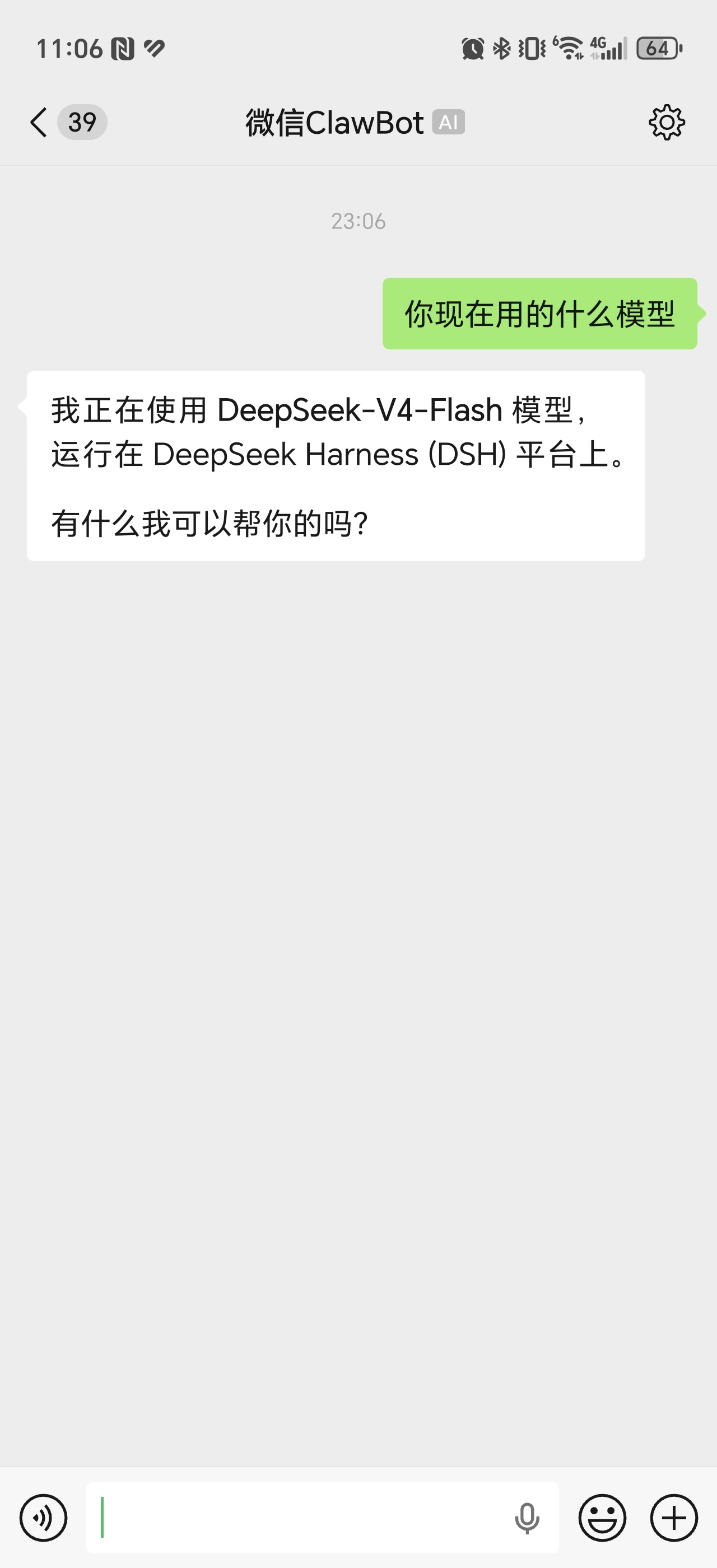
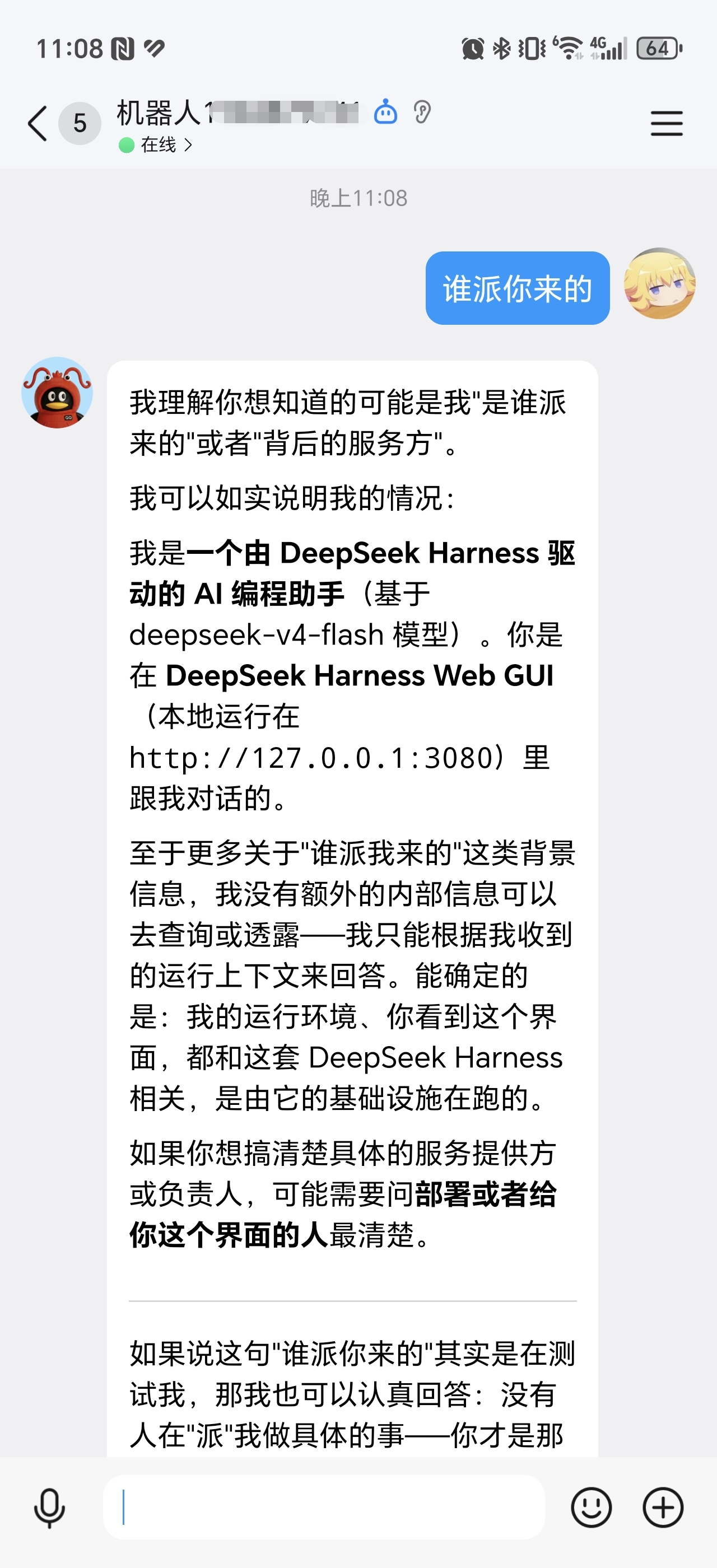
接入后,在 Harness Web“设置 → 渠道”面板统一配置与扫码授权,并在各平台对话框中直接与 Agent 对话(图片来源:docs/ScreenShot):
Harness Web · 渠道设置与 Telegram 接入示例(图片与文件收发、附件内容读取)
各平台对话框
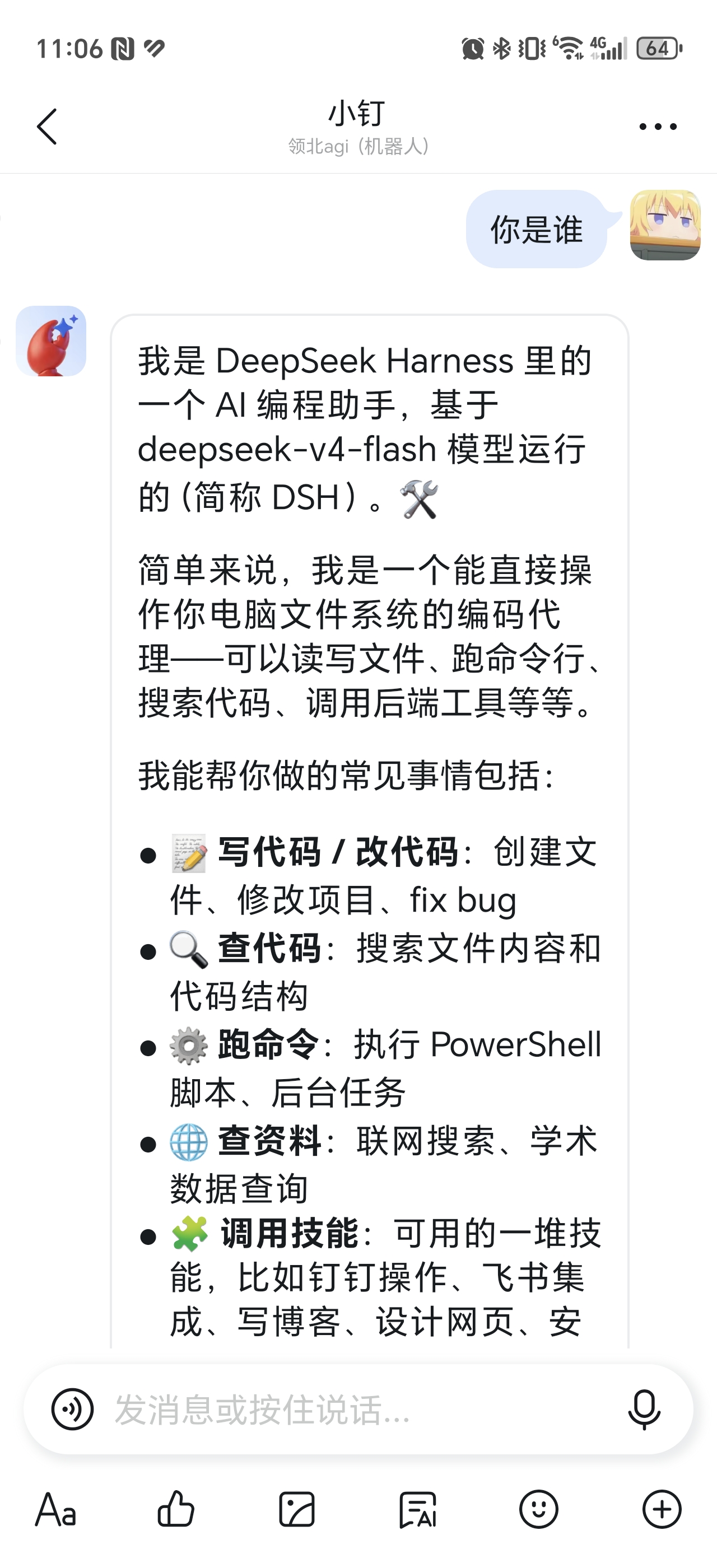
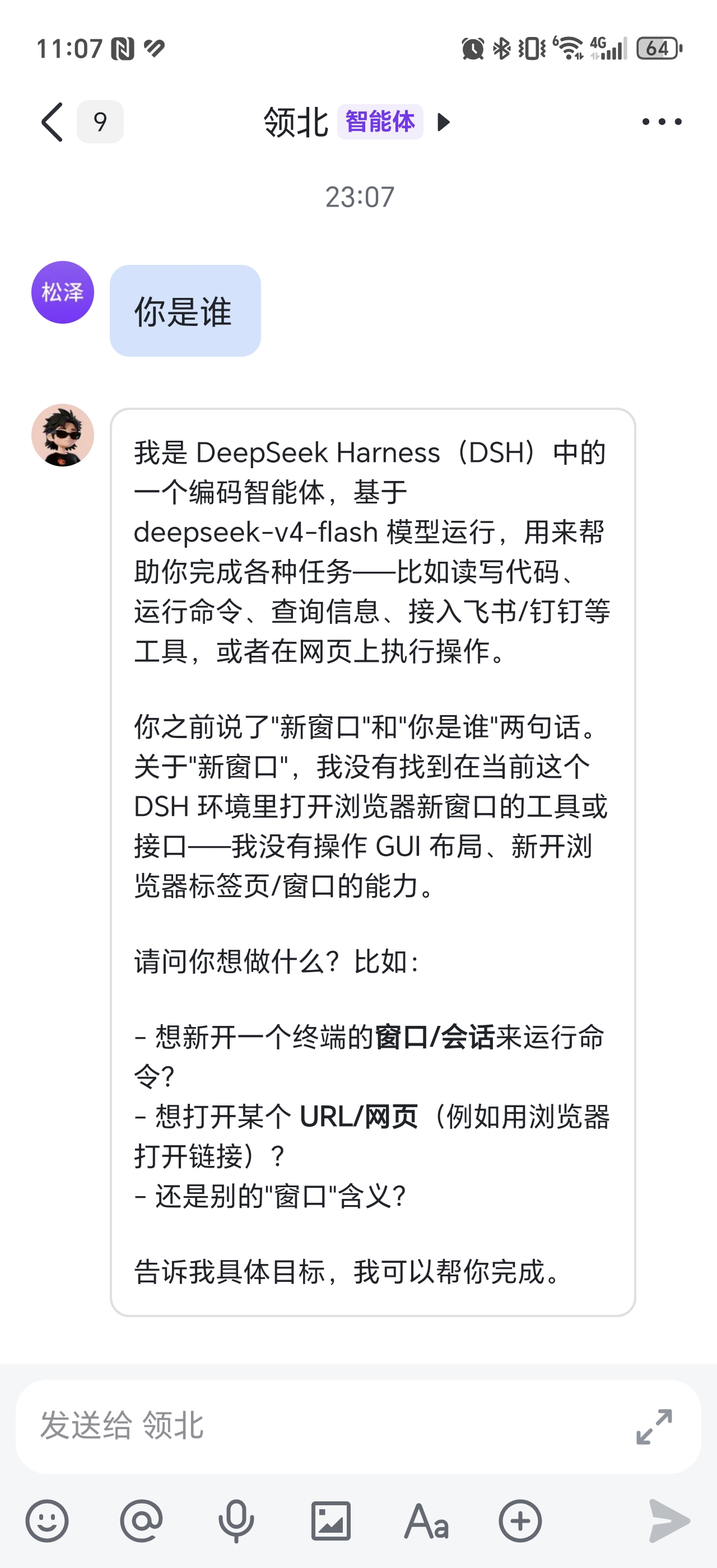
能力总览
| 渠道 | 文本 | 图片 | 文件 | 流式回复 | 状态 |
|---|---|---|---|---|---|
| 微信 | 支持 | 收发 | 入站读取 | - | ✅ |
| 支持 | 收发 | 收发 | 支持 | ✅ | |
| 钉钉 | 支持 | 收发 | 收发 | 支持 | ✅ |
| 飞书 | 支持 | 收发 | 收发 | 支持 | ✅ |
| Telegram | 支持 | 收发 | 收发 | 支持 | ✅ |
- 支持视觉的多模态模型可直接识别图片;PDF、DOCX、XLSX 和文本附件可提取内容供 Agent 读取(入站单文件上限 100 MiB);音频和视频暂为降级处理。
使用前须知
- 确认
npx @deepseek-ai/dsh可运行,且 Harness Web 普通会话可正常对话。 - 需要 DeepSeek Harness
0.1.5-rc.2与 Node22.19+(版本对照见兼容矩阵)。 - 渠道会话通常使用
Workspace Write;仅在确需访问 Workspace 外文件且信任当前任务时启用Full access。 - 项目仍在快速迭代,升级前请备份数据。
安装
# 安装稳定版 bundle
npx @deepseek-ai/dsh plugin --profile web add -w @wsz987/dsh-channels@latest

# 检查 bundle 是否合并到 profile
npx @deepseek-ai/dsh --profile web --dump-config

# 启动 Harness Web
npx @deepseek-ai/dsh web
安装完成后,在 Harness Web 的“设置 → 渠道”中配置或登录需要使用的渠道,并完成“安全访问”设置。
更新与卸载
安装、更新和卸载时请保留 -w 参数。插件需与 Harness 版本匹配,升级时先升 Harness,再更新插件:
# 升级 Harness(当前基线在 npm 的 next 标签)
npm i -g @deepseek-ai/dsh@next

# 同一版本线内更新插件
npx @deepseek-ai/dsh plugin --profile web update -w @wsz987/dsh-channels

# 跨版本线升级:用 add 重装
npx @deepseek-ai/dsh plugin --profile web add -w @wsz987/dsh-channels@latest

# 卸载
npx @deepseek-ai/dsh plugin --profile web remove -w @wsz987/dsh-channels
各版本要求的 Harness 见兼容矩阵。
配置与登录
| 渠道 | 必要信息 | 登录方式 |
|---|---|---|
| 微信 | 无 | 扫码登录,凭据自动持久化 |
| AppID、AppSecret | QQ 开放平台创建机器人 | |
| 钉钉 | clientId、clientSecret(可选) | 扫码或在钉钉开放平台创建应用 |
| 飞书 | AppId、AppSecret | 在飞书开放平台创建应用,或扫码创建智能体 |
| Telegram | Bot Token | 在 @BotFather 创建机器人并填写 Token |
Telegram:需 Bot API 10.2+;只支持
getUpdates长轮询,启动时会调用deleteWebhook移除该 Bot 已配置的 webhook,不要让同一 Bot 同时承担其他 webhook 消费者。
必做:配置安全访问
在 设置 → 渠道 → 安全访问 确认谁可以通过 Bot 使用本机 Agent。默认不会把「能给 Bot 发消息的人」当作已授权用户。
- 微信:自动使用当前扫码账号。
- 钉钉 / 飞书 / Telegram:点击「识别我的账号」,按提示私聊 Bot 发送一次识别指令,再回本地页面确认。
- QQ:私聊仅创建者可用,无需识别;群聊需单独配置。
- 群聊默认关闭,需手动添加允许的群,或显式开启「所有群组」。
未完成确认时,渠道可能显示已连接,但消息不会进入 Agent。
常用操作
渠道指令
任意渠道会话内可直接发斜杠指令,由 Harness 官方命令系统解析执行:
部分指令暂不支持在群聊中使用,具体可用范围以当前渠道和会话为准。
| 指令 | 说明 |
|---|---|
/stop |
立即终止当前任务(最高优先级:不等渠道排队消息,直接取消当前 Agent) |
/new |
开启全新会话(遇到 bug 可以尝试使用) |
/help [command] |
查看当前会话实际生效的命令,或单个命令的用法 |
/status |
查看当前 Session / Agent / 模型状态 |
/version |
查看当前 bundle 版本、Harness 兼容基线与新版本提示 |
/models [provider] |
查看 Harness 当前注册的模型 Provider 及其模型 |
/model [<provider> <model> [<reasoningEffort>]] |
查看或切换当前会话模型 |
/mirror [on|off] |
开关镜像模式:开启后,在 Web / CLI 发起的回复也会同步发送到本会话(默认关闭,状态持久化) |
/bind <会话ID> [confirm] |
把本对话重绑到一个已存在的会话(先解析并列出影响,确认后加 confirm 执行) |
/help会列出当前可用的全部指令(含宿主加载的官方插件指令);未识别的斜杠指令直接提示「未知命令」,不会发给模型。
/model 示例
/model                       # 查看当前会话解析到的模型
/model deepseek deepseek-chat
/model openai gpt-5.6 high   # 指定 reasoning effort
/model切换当前会话,并同步写入 Harness 的全局默认模型,供后续新会话使用。
Workspace 隔离
默认已按「渠道 / 账号」自动隔离各渠道会话的文件,无需配置。如需复用 Harness 启动目录或关闭隔离,编辑 $DSH_HOME/profiles/web/cordis.patch.yml:
- id: channels-harness
  name: '@wsz987/dsh-channels/harness'
  inject: [channels, agents, agentDefaultModel, agentPresets, llm, commands]
  config:
    workspace:
      mode: channel-account # channel-account(默认)| host-cwd | disabled
      autoCreate: true
Roadmap
- 完善渠道内的会话管理和异常恢复体验。
- 接入更多即时通讯渠道(画饼中)。
从源码运行
git clone https://github.com/wsz987/dsh-channels.git
cd dsh-channels
pnpm install
pnpm build
pnpm channels
pnpm web:debug
pnpm channels可指定渠道,例如pnpm channels weixin qq。- 修改代码后重新构建并重启 Harness;切回 npm 版本前运行
pnpm channels:clean。
提交前运行完整门禁:
pnpm ci:check
📚 文档
- 架构总览
- 公共/统一代码设计
- 多渠道规划
- 架构决策记录(ADR)
- 入站访问控制(安全)
- 渠道身份映射(安全)
- 第三方渠道接入指南
- 发布流程
- 兼容矩阵(Harness / Node / 必测场景)
- 微信 live 验证手册
- 渠道权限核验(接口/权限/上游漂移对照)
- 第三方版权声明
- 各子包 README:
packages/*/README.md(每个包的安装、配置、开发说明)
🤝 二次开发规范
参考主流开源项目(Koishi / Wechaty 风格)的分层约定:适配器层零侵入核心,核心层不感知平台。
仓库结构
| 目录 | 职责 |
|---|---|
packages/channels |
对外 bundle @wsz987/dsh-channels(聚合 patch) |
packages/channel-core |
Channel Contract:类型 + ctx.channels Service + defineChannelAdapter |
packages/channel-harness |
渠道 ↔ Harness 桥;只保留可选 ChannelAttachmentProvider 端口(旧名 ChannelFileProvider 为兼容别名) |
packages/channel-files |
Generic Attachment compatibility backend:会话隔离存储、legacy 兼容解析、read_channel_attachment 兼容工具 |
packages/channel-control |
控制面:配置 / 凭据 / 扫码授权 / 运行时生命周期 |
packages/channel-{weixin,qq,dingtalk,lark,telegram} |
五个内置渠道适配器 |
packages/channel-{compat,testkit,verify,web} |
契约验证 / 测试工具 / Web 可视化 |
templates/channel-adapter |
新渠道脚手架 |
使用核心包(channel-core)
适配器只需实现 ChannelAdapter 契约,核心自动完成注册 / 挂载 / 回执 / 健康检查:
import { defineChannelAdapter } from '@wsz987/channel-core';

export default defineChannelAdapter({
  id: 'my-channel',
  capabilities: {
    text: true, image: false, file: false,
    audio: false, video: false, markdown: false,
    cards: false, reactions: false, threads: false,
    streaming: 'buffered',   // native | edit | buffered
  },
  async start(ctx) { /* 连接平台、ctx.emit('message', ...) */ },
  async stop() { /* 幂等清理 */ },
  async send(target, message) { /* 发送 */ },
  // 可选:createReply 流式 / beginAuth+pollAuth 扫码 / getHealth 健康
});
三条红线(详见 docs/adapter-authoring.md):
- 不在 core 里按渠道做特判——渠道差异由 core 按
capabilities协商处理 - 适配器禁止调用 Harness Agent API(
ctx.agents...) - 平台原始 payload 必须映射为结构化
MessagePart,禁止直塞给模型
契约表达不了的需求 → 上报 contract gap,禁止改 channel-core / channel-harness。
新增渠道四步
- 复制
templates/channel-adapter为packages/channel-<name>,实现defineChannelAdapter(含 config / transport / mapper) - 在
packages/channels/cordis.patch.yml加一行(pnpm channels自动识别新渠道) pnpm build && pnpm typecheck && pnpm testpnpm verify packages/channel-<name> --test跑契约验证(fixtures + manifest + 测试套件)
新增渠道指令
指令以 factory 形式放在 packages/channel-harness/src/commands/,加入 commandFactories 数组即随 Agent 自动注册(官方 @deepseek-ai/dsh-commands 格式,无需改 bridge):
// packages/channel-harness/src/commands/reset.ts
export function createResetCommand(deps: ChannelCommandDependencies): CommandDefinition {
  return {
    name: 'reset',
    description: 'Reset the current session',
    async handler(invocation) {
      if (invocation.rawInput.trim().length > 0) return { kind: 'error', text: '用法:/reset' };
      if (invocation.agent.status !== 'idle') return { kind: 'error', text: '当前会话仍在运行,请稍后再试。' };
      // ...调用 deps 提供的 bridge 能力
      return { kind: 'success', text: '已重置会话。' };
    },
  };
}
commandFactories是唯一注册点:['createNewCommand', createResetCommand]- 需要 bridge 新能力时,在
ChannelCommandDependencies加一个方法(平台无关),bridge 侧实现即可
提交与发布
- Commit:Conventional Commits(
feat(scope): .../fix(scope): .../docs: ...),scope 用包名(如channel-qq) - PR:过 CI(build + typecheck + test + 契约验证 + live gate 前检)
- 发布:
pnpm changeset记录变更 → CI 合入后pnpm release(Changesets 自动发版,见 docs/release.md)
🙏 致谢
本项目基于以下开源项目:
- deepseek-ai/deepseek-harness —— DeepSeek Harness(
@deepseek-ai/*) - DingTalk-Real-AI/dingtalk-openclaw-connector —— 钉钉渠道插件(
@dingtalk-real-ai/dingtalk-connector) - tencent-connect/openclaw-qqbot —— QQ 机器人渠道插件(
@tencent-connect/openclaw-qqbot) - larksuite/openclaw-lark —— 飞书渠道插件(
@larksuite/openclaw-lark) - Tencent/openclaw-weixin —— 微信渠道插件(
@tencent-weixin/openclaw-weixin)
License
More in Chat & IM
awesome-gpt-image-2
by freestylefly
Prompt-as-Code engine and template library for GPT-Image2, with 470+ reverse-engineered cases, 20+ production templates and distilled agent skills.
voyager
by voyager-crew
A browser-extension suite for Gemini, AI Studio, Claude, ChatGPT, and DeepSeek, with a prompt manager that works on any website, including DeepSeek Harness.
dsh-im
by xmanrui
把 IM 机器人接入 DSH:统一管理飞书/微信/钉钉/企业微信/QQ/Telegram/Discord/WhatsApp 八个渠道,扫码或凭据接入、流式回复与设置页管理
wegent
by wecode-ai
Plan, build, and deliver with an open-source, self-hostable AI workspace for coding, collaboration, and automation.