
dsh-provider-qoder
Curated pickMaintenance: Activemo-n/dsh-provider-qoder
DSH provider plugin for Qoder subscriptions.
$ dsh plugin add dsh-provider-qoderInstall
dsh has no central install command — add this plugin’s entry (documented in its README below) to your profile or patch config, then restart.
How installs work9
stars
2
forks
TypeScript
Language
MIT
License
2026-09-08
Created
2026-09-29
Last push
README
dsh-provider-qoder



English | 简体中文
Use your Qoder subscription in DeepSeek Harness (DSH), supporting multimodality, web search, and tool calls across Global and China Qoder services.
The plugin handles authentication and model communication, while tool execution, workspace operations, and permission management are handled by DSH. This project is a community adapter plugin and is not affiliated with Qoder or DeepSeek.
Features
- Configure subscription access via Qoder Personal Access Token (PAT).
- Supports both Global (
global) and China (china) services. - Automatically fetches available models for your account, supports selecting enabled models, and displays pricing multipliers and reasoning effort options when reported by the service.
- Supports multimodality, web search, and tool calls.
- View account information, quota, and reset dates in Settings.
Installation
Prerequisites
- An active Qoder subscription and a PAT matching the selected service region.
- The DSH profile running the plugin must provide a managed credentials service; when configuring via the settings page, the credential storage must also be writable.
- Requirements: DSH
>=0.1.7-rc.2.
Install from npm
Run in your terminal:
dsh plugin --profile web add dsh-provider-qoder
Configuration & Usage
1. Save Service Region and PAT
Open DSH Web, navigate to Settings → Models, locate the Qoder Credentials card at the bottom of the page, and click Edit.
| Service Region | Account Domain |
|---|---|
| Global (default) | qoder.com |
| China (CN) | qoder.com.cn |
Select the region matching your account, enter your Qoder PAT into the input box labeled API Key, and click Save.
Once saved, the plugin automatically fetches the list of supported models for your account, making them immediately available in the DSH model picker.
2. View Account & Manage Models
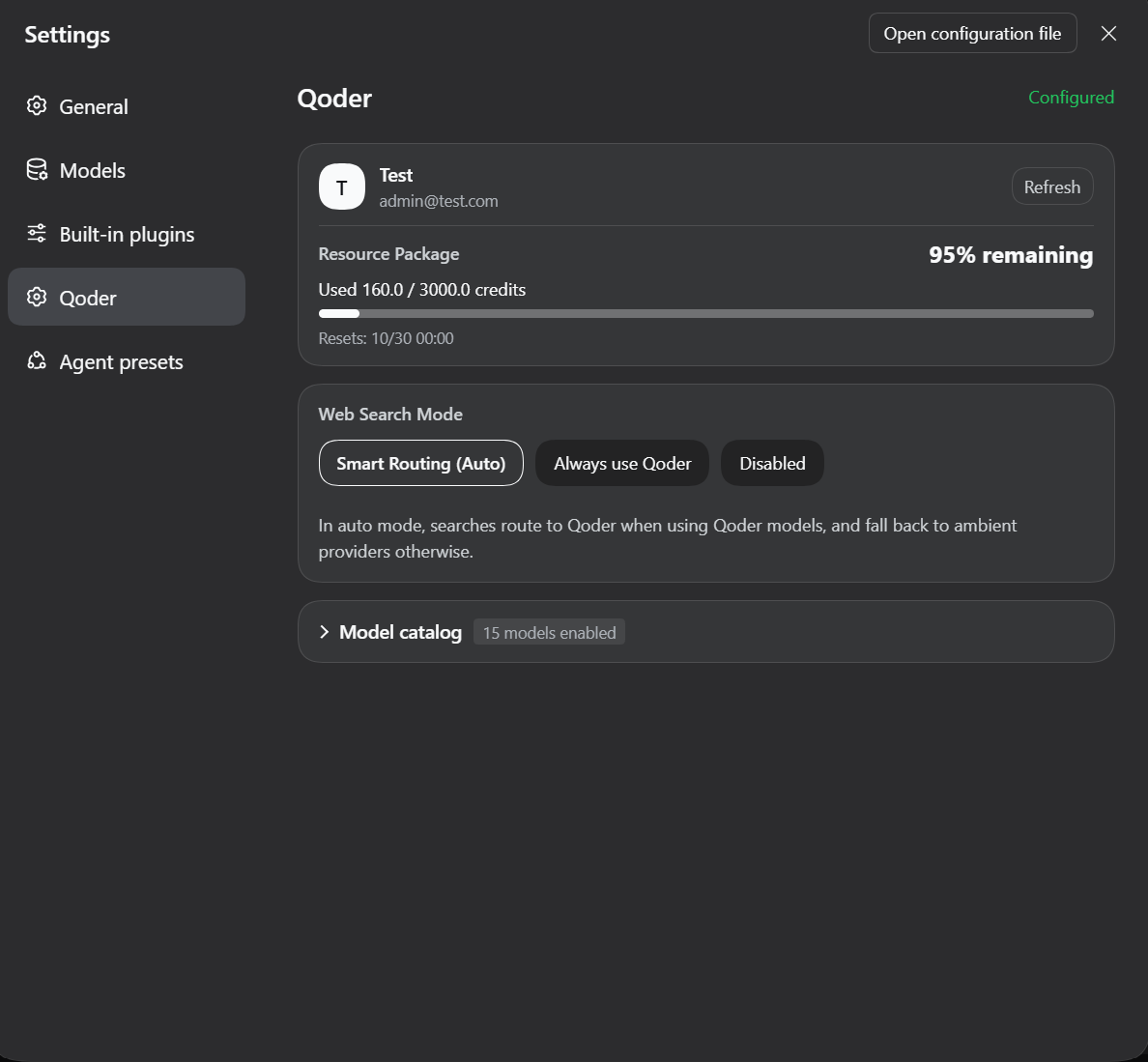
Open Settings → Qoder to view account and quota details, configure the web search policy, and adjust enabled models:
Upcoming Features
- [ ] Request rate-limiting queue mechanism
- [ ] Connect with Qoder's Protobuf protocol
References
- pi-provider-qoder - Reference implementation for Qoder authentication, API communication, and protocol handling.
Feedback
Please report issues via GitHub Issues with the plugin and DSH versions, selected service region, reproduction steps, and sanitized error messages. Do not submit PATs, short-lived tokens, or personal account information.
License
This project is licensed under the MIT License.
More in Integrations & Sharing
dsh-notification
by omdsh-dev
Desktop notifications for DeepSeek Harness turn completions, with per-outcome controls and include/exclude keyword rules.
dsh-open-in-vscode
by omdsh-dev
Open DeepSeek Harness workspace directories in VS Code directly from the web GUI.
fn-os-apps
by tnnevol
Tencent CodeBuddy model provider for DeepSeek Harness that signs in with browser OAuth instead of an API key, lists the CodeBuddy model catalog with the context, output, tool-calling, reasoning and image capabilities of each model, keeps multiple accounts with automatic failover to the next usable one, shows remaining quota in the composer with a token and credit usage panel, and completes automatable CodeBuddy growth tasks per account with an execution log. Install from npm with `dsh plugin --profile web add @tnnevol/dsh-codebuddy`.
dsh-lark-bot
by plutokeating
Feishu/Lark bridge for DeepSeek Harness: scan-to-connect PersonalAgent binding, streaming cards, git-worktree project workspaces, parallel per-scope tasks, multi-role agents, cross-session notify, in-chat model/key management, and a safety-net guardian that still answers in Feishu after dsh crashes.