
cocode
Maintenance: Activecocode-agency/cocode
Best ready-to-run DeepSeek Harness distribution: DSH desktop GUI, terminal TUI, and harness integration.
Install
dsh has no central install command — add this plugin’s entry (documented in its README below) to your profile or patch config, then restart.
How installs work81
stars
6
forks
TypeScript
Language
MIT
License
2026-08-14
Created
2026-08-19
Last push
README
Cocode
A ready-to-run DeepSeek Harness distribution.

Most coding agents make the choices for you and take the choice away with them: which tools are available, how work gets scheduled, what the interface looks like — all settled upstream. Cocode wants the other half of that bargain. It makes the choices for you and leaves the screwdriver within reach: the default setup works the moment you install it, with nothing to study first, and when it doesn't fit you can open it up, see exactly how it was put together, and change it to your liking. Everything else in Cocode follows from that.
The runtime underneath is DeepSeek Harness, which makes an argument of its own: everything is a plugin. Models, tools, skills, sessions, sandboxes, and scheduling all come together through configuration, and Harness takes no position on what you should assemble. Cocode assembles one of those, and puts the assembly out in the open in the product instead of burying it in a config file.
Project status: Developer preview. Cocode is built on the DeepSeek Harness developer preview. It is an independent distribution, not an official DeepSeek product, and upstream compatibility may change. The repository supports source builds on macOS, Windows, and Linux; the current release scripts target macOS and Windows artifacts, and this repository does not include a hosted backend or a vendored Harness checkout.
Install and try it in five minutes
| Use case | Install | Start |
|---|---|---|
| GUI | Download the installer for your platform from the GitHub Releases page. | Launch Cocode, then choose Cocode Nut or your own DeepSeek-compatible key. |
| TUI | Node.js 22.19.x or later (24+ is also supported), then npm install --global @cocode-agency/tui. |
Run cocode doctor, then cocode. A real terminal is required. |
| From source | Follow the component-specific pnpm instructions below. | Use make dev gui or make dev tui. |
The published TUI package installs the matching @cocode-agency/host-supervisor
automatically. For every release, keep @cocode-agency/tui and
@cocode-agency/host-supervisor on the same version line; do not mix versions from
different releases. GUI installers are downloaded separately from the matching
GitHub Release and are not installed through npm. The current repository is a
developer preview, so release availability and upstream Harness compatibility
can change.
Five-minute first run
- Install the GUI from GitHub Releases, or run
npm install --global @cocode-agency/tui. - Start the GUI, or run
cocode doctorfollowed bycocodein a real TTY. - Choose Cocode Nut or enter your own DeepSeek-compatible API key.
- Open a workspace and ask the agent to inspect a file or explain the project.
- If startup fails, save the output of
cocode doctorandcocode host status --jsonfor troubleshooting. Remove credentials and private session data before sharing diagnostics.
Why Cocode
The agent itself comes apart. Which tools a session runs, what prompts it
carries, which capabilities are on — that is a plugin assembly called a preset,
and you can read its agent.cordis.yml right in the interface. Four presets
ship built in — Standard, PTC, Minimal, and Creator — and you copy one to make
it yours. Elsewhere you get to swap the model. Here you get to swap the agent.
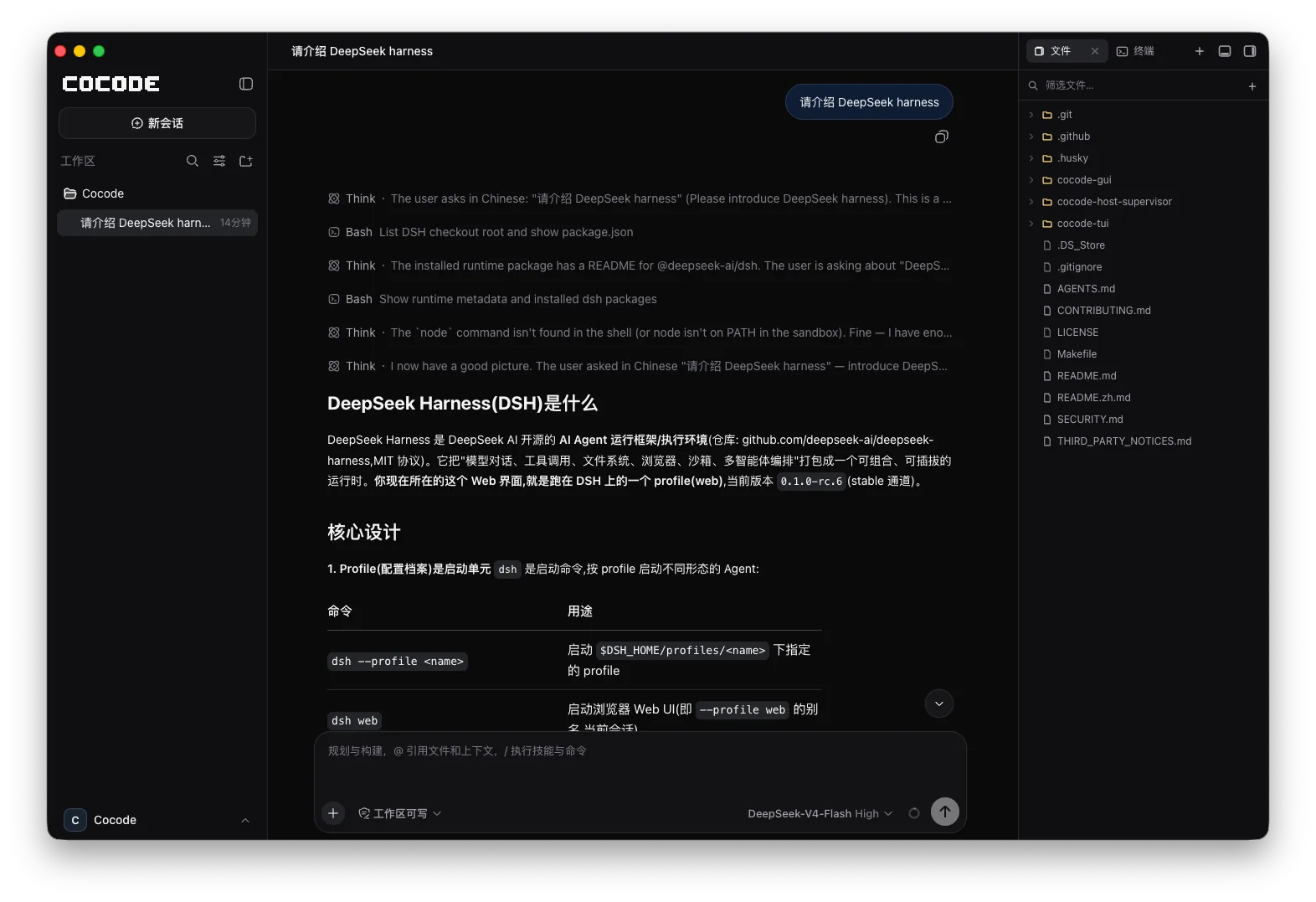
A workspace, not a chat box. Files, Git, a terminal, a built-in browser, and diff previews sit alongside the session. What the agent changed and what it ran is right there next to you, and you can take over by hand at any point instead of carrying context between windows.
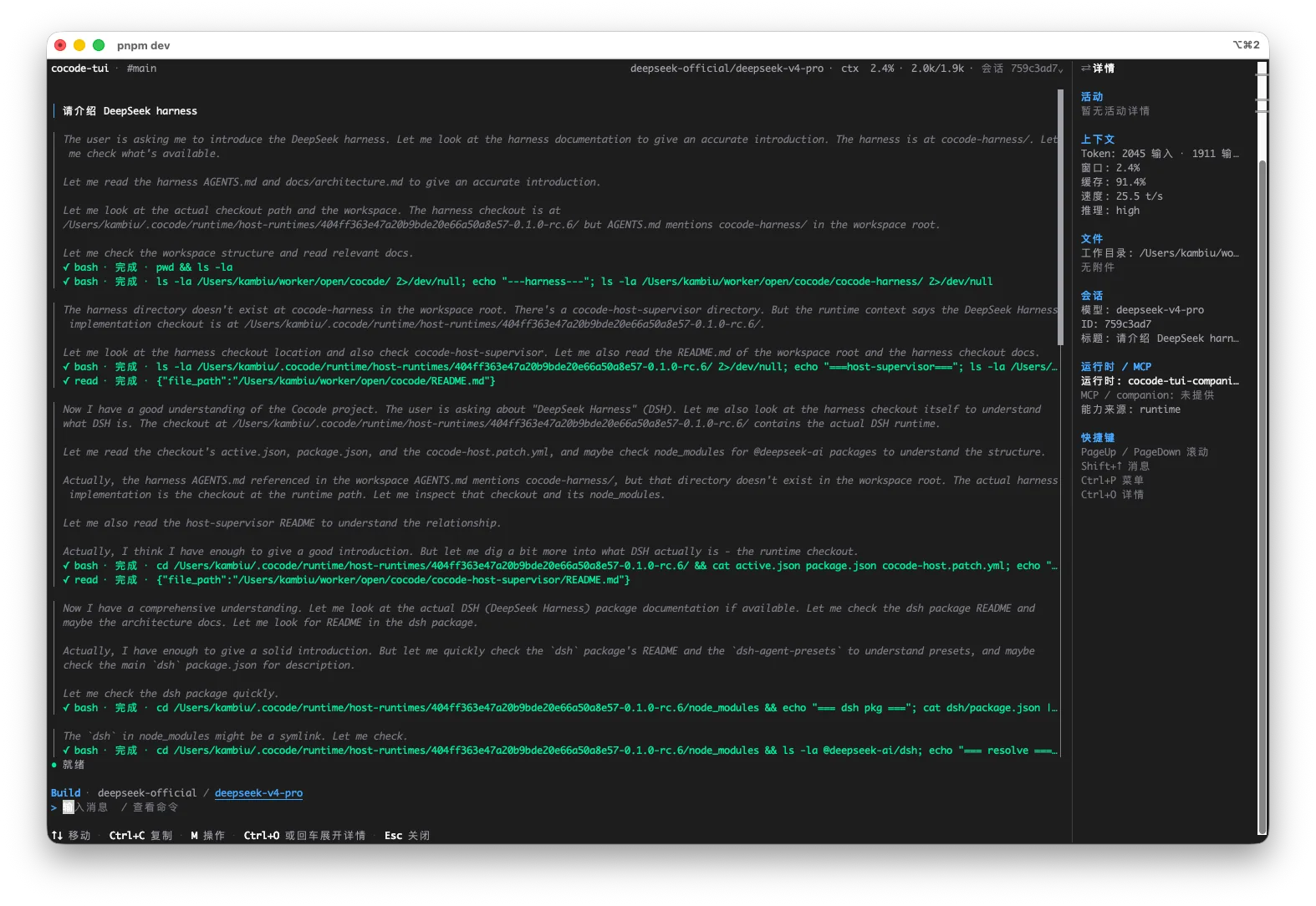
The desktop and the terminal pick up the same session. GUI and TUI connect to the same Host and read and write the same session record. Push a task forward at your desk, then SSH in and continue from the terminal — presentation state never enters the session log, so any client can rebuild the full conversation from it.
The model is your call too. An official DeepSeek key, any OpenAI-compatible self-hosted or gateway endpoint, or Cocode's own model service, Cocode Nut — all three are available, and you can switch between them.
Cocode is not trying to be another chat window. It won't parade a full chain of thought at you as a feature, and it won't hand the model every tool by default. What it wants to be is a workspace you trust with real work — and one you can reshape to your own liking.
Two entry points, one session
| Cocode GUI | A desktop workspace built on Electron. Sessions, files, terminals, and runtime state live on one surface. Diffs and attachments open in a preview panel, so you see exactly what changed before you confirm. |
| Cocode TUI | A terminal client for keyboard-first and remote work. SSH into a machine and keep pushing tasks with no graphical environment required. |
Both attach to the same Host through @cocode-agency/host-supervisor, so they can share
sessions and task state when they use the same DSH_HOME, profile, and Host
configuration scope. Switching between the desktop app and the terminal does
not reset your work within that scope.
Cocode GUI
Cocode TUI
Repository layout
This repository is not a single workspace. Each component is an independent
pnpm workspace with its own lockfile and toolchain, tied together by a root
Makefile.
cocode/
├── cocode-gui/               # Electron desktop / web GUI  (@cocode/gui-root)
├── cocode-tui/               # Terminal client             (@cocode-agency/tui)
├── cocode-host-supervisor/   # Shared DSH Host lifecycle   (@cocode-agency/host-supervisor)
├── Makefile                  # Root dev shortcuts
└── AGENTS.md                 # Engineering contract for contributors and agents
The runtime itself is not vendored here. @cocode-agency/host-supervisor pins
@deepseek-ai/dsh from npm and owns the Supervisor service, the local IPC and
lease protocol, runtime-slot materialization, and the Cocode JSON-RPC Host
plugin. GUI and TUI never launch a Harness process themselves — they acquire a
lease for a canonical DSH_HOME + profile + Host configuration scope and connect
to the endpoint the Host advertises.
Cocode GUI ─┐
            ├─→ @cocode-agency/host-supervisor ─→ @deepseek-ai/dsh (npm) ─→ models · tools · sessions
Cocode TUI ─┘
Requirements
The three components do not share a toolchain baseline. Check the one you plan to build:
| Component | Node.js | pnpm |
|---|---|---|
cocode-gui |
>=22.12.0 (see .nvmrc) |
10.34.5 exactly |
cocode-tui |
^22.19 or >=24 |
any recent version |
cocode-host-supervisor |
>=22.12.0 |
any recent version |
Getting started
Every target below runs from the repository root.
# Desktop workspace: Electron client + Vite on :5273
make install-gui
make dev gui

# Terminal client (requires a TTY; preflight installs deps and refreshes the Host runtime)
make install-tui
make dev tui

# Browser-only GUI, useful for design-system work
make dev gui-web

# The Host on its own, for wire-protocol debugging
make install-dsh
make dev dsh
Run make with no arguments to list every target.
The cocode command
After installing the TUI or desktop build, cocode is the unified entry point. With no subcommand it keeps the existing behavior and opens the TUI. GUI, TUI, and Host management use the same environment-derived Host scope, so different clients can attach to the same Host.
cocode version                   # Show Cocode and bundled DSH versions
cocode --version                 # Print the installed Cocode version
cocode gui                       # Open the GUI
cocode tui                       # Open the TUI
cocode plugin list               # List plugins in the default cocode profile
cocode plugin --profile web list # List plugins in a selected DSH profile
cocode host status               # Inspect the shared Host without starting it
cocode host status --json        # Print machine-readable status
cocode host stop                 # Stop Host and Supervisor when no clients hold leases
cocode host stop --force         # Explicitly interrupt GUI/TUI clients that hold leases
cocode doctor                    # Check TUI, Supervisor, and Host connectivity
--dsh-home <path>, --profile <name>, and --runtime-channel stable|preview|dev can be placed before or after a subcommand to select the Host scope. If the GUI cannot be located automatically on a platform, set COCODE_GUI_EXECUTABLE (or the COCODE_GUI_PATH alias) to its executable path.
The GUI reuses a staged runtime in the OS cache directory. Two escape hatches when that cache goes stale:
DSH_FORCE_RESTAGE=1 make dev gui        # refresh the cache
DSH_DISABLE_RUNTIME_CACHE=1 make dev gui  # isolated runtime, no cache
Building distributables
make gui-build # Electron Forge installers for the current platform
Platform-specific release builds live in cocode-gui, as
release:mac:x64, release:mac:arm64, release:win:x64, and
release:win:arm64.
The GUI is a private Electron workspace rather than an npm application package. The TUI and Host Supervisor have public publish configuration, but registry installation should only use matching versions listed in the same GitHub Release and npm release.
Getting a model
Cocode does not bundle a model and is not tied to one vendor. On first launch it asks you exactly one thing: use Cocode Nut, or use your own key. Both can live on the same machine, and you can switch at any time.
Cocode Nut: no API key to apply for
Cocode Nut is Cocode's own model service. Sign up, sign in, and call models directly from the desktop workspace and the terminal — no key to apply for, store, or reconfigure on every new device.
- There's a free tier, so you can just try it. No payment up front; decide about more credits after it works in your real workflow.
- $10 a month, for up to $60 worth of model usage. How far that goes depends on which model you call; it is not a fixed amount. Models run on our own B300 cluster with no third-party resale, so the same money goes noticeably further.
- DeepSeek V4 Pro and V4 Flash. The free tier is Flash only; paid tiers can call both.
- One balance across both entry points. The desktop workspace and the terminal draw from the same credits, so there is nothing to manage separately.
- Your code is not used for training. Prompts, code, and model responses are not used for training or sold to third parties, and request content is not retained beyond completing the call, billing, and necessary troubleshooting.
Current plans, credit windows, and billing live at
cocode.agency/nut; upgrade or cancel at any time.
Identity tokens are stored in account.yaml under ~/.cocode, and the personal
inference key is owned by the Host credentials service. Neither enters the
session log.
Your own key
If you already have a DeepSeek API key, paste it on first launch. Cocode is a
DeepSeek Harness distribution, so running entirely locally comes with no strings
attached. The key is stored in the DSH credentials file under $DSH_HOME and
likewise never enters the session log.
Relevant environment variables: DSH_HOME and DSH_PROFILE select the shared
Host scope, COCODE_HOST_CONFIG_FINGERPRINT pins a custom Host composition,
COCODE_HOME isolates Cocode credentials, and DSH_SESSION_ROOT relocates
session files.
Documentation
CONTRIBUTING.md |
Contribution workflow, checks, and change boundaries |
SECURITY.md |
Vulnerability reporting process |
cocode-tui/docs/ |
TUI user guides, in English and Chinese |
cocode-host-supervisor/README.md |
Supervisor lease protocol and client API |
cocode-gui/README.md |
GUI development, packaging, and update behavior |
THIRD_PARTY_NOTICES.md |
Third-party sources and license notices |
Product documentation lives at doc.cocode.agency.
Contributing
Read CONTRIBUTING.md first — it covers the commit convention, which checks are mandatory, and how changes are scoped across the three components. Please keep changes focused on the component they affect and avoid committing local runtimes, caches, credentials, or generated output.
To report a security vulnerability, follow SECURITY.md rather than opening a public issue.
License
MIT © 2026 Cocode Agency.
Third-party components, including DeepSeek Harness and the source-vendored Cordis framework, keep their own licenses. See THIRD_PARTY_NOTICES.md.
More in Desktop & Apps
open-design
by nexu-io
🎨 Best DeepSeek Harness Design Plugin. The open-source Claude Design alternative. 🖥️ Local-first desktop app. 🖼️ Your coding agent becomes the design engine: prototypes, landing pages, dashboards, slides, images & video — real files, HTML/PDF/PPTX/MP4 export. 🤖 Claude Code / Codex / Cursor / DeepSeek Harness / OpenCode & 20+ CLIs via BYOK.
deepseek-harness-desktop
by anywhere-labs
Modern desktop client for the DeepSeek Harness (dsh) plugin ecosystem — everything is a plugin, even the desktop itself.
openbiliclaw
by whiteguo233
Local-first, open-source AI content discovery agent that learns your taste and proactively finds content across Bilibili, Douyin, YouTube, Reddit, X and the open web.
deeptide
by paean-ai
Built by DeepSeek, for DeepSeek — a Swift-native macOS coding agent