
dsh-expert-mode
Curated pickasher-2000/dsh-expert-mode
Expert-mode agent preset for DeepSeek Harness, now BILINGUAL: English "Expert Mode" preset (Chief Coordinator + 11 fully-English domain-expert subagents) and Chinese 「专家模式」 preset (首席协调官). Experts: data analyst, copywriter, legal review, product manager, frontend, UI/UX, architect, social media ops, growth hacker, quant finance, finance — with automatic task delegation.
3
stars
1
forks
MIT
License
2026-08-15
Created
2026-08-16
Last push
README
DSH Expert Mode
An agent preset for DeepSeek Harness (DSH): a "chief coordinator" plus 11 domain-expert subagents with automatic task delegation.
An agent preset for DeepSeek Harness (DSH): a "chief coordinator" plus 11 domain-expert subagents with automatic task delegation.




中文版见 README.zh.md
What is this
"Expert Mode" is a DSH agent preset. Once mounted, your agent becomes a chief coordinator commanding 11 domain-expert subagents. When a task arrives, the coordinator decides which domain it belongs to, delegates it to the best expert, and consolidates the final delivery.
Screenshots
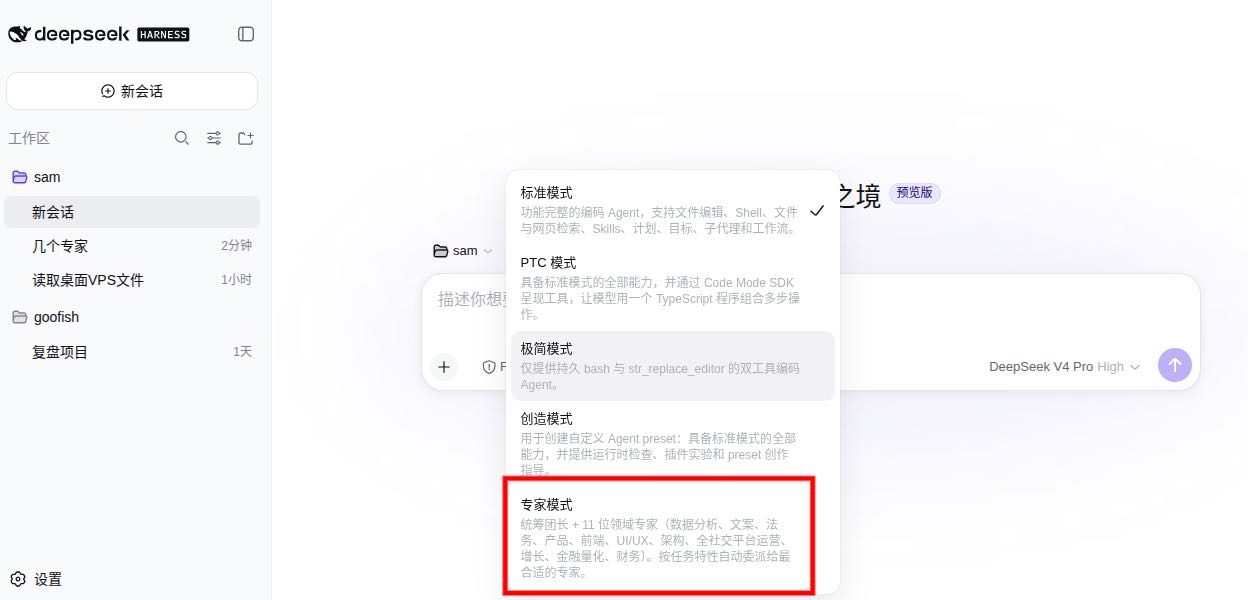
Select "Expert Mode" preset in the DSH workspace
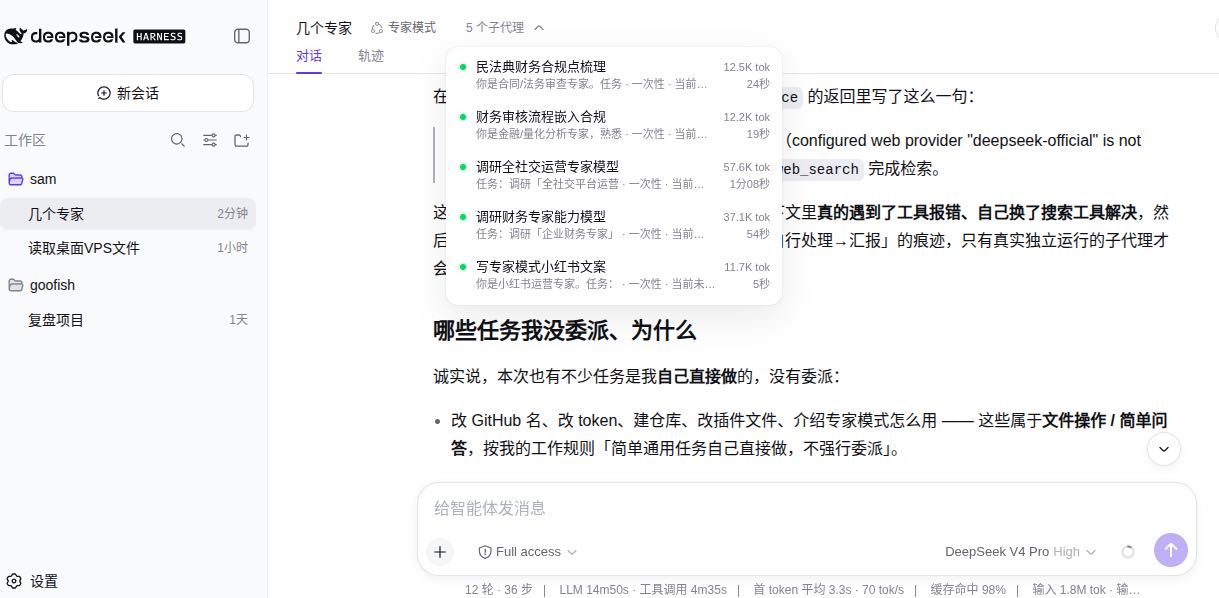
Tasks are automatically delegated to multiple domain-expert subagents in parallel, with real-time token usage and duration
11 位专家 / The 11 experts
Who is it for
- Users who want one agent to cover many professional domains (code + design + finance + legal + operations...)
- Teams that want an "out-of-the-box" multi-expert workflow without maintaining multiple prompt/tool setups
- Developers interested in DSH subagent mechanics
The 11 experts
| Expert | Delegation Tool | Domain |
|---|---|---|
| Data Analyst | expert_data_analyst |
data processing, statistics, visualization |
| Copywriter | expert_copywriter |
marketing copy, content creation |
| Legal Review | expert_legal_review |
contracts, legal risk |
| Product Manager | expert_product_manager |
requirements, product planning |
| Frontend Dev | expert_frontend_dev |
web frontend implementation |
| UI/UX Design | expert_uiux_design |
interface design, interaction |
| Architect | expert_architect |
system design, tech selection |
| Social Media Ops | expert_social_media |
multi-platform content distribution |
| Growth Hacker | expert_growth |
growth strategy, conversion |
| Quant Finance | expert_quant_finance |
quant models, financial analysis |
| Finance | expert_finance |
financial analysis, reporting |
Install
Option 0: dsh plugin add (recommended)
dsh plugin --profile web add github:Asher-2000/dsh-expert-mode
Option 1: git clone
mkdir -p ~/.dsh/.agent-presets
git clone https://github.com/Asher-2000/dsh-expert-mode.git ~/.dsh/.agent-presets/expert-mode
Want the English version? The repo ships an expert-mode-en/ preset (Chief Coordinator + 11 experts, fully English). After cloning, copy it into your presets directory:
cp -r ~/.dsh/.agent-presets/expert-mode/expert-mode-en ~/.dsh/.agent-presets/expert-mode-en
Then pick "Expert Mode" (English) or 「专家模式」 (Chinese) in the DSH preset picker.
Option 2: manual download
Download the latest release from Releases, then place preset.yml + agent.cordis.yml into ~/.dsh/.agent-presets/expert-mode/.
Usage
After installation, select the "Expert Mode" preset when creating a new session in the DSH Web GUI; or specify it from the command line:
dsh --profile headless "Analyze this data and give recommendations" --preset expert-mode
Note: the preset selector lives in the Agent preset dropdown of the session creation screen. Exact flags depend on your installed DSH version.
How it works
- On task arrival, decide which expert domain(s) it belongs to.
- If it fits an expert domain, delegate to the most suitable expert subagent (complex tasks may run multiple experts in parallel), then consolidate the delivery.
- Simple generic tasks (Q&A, file operations, chit-chat) are handled by the coordinator directly — no forced delegation.
When delegating, state the goal, inputs, and expected output clearly so the expert subagent works independently; when consolidating, keep the expert's conclusions and data evidence intact without rewriting.
Files
.
├── preset.yml          # preset metadata (name + description)
├── agent.cordis.yml    # cordis composition: coordinator persona + 11 expert subagent tools
├── README.md
├── README.zh.md
└── LICENSE
FAQ
Q: Does Expert Mode consume extra model quota? A: Delegating to an expert subagent does incur the subagent's model calls (standard DSH subagent mechanics); simple tasks answered directly by the coordinator cost nothing extra.
Q: Can I add my own experts?
A: Yes. Copy any expert entry from agent.cordis.yml, adjust the tool name and persona.
Q: Relationship to the official standard preset? A: Built on top of the official standard preset composition, keeping the full toolset and adding an expert-delegation layer.
Community
- 📢 Featured in Awesome DSH Plugin — the curated list of DeepSeek Harness plugins.
- 🏷️ Listed under the dsh-plugin GitHub topic.
Tags
dsh deepseek-harness agent-preset expert-mode multi-agent subagent ai-agent dsh-plugin
License
MIT License — see LICENSE.
More in Plugin Tooling
awesome-deepseek-harness-plugins
by zhiyuan-fan
Curated DeepSeek Harness (DSH) plugins, extensions, tools, skills, clients, runtimes, integrations, and verified references — English and Chinese.
awesome-deepseek-harness
by libukai
DeepSeek Harness 终极指南:快速入门、资源推荐、精选插件与实用工具 |The Ultimate Guide to DeepSeek Harness: QuickStart, Resources, Plugins&Toolkit
awesome-deepseek-harness-plugins
by imsai-sh
DeepSeek Harness plugin store, marketplace and hub — 3,100+ dsh plugins with search, rankings, install commands and a free public API. DeepSeek Harness 插件市场 / 插件商店:自动收集与格式校验,免费搜索 API。deepseek1024.com
dsh-market
by 2bingling
DeepSeek Harness 插件市场 · 持续收录 1500+ DSH 插件:中文搜索 + 实用五维评分 + 一键安装。Web 版与 DSH 侧边栏插件双形态。Plugin marketplace for DeepSeek Harness: 1500+ plugins, Chinese search, 5-dim scoring, one-click install.