
Best DeepSeek Harness Skills to Install First
Three proven picks from real recorded sessions — a commit skill built live and hardened until it catches secrets, plus two ways to bring your whole Claude Code and Codex skill library into dsh.
Last updated: 2026-09-15
Asking which skills are worth installing in DeepSeek Harness is really asking what you repeat. A skill is the lightest extension the harness has — one Markdown file that packages a routine into something the agent loads on demand, no restart required. Instead of a raw marketplace dump, this guide follows real recorded sessions and shows what each pick actually does the moment it is installed.
The centerpiece is a commit skill, created and stress-tested on camera: you will see the exact prompt, the skill going live in the session catalog, its anatomy, a deterministic safety-check upgrade, and a planted secret getting caught. Then two migration paths — Claude Code global skills and Codex skills — pull in everything you already have. Frames are captured from the videos in Sources; every image links back to the exact moment.
The skills worth installing, step by step
- 1
Start from the skill catalog every session already has
Before installing anything, know where skills surface. Every prompt you send carries two context rows: the dsh system prompt and the skill catalog. In the recorded session the catalog starts empty — nothing created yet — and that is your baseline. Type a slash in the composer any time to list the skills your session can invoke; filling that list up is what the rest of this guide does.
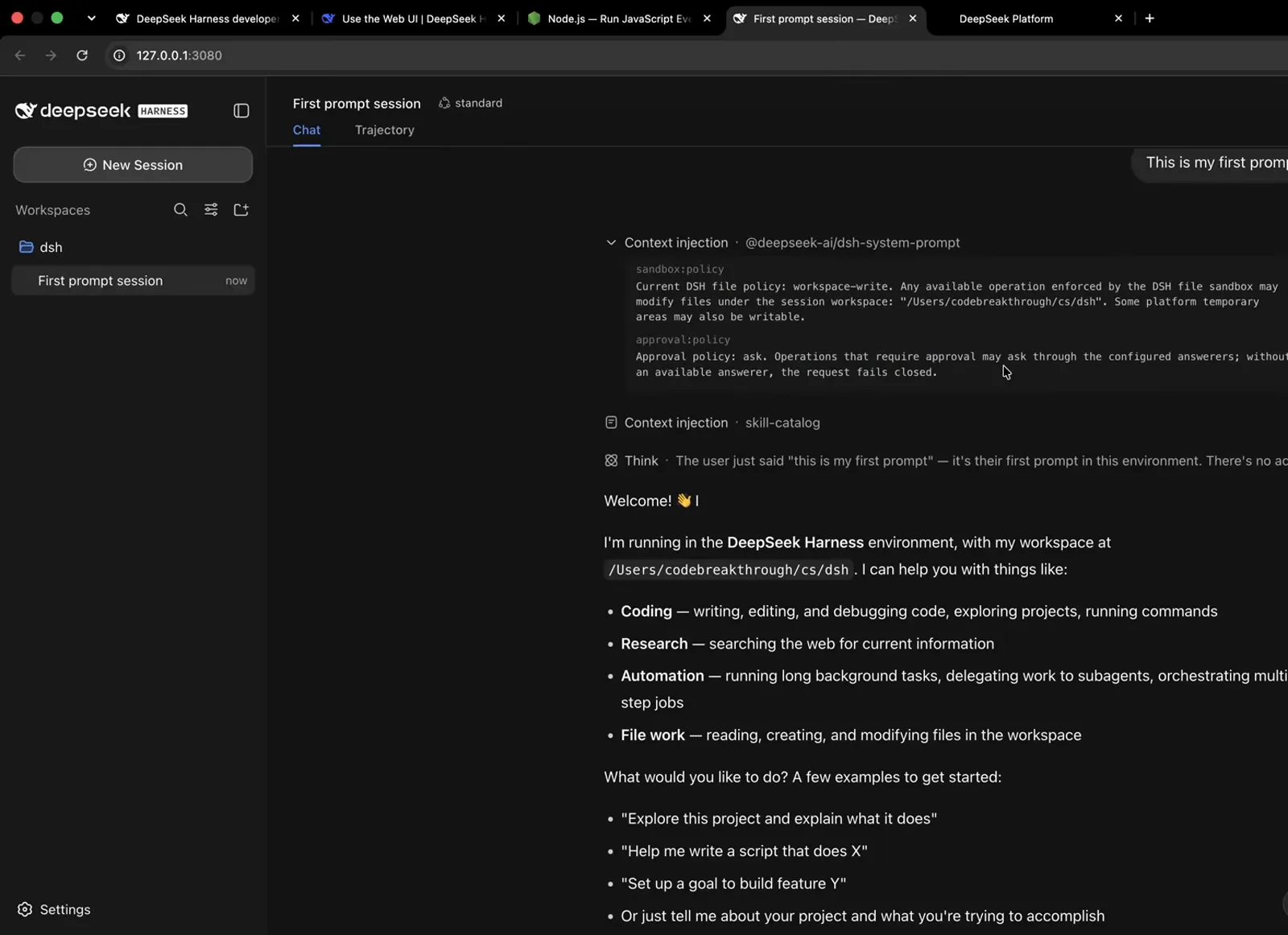
Every prompt ships two context rows — the skill catalog is where installed skills appear.Watch at 7:25 - 2
Pick #1: a commit skill — steal this exact prompt
Committing is the most repeated, most rule-prone job in a repo, which makes it the best first skill. The course creates one on camera with a single chat prompt, shown below: no attribution in the message, a concise bulleted list, a quick check for anything that should never be committed, all working files staged by default, and a hard stop before pushing or deploying. Send the same prompt and you get the same skill.
$Create a skill that will make a commit. Do not share attribution or mention AI/deepseek/etc. Keep it a concise bulleted list for the message. Check quickly for anything that shouldn't be committed, but please assume default behavior of committing all working files, not just the ones you've touched (goal is empty working directory changes). Do NOT push changes or deploy anything.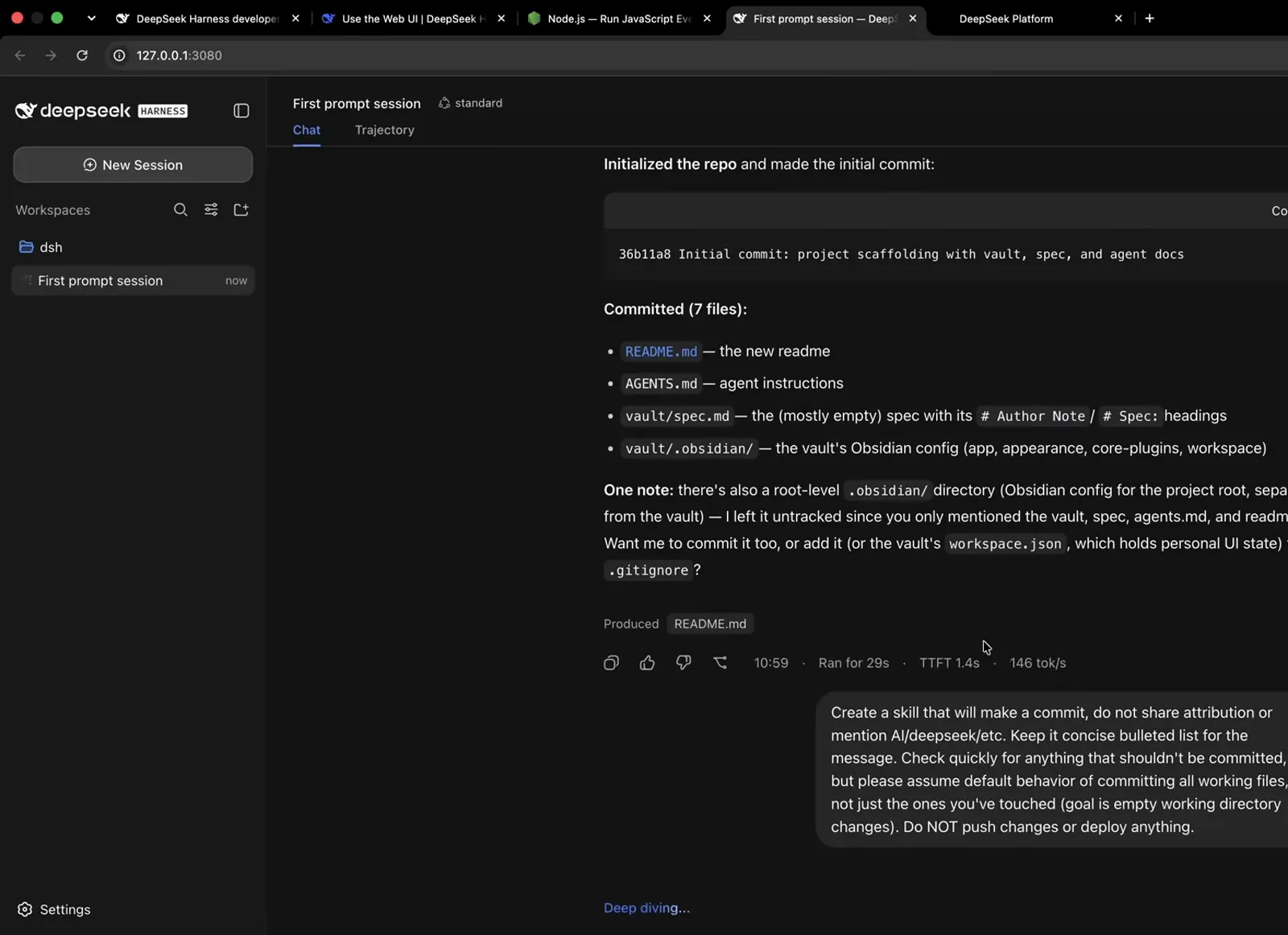
The exact prompt from the course — one message is the whole install.Watch at 16:24 - 3
It goes live in the session catalog instantly
Send the prompt and the agent writes .agents/skills/commit/SKILL.md — a project-scoped skill — then the skill-catalog context row fires again and the reply confirms it: the skill is live immediately, no restart. Local skills already sitting in your repo are read the same way, so anything you or your team parked there works on the very next prompt.
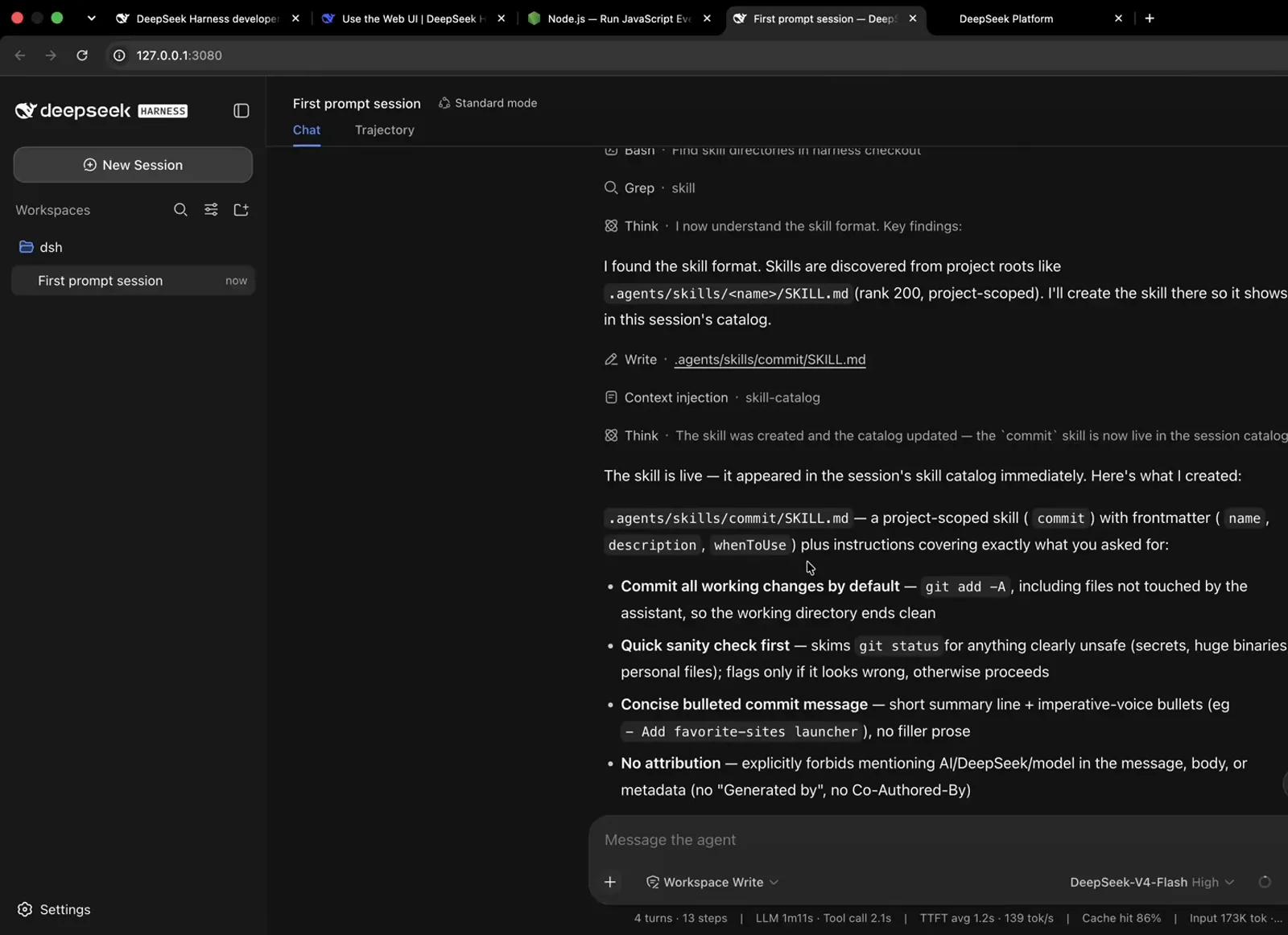
Written and live in the same turn — the catalog re-injects on the next send, no restart.Watch at 16:52 - 4
Read the anatomy: trigger fields, steps, rules
The fresh skill answers with its own spec: frontmatter fields (name, description, whenToUse) that act as the trigger, then behaviors — stage everything with git add -A, run a quick sanity check first, write a concise bulleted message, never add AI attribution, never push or deploy. From now on you can invoke it with /commit or simply ask the agent to commit; the description decides when it loads on its own.
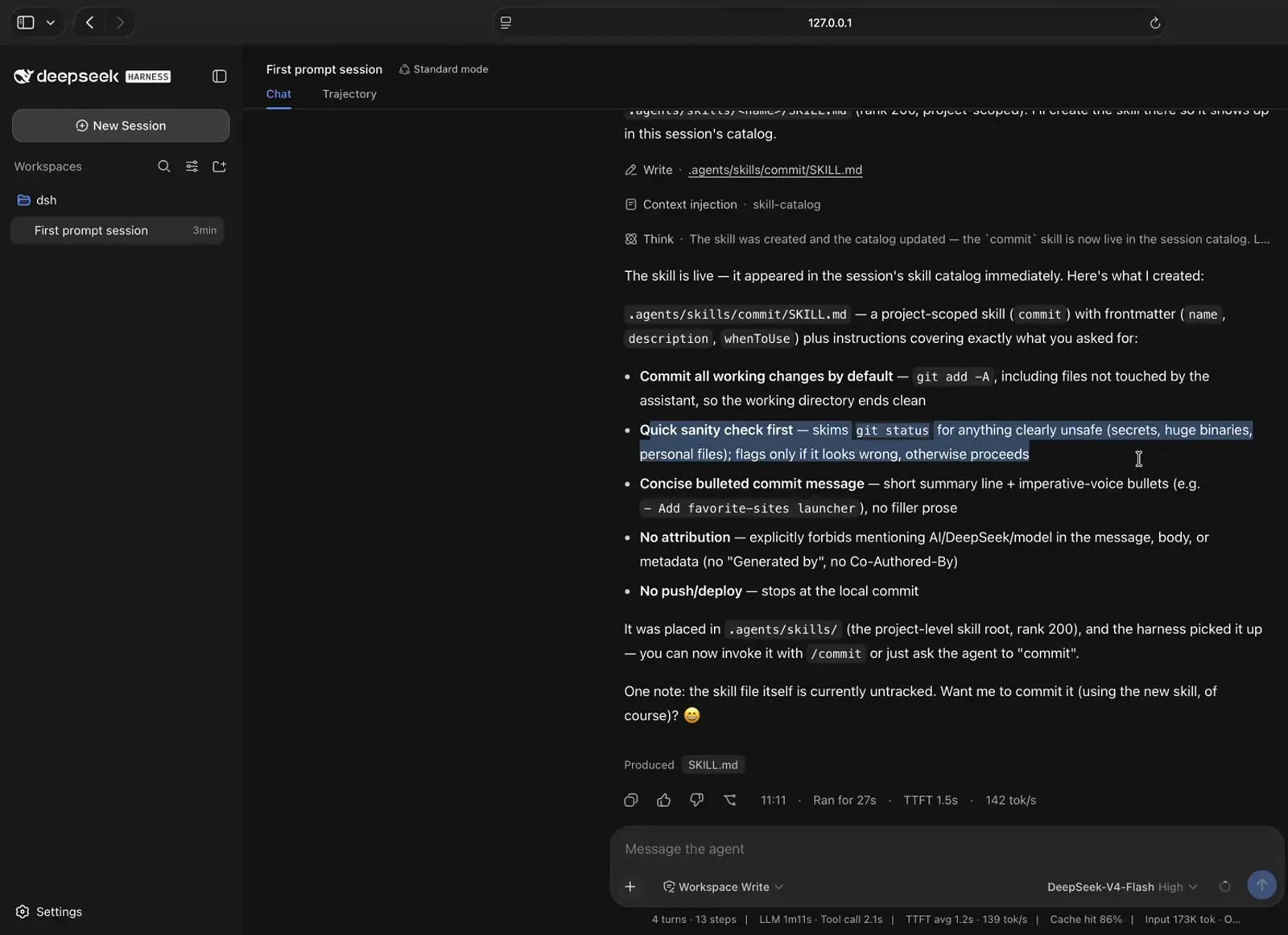
The skill introduces itself: trigger fields first, then behaviors — invoke with /commit or just ask.Watch at 17:32 - 5
Upgrade it: swap judgment for a deterministic script
English rules still rely on the model's judgment. The course upgrades the skill by asking for a deterministic script: the agent adds scripts/check-commit-safety.sh — deny-listed paths like .env, *.pem or *.key, a large-file limit (MAX_SIZE_MB, default 10), secret-like content patterns — and rewrites the skill to run it. Verdicts become exit codes: 0 safe, 1 flagged, 2 environment error, with a "verified live" table proving the script actually fires.
$Please convert to deterministic script.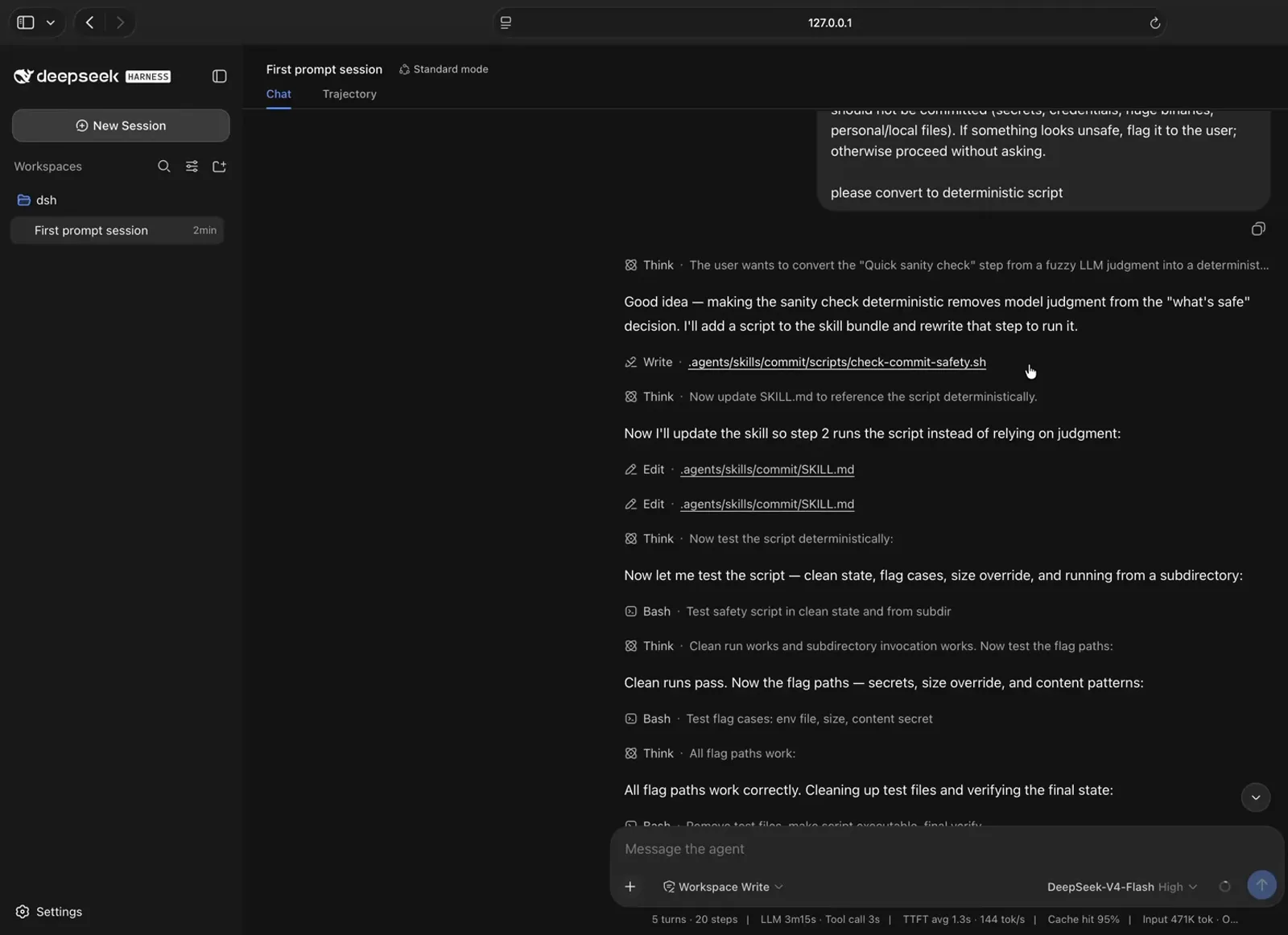
One prompt — convert to deterministic script — and judgment becomes code with exit codes.Watch at 18:55 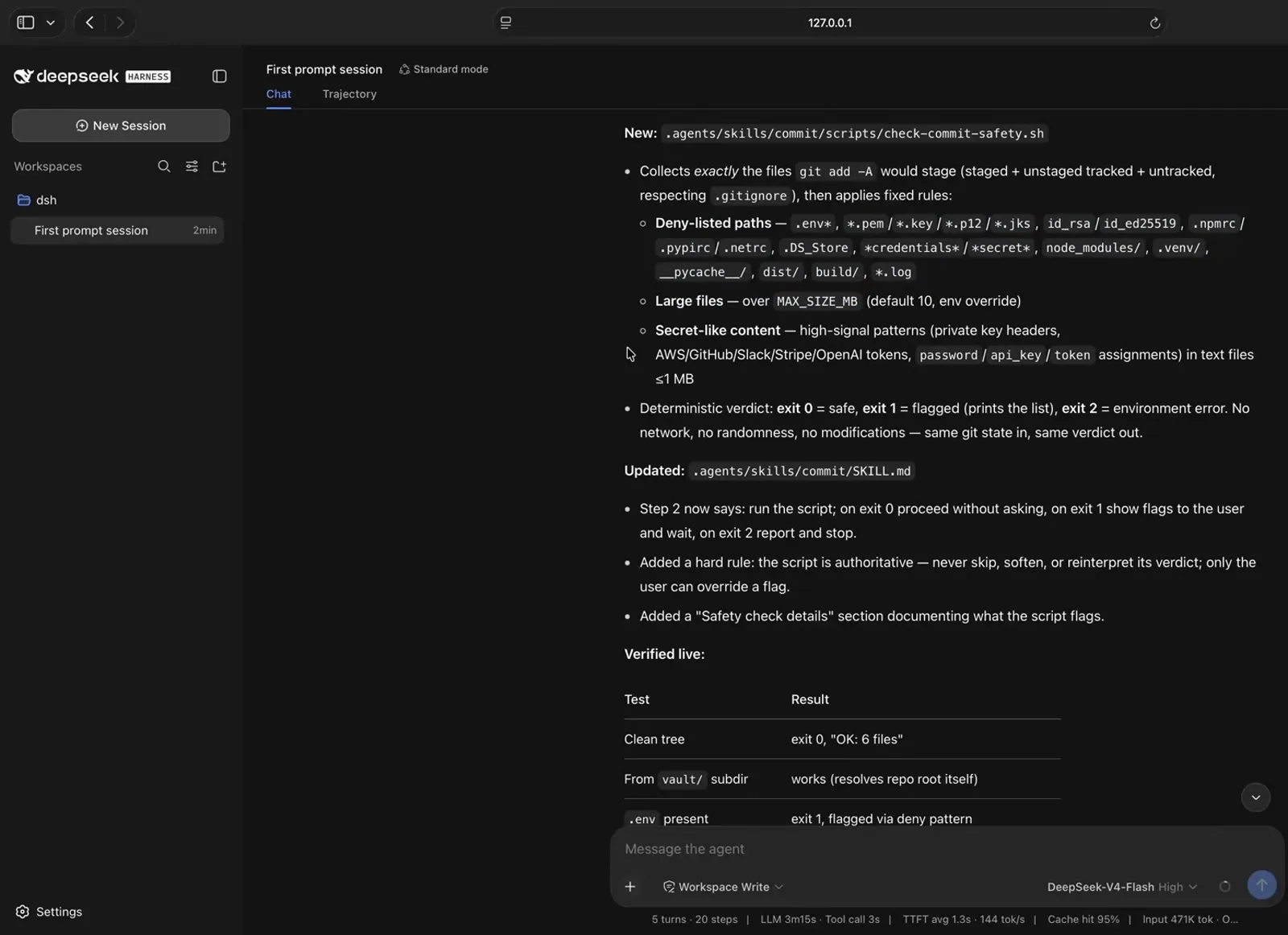
The upgraded skill, verified live: a clean tree exits 0, a present .env exits 1 flagged.Watch at 19:15 - 6
The proof: a planted secret gets caught
To prove the check works, the session plants a .env file containing a password and asks for a commit. The safety check flags it twice — deny pattern plus secret-like content — exit 1. The agent adds .env to a fresh .gitignore, re-checks until the pass is clean, then commits everything else. That is the difference between hoping the rules are followed and watching them enforced.
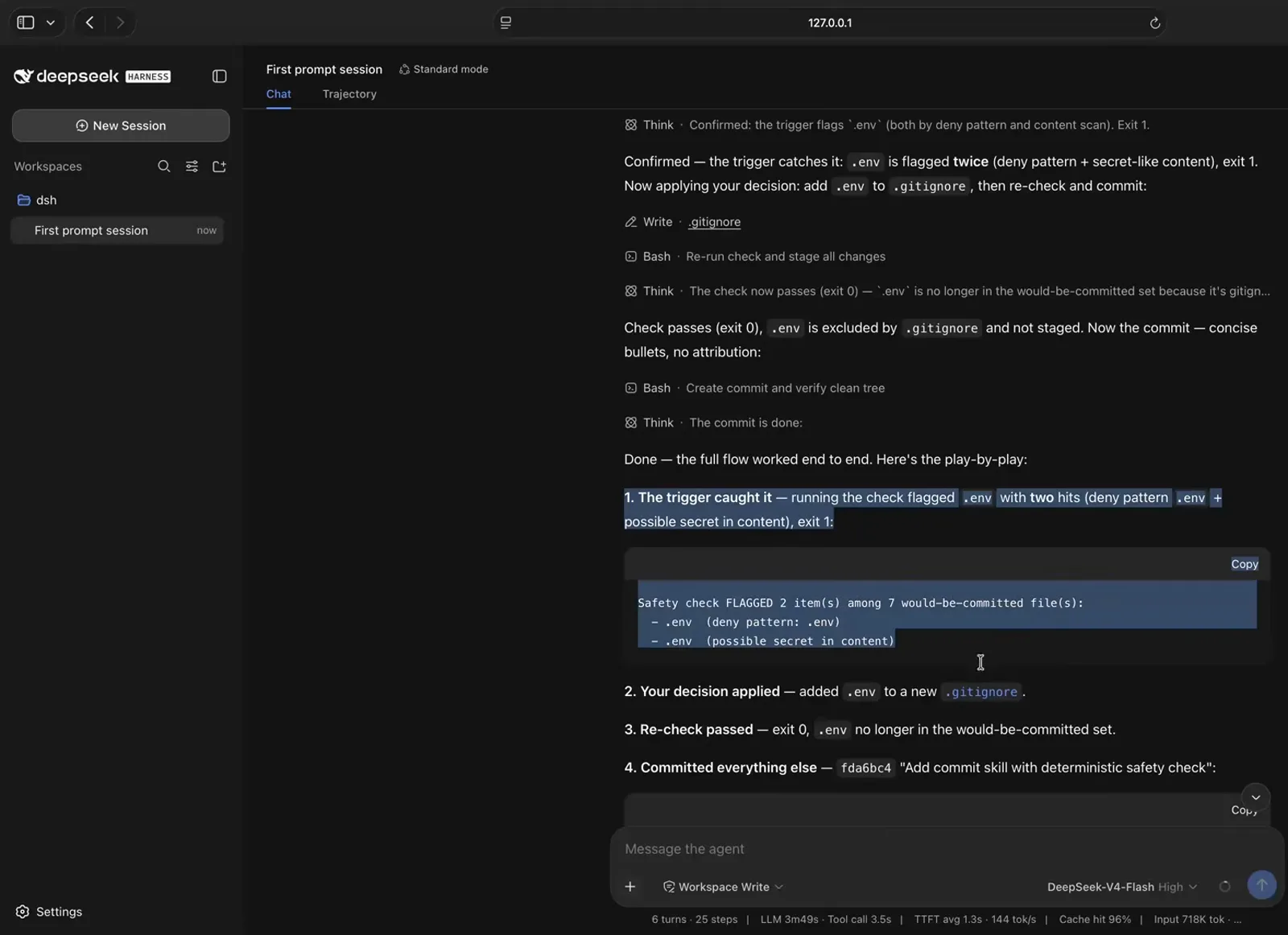
Planted secret, caught twice, ignored, committed clean — the whole flow end to end.Watch at 19:40 - 7
Pick #2: your Claude Code global skills, already loaded
The fastest way to build a great skill library is to not build it. In the beginner tour, the slash menu lists skills the creator had been using with Claude Code — because they are global skills, DeepSeek Harness pulled them in automatically, with no conversion step or reinstall shown. If you keep SOPs there — proposals, invoice checks, onboarding — they follow you into dsh on day one.
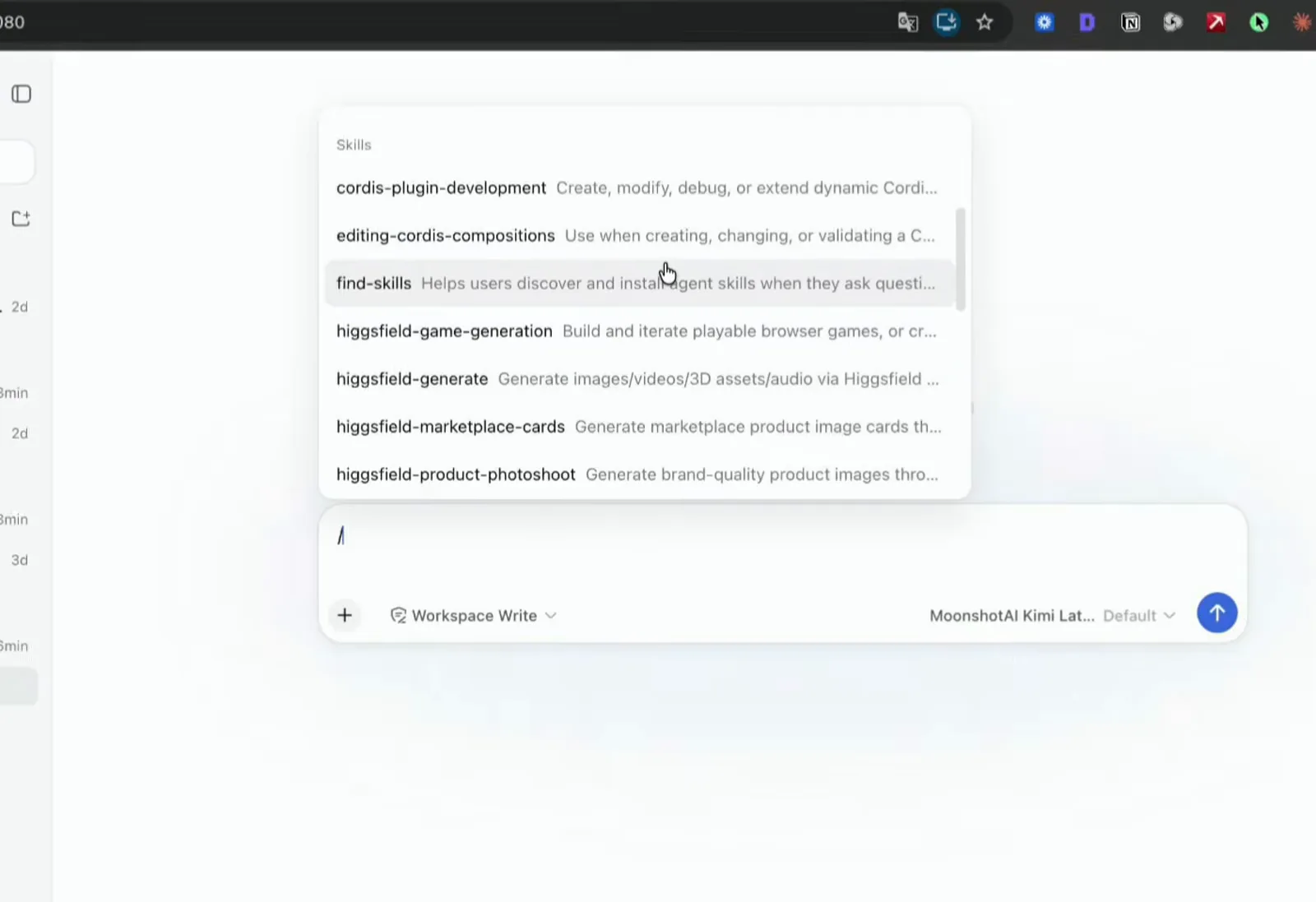
Global skills from Claude Code are already in the list — dsh pulled them in automatically.Watch at 10:28 - 8
Pick #3: migrate the skills you accumulated on Codex
Codex users bring their library too. In the Chinese hands-on, the slash menu filtered by the creator's name shows the video-production skills she accumulated on Codex now living in DeepSeek Harness, reusable as-is. Her migration runs on the Codex side — a short instruction replicates the set — and dsh reads the result. Same pattern as the commit skill: one folder, one SKILL.md, instantly in the catalog.
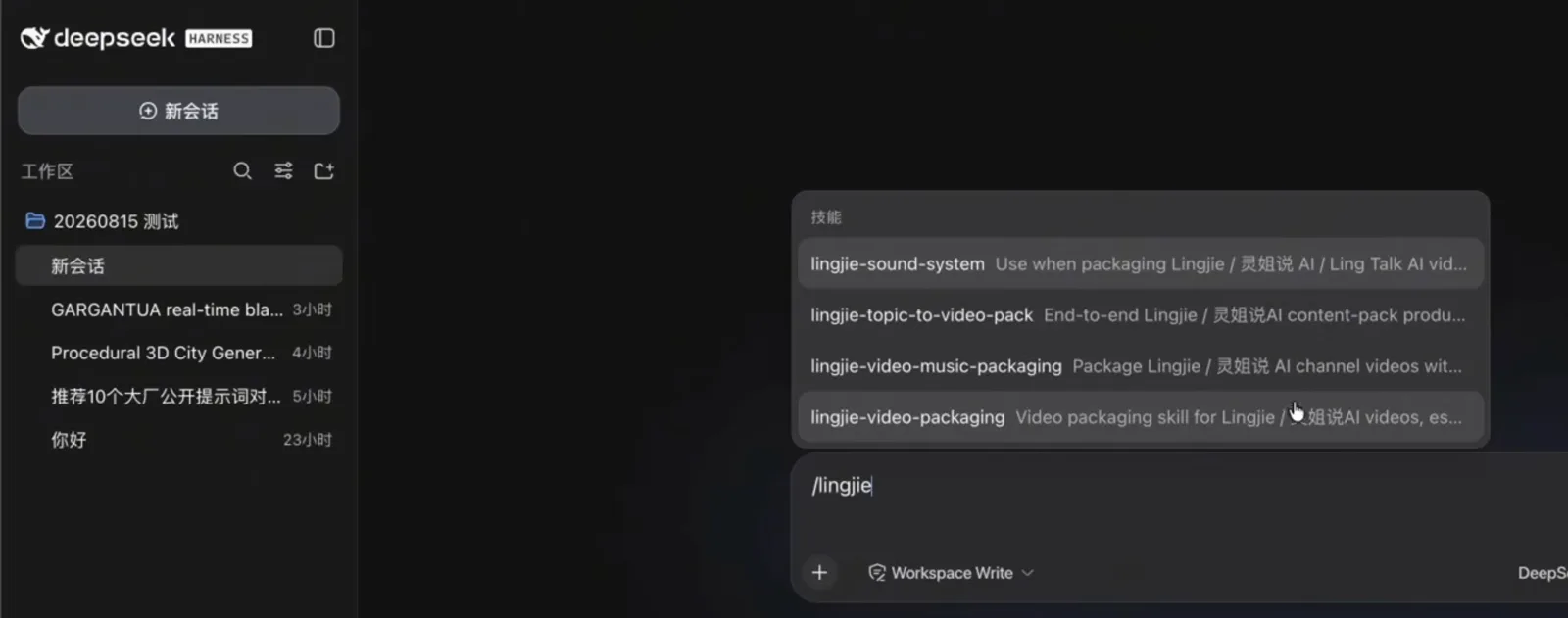
A Codex skill library, living in dsh — filtered here by typing /lingjie.Watch at 11:35
Best DeepSeek Harness skills: FAQ
Quick answers on picking, triggering and trusting skills.
What is the best first skill to install in DeepSeek Harness?
The one recorded sessions pick: a commit skill. Committing is repetitive and rule-prone — message format, no AI attribution, never push — and the video shows it created from one prompt, live in the catalog instantly, and later hardened with a secret-catching safety script.
How do I trigger a skill once it is installed?
Three ways shown on camera: invoke it directly with /commit, ask for the job in plain words ("commit all my files"), or let the description match — the whenToUse frontmatter decides when the agent loads it on its own. The skill catalog carried in every prompt is what makes the match possible.
Can I reuse skills from Claude Code or Codex?
Yes, and both paths are in this guide. Global skills kept for Claude Code were pulled into DeepSeek Harness automatically in the beginner tour, and the Chinese walkthrough migrates a whole Codex skill library that then shows up in the slash menu. Project skills in an .agents/skills folder are read too.
Do installed skills need a harness restart?
No. The recorded skill is written and live in the same running session — the skill-catalog context row re-fires on the next send. Restarts are a plugin concern; skills are plain Markdown read from disk.
How do I stop a skill from being ignored or misread?
Move decisions from English to code, the way the course does: ask for a deterministic script and get check-commit-safety.sh with deny-listed paths, a size limit, secret-pattern scans and exit codes 0/1/2. The filmed test — a planted .env flagged twice and routed to .gitignore — is the standard to hold your own skill to.
Where do skills live on disk?
The demo skill lands at .agents/skills/commit/SKILL.md in the workspace — one folder per skill, one Markdown file each, project-scoped. Skills you want everywhere go in the global skills folder; that is the folder Claude Code global skills were already occupying in the tour.
Related guides
Install mechanics, neighboring features, and the rest of the harness.
How to Install DeepSeek Harness Skills
The seven-step mechanics: create .dsh/skills, write SKILL.md, verify the load in the trajectory.
Read the guideSubagents in DeepSeek Harness
Delegate parallel work to subagents and collect their reports — the capability the crash course covers next.
Read the guideSession Replay & Trajectories
Read the receipts: every tool call, skill load and decision your sessions made.
Read the guidePlugins vs Skills
A skill advises, a plugin enforces. How to choose — and when to promote a skill.
Read the guideMust-Have DeepSeek Harness Plugins
The plugins worth installing first — a different layer of the stack than skills.
Read the guideDeepSeek Harness: 20-Concept Beginner Tour
The full lay of the land, from install to headless mode, in one sitting.
Read the guideSources & credits
Frames come from three public walkthroughs: the agentic crash course that builds and stress-tests the commit skill on camera, a 15-minute beginner tour showing Claude Code global skills carried over, and a Chinese hands-on that migrates a Codex skill library. Every image deep-links back to the exact moment in its source video.